Kat Planı Nasıl Renklendirilir — AI Destekli Adım Adım Kılavuz
Roomagen ile bir kat planını renklendirmek için siyah-beyaz planı görsel olarak yükleyin, dört tasarımcı paletinden birini seçin ve sonucu indirin — her çalıştırma genellikle bir dakikadan kısa sürer.
Çevrimiçi kat planı renklendirme eğitimlerinin çoğu Photoshop bilgisi (maskeleme, katman modları, renk dolguları, karıştırma modları) varsayar ve 20–40 manuel adım içerir. Eğitimi izledikten sonra bile, gerçek renklendirme her plan için 45–90 dakika sürer. Roomagen iş akışı üç adımdan oluşur: yükle, palet seç, indir. Öğrenilecek bir şey olmadığı için eğitime gerek yoktur — AI her renklendirme kararını otomatik olarak halleder. İlk öğrenme eğrisi dahil toplam süre, plan başına 0,23–0,40 $ maliyetle 2 dakikadan azdır.
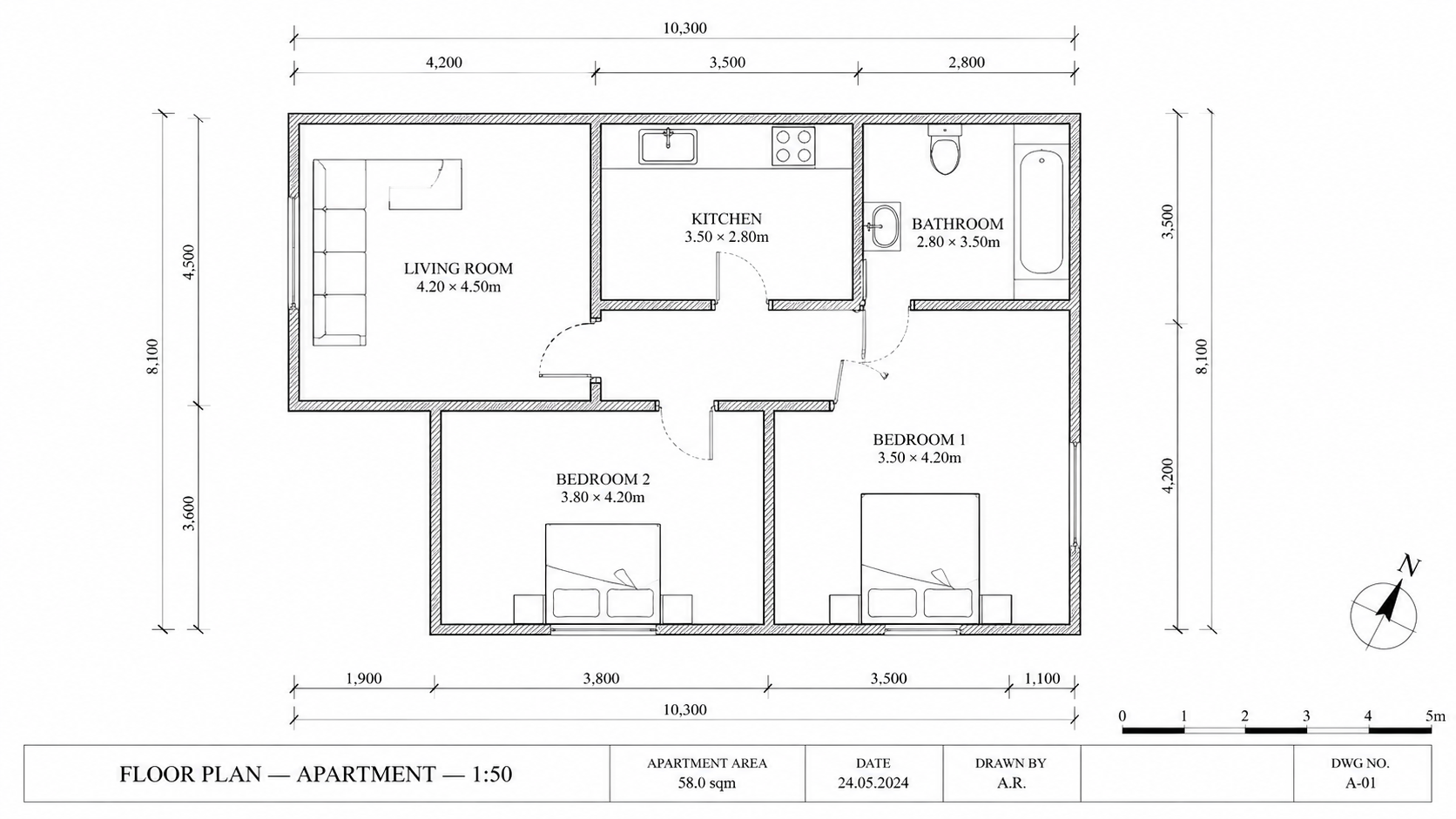
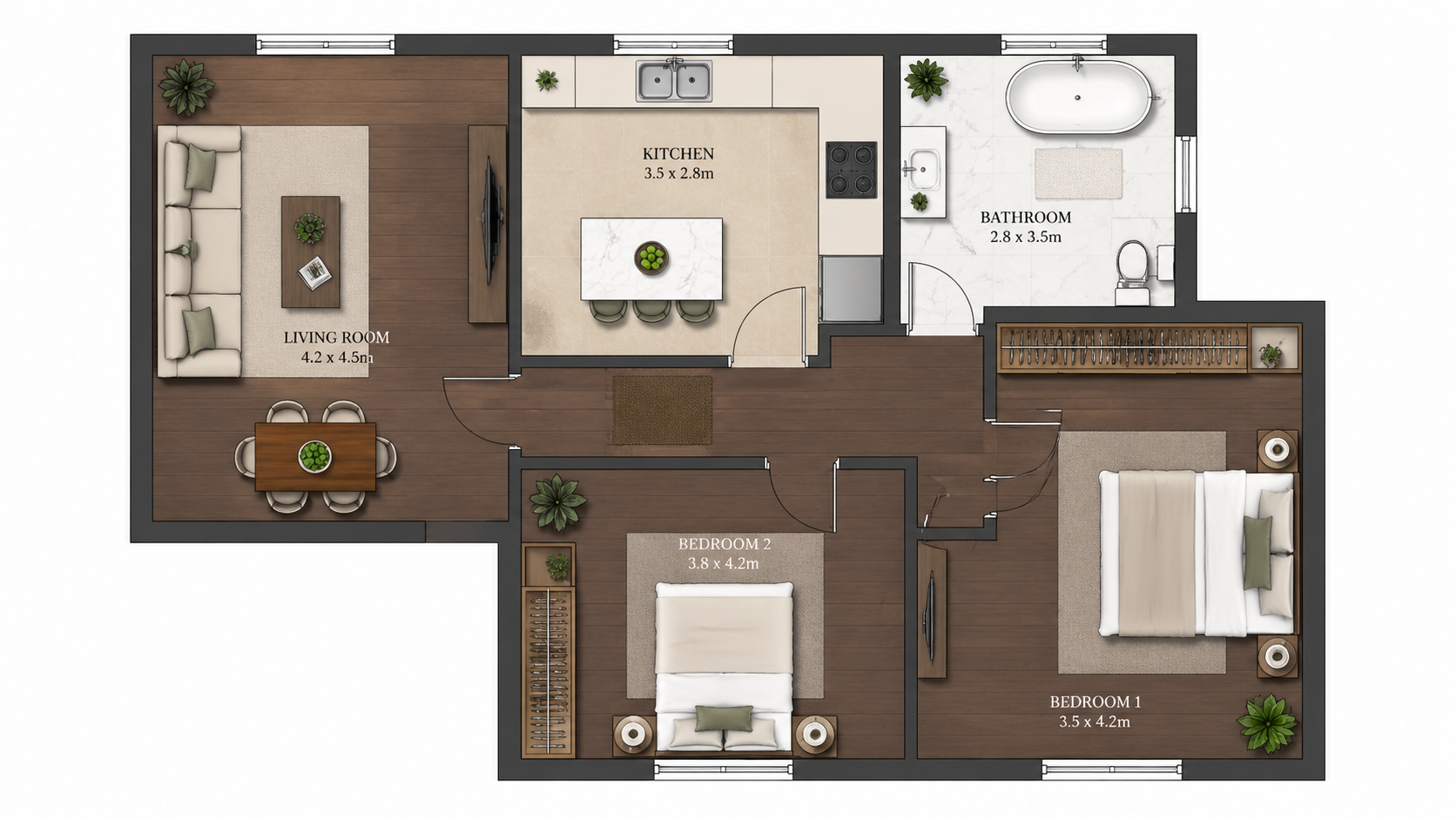
Demo örneği: "Önce" görseli bu site için yapay zekâ ile oluşturuldu; müşteri fotoğrafı değildir.
Özellikler
Herhangi bir kat planını AI ile üç adımda renklendirmek için adım adım kılavuz. Yükle, dört paletten birini seç, renkli planı indir — iş akışını ilk kez öğrenme dahil toplam süre 2 dakikadan az.
Bir Kat Planını Üç Adımda Nasıl Renklendirirsiniz?
Üç adımlı iş akışı — planı yükle, dört paletten birini seç, renkli planı indir — Photoshop eğitimi veya tasarım geçmişi gerekmez
Bu Şekilde Hangi Plan Türleri Renklendirilebilir?
İlk kez kullananlar, arayüzü sıfırdan öğrenme dahil 2 dakikadan kısa sürede bir renklendirme işlemini tamamlar
AI Yöntemi Neden Photoshop'tan Daha Hızlı?
AI, oda algılama, renk eşleme ve palet uygulamasını otomatik olarak halleder — sıfır manuel maskeleme veya seçim işi
Nasıl Çalışır
Üç basit adımda profesyonel sonuçlar elde edin
Fotoğraflarınızı buraya bırakın
veya dosyalara göz atın
Fotoğraflarınızı Yükleyin
Fotoğraflarınızı sürükleyip bırakın veya yüklemek için göz atın. Roomagen, her biri 50 MB'a kadar JPEG, PNG ve WebP dosyalarını kabul eder.
Yapay Zeka İşleme
Gelişmiş yapay zekamız görüntülerinizi analiz eder ve profesyonel iyileştirmeleri otomatik olarak uygular. Sanal dekorasyon, iyileştirme, nesne kaldırma veya gündüzden geceye dönüşüm arasından seçim yapın.
Sonuçları İndirin
Dönüştürülen görüntülerin önizlemesini yapın ve emlak listeleri, pazarlama materyalleri ve sosyal medya için hazır yüksek çözünürlüklü sonuçları indirin. Premium planlarda filigran yoktur.
Neden Roomagen'i Seçmelisiniz?
Adım 1 — Siyah Beyaz Planı Yükleyin
Üç adımlı iş akışı — planı yükle, dört paletten birini seç, renkli planı indir — Photoshop eğitimi veya tasarım geçmişi gerekmez
Adım 2 — Bir Tasarımcı Paleti Seçin
İlk kez kullananlar, arayüzü sıfırdan öğrenme dahil 2 dakikadan kısa sürede bir renklendirme işlemini tamamlar
Adım 3 — Renkli Planı İndirin
AI, oda algılama, renk eşleme ve palet uygulamasını otomatik olarak halleder — sıfır manuel maskeleme veya seçim işi
Kimler İçin?
İlk Kez Kullananlar
"Kat planı nasıl renklendirilir" diye arama yapan ve Photoshop eğitimleriyle bunalanlar — Roomagen, iş akışını yükle, seç, indir adımlarına indirgeyerek tasarım bilgisi gerektirmez.
İş Akışı Eğitmenleri
Ekip üyelerine pahalı Photoshop eğitimi olmadan kat planı renklendirmeyi öğretmek — Roomagen, yeni kullanıcıları 5 dakikada, yazılım öğrenimi gerektirmeden sisteme dahil eder.
Eğitim Takipçileri
Tekrarlanabilir sonuçlar için net, adım adım bir süreç isteyenler — Roomagen, her planda tutarlı kaliteyle tam olarak üç adıma sahiptir.
Photoshop eğitimleri, kabul edilebilir sonuçlar üretmeden önce genellikle 4–10 saatlik maskeleme, katman karıştırma ve renk teorisi öğrenimi gerektirir. Eğitimden sonra bile plan başına renklendirme 45–90 dakika sürer. Roomagen sıfır eğitim gerektirir; ilk renklendirme 0,23–0,40 $ karşılığında 2 dakikadan az sürer.
| Roomagen AI | Photoshop Eğitimi | Tasarımcı Dış Kaynak | |
|---|---|---|---|
| Gerekli adımlar | 3 (yükle, palet, indir) | 20–40 manuel adım | Özet + bekle + incele |
| İlk plan süresi | Öğrenme dahil 2 dakika | 4–10 saat eğitim + 45–90 dakika | 1–3 gün geri dönüş süresi |
| Sonraki planlar süresi | 2 dakikadan az | 45–90 dakika manuel | Her biri 1–3 gün |
| Gerekli beceri | Yok | Photoshop uzmanlığı | Yok — dış kaynaklı |
| Plan başına maliyet | 0,23–0,40 $ | 240 $/yıl + tasarım süresi | 40–200 $ tasarımcı ücreti |
Sıkça Sorulan Sorular
Roomagen hakkında bilmeniz gereken her şey
Roomagen'e giriş yapın, Kat Planı → Renkli aracını açın ve siyah-beyaz planı en fazla 50 MB'lık JPEG, PNG veya WebP görsel olarak yükleyin — fotoğraf, tarama veya görsel çıktı. PDF ve HEIC dosyalarını önce JPEG veya PNG'ye dönüştürün.
Dört paletten birini seçin: Real Estate Pastel (varsayılan), Studio Watercolor, Asian Compact veya Nordic Mono. Her çalıştırma tek bir palet üretir; bu yüzden kitlenize göre seçin — ilanlar için genellikle Real Estate Pastel tercih edilir — ve karşılaştırmak isterseniz 2 krediye bir tane daha çalıştırın.
Hayır. AI odaları, duvarları ve etiketleri otomatik olarak algılar. Ön işlem, maskeleme veya açıklama gerekmez. Planı olduğu gibi yüklemeniz yeterlidir.
Yükleme birkaç saniye, AI işleme genellikle bir dakikadan kısa sürer; sonuç hazır olur olmaz indirebilirsiniz. Başlangıçtan bilgisayarınızda renkli bir plan olmasına kadar geçen süre genellikle 2 dakikadan azdır. Her ek palet, 2 kredilik ayrı bir çalıştırmadır.
Önce Roomagen Sketch to Floor Plan kullanarak taslağı dönüştürün, ardından dijital çıktıyı renklendirin. Peçete taslağından renkli plana kadar uçtan uca toplam 4 dakikadan kısa sürede.
Planı aynı veya başka bir paletle 2 krediye yeniden çalıştırın; her çalıştırma tek bir palet üretir. AI renkleri planda okuduklarına göre atar, bu yüzden bir oda zaman zaman beklenmedik bir renk alabilir; en iyi çalışan sürümü kullanın.
Evet. Her renklendirme 2 kredidir (0,23–0,40 $). Ek varyasyonlar için aynı planı farklı palet tercihiyle yeniden yükleyin.
Renkli görseli indirin ve e-postayla gönderin ya da müşteri portalınız üzerinden paylaşın. Çıktı, her e-posta istemcisinin ve CRM'in kabul ettiği bir JPEG dosyasıdır.
İş akışı gerçekten üç adımdan oluşur — yükle, seç, indir. Bir video 30 saniye sürerdi. Bu SSS bölümünü okuyun ve ihtiyacınız olan her şeye sahip olursunuz.
İlk renklendirme ücretsiz başlangıç kredileriyle birlikte gelir. Bundan sonra, her renklendirme 2 kredi (0,23–0,40 $) tutarındadır. Başlangıç planı (aylık 12 $, 60 kredi) 30 renklendirmeyi destekler.
Parçası olduğu araç
Kat Planı RenklendirmeBu Aileden Daha Fazla Araç
- Online Kat Planı Renklendirici
- Ücretsiz Kat Planı Renklendirme Aracı
- Ev Kat Planlarını Renklendirin
- Daire Kat Planlarını Renklendirin
- Ofis Kat Planlarını Renklendirin
- Restoran Kat Planlarını Renklendirin
- Otel Kat Planlarını Renklendirin
- Perakende Kat Planlarını Renklendirin
- Klinik Kat Planlarını Renklendir
- Depo Kat Planlarını Renklendirme
- Emlakçılar İçin Kat Planı Renklendirme
- Mimarlar İçin Kat Planı Renklendirme
İlgili Araçları Keşfedin
Görsel içeriklerinizi güçlendirecek daha fazla AI destekli araç keşfedin
Kat Planı Renklendirme — Siyah Beyaz Planlar için Bir Dakikadan Kısa Sürede AI Renklendirme
Siyah beyaz kat planlarını AI ile renklendirin. Dört tasarımcı paleti, otomatik algılanan odalar, emlak, mimarlık ve iç tasarım için 90 saniyeden kısa sürede hazır çıktı — Photoshop veya tasarım becerileri gerekmez.
Daha fazla bilgiOnline Kat Planı Renklendirici — Tarayıcı Tabanlı AI, Kurulum Gerektirmez
AI ile tarayıcınızda online kat planlarını renklendirin. Kurulum yok, Photoshop yok, Adobe aboneliği yok — siyah beyaz bir plan yükleyin, herhangi bir cihazda 90 saniyenin altında, dört paletten biriyle renklendirilmiş bir plan elde edin.
Daha fazla bilgiÜcretsiz Kat Planı Renklendirme Aracı — Başlangıç Kredileriyle AI Renklendirmeyi Deneyin
6 ücretsiz krediyle kat planlarını AI ile renklendirin — her biri dört paletten biriyle 3 plana yeter. Sonrasında aylık planlarda plan başına $0.23–$0.40, gizli ücret yok. Ücretsiz sonuçlarda filigran bulunur.
Daha fazla bilgiProfesyonel 2D & 3D Kat Planları — Bir Dakikadan Kısa Sürede AI ile Oluşturulur
Bir eskizi, taramayı veya eski bir planı temiz bir 2D kat planına ya da 3D görünüme dönüştürün. Ölçüleri ve oda adlarını koruyun veya kaldırın, dört çizim stilinden birini seçin.
Daha fazla bilgiKat Planı Görselleştirme — 2D Planlardan Bir Dakikadan Kısa Sürede AI 3D Renderlar
2D kat planlarını AI ile 3D renderlar olarak görselleştirin. Fotogerçekçi, mimari eskiz, stilize ve tek renkli stiller, mobilyalı veya mobilyasız, render başına $0.23–$0.40 karşılığında 90 saniyenin altında çıktı — 3ds Max, Lumion veya Twinmotion gerekmez.
Daha fazla bilgi