Cómo colorear un plano de planta — Guía paso a paso con AI
Para colorear un plano con Roomagen, sube el plano en blanco y negro como imagen, elige una de cuatro paletas de diseñador y descarga el resultado: normalmente menos de un minuto por ejecución.
La mayoría de los tutoriales en línea para colorear planos de planta asumen conocimientos de Photoshop — enmascaramiento, modos de capa, rellenos de color, modos de fusión — y guían a través de 20–40 pasos manuales. Incluso después de ver el tutorial, el coloreado real toma entre 45 y 90 minutos por plano. El flujo de trabajo de Roomagen tiene tres pasos: subir, elegir paleta, descargar. No se necesita tutorial porque no hay nada que aprender — la AI maneja cada decisión de coloración automáticamente. El tiempo total, incluyendo la curva de aprendizaje por primera vez, es de menos de 2 minutos por plano a un costo de $0.23–$0.40.
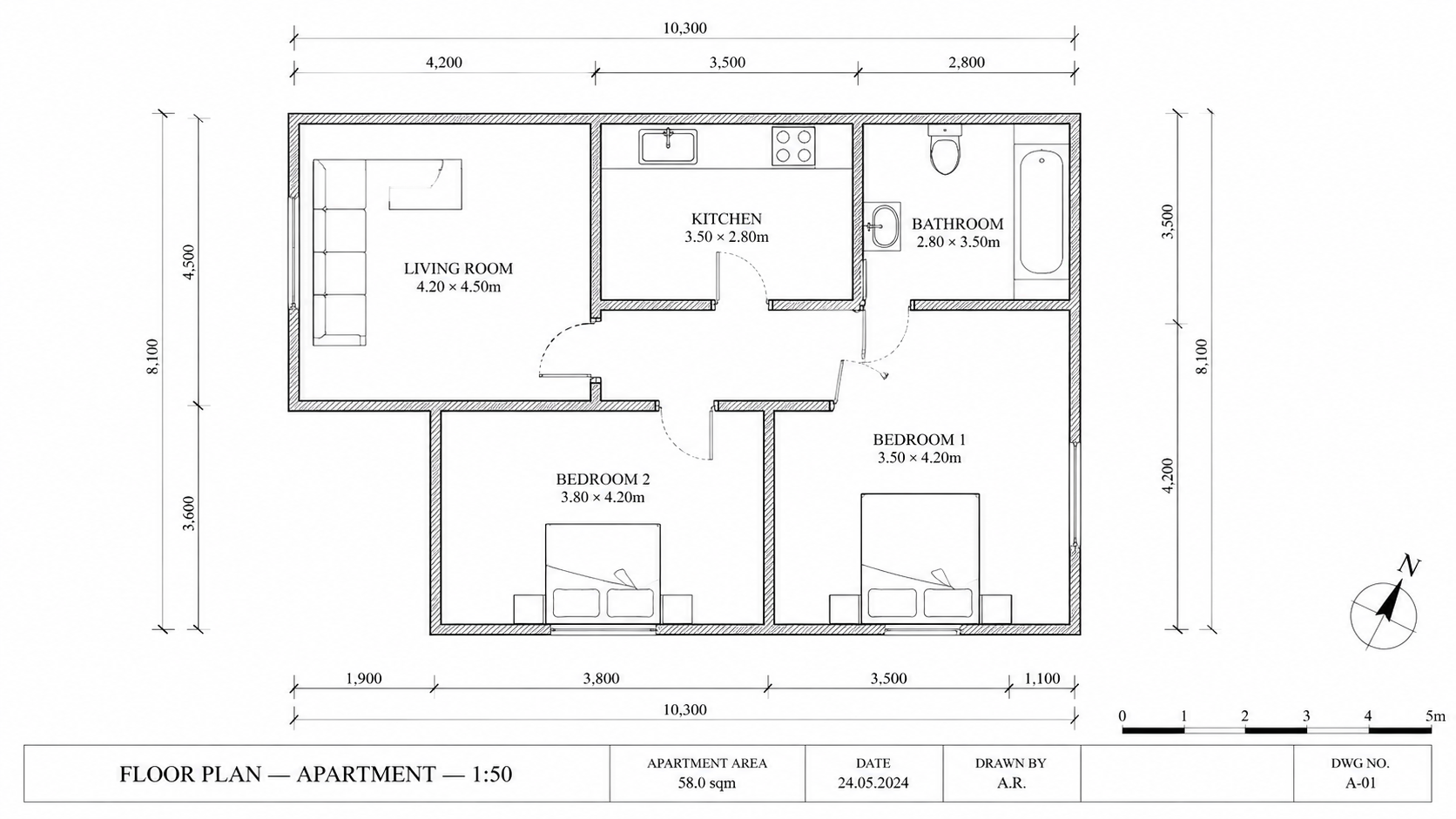
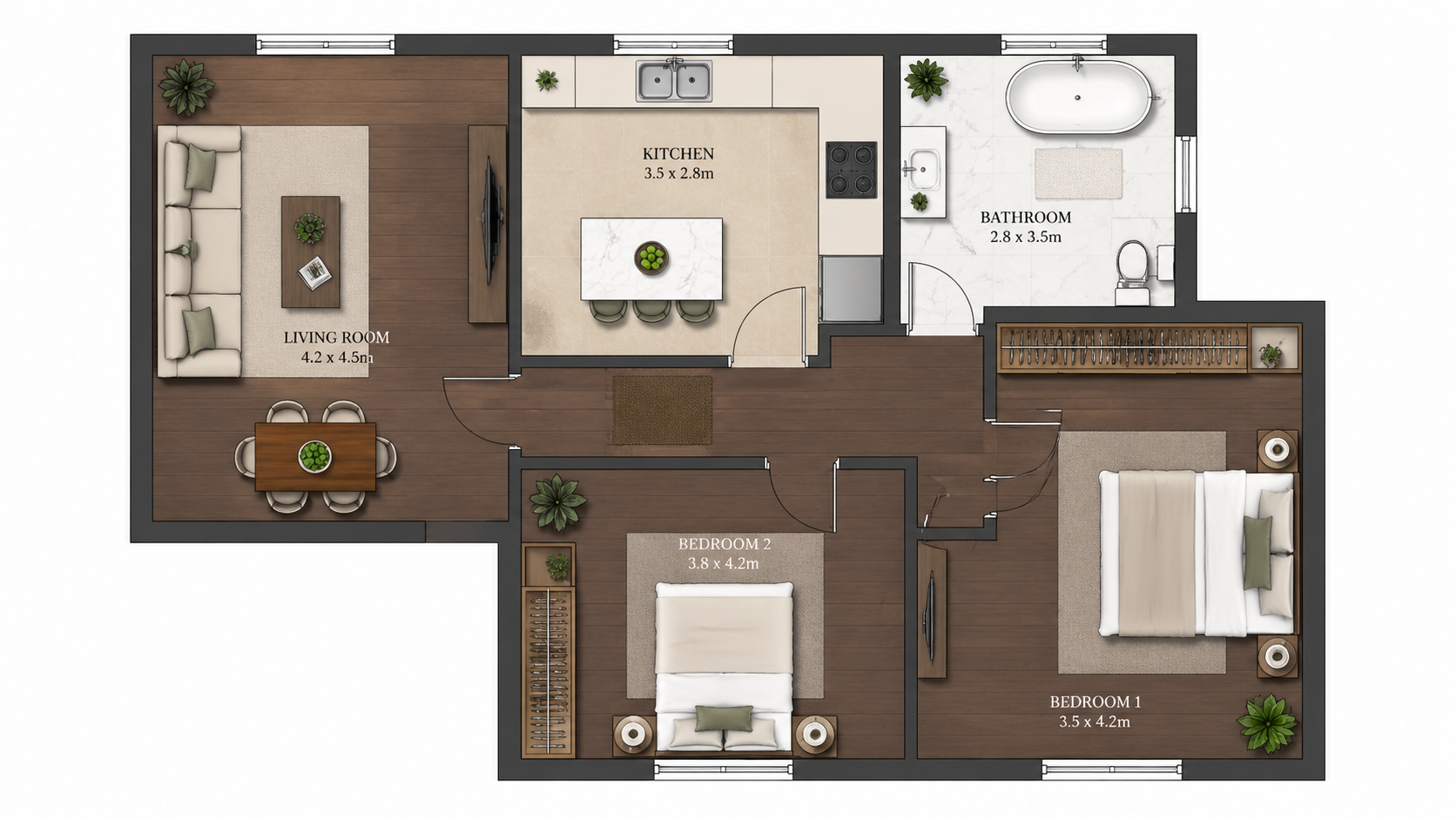
Ejemplo de demostración: la imagen «Antes» se creó con IA para este sitio web; no es una foto de un cliente.
Funciones
Guía paso a paso para colorear cualquier plano de planta con AI en tres pasos. Sube el plano, elige una de las cuatro paletas, descarga el plano coloreado — tiempo total inferior a 2 minutos, incluyendo el aprendizaje del flujo de trabajo por primera vez.
¿Cómo se colorea un plano de planta en tres pasos?
Flujo de trabajo de tres pasos — sube el plano, elige una de las cuatro paletas, descarga el plano coloreado — no se requiere capacitación en Photoshop ni experiencia en diseño
¿Qué tipos de planos se pueden colorear de esta manera?
Los usuarios por primera vez completan una colorización en menos de 2 minutos, incluyendo el aprendizaje de la interfaz desde cero
¿Por qué el método de AI es más rápido que Photoshop?
La AI gestiona la detección de habitaciones, el mapeo de colores y la aplicación de paletas automáticamente — cero trabajo manual de enmascaramiento o selección
Cómo Funciona
Obtenga resultados profesionales en tres simples pasos
Arrastre sus fotos aquí
o buscar archivos
Suba Sus Fotos
Arrastre y suelte sus fotos o búsquelas en su equipo para subirlas. Roomagen acepta archivos JPEG, PNG y WebP de hasta 50 MB cada uno.
Procesamiento IA
Nuestra IA avanzada analiza sus imágenes y aplica mejoras profesionales automáticamente. Elija entre home staging virtual, mejora, eliminación de objetos o conversión de día a atardecer.
Descargue los Resultados
Previsualice sus imágenes transformadas y descargue resultados de alta resolución listos para anuncios, materiales de marketing y redes sociales. Sin marcas de agua en planes premium.
Por Qué Elegir Roomagen
Paso 1 — Sube el plano en blanco y negro
Flujo de trabajo de tres pasos — sube el plano, elige una de las cuatro paletas, descarga el plano coloreado — no se requiere capacitación en Photoshop ni experiencia en diseño
Paso 2 — Selecciona una paleta de diseñador
Los usuarios por primera vez completan una colorización en menos de 2 minutos, incluyendo el aprendizaje de la interfaz desde cero
Paso 3 — Descarga el plano coloreado
La AI gestiona la detección de habitaciones, el mapeo de colores y la aplicación de paletas automáticamente — cero trabajo manual de enmascaramiento o selección
¿Para quién es?
Usuarios por Primera Vez
Buscan "cómo colorear un plano de planta" y se sienten abrumados por los tutoriales de Photoshop — Roomagen reduce el flujo de trabajo a subir, seleccionar, descargar sin necesidad de conocimientos de diseño.
Formadores de Flujo de Trabajo
Enseñan a los miembros del equipo a colorear planos de planta sin costosos entrenamientos de Photoshop — Roomagen incorpora nuevos usuarios en 5 minutos sin aprendizaje de software.
Seguidores de Tutoriales
Quieren un proceso claro paso a paso para resultados repetibles — Roomagen tiene exactamente tres pasos con calidad consistente en cada plano.
Los tutoriales de Photoshop requieren aprender enmascaramiento, fusión de capas y teoría del color — típicamente 4–10 horas de capacitación antes de producir resultados aceptables. El coloreado por plano aún toma 45–90 minutos después de la capacitación. Roomagen no requiere capacitación; la primera colorización toma menos de 2 minutos por $0.23–$0.40.
| Roomagen AI | Tutorial de Photoshop | Subcontratación a Diseñador | |
|---|---|---|---|
| Pasos requeridos | 3 (subir, paleta, descargar) | 20–40 pasos manuales | Brief + espera + revisión |
| Tiempo primer plano | 2 minutos incluyendo aprendizaje | 4–10 horas de capacitación + 45–90 min | 1–3 días de entrega |
| Tiempo planos posteriores | Menos de 2 minutos | 45–90 minutos manuales | 1–3 días cada uno |
| Habilidad requerida | Ninguna | Experiencia en Photoshop | Ninguna — subcontratado |
| Costo por plano | $0.23–$0.40 | $240/año + tiempo de diseño | Tarifa de diseñador de $40–$200 |
Preguntas Frecuentes
Todo lo que necesita saber sobre Roomagen
Inicia sesión en Roomagen, abre Plano → Color y sube el plano en blanco y negro como imagen JPEG, PNG o WebP de hasta 50 MB: una foto, un escaneo o una exportación en imagen. Convierte primero los archivos PDF y HEIC a JPEG o PNG.
Elige una de cuatro: Real Estate Pastel (por defecto), Studio Watercolor, Asian Compact o Nordic Mono. Cada ejecución produce una paleta, así que elige según tu público —para anuncios, Real Estate Pastel es la opción habitual— y ejecuta otra por 2 créditos si quieres comparar.
No. La AI detecta habitaciones, paredes y etiquetas automáticamente. No se necesita preprocesamiento, enmascaramiento o anotación. Simplemente sube el plano tal cual.
La subida tarda unos segundos y el procesamiento de AI suele tardar menos de un minuto; puedes descargar el resultado en cuanto esté listo. Desde el inicio hasta tener un plano coloreado en tu ordenador suelen pasar menos de 2 minutos. Cada paleta adicional es otra ejecución de 2 créditos.
Primero convierte el boceto usando Roomagen Sketch to Floor Plan, luego colorea el resultado digital. De principio a fin, desde un boceto en servilleta hasta un plano coloreado en menos de 4 minutos en total.
Procesa el plano de nuevo —con la misma paleta u otra— por 2 créditos; cada ejecución produce una paleta. La IA asigna los colores según lo que lee en el plano, así que una habitación puede recibir a veces un color inesperado; quédate con la versión que mejor funcione.
Sí. Cada colorización cuesta 2 créditos ($0.23–$0.40). Vuelve a subir el mismo plano con una preferencia de paleta diferente para obtener variaciones adicionales.
Descarga la imagen coloreada y envíala por correo o compártela desde tu portal de clientes. El resultado es un archivo JPEG, que aceptan todos los clientes de correo y CRM.
El flujo de trabajo es realmente de tres pasos: subir, seleccionar, descargar. Un video duraría 30 segundos. Lee esta sección de preguntas frecuentes y tendrás todo lo necesario.
La primera colorización está incluida con créditos de inicio gratuitos. Después de eso, cada colorización cuesta 2 créditos ($0.23–$0.40). El plan Starter ($12/mes, 60 créditos) soporta 30 colorizaciones.
Parte de
Colorear Planos de PlantaMás herramientas de esta familia
- Colorizador de Planos de Planta Online
- Herramienta Gratuita para Colorear Planos
- Colorear Planos de Casas
- Colorea Planos de Apartamentos
- Colorea planos de oficinas
- Colorea Planos de Restaurantes
- Colorear planos de hoteles
- Colorea Planos de Tiendas Minoristas
- Colorear Planos de Clínicas
- Colorear Planos de Plantas de Almacenes
- Colorear Planos de Planta para Agentes Inmobiliarios
- Colorear Planos para Arquitectos
Explora herramientas relacionadas
Descubre más herramientas de IA para mejorar tu marketing inmobiliario
Colorear Planos de Planta — Color con AI para Planos en Blanco y Negro en Menos de un Minuto
Colorea planos de planta en blanco y negro con AI. Cuatro paletas de diseñador, habitaciones detectadas automáticamente, resultados listos en menos de 90 segundos para bienes raíces, arquitectura y diseño de interiores — no se requieren habilidades de Photoshop ni de diseño.
Más informaciónColorizador de Planos de Planta Online — AI Basada en Navegador, No Requiere Instalación
Colorea planos de planta online en tu navegador con AI. Sin instalación, sin Photoshop, sin suscripción a Adobe: sube un plano en blanco y negro, obtén un plano coloreado en una de cuatro paletas en menos de 90 segundos en cualquier dispositivo.
Más informaciónHerramienta Gratuita para Colorear Planos — Prueba AI Colorize con Créditos Iniciales
Colorea planos con AI usando 6 créditos gratuitos — suficientes para 3 planos, cada uno en una de cuatro paletas. Después $0.23–$0.40 por plano en los planes mensuales, sin tarifas ocultas. Los resultados gratuitos llevan marca de agua.
Más informaciónPlanos de planta 2D y 3D profesionales — Generados por AI en menos de un minuto
Convierte un boceto, un escaneo o un plano antiguo en un plano 2D limpio o en una vista 3D. Conserva o quita las medidas y los nombres de las habitaciones, y elige uno de cuatro estilos de dibujo.
Más informaciónVisualizador de Planos — Renders 3D con AI a partir de Planos 2D en Menos de un Minuto
Visualice planos 2D como renders 3D con AI. Estilos fotorrealista, boceto arquitectónico, estilizado y monocromático, amueblado o sin amueblar, con salida en menos de 90 segundos por $0.23–$0.40 por render, sin necesidad de 3ds Max, Lumion o Twinmotion.
Más información