Cómo Renderizar un Plano de Planta — Guía Paso a Paso con AI
Para renderizar un plano de planta con Roomagen, sube un plano 2D, elige un estilo de renderizado y una opción de amueblado, y descarga el render 3D — todo el proceso toma menos de 2 minutos, incluyendo el aprendizaje por primera vez, sin necesidad de 3ds Max, Lumion o Twinmotion.
La mayoría de los tutoriales de renderizado de planos de planta en línea asumen conocimientos de 3ds Max, Revit o Lumion — modelado de paredes, aplicación de materiales, configuración de luces, configuración de pases de renderizado — y guían a través de 40–80 pasos manuales en múltiples sesiones. Incluso después de ver el tutorial, el renderizado real lleva de 5 a 10 horas por plano. El flujo de trabajo de Roomagen tiene tres pasos: subir, elegir estilo, descargar. No se necesita tutorial porque no hay nada que aprender — la AI maneja automáticamente cada decisión de modelado, iluminación y material. El tiempo total, incluyendo la curva de aprendizaje por primera vez, es de menos de 2 minutos por render a un costo de $0.23–$0.40.
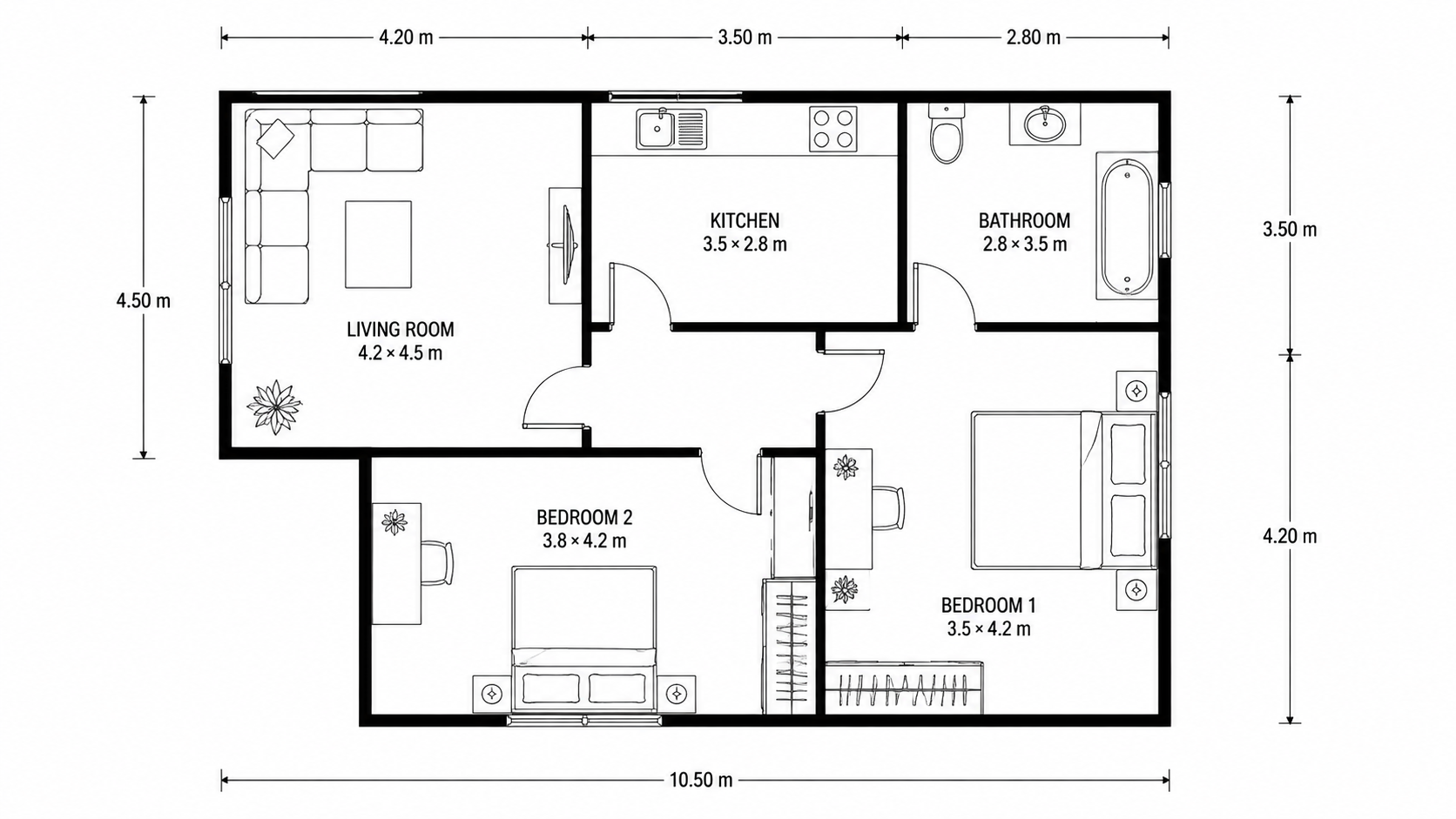
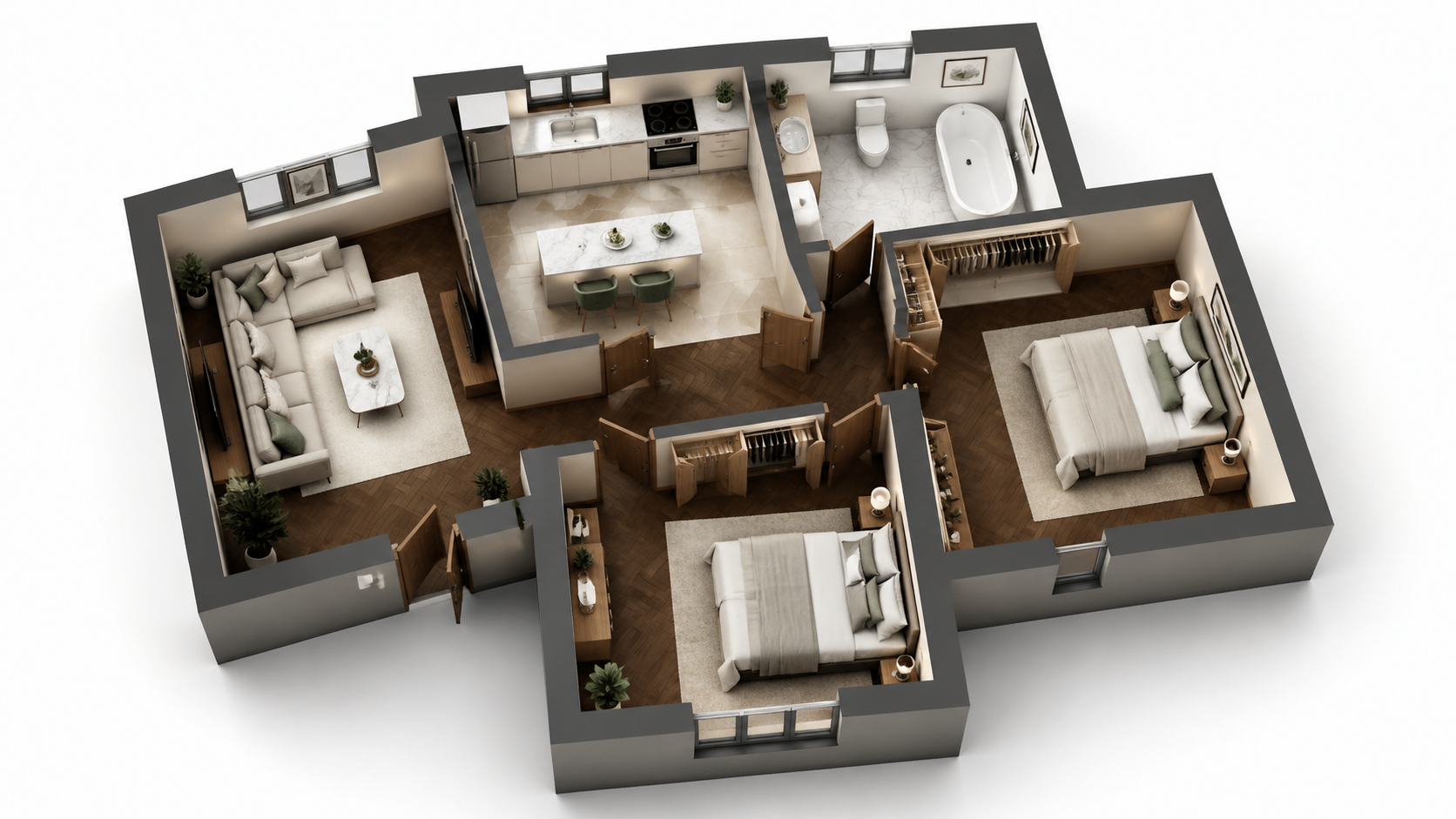
Ejemplo de demostración: la imagen «Antes» se creó con IA para este sitio web; no es una foto de un cliente.
Funciones
Guía paso a paso para renderizar cualquier plano de planta con AI en tres pasos. Sube, elige estilo, descarga — tiempo total inferior a 2 minutos, incluyendo el aprendizaje del flujo de trabajo por primera vez. No se requiere 3ds Max ni Lumion.
¿Cómo se Renderiza un Plano de Planta en Tres Pasos?
Flujo de trabajo de tres pasos — sube el plano, elige el estilo, descarga el render — no se requiere capacitación en 3ds Max o Lumion ni experiencia en 3D
¿Qué Tipos de Planos se Pueden Renderizar de Esta Manera?
Los usuarios primerizos completan un render en menos de 2 minutos, incluyendo el aprendizaje de la interfaz desde cero — no se requieren videos tutoriales
¿Por Qué el Método de AI es Más Rápido que Lumion o 3ds Max?
La AI gestiona el modelado 3D, la iluminación, los materiales y la postproducción automáticamente — cero trabajo manual o gestión de cola de renderizado
Cómo Funciona
Obtenga resultados profesionales en tres simples pasos
Arrastre sus fotos aquí
o buscar archivos
Suba Sus Fotos
Arrastre y suelte sus fotos o búsquelas en su equipo para subirlas. Roomagen acepta archivos JPEG, PNG y WebP de hasta 50 MB cada uno.
Procesamiento IA
Nuestra IA avanzada analiza sus imágenes y aplica mejoras profesionales automáticamente. Elija entre home staging virtual, mejora, eliminación de objetos o conversión de día a atardecer.
Descargue los Resultados
Previsualice sus imágenes transformadas y descargue resultados de alta resolución listos para anuncios, materiales de marketing y redes sociales. Sin marcas de agua en planes premium.
Por Qué Elegir Roomagen
Paso 1 — Sube el Plano 2D
Flujo de trabajo de tres pasos — sube el plano, elige el estilo, descarga el render — no se requiere capacitación en 3ds Max o Lumion ni experiencia en 3D
Paso 2 — Elige un Estilo de Renderizado y la Opción de Amueblado
Los usuarios primerizos completan un render en menos de 2 minutos, incluyendo el aprendizaje de la interfaz desde cero — no se requieren videos tutoriales
Paso 3 — Descarga el Render 3D
La AI gestiona el modelado 3D, la iluminación, los materiales y la postproducción automáticamente — cero trabajo manual o gestión de cola de renderizado
¿Para quién es?
Usuarios Primerizos
Buscando "cómo renderizar un plano de planta" y abrumados por los tutoriales de 3ds Max o Lumion — Roomagen reduce el flujo de trabajo a subir, seleccionar, descargar sin necesidad de conocimientos de 3D.
Formadores de Flujo de Trabajo
Enseñando a los miembros del equipo a renderizar planos de planta sin programas de capacitación costosos de Lumion o 3ds Max — Roomagen incorpora a nuevos usuarios en 5 minutos sin curva de aprendizaje de software.
Seguidores de Tutoriales
Quieren un proceso claro paso a paso para resultados repetibles — Roomagen tiene exactamente tres pasos con calidad consistente en cada render.
Los tutoriales de 3ds Max y Lumion requieren aprender modelado 3D, materiales, iluminación y postproducción — típicamente 40–100 horas de capacitación antes de producir resultados aceptables. El renderizado por plano aún lleva de 5 a 10 horas después de la capacitación. Roomagen no requiere capacitación; el primer render toma menos de 2 minutos por $0.23–$0.40.
| Roomagen AI | Tutorial 3ds Max / Lumion | Subcontratación de Diseñador 3D | |
|---|---|---|---|
| Pasos requeridos | 3 (subir, estilo, descargar) | 40–80 pasos manuales | Brief + espera + revisiones |
| Tiempo de capacitación antes del primer render | 0 minutos | 40–100 horas | Ninguno (diseñador capacitado) |
| Tiempo por render | 90 segundos | 5–10 horas después de la capacitación | 3–7 días |
| Costo del software | $12–$79/mes | $249–$1,800/año Adobe/Autodesk | Ninguno para el comprador |
| Costo por render | $0.23–$0.40 | $0 marginal + 5–10 horas de mano de obra | $200–$800 |
Preguntas Frecuentes
Todo lo que necesita saber sobre Roomagen
Inicia sesión en Roomagen, haz clic en "Floor Plan Visualize" y sube el plano 2D. Formatos aceptados: JPEG, PNG o WebP, hasta 50 MB; convierte primero los archivos PDF o HEIC a JPEG o PNG. El plano puede ser una foto, un escaneo o una exportación digital de cualquier fuente.
Cuatro estilos disponibles: Marketing Fotorrealista para listados, Boceto Arquitectónico para presentaciones esquemáticas, Marketing Estilizado para folletos cálidos, Monocromo Editorial para impresiones de portafolio premium. Para listados MLS, el Marketing Fotorrealista es la opción más segura.
Amueblado para renders de listados con staging y folletos; sin amueblar cuando el comprador quiere visualizar sus propios muebles o cuando la arquitectura en sí es el punto de venta. Renderiza ambas versiones por un total de $0.58 — a los compradores les encanta ver la misma habitación de dos maneras.
No. La AI detecta habitaciones, paredes, puertas y ventanas automáticamente. No se necesita preprocesamiento, enmascaramiento o anotación. Simplemente sube el plano tal cual.
Subida: 2–10 segundos. Renderizado AI: 60–90 segundos. Descarga: instantánea. Total menos de 2 minutos desde el inicio hasta tener un render 3D terminado. Compara esto con 5–10 horas en Lumion o 3ds Max para el mismo resultado.
Convierte el boceto primero usando Roomagen Sketch to Floor Plan, luego visualiza el resultado digital. De un boceto en servilleta a un render 3D en menos de 4 minutos en total.
Vuelve a renderizar con un estilo diferente o sube un plano fuente de mayor calidad. Cada render cuesta 2 créditos (entre $0.23 y $0.40). La precisión de la AI mejora con planos fuente más limpios: etiquetas claras, paredes distintas, puertas visibles.
Sí. Cambia el estilo o la opción de amueblado y vuelve a renderizar. Cada render cuesta 2 créditos. La mayoría de los usuarios renderizan una vez y obtienen inmediatamente lo que necesitan.
Descarga la imagen renderizada y envíala por correo electrónico o compártela a través de tu portal de clientes existente. El resultado es un JPG/PNG estándar compatible con cualquier cliente de correo electrónico, CRM y herramienta de presentación.
El primer render está incluido con créditos de inicio gratuitos. Después de eso, cada render cuesta 2 créditos (entre $0.23 y $0.40). El plan Starter ($12/mes, 60 créditos) soporta 30 renders.
Parte de
Visualizador de PlanosMás herramientas de esta familia
- Renderizador de Planos de Planta Online
- Herramienta de Renderizado de Planos de Planta 3D
- Visualice Planos de Casas
- Visualice Planos de Apartamentos
- Visualice Planos de Oficinas
- Visualice Planos de Restaurantes
- Visualice Planos de Hoteles
- Visualice Planos de Tiendas Minoristas
- Visualice Planos de Almacenes
- Visualice Planos de Clínicas
- Visualice Planos de Planta Escolares
- Visualización de Planos para Agentes Inmobiliarios
Explora herramientas relacionadas
Descubre más herramientas de IA para mejorar tu marketing inmobiliario
Visualizador de Planos — Renders 3D con AI a partir de Planos 2D en Menos de un Minuto
Visualice planos 2D como renders 3D con AI. Estilos fotorrealista, boceto arquitectónico, estilizado y monocromático, amueblado o sin amueblar, con salida en menos de 90 segundos por $0.23–$0.40 por render, sin necesidad de 3ds Max, Lumion o Twinmotion.
Más informaciónRenderizador de Planos de Planta Online — 3D Basado en Navegador, Sin Instalación Requerida
Renderiza planos de planta online en tu navegador con AI. Sin 3ds Max, sin Lumion, sin Twinmotion, sin instalación — sube un plano 2D, obtén un renderizado 3D en menos de 90 segundos en cualquier dispositivo por $0.23–$0.40.
Más informaciónHerramienta de Renderizado de Planos de Planta 3D — Visualización AI para Cada Tipo de Propiedad
Herramienta de renderizado de planos de planta 3D impulsada por AI. Salida fotorrealista, de boceto, estilizada y monocromática para cualquier tipo de propiedad en menos de 90 segundos. Reemplaza a 3ds Max ($1,800/año), Lumion ($1,499/año) y Twinmotion ($249/año) para el 95% de los casos de uso de renderizado de planos de planta.
Más informaciónPlanos de planta 2D y 3D profesionales — Generados por AI en menos de un minuto
Convierte un boceto, un escaneo o un plano antiguo en un plano 2D limpio o en una vista 3D. Conserva o quita las medidas y los nombres de las habitaciones, y elige uno de cuatro estilos de dibujo.
Más informaciónColorear Planos de Planta — Color con AI para Planos en Blanco y Negro en Menos de un Minuto
Colorea planos de planta en blanco y negro con AI. Cuatro paletas de diseñador, habitaciones detectadas automáticamente, resultados listos en menos de 90 segundos para bienes raíces, arquitectura y diseño de interiores — no se requieren habilidades de Photoshop ni de diseño.
Más información