Como Renderizar uma Planta Baixa — Guia Passo a Passo com AI
Para renderizar uma planta baixa com Roomagen, faça o upload de uma planta 2D, escolha um estilo de renderização e opção de mobiliário, e baixe a renderização 3D — todo o processo leva menos de 2 minutos, incluindo o aprendizado inicial, sem a necessidade de 3ds Max, Lumion ou Twinmotion.
A maioria dos tutoriais de renderização de plantas baixas online assume conhecimento de 3ds Max, Revit ou Lumion — modelagem de paredes, aplicação de materiais, configuração de luzes, configuração de passes de renderização — e percorre 40–80 passos manuais em várias sessões. Mesmo depois de assistir ao tutorial, a renderização real leva de 5 a 10 horas por planta. O fluxo de trabalho do Roomagen tem três passos: upload, escolha do estilo, download. Nenhum tutorial é necessário porque não há nada para aprender — a AI lida com todas as decisões de modelagem, iluminação e material automaticamente. O tempo total, incluindo a curva de aprendizado inicial, é de menos de 2 minutos por renderização, a um custo de US$ 0,23–US$ 0,40.
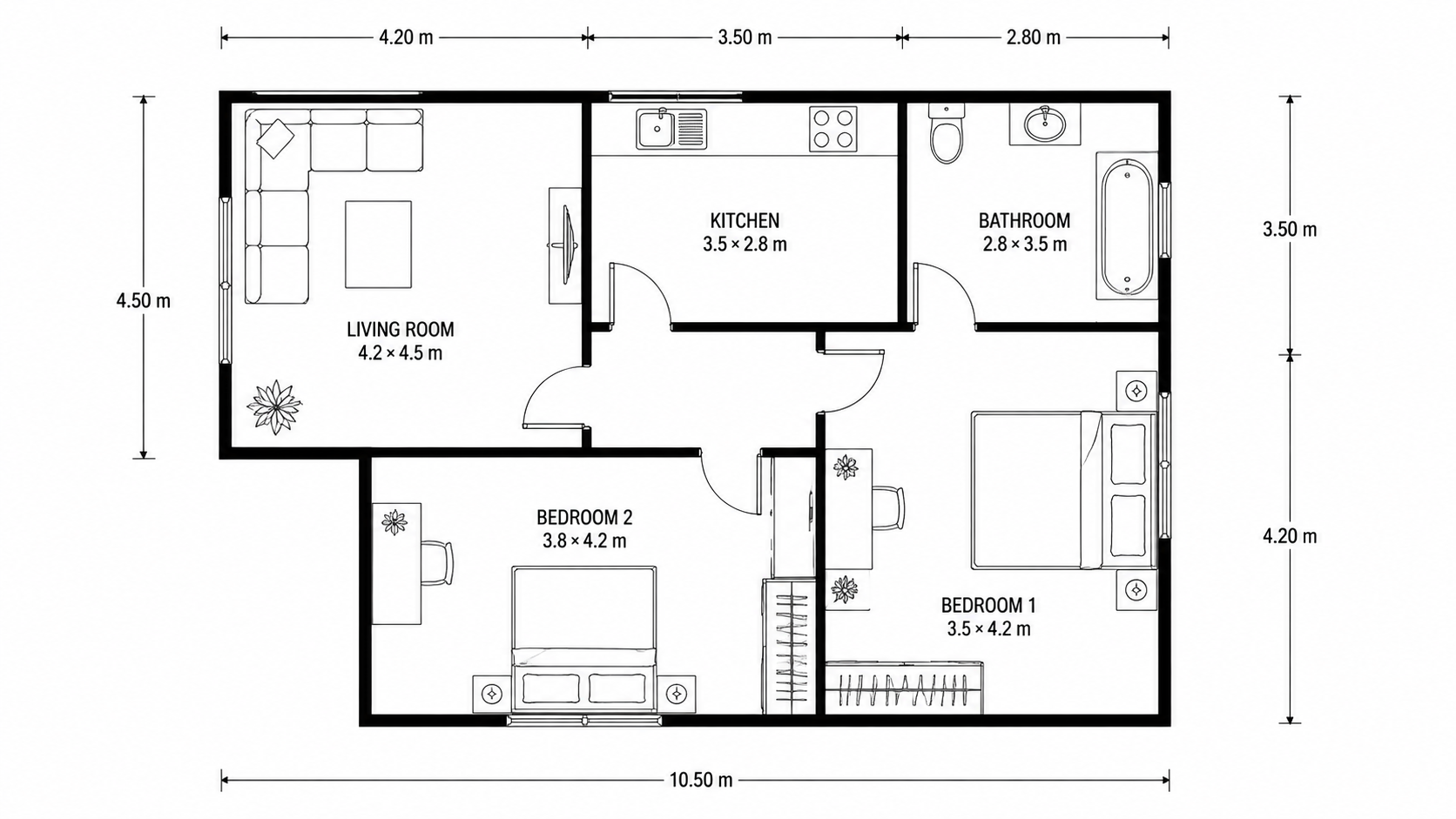
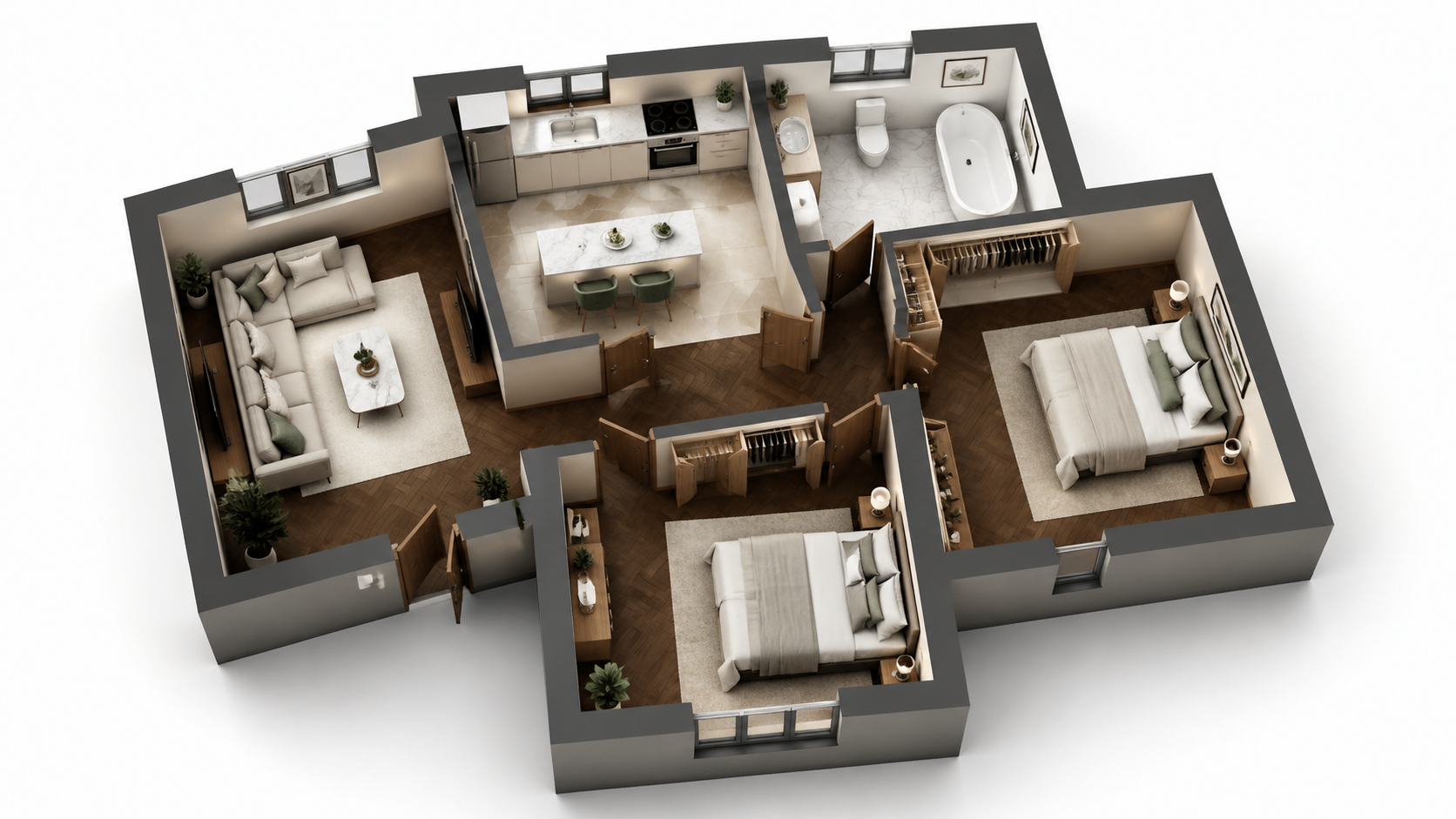
Exemplo de demonstração: a imagem "Antes" foi criada com IA para este site; não é uma foto de cliente.
Recursos
Guia passo a passo para renderizar qualquer planta baixa com AI em três passos. Faça o upload, escolha o estilo, baixe — tempo total inferior a 2 minutos, incluindo o aprendizado do fluxo de trabalho pela primeira vez. Não é necessário 3ds Max ou Lumion.
Como Você Renderiza uma Planta Baixa em Três Passos?
Fluxo de trabalho de três passos — faça o upload da planta, escolha o estilo, baixe a renderização — sem necessidade de treinamento em 3ds Max ou Lumion ou experiência em 3D
Que Tipos de Plantas Podem Ser Renderizadas Desta Forma?
Usuários de primeira viagem completam uma renderização em menos de 2 minutos, incluindo o aprendizado da interface do zero — sem necessidade de vídeos tutoriais
Por Que o Método AI É Mais Rápido Que Lumion ou 3ds Max?
A AI lida com modelagem 3D, iluminação, materiais e pós-produção automaticamente — zero trabalho manual ou gerenciamento de fila de renderização
Como Funciona
Obtenha resultados profissionais em três passos simples
Arraste suas fotos aqui
ou procure arquivos
Envie Suas Fotos
Arraste e solte suas fotos ou procure os arquivos para enviá-las. A Roomagen aceita arquivos JPEG, PNG e WebP de até 50 MB cada.
Processamento por IA
Nossa IA avançada analisa suas imagens e aplica aprimoramentos profissionais automaticamente. Escolha entre decoração virtual, aprimoramento, remoção de objetos ou conversão de dia para entardecer.
Baixe os Resultados
Visualize suas imagens transformadas e baixe resultados em alta resolução prontos para anúncios, materiais de marketing e redes sociais. Sem marcas d'água nos planos premium.
Por que Escolher a Roomagen
Passo 1 — Faça o Upload da Planta 2D
Fluxo de trabalho de três passos — faça o upload da planta, escolha o estilo, baixe a renderização — sem necessidade de treinamento em 3ds Max ou Lumion ou experiência em 3D
Passo 2 — Escolha um Estilo de Renderização e Opção de Mobiliário
Usuários de primeira viagem completam uma renderização em menos de 2 minutos, incluindo o aprendizado da interface do zero — sem necessidade de vídeos tutoriais
Passo 3 — Baixe a Renderização 3D
A AI lida com modelagem 3D, iluminação, materiais e pós-produção automaticamente — zero trabalho manual ou gerenciamento de fila de renderização
Para quem é?
Usuários de Primeira Viagem
Procurando "como renderizar uma planta baixa" e sobrecarregados por tutoriais de 3ds Max ou Lumion — Roomagen reduz o fluxo de trabalho para upload, seleção e download, sem exigir conhecimento 3D.
Treinadores de Fluxo de Trabalho
Ensinando membros da equipe a renderizar plantas baixas sem programas de treinamento caros como Lumion ou 3ds Max — Roomagen integra novos usuários em 5 minutos, sem curva de aprendizado de software.
Seguidores de Tutoriais
Querem um processo claro e passo a passo para resultados repetíveis — Roomagen tem exatamente três passos com qualidade consistente em cada renderização.
Os tutoriais de 3ds Max e Lumion exigem o aprendizado de modelagem 3D, materiais, iluminação e pós-produção — tipicamente 40–100 horas de treinamento antes de produzir resultados aceitáveis. A renderização por planta ainda leva de 5 a 10 horas após o treinamento. Roomagen exige zero treinamento; a primeira renderização leva menos de 2 minutos por US$ 0,23–US$ 0,40.
| Roomagen AI | Tutorial 3ds Max / Lumion | Terceirização de Designer 3D | |
|---|---|---|---|
| Passos necessários | 3 (upload, estilo, download) | 40–80 passos manuais | Briefing + espera + revisões |
| Tempo de treinamento antes da primeira renderização | 0 minutos | 40–100 horas | Nenhum (designer treinado) |
| Tempo por renderização | 90 segundos | 5–10 horas após o treinamento | 3–7 dias |
| Custo do software | US$ 12–US$ 79/mês | US$ 249–US$ 1.800/ano Adobe/Autodesk | Nenhum para o comprador |
| Custo por renderização | US$ 0,23–US$ 0,40 | US$ 0 marginal + 5–10 horas de trabalho | US$ 200–US$ 800 |
Perguntas Frequentes
Tudo o que você precisa saber sobre o Roomagen
Faça login no Roomagen, clique em "Floor Plan Visualize" e faça o upload da planta 2D. Formatos aceitos: JPEG, PNG ou WebP, até 50 MB; converta antes arquivos PDF ou HEIC para JPEG ou PNG. A planta pode ser uma foto, digitalização ou exportação digital de qualquer fonte.
Quatro estilos disponíveis — Marketing Fotorrealista para anúncios, Esboço Arquitetônico para apresentações esquemáticas, Marketing Estilizado para brochuras acolhedoras, Monocromático Editorial para impressões de portfólio premium. Para anúncios MLS, o Marketing Fotorrealista é a escolha mais segura.
Com mobiliário para renderizações de anúncios e brochuras; sem mobiliário quando o comprador quer visualizar seus próprios móveis ou quando a arquitetura em si é o ponto de venda. Renderize ambas as versões por um total de US$ 0,58 — os compradores adoram ver o mesmo ambiente de duas maneiras.
Não. A AI detecta ambientes, paredes, portas e janelas automaticamente. Não é necessário pré-processamento, mascaramento ou anotação. Basta fazer o upload da planta como está.
Upload: 2–10 segundos. Renderização AI: 60–90 segundos. Download: instantâneo. Total de menos de 2 minutos do início até ter uma renderização 3D finalizada. Compare com 5–10 horas em Lumion ou 3ds Max para o mesmo resultado.
Converta o esboço primeiro usando Roomagen Sketch to Floor Plan, depois visualize a saída digital. Do rascunho em guardanapo à renderização 3D em menos de 4 minutos no total.
Renderize novamente com um estilo diferente ou faça o upload de uma planta fonte de maior qualidade. Cada renderização custa 2 créditos (US$ 0,23–US$ 0,40). A precisão da AI melhora com plantas fonte mais limpas — rótulos claros, paredes distintas, portas visíveis.
Sim. Mude o estilo ou a opção de mobiliário e renderize novamente. Cada renderização custa 2 créditos. A maioria dos usuários renderiza uma vez e imediatamente tem o que precisa.
Baixe a imagem renderizada e envie por e-mail ou compartilhe através do seu portal de clientes existente. A saída é um JPG/PNG padrão compatível com todos os clientes de e-mail, CRM e ferramentas de apresentação.
A primeira renderização está incluída com créditos iniciais gratuitos. Depois disso, cada renderização custa 2 créditos (US$ 0,23–US$ 0,40). O plano Starter (US$ 12/mês, 60 créditos) suporta 30 renderizações.
Parte de
Visualizador de Plantas BaixasMais ferramentas desta família
- Renderizador de Plantas Online
- Ferramenta de Renderização de Plantas 3D
- Visualize Plantas de Casas
- Visualize Plantas de Apartamentos
- Visualize Plantas de Escritório
- Visualize Plantas de Restaurantes
- Visualize Plantas de Hotéis
- Visualize Plantas de Lojas de Varejo
- Visualize Plantas Baixas de Armazéns
- Visualize Plantas de Clínicas
- Visualize Plantas Baixas de Escolas
- Visualização de Planta Baixa para Corretores de Imóveis
Explore ferramentas relacionadas
Descubra mais ferramentas de IA para aprimorar seu marketing imobiliário
Visualizador de Plantas Baixas — Renderizações 3D com AI a Partir de Plantas 2D em Menos de um Minuto
Visualize plantas baixas 2D como renderizações 3D com AI. Estilos fotorrealista, esboço arquitetônico, estilizado e monocromático, mobiliado ou não mobiliado, com saída em menos de 90 segundos por US$ 0,23–US$ 0,40 por renderização — sem necessidade de 3ds Max, Lumion ou Twinmotion.
Saiba maisRenderizador de Plantas Online — 3D Baseado em Navegador, Sem Instalação Necessária
Renderize plantas online no seu navegador com AI. Sem 3ds Max, sem Lumion, sem Twinmotion, sem instalação — carregue uma planta 2D, obtenha uma renderização 3D em menos de 90 segundos em qualquer dispositivo por US$ 0,23–US$ 0,40.
Saiba maisFerramenta de Renderização de Plantas 3D — Visualização AI para Todo Tipo de Imóvel
Ferramenta de renderização de plantas 3D alimentada por AI. Saída fotorrealista, esboço, estilizada e monocromática para qualquer tipo de imóvel em menos de 90 segundos. Substitui 3ds Max ($1,800/ano), Lumion ($1,499/ano) e Twinmotion ($249/ano) para 95% dos casos de uso de renderização de plantas.
Saiba maisPlantas Baixas 2D e 3D Profissionais — Geradas por AI em Menos de um Minuto
Transforme um esboço, uma digitalização ou uma planta antiga em uma planta 2D limpa ou em uma vista 3D. Mantenha ou remova medidas e nomes dos cômodos e escolha um de quatro estilos de desenho.
Saiba maisColorir Plantas Baixas — Cores AI para Plantas em Preto e Branco em Menos de um Minuto
Colora plantas baixas em preto e branco com AI. Quatro paletas de designer, cômodos detectados automaticamente, saída pronta em menos de 90 segundos para imóveis, arquitetura e design de interiores — sem necessidade de Photoshop ou habilidades de design.
Saiba mais