Colorizador de Planta Baixa Online — AI Baseada no Navegador, Sem Instalação Necessária
O Colorizador de Planta Baixa Online Roomagen funciona inteiramente no navegador — faça upload de uma planta baixa, a AI a colore em uma das quatro paletas em menos de 90 segundos, sem necessidade de instalação de software ou assinatura Adobe Creative Cloud.
A coloração de plantas baixas tradicionalmente exige Adobe Photoshop (US$240/ano), AutoCAD (US$1.865/ano) ou plug-ins CAD especializados — nenhum dos quais a maioria dos corretores, imobiliárias ou proprietários possui. Mesmo usuários avançados de Photoshop gastam de 45 a 90 minutos por planta. Roomagen funciona em qualquer navegador moderno em qualquer dispositivo — Mac, Windows, iPad, Android — sem instalação. Faça upload de uma planta baixa fotografada, receba uma planta colorida em uma das quatro paletas em menos de 90 segundos por US$0.23–US$0.40 por colorização. Mesmo resultado, custo zero de software, curva de aprendizado zero.
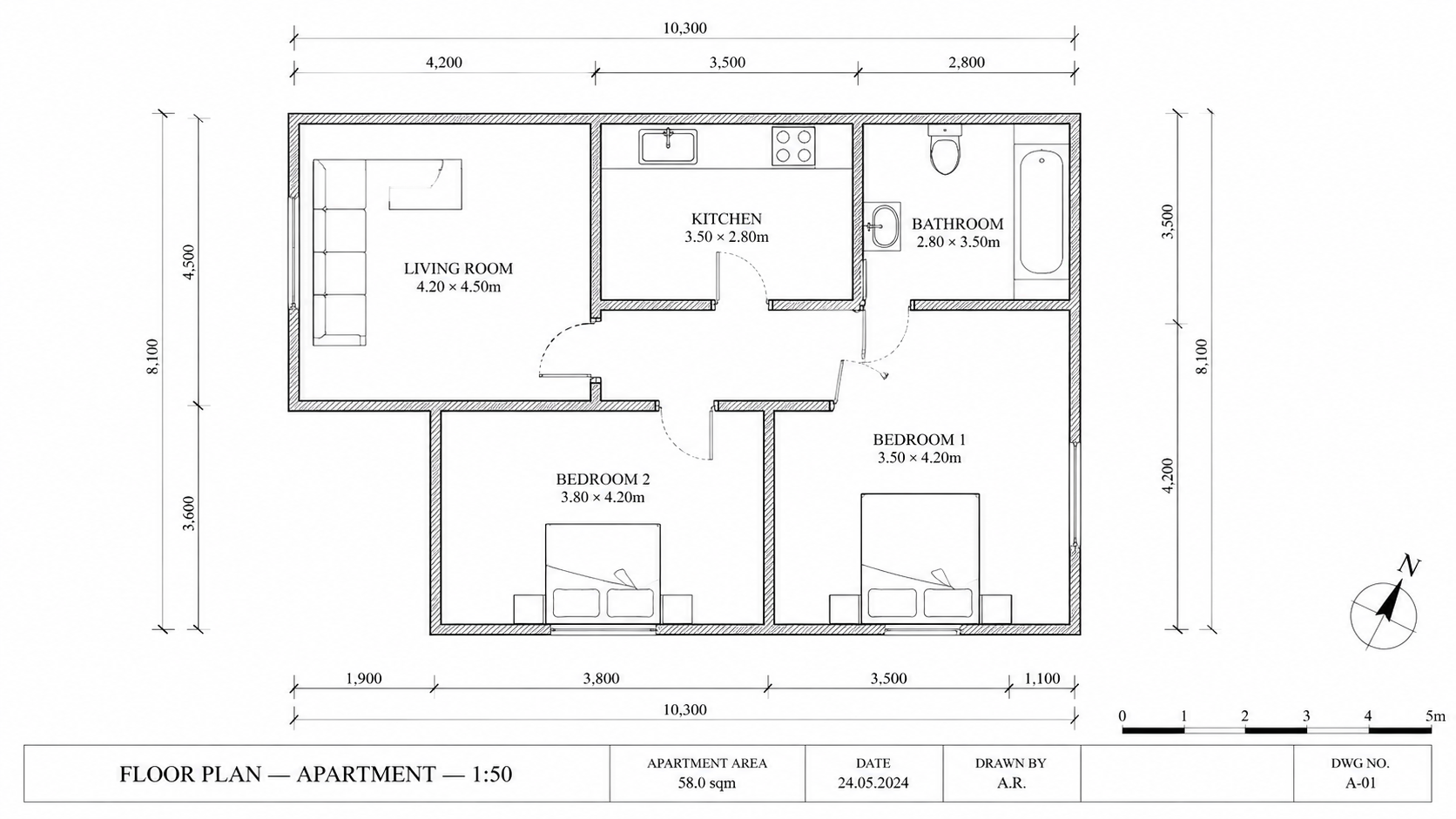
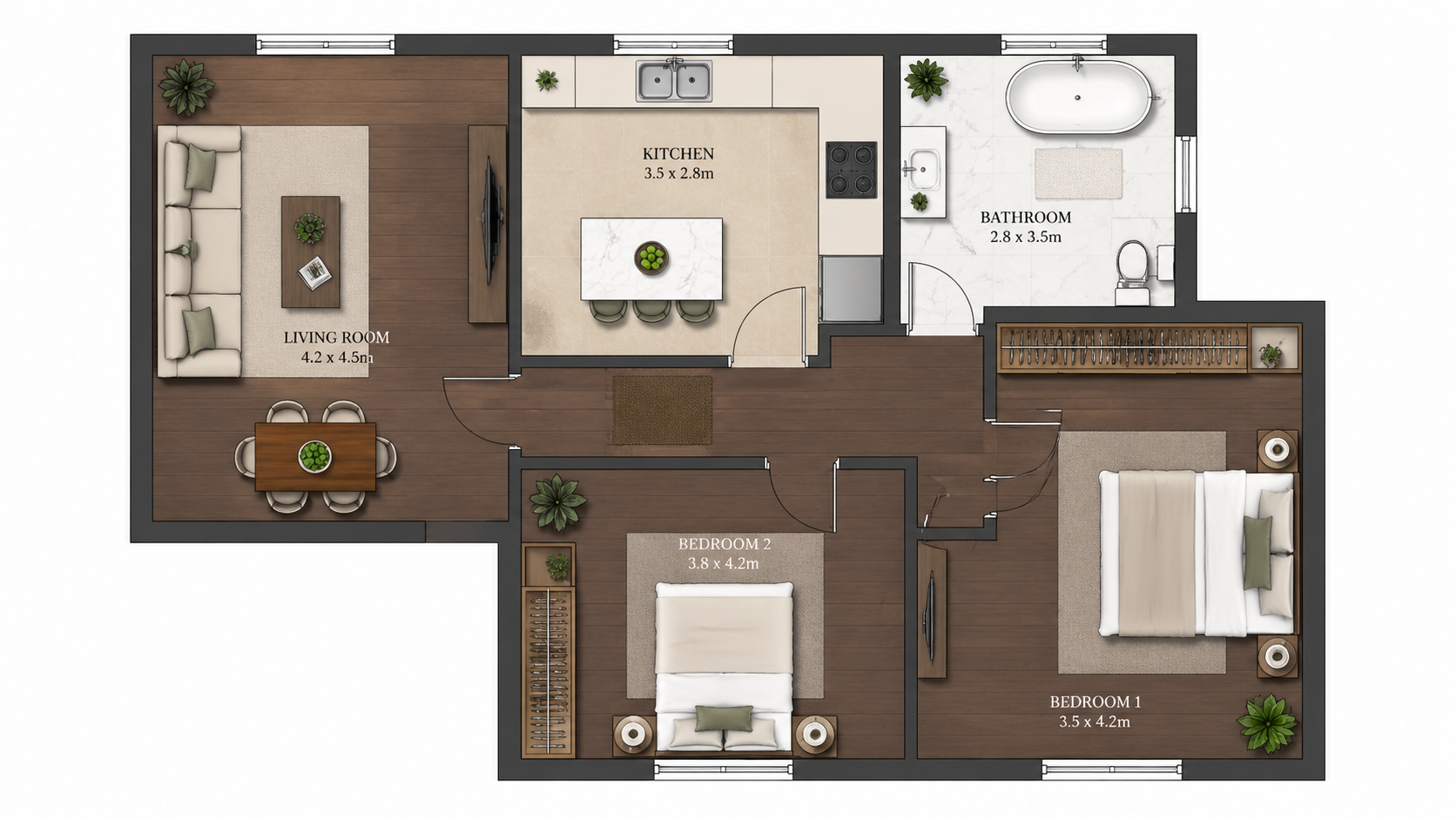
Exemplo de demonstração: a imagem "Antes" foi criada com IA para este site; não é uma foto de cliente.
Recursos
Colorize plantas baixas online no seu navegador com AI. Sem instalação, sem Photoshop, sem assinatura Adobe — faça upload de uma planta em preto e branco, obtenha uma planta colorida em uma das quatro paletas em menos de 90 segundos em qualquer dispositivo.
Como Funciona um Colorizador de Planta Baixa Online?
Coloração de planta baixa totalmente baseada no navegador, sem necessidade de instalação de software — funciona em qualquer dispositivo ou sistema operacional moderno
Quais Navegadores e Dispositivos Suportam a Ferramenta?
Compatível com iPad e dispositivos móveis — mesmo conjunto de recursos e qualidade de saída do desktop, útil para fluxos de trabalho de corretores em campo
Por Que Escolher a Coloração Online em Vez de Software de Desktop?
Sem Adobe Creative Cloud nem assinatura do AutoCAD — pague só por colorização, $0.23–$0.40, uma de quatro paletas por execução
Como Funciona
Obtenha resultados profissionais em três passos simples
Arraste suas fotos aqui
ou procure arquivos
Envie Suas Fotos
Arraste e solte suas fotos ou procure os arquivos para enviá-las. A Roomagen aceita arquivos JPEG, PNG e WebP de até 50 MB cada.
Processamento por IA
Nossa IA avançada analisa suas imagens e aplica aprimoramentos profissionais automaticamente. Escolha entre decoração virtual, aprimoramento, remoção de objetos ou conversão de dia para entardecer.
Baixe os Resultados
Visualize suas imagens transformadas e baixe resultados em alta resolução prontos para anúncios, materiais de marketing e redes sociais. Sem marcas d'água nos planos premium.
Por que Escolher a Roomagen
Upload, Processamento, Download — Totalmente no Navegador
Coloração de planta baixa totalmente baseada no navegador, sem necessidade de instalação de software — funciona em qualquer dispositivo ou sistema operacional moderno
Compatível com Mac, Windows, iPad e Android
Compatível com iPad e dispositivos móveis — mesmo conjunto de recursos e qualidade de saída do desktop, útil para fluxos de trabalho de corretores em campo
Sem Photoshop, Sem CAD, Sem Assinaturas de Software
Sem Adobe Creative Cloud nem assinatura do AutoCAD — pague só por colorização, $0.23–$0.40, uma de quatro paletas por execução
Para quem é?
Corretores com Foco no iPad
Colorize plantas baixas durante visitas a imóveis ou em viagens — sem necessidade de laptop, funciona no Safari ou Chrome móveis com a mesma qualidade de saída do desktop.
Usuários Casuais
Projetos pontuais não justificam uma licença de Photoshop de US$240/ano. Abra o navegador, faça upload de uma planta, baixe a versão colorida, pague apenas US$0.29 por planta.
Equipes Multiplataforma
Equipes mistas de Mac/Windows/Linux trabalham na mesma ferramenta online sem problemas de compatibilidade. A saída é consistente, independentemente do dispositivo que a produziu.
Adobe Photoshop custa US$240/ano mais um fluxo de trabalho de coloração manual de 45 a 90 minutos. Plug-ins CAD de desktop custam US$50–US$200/ano e exigem treinamento profissional. Roomagen é baseado em navegador, não requer instalação e produz uma planta colorida em uma das quatro paletas por US$0.23–US$0.40 em menos de 90 segundos.
| Roomagen Online | Photoshop Desktop | Plug-ins AutoCAD | |
|---|---|---|---|
| Custo por planta | US$0.23–US$0.40 | US$240/ano Adobe + 45–90 min | US$1.865/ano AutoCAD + plug-in US$50–US$200/ano |
| Instalação necessária | Não — apenas navegador | Sim — Adobe Creative Cloud | Sim — AutoCAD desktop |
| Móvel / iPad | Sim — conjunto completo de recursos | iPad com recursos limitados | Sem suporte móvel |
| Multiplataforma | Mac, Windows, Linux, iOS, Android | Apenas Mac e Windows | Principalmente Windows |
| Curva de aprendizado | Upload e download | Conhecimento em Photoshop | Treinamento profissional em CAD |
Perguntas Frequentes
Tudo o que você precisa saber sobre o Roomagen
Sim. Roomagen funciona no Safari e Chrome móveis em iPad, iPhone e Android. Faça upload do rolo da câmera ou de arquivos, o resultado é baixado para o dispositivo. O conjunto completo de recursos está disponível no celular.
Sim. Uma conta gratuita oferece créditos iniciais para testar a ferramenta antes de pagar. A conta é necessária para salvar e baixar plantas coloridas entre sessões.
Sim. As plantas enviadas e os resultados ficam guardados na sua Biblioteca, e cada imagem é enviada ao nosso provedor de IA, o Google, para processamento. Os resultados são mantidos pelo período do seu plano (3 dias no Free, 30 no Starter, 180 no Pro e sem limite de tempo no Business); veja a Política de Privacidade para mais detalhes.
O upload leva de 2 a 10 segundos, dependendo do tamanho do arquivo. O processamento por AI leva de 60 a 90 segundos. O download é instantâneo. De ponta a ponta, em menos de 90 segundos, mesmo em conexões lentas.
Imagens JPEG, PNG e WebP de até 50 MB — fotos, digitalizações ou exportações em imagem da planta. Arquivos PDF e HEIC não são aceitos, então exporte ou converta antes para JPEG ou PNG.
Não. A AI é executada nas GPUs da nuvem Roomagen — conexão com a internet é necessária para o processamento. Uploads e downloads precisam de conexão estável.
Esse é o objetivo principal. Sem Adobe Creative Cloud, sem AutoCAD, sem plug-ins CAD especializados. Apenas um navegador e uma imagem de planta baixa. A AI lida com toda a coloração.
Mais rápido. A coloração manual no Photoshop de desktop leva de 45 a 90 minutos. A ferramenta de navegador Roomagen entrega uma planta colorida em menos de 90 segundos — ferramentas de AI de desktop têm velocidade similar, mas exigem instalação.
A Roomagen não tem assentos de equipe, saldo de créditos compartilhado nem biblioteca de projetos comum — uma conta tem um único login. O plano Business ($79/mês) dá a uma conta 700 créditos por mês e guarda até 2.000 resultados sem limite de tempo.
Online: US$0.23–US$0.40 por colorização, sem custo inicial de software. Alternativa de desktop: US$240/ano Photoshop + 45–90 min por planta. A ferramenta do navegador ganha em tempo e dinheiro para qualquer volume.
Parte de
Colorir Plantas BaixasMais ferramentas desta família
- Como Colorir uma Planta Baixa
- Ferramenta Gratuita de Coloração de Plantas Baixas
- Colorir Plantas Baixas de Casas
- Colorir Plantas de Apartamento
- Colorir Plantas de Escritório
- Colorir Plantas de Restaurantes
- Colorir Plantas Baixas de Hotéis
- Colorir Plantas Baixas de Varejo
- Colorir Plantas Baixas de Clínicas
- Colorir Plantas de Armazéns
- Colorização de Plantas Baixas para Corretores de Imóveis
- Colorização de Plantas Baixas para Arquitetos
Explore ferramentas relacionadas
Descubra mais ferramentas de IA para aprimorar seu marketing imobiliário
Colorir Plantas Baixas — Cores AI para Plantas em Preto e Branco em Menos de um Minuto
Colora plantas baixas em preto e branco com AI. Quatro paletas de designer, cômodos detectados automaticamente, saída pronta em menos de 90 segundos para imóveis, arquitetura e design de interiores — sem necessidade de Photoshop ou habilidades de design.
Saiba maisPlantas Baixas 2D e 3D Profissionais — Geradas por AI em Menos de um Minuto
Transforme um esboço, uma digitalização ou uma planta antiga em uma planta 2D limpa ou em uma vista 3D. Mantenha ou remova medidas e nomes dos cômodos e escolha um de quatro estilos de desenho.
Saiba maisFerramenta Gratuita de Coloração de Plantas Baixas — Experimente o AI Colorize com Créditos Iniciais
Colora plantas baixas com AI usando 6 créditos gratuitos — o suficiente para 3 plantas, cada uma em uma de quatro paletas. Depois, $0.23–$0.40 por planta nos planos mensais, sem taxas ocultas. Os resultados gratuitos têm marca d'água.
Saiba maisComo Colorir uma Planta Baixa — Guia Passo a Passo com AI
Guia passo a passo para colorir qualquer planta baixa com AI em três passos. Carregue a planta, escolha uma das quatro paletas, baixe a planta colorida — tempo total inferior a 2 minutos, incluindo o aprendizado do fluxo de trabalho pela primeira vez.
Saiba maisVisualizador de Plantas Baixas — Renderizações 3D com AI a Partir de Plantas 2D em Menos de um Minuto
Visualize plantas baixas 2D como renderizações 3D com AI. Estilos fotorrealista, esboço arquitetônico, estilizado e monocromático, mobiliado ou não mobiliado, com saída em menos de 90 segundos por US$ 0,23–US$ 0,40 por renderização — sem necessidade de 3ds Max, Lumion ou Twinmotion.
Saiba mais