Как визуализировать план этажа — Пошаговое руководство с AI
Чтобы визуализировать план этажа с помощью Roomagen, загрузите 2D-план, выберите стиль рендеринга и опцию меблировки, а затем скачайте 3D-рендер — весь процесс занимает менее 2 минут, включая первое знакомство с системой, и не требует 3ds Max, Lumion или Twinmotion.
Большинство онлайн-руководств по визуализации планов этажей предполагают знание 3ds Max, Revit или Lumion — моделирование стен, применение материалов, настройку освещения, конфигурирование проходов рендеринга — и включают 40–80 ручных шагов в течение нескольких сеансов. Даже после просмотра учебника фактический рендеринг занимает 5–10 часов на план. Рабочий процесс Roomagen состоит из трех шагов: загрузка, выбор стиля, скачивание. Учебник не нужен, потому что нечему учиться — AI автоматически принимает все решения по моделированию, освещению и материалам. Общее время, включая кривую обучения для первого раза, составляет менее 2 минут на рендер по цене $0.23–$0.40.
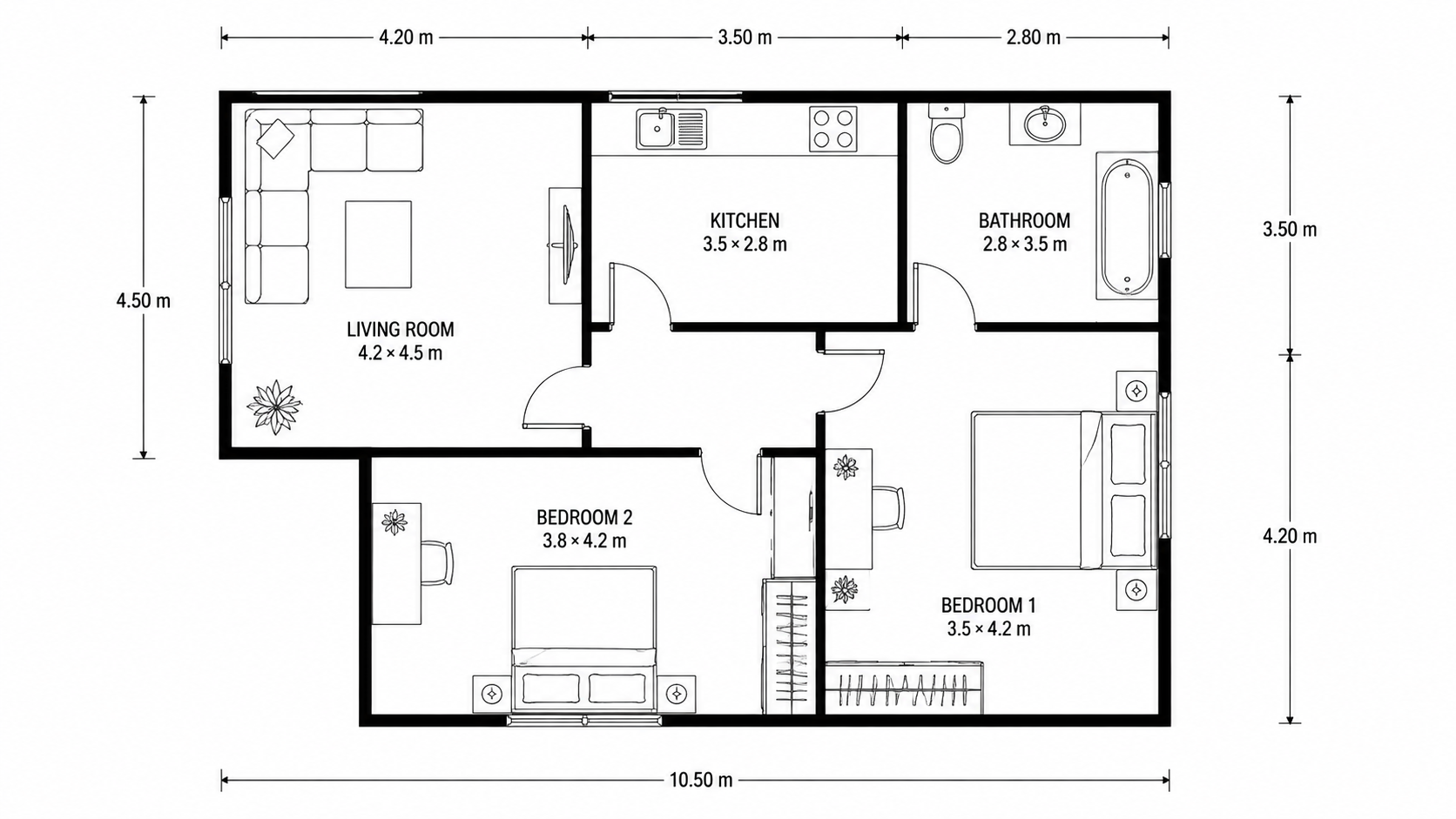
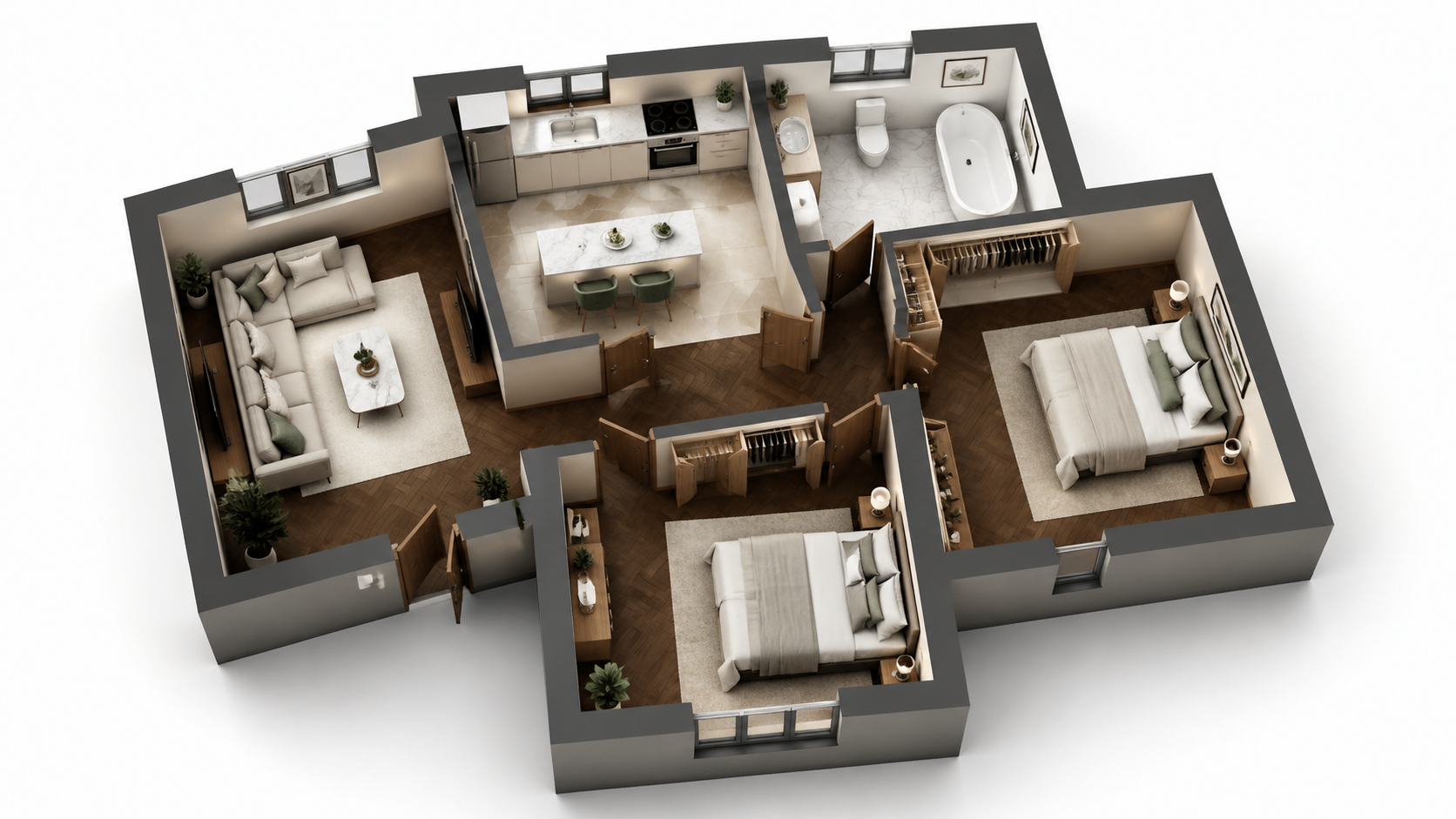
Демонстрационный пример: изображение «До» создано с помощью ИИ для этого сайта; это не фото клиента.
Возможности
Пошаговое руководство по визуализации любого плана этажа с помощью AI за три шага. Загрузите, выберите стиль, скачайте — общее время менее 2 минут, включая первое знакомство с рабочим процессом. Не требуются 3ds Max или Lumion.
Как визуализировать план этажа за три шага?
Трехэтапный рабочий процесс — загрузите план, выберите стиль, скачайте рендер — не требуется обучение 3ds Max или Lumion, а также опыт в 3D.
Какие типы планов можно визуализировать таким образом?
Новички выполняют рендер менее чем за 2 минуты, включая освоение интерфейса с нуля — обучающие видео не требуются.
Почему метод AI быстрее, чем Lumion или 3ds Max?
AI автоматически обрабатывает 3D-моделирование, освещение, материалы и пост-продакшн — ноль ручной работы или управления очередью рендеринга.
Как это работает
Получите профессиональные результаты за три простых шага
Перетащите фото сюда
или выберите файлы
Загрузите ваши фотографии
Перетащите фотографии или выберите их через обзор файлов. Roomagen принимает файлы JPEG, PNG и WebP размером до 50 МБ каждый.
Обработка ИИ
Наш передовой ИИ анализирует ваши изображения и автоматически применяет профессиональные улучшения. Выбирайте виртуальный стейджинг, улучшение, удаление объектов или преобразование дня в сумерки.
Скачайте результаты
Просмотрите преобразованные изображения и скачайте результаты в высоком разрешении, готовые для объявлений, маркетинговых материалов и социальных сетей. Без водяных знаков на премиум-тарифах.
Почему выбирают Roomagen
Шаг 1 — Загрузите 2D-план
Трехэтапный рабочий процесс — загрузите план, выберите стиль, скачайте рендер — не требуется обучение 3ds Max или Lumion, а также опыт в 3D.
Шаг 2 — Выберите стиль рендеринга и опцию меблировки
Новички выполняют рендер менее чем за 2 минуты, включая освоение интерфейса с нуля — обучающие видео не требуются.
Шаг 3 — Загрузите 3D-рендер
AI автоматически обрабатывает 3D-моделирование, освещение, материалы и пост-продакшн — ноль ручной работы или управления очередью рендеринга.
Для кого это?
Новички
Ищут «как визуализировать план этажа» и перегружены учебниками по 3ds Max или Lumion — Roomagen упрощает рабочий процесс до загрузки, выбора, скачивания без необходимости знаний в 3D.
Тренеры по рабочим процессам
Обучают членов команды визуализации планов этажей без дорогостоящих обучающих программ Lumion или 3ds Max — Roomagen вводит новых пользователей в курс дела за 5 минут без необходимости освоения программного обеспечения.
Последователи руководств
Хотят четкий пошаговый процесс для повторяемых результатов — Roomagen предлагает ровно три шага с постоянным качеством для каждого рендера.
Учебники по 3ds Max и Lumion требуют изучения 3D-моделирования, материалов, освещения и пост-продакшна — обычно 40–100 часов обучения, прежде чем будут получены приемлемые результаты. Рендеринг каждого плана по-прежнему занимает 5–10 часов после обучения. Roomagen не требует обучения; первый рендер занимает менее 2 минут за $0.23–$0.40.
| Roomagen AI | Учебник 3ds Max / Lumion | Аутсорсинг 3D-дизайнера | |
|---|---|---|---|
| Требуемые шаги | 3 (загрузка, стиль, скачивание) | 40–80 ручных шагов | Бриф + ожидание + правки |
| Время обучения до первого рендера | 0 минут | 40–100 часов | Нет (дизайнер обучен) |
| Время на рендер | 90 секунд | 5–10 часов после обучения | 3–7 дней |
| Стоимость ПО | $12–$79/месяц | $249–$1,800/год Adobe/Autodesk | Для покупателя нет |
| Стоимость рендера | $0.23–$0.40 | $0 маржинальных + 5–10 часов работы | $200–$800 |
Часто Задаваемые Вопросы
Всё, что вам нужно знать о Roomagen
Войдите в Roomagen, нажмите «Floor Plan Visualize» и загрузите 2D-план. Принимаемые форматы: JPEG, PNG или WebP, до 50 МБ; файлы PDF или HEIC сначала конвертируйте в JPEG или PNG. План может быть фотографией, сканом или цифровым экспортом из любого источника.
Доступны четыре стиля — Photoreal Marketing для объявлений, Architectural Sketch для схематических презентаций, Stylized Marketing для теплых брошюр, Editorial Monochrome для премиальных портфолио-принтов. Для объявлений MLS Photoreal Marketing — самый безопасный выбор.
С мебелью для рендеров объявлений с виртуальной расстановкой мебели и брошюр; без мебели, когда покупатель хочет представить свою собственную мебель или когда сама архитектура является ключевым преимуществом. Визуализируйте обе версии всего за $0.58 — покупатели любят видеть одну и ту же комнату в двух вариантах.
Нет. AI автоматически определяет комнаты, стены, двери и окна. Не требуется предварительная обработка, маскирование или аннотирование. Просто загрузите план как есть.
Загрузка: 2–10 секунд. Рендеринг AI: 60–90 секунд. Загрузка: мгновенно. Всего менее 2 минут от начала до получения готового 3D-рендера. Сравните с 5–10 часами в Lumion или 3ds Max для того же результата.
Сначала преобразуйте эскиз с помощью Roomagen Sketch to Floor Plan, затем визуализируйте цифровой результат. От эскиза на салфетке до 3D-рендера всего за 4 минуты.
Перерендерите с другим стилем или загрузите исходный план более высокого качества. Каждый рендер стоит 2 кредита ($0.23–$0.40). Точность AI улучшается с более четкими исходными планами — ясными метками, отчетливыми стенами, видимыми дверями.
Да. Измените стиль или опцию меблировки и перерендерите. Каждый рендер стоит 2 кредита. Большинство пользователей рендерят один раз и сразу получают то, что им нужно.
Загрузите отрендеренное изображение и отправьте по электронной почте или поделитесь через существующий клиентский портал. Результат — стандартный JPG/PNG, совместимый с любым почтовым клиентом, CRM и инструментом для презентаций.
Первый рендер включен в бесплатные стартовые кредиты. После этого каждый рендер стоит 2 кредита ($0.23–$0.40). План Starter ($12/месяц, 60 кредитов) поддерживает 30 рендеров.
Часть инструмента
Визуализация планов этажейДругие инструменты этого семейства
- Онлайн-рендеринг планов этажей
- Инструмент для рендеринга 3D планов этажей
- Визуализация планов этажей домов
- Визуализируйте планы этажей квартир
- Визуализируйте планировки офисов
- Визуализируйте планы ресторанов
- Визуализируйте планы этажей отелей
- Визуализируйте планы розничных магазинов
- Визуализируйте планы складских помещений
- Визуализация планов клиник
- Визуализируйте планы этажей школ
- Визуализация Планировок для Агентов по Недвижимости
Похожие инструменты
Откройте больше AI-инструментов для улучшения маркетинга недвижимости
Визуализация планов этажей — AI 3D рендеры из 2D планов меньше чем за минуту
Визуализируйте 2D планы этажей как 3D рендеры с помощью AI. Фотореалистичные, архитектурные эскизы, стилизованные и монохромные стили, с мебелью или без, результат менее чем за 90 секунд по цене $0.23–$0.40 за рендер — не требуется 3ds Max, Lumion или Twinmotion.
ПодробнееОнлайн-рендеринг планов этажей — 3D в браузере, установка не требуется
Рендеринг планов этажей онлайн в вашем браузере с помощью AI. Без 3ds Max, без Lumion, без Twinmotion, без установки — загрузите 2D-план, получите 3D-рендер менее чем за 90 секунд на любом устройстве за $0.23–$0.40.
ПодробнееИнструмент для рендеринга 3D планов этажей — AI-визуализация для любого типа недвижимости
Инструмент для рендеринга 3D планов этажей на базе AI. Фотореалистичный, эскизный, стилизованный, монохромный вывод для любого типа недвижимости менее чем за 90 секунд. Заменяет 3ds Max ($1,800/год), Lumion ($1,499/год) и Twinmotion ($249/год) для 95% сценариев использования рендеринга планов этажей.
ПодробнееПрофессиональные 2D и 3D планы этажей — созданные AI меньше чем за минуту
Превратите эскиз, скан или старый план в аккуратный 2D-план или 3D-вид. Оставьте или уберите размеры и названия комнат и выберите один из четырех стилей.
ПодробнееРаскрашивание планов этажей — AI-цвет для черно-белых планов меньше чем за минуту
Раскрашивайте черно-белые планы этажей с помощью AI. Четыре дизайнерские палитры, автоматически определяемые комнаты, результат готов менее чем за 90 секунд для недвижимости, архитектуры и дизайна интерьера — Photoshop или дизайнерские навыки не требуются.
Подробнее