AI-Tools für Innenarchitekten — Konzeptvisualisierung, Kundenpräsentation & Moodboards
Das Roomagen Interior Designers Toolkit ist eine AI-gestützte Konzeptvisualisierungsplattform für professionelle Innenarchitekten. Sie ermöglicht es Designern, Kunden zu zeigen, wie ihr Raum in verschiedenen Richtungen aussehen könnte, bevor der Vertrag unterzeichnet wird. So entfällt die frühe CAD-Rendering-Phase für Vorvertragsarbeiten. Es wird von freiberuflichen Designern, Boutique-Studios und Designfirmen genutzt, um den Kundenabschluss zu beschleunigen, unbezahlte Vorvertragsarbeiten zu reduzieren und bessere visuelle Moodboards zu erstellen.
Innenarchitekten verlieren Aufträge, wenn sie dem Kunden im Erstgespräch keine visuelle Richtung zeigen können. Der traditionelle Workflow erfordert 4–8 Stunden CAD-Rendering pro Konzept, was für unbezahlte Vorvertragsarbeiten unwirtschaftlich ist. AI-Visualisierung erstellt Konzeptbilder aus einem Handyfoto in unter 5 Minuten, sodass Designer die Richtung sofort im ersten Meeting zeigen können – dies verbessert die Abschlussquoten und reduziert unbezahlte Arbeit in der Frühphase.
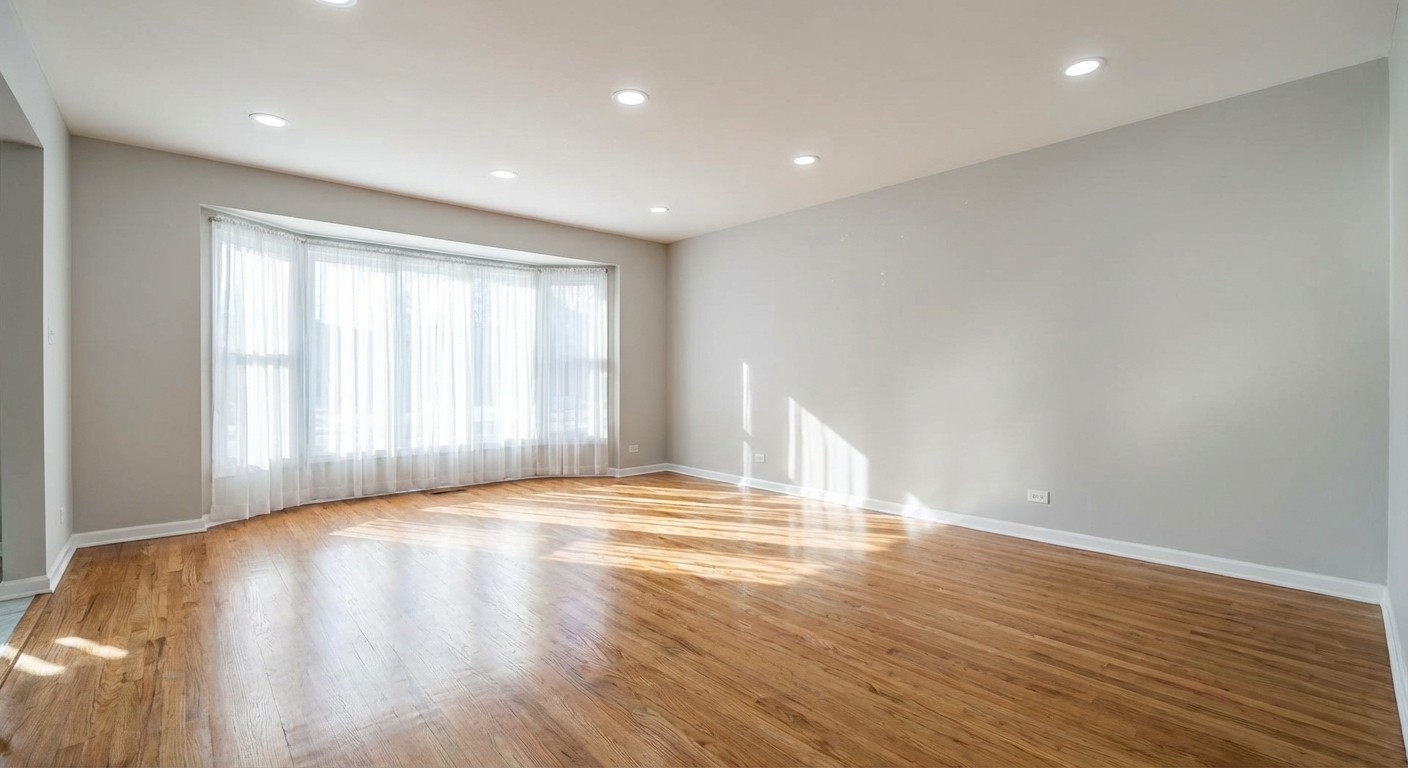
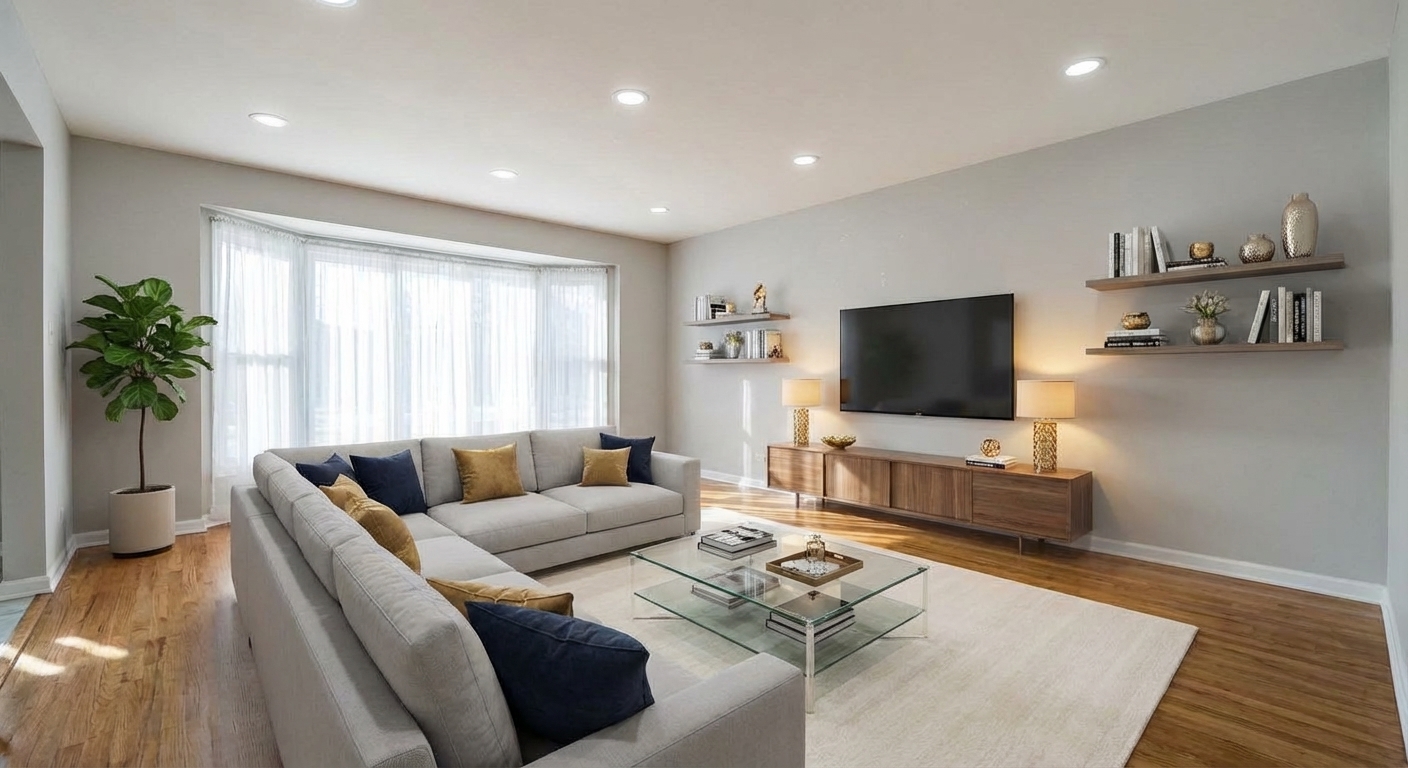
Demo-Beispiel: Das „Vorher“-Bild wurde für diese Website mit KI erstellt; es ist kein Kundenfoto.
Funktionen
AI-Toolkit für Innenarchitekten. Generieren Sie Konzeptvisualisierungen aus Kundenfotos, testen Sie mehrere Designrichtungen, bevor Sie sich für Renderings entscheiden, und schließen Sie mehr Verträge mit visuellen Präsentationen ab.
Wo AI in einen professionellen Innenarchitektur-Workflow passt
Generieren Sie 3–4 Designrichtungskonzepte aus einem einzigen Kundenraumfoto in unter 5 Minuten
Das Toolkit für freiberufliche und Studio-Designer
Schließen Sie mehr Designverträge ab, indem Sie Kunden zeigen, wie ihr Raum aussehen könnte, bevor sie unterschreiben
Mehr Kundenverträge mit visuellen Konzepten abschließen
Testen Sie Wandfarben und Bodenbelagsmaterialien auf Kundenfotos ohne physische Muster
Visualisierung vor Vertragsabschluss vs. Endgültige Lieferobjekte
Überspringen Sie den frühen CAD-Rendering-Zyklus — gehen Sie direkt vom Briefing zum visuellen Konzept
Wo traditionelles CAD und 3D immer noch überzeugen
Erstellen Sie Moodboards mit stilkonsistenten Raumvisualisierungen statt Stockbildern
Designer über die Auswirkungen auf ihr Geschäft
Laden Sie ein Foto hoch, wählen Sie die Optionen und laden Sie das bearbeitete Bild herunter, meist in unter einer Minute.
So funktioniert's
Professionelle Ergebnisse in drei einfachen Schritten
Fotos hier ablegen
oder Dateien durchsuchen
Fotos hochladen
Ziehen Sie Ihre Fotos per Drag & Drop hierher oder wählen Sie sie über die Dateisuche aus. Roomagen akzeptiert JPEG-, PNG- und WebP-Dateien mit bis zu 50 MB pro Datei.
Create a free account — 6 free credits covers 3 AI generations for initial testing.
KI-Verarbeitung
Unsere fortschrittliche KI analysiert Ihre Bilder und wendet automatisch professionelle Verbesserungen an. Wählen Sie zwischen virtuellem Staging, Bildverbesserung, Objektentfernung oder Tag-zu-Dämmerung-Umwandlung.
For freelance designers, the Starter plan ($12/mo, 60 credits) typically covers pre-contract visualisation volume. For studios, the Pro plan ($29/mo, 200 credits).
Ergebnisse herunterladen
Sehen Sie sich eine Vorschau Ihrer transformierten Bilder an und laden Sie hochauflösende Ergebnisse herunter, bereit für Inserate, Marketingmaterialien und soziale Medien. Keine Wasserzeichen bei Premium-Tarifen.
Initial client meeting workflow: client sends phone photo → you generate 3 concepts → present direction options → scope contract. Total time: 15–30 minutes vs 2–5 days of unpaid concept rendering.
Warum Roomagen wählen
Virtuelle Inszenierung für die Konzeptpräsentation
Generieren Sie 3–4 Designrichtungskonzepte aus einem einzigen Kundenraumfoto in unter 5 Minuten
Möblierte Räume neu gestalten für die Visualisierung bestehender Kundenräume
Schließen Sie mehr Designverträge ab, indem Sie Kunden zeigen, wie ihr Raum aussehen könnte, bevor sie unterschreiben
Skizze zum Grundriss für Konzept-zu-Layout
Testen Sie Wandfarben und Bodenbelagsmaterialien auf Kundenfotos ohne physische Muster
Wandfarbwechsel für Farbrichtungstests
Überspringen Sie den frühen CAD-Rendering-Zyklus — gehen Sie direkt vom Briefing zum visuellen Konzept
Bodenbelagserneuerung für Materialentscheidungen
Erstellen Sie Moodboards mit stilkonsistenten Raumvisualisierungen statt Stockbildern
Für wen ist es?
Freiberufliche Innenarchitekten
Zeigen Sie potenziellen Kunden im Erstgespräch, wie ihr Raum in 3 verschiedenen Stilrichtungen aussehen könnte. Schließen Sie Verträge schneller ab und reduzieren Sie den Zeitaufwand für unbezahlte Vorvertragsarbeiten.
Boutique-Designstudios
Integrieren Sie AI-Visualisierung in Ihren Kundenaufnahme-Workflow. Konsistente Konzeptpräsentation über alle Designer hinweg, schnellere Bearbeitung vom Briefing bis zur ersten Konzeptprüfung.
Designberater und Stylisten
Bieten Sie Stilrichtung, Wandfarbempfehlungen und Materialauswahl, untermauert durch visuelle Mockups auf den tatsächlichen Raumfotos des Kunden. Überzeugender als nur Farbmuster und Moodboards.
Häufige Anwendungsfälle
Initial Client Consultation Visualisation
During the first client meeting, have them send a phone photo of the room they want designed. Generate 3 style directions (modern, Scandinavian, traditional) on the spot using Redesign Furnished Rooms. Discuss which direction resonates. Scope the project from there.
Paint and Material Decision Support
Client is deciding between two paint colours. Apply Wall Color Change on their actual room photo showing each colour. Send both versions. Client picks based on visual evidence rather than swatches alone.
Concept-to-Layout Exploration
Client has a hand-sketched room layout. Use Sketch to Floor Plan to convert the sketch to a clean 2D plan, then use Floor Plan to 3D for a rough 3D concept. Use this for the initial design review before committing to detailed CAD work.
Pre-Contract Moodboard Assembly
Build visual moodboards using AI-generated room renderings in your target style, not stock photos. Clients see the proposed direction on their own space, not someone else's. Differentiates your presentation from competing designers using generic Pinterest boards.
Material and Flooring Exploration
Use Flooring Replacement to show the client's room with 3 different flooring options (light oak, dark walnut, polished concrete). Helps material selection decisions when sample boards are hard to visualise in context.
Traditionelles Konzept-Rendering erfordert 4–8 Stunden CAD-Zeit pro Variation bei $50–$100/Stunde — $200–$800 Arbeitskosten pro Konzept. Die meisten Designer absorbieren dies als unbezahlte Vorvertragsarbeit, was die Anzahl der Konzepte, die sie zeigen können, begrenzt. AI generiert Konzeptbilder von gleichwertiger Qualität in 60 Sekunden für unter $1 pro Variation, wodurch die Kostenbarriere für die Präsentation mehrerer Richtungen entfällt.
| Roomagen AI Konzept | Traditionelles SketchUp/Rendering | |
|---|---|---|
| Zeit vom Briefing bis zur ersten Visualisierung | Unter 5 Minuten | 4–8 Stunden |
| Kosten pro Konzept | $0.50–$1.00 | $200–$500 in labour |
| Stiliterationen pro Kunde | Unbegrenzt | Typischerweise 1–2 |
| Verwendet den tatsächlichen Raum des Kunden | Ja, vom Foto | Erfordert Modellierung nach Maßen |
| Qualität des Endergebnisses | Nur Überprüfung vor Vertragsabschluss | Präsentation und Konstruktion |
| Erforderliche Fähigkeiten | Minuten zum Erlernen | Monate CAD-Training |
| Optimaler Anwendungsfall | Vorvertrag, Moodboards, Farb-/Materialentscheidungen | Endpräsentation, Konstruktionsdokumente |
Technische Spezifikationen
- Supported input formats
- JPEG, PNG, WebP (client phone photos work well)
- Max file size
- 50 MB
- Processing time
- 30–60 seconds per concept
- Style variations
- 13 Voreinstellungen; weitere Stile über den Design-Companion-Chat
- Material options
- Walls, floors, countertops, cabinetry, furniture
- Credits per visualisation
- 2
- Best use case
- Pre-contract concepts, client decision support, moodboards
Preise
| Plan | Preis | Credits/Monat | Pro Bild | Auflösung |
|---|---|---|---|---|
| Free | $0 | 6 (one-time) | Kostenlos | 2K bei der ersten Bearbeitung, dann 1K |
| Starter | $12/Monat | 60 | $0.40 | 2K |
| Pro | $29/Monat | 200 | $0.29 | 2K oder 4K (4 Credits) |
| Business | $79/Monat | 700 | $0.23 | 2K oder 4K (4 Credits) |
Kosten pro Bild = 2 Credits. Jahrespläne senken die Kosten um ~17 %. Credit-Pakete: 60 Credits für $19, 180 für $45, 360 für $79.
Häufig Gestellte Fragen
Alles, was Sie über Roomagen wissen müssen
Nein, dafür ist es nicht konzipiert. AI-Visualisierung ist ein Konzepttool vor Vertragsabschluss – für Kundengespräche, Moodboards und Materialentscheidungen. Endgültige Baupläne erfordern CAD. AI ersetzt die 4–8 Stunden unbezahlter Konzept-Renderings in der Frühphase, nicht Ihre Detailarbeit.
Drei Stilrichtungen für den Raum eines Kunden im Erstgespräch zu zeigen, hilft ihm, auf seinen eigenen Raum zu reagieren. Der Kunde verbindet sich emotional mit dem transformierten eigenen Raum, statt ihn von generischen Inspirationsfotos vorzustellen.
Ein Handyfoto bei gutem Tageslicht, Kamera waagerecht gehalten, funktioniert gut. Ideal sind Fotos aus einer Ecke oder Tür (zeigt den größten Teil des Raumes), tagsüber mit sichtbaren Fenstern und mindestens 1200px Auflösung. Die meisten modernen Handys schaffen das problemlos.
Ja. Das Toolkit funktioniert am besten für Wohnräume, ist aber auch für kleine Gewerberäume (Restaurants, Cafés, Büros, Boutiquen) und Gastronomie (Hotelzimmer, Ferienwohnungen, Boutique-B&Bs) geeignet.
Wandfarbwechsel, Wandbehandlung, Bodenbelagserneuerung und Möbelfacelift funktionieren alle für renovierungsfokussiertes Design. Sie können Kunden zeigen, wie ihre Küche mit neuen Schränken und Böden oder ihr Wohnzimmer mit anderer Farbe aussähe, bevor sie sich zu physischen Änderungen verpflichten.
Die meisten Designer berechnen AI-Visualisierung nicht separat; sie ersetzt unbezahlte Vorvertragsarbeit, die immer in die Projektgebühr einfloss. Der ROI liegt im schnelleren Vertragsabschluss und weniger abgelehnten Konzepten nach teurer CAD-Arbeit.
AI für Einzelräume funktioniert am besten. Für Mehrraum- oder offene Bereiche, teilen Sie diese in einzelne Fotos pro Bereich auf und generieren Sie Konzepte pro Raum. Für Gesamtprojekte ist AI am besten für Schlüsselraumkonzepte; traditionelles CAD übernimmt die Gesamtkoordination.
Bitten Sie den Kunden, das Foto unter besseren Bedingungen (tagsüber, natürliches Licht, Kamera waagerecht, Eckwinkel) neu aufzunehmen. Falls das nicht möglich ist, nutzen Sie zuerst die Bildverbesserung, um die Quelle zu optimieren, und führen Sie dann Ihre Visualisierung durch. Schlechte Ausgangsfotos führen zu schlechten AI-Ergebnissen.
Bearbeiten Sie jeden Raum einzeln. Eine typische 3-Zimmer-Wohnberatung verbraucht 6–12 Credits (2 Credits pro Visualisierung × 3 Räume × 2–3 Stilvarianten). Das liegt gut innerhalb des Starter-Plan-Budgets.
Ja, im Design-Companion-Chat: Das Staging-Tool bietet 13 voreingestellte Stile und kein Freitextfeld, der Chat nimmt aber eine ausführliche Beschreibung einer Epoche oder kulturellen Referenz an. Genauere Beschreibungen liefern einheitlichere Ergebnisse.
Verwandte Tools entdecken
Entdecken Sie weitere KI-gestützte Tools für Ihre Projekte
AI Virtuelles Staging — Leere Räume in unter einer Minute einrichten
Leere Räume mit AI einrichten, meist in unter einer Minute. 13 Designstile, 15 Raumtypen, inseratsfertige Fotos für Immobilien, Vermietung und Hotellerie. 6 kostenlose Credits, keine Kreditkarte erforderlich.
Mehr erfahrenMöblierte Zimmer mit AI neu gestalten — 13 Stile, meist in unter einer Minute
Gestalten Sie bereits möblierte Zimmer mit AI neu. Ersetzen Sie veraltete Möbel durch moderne Stile, ohne ein einziges Stück zu bewegen. Perfekt zur Aktualisierung veralteter Räume in Wohnungen, Hotels und gewerblichen Innenräumen.
Mehr erfahrenMöbel & Objekte austauschen
Tauschen Sie bestimmte Möbel oder Objekte in Ihren Fotos aus. Ersetzen Sie eine veraltete Couch durch eine moderne oder tauschen Sie beliebige Gegenstände aus, während der Rest erhalten bleibt.
Mehr erfahrenVirtueller Bodenaustausch
Vorschau auf neue Bodenbeläge virtuell vor der Renovierung. Sehen Sie, wie Parkett, Fliesen, Teppich oder Vinyl in jedem Raum aussehen würden.
Mehr erfahrenSkizze zu Grundriss — AI-Digitalisierung von handgezeichneten Plänen
Wandeln Sie handgezeichnete Grundriss-Skizzen und Papierbaupläne mit AI in saubere digitale Grundrisse um. Laden Sie ein Foto einer beliebigen Skizze hoch — Serviettenzeichnung, kariertes Papierlayout oder alter Bauplan — und erhalten Sie meist in unter einer Minute einen professionellen digitalen Grundriss.
Mehr erfahrenGrundriss zu 3D — KI-Puppenhausansicht-Generator
Wandeln Sie 2D-Grundrisse mit AI in isometrische 3D-Puppenhausansichten um. Laden Sie einen beliebigen Grundriss hoch und erhalten Sie eine möblierte 3D-Visualisierung, die Raumaufteilung, Möbelplatzierung und räumliche Beziehungen zeigt – perfekt für Anzeigen, Präsentationen und Designvorschläge.
Mehr erfahren