Grundriss kolorieren – Schritt-für-Schritt-Anleitung mit AI
Um einen Grundriss mit Roomagen zu kolorieren, laden Sie den Schwarzweiß-Plan als Bild hoch, wählen eine von vier Designer-Paletten und laden das Ergebnis herunter — meist unter einer Minute pro Durchlauf.
Die meisten Online-Tutorials zum Kolorieren von Grundrissen setzen Photoshop-Kenntnisse voraus – Maskierung, Ebenenmodi, Farbfüllungen, Mischmodi – und führen durch 20–40 manuelle Schritte. Selbst nach dem Ansehen des Tutorials dauert das eigentliche Kolorieren 45–90 Minuten pro Plan. Der Roomagen-Workflow besteht aus drei Schritten: hochladen, Palette auswählen, herunterladen. Es ist kein Tutorial erforderlich, da es nichts zu lernen gibt – die AI trifft jede Kolorierungsentscheidung automatisch. Die Gesamtzeit, einschließlich der erstmaligen Einarbeitung, beträgt unter 2 Minuten pro Plan zu $0.23–$0.40.
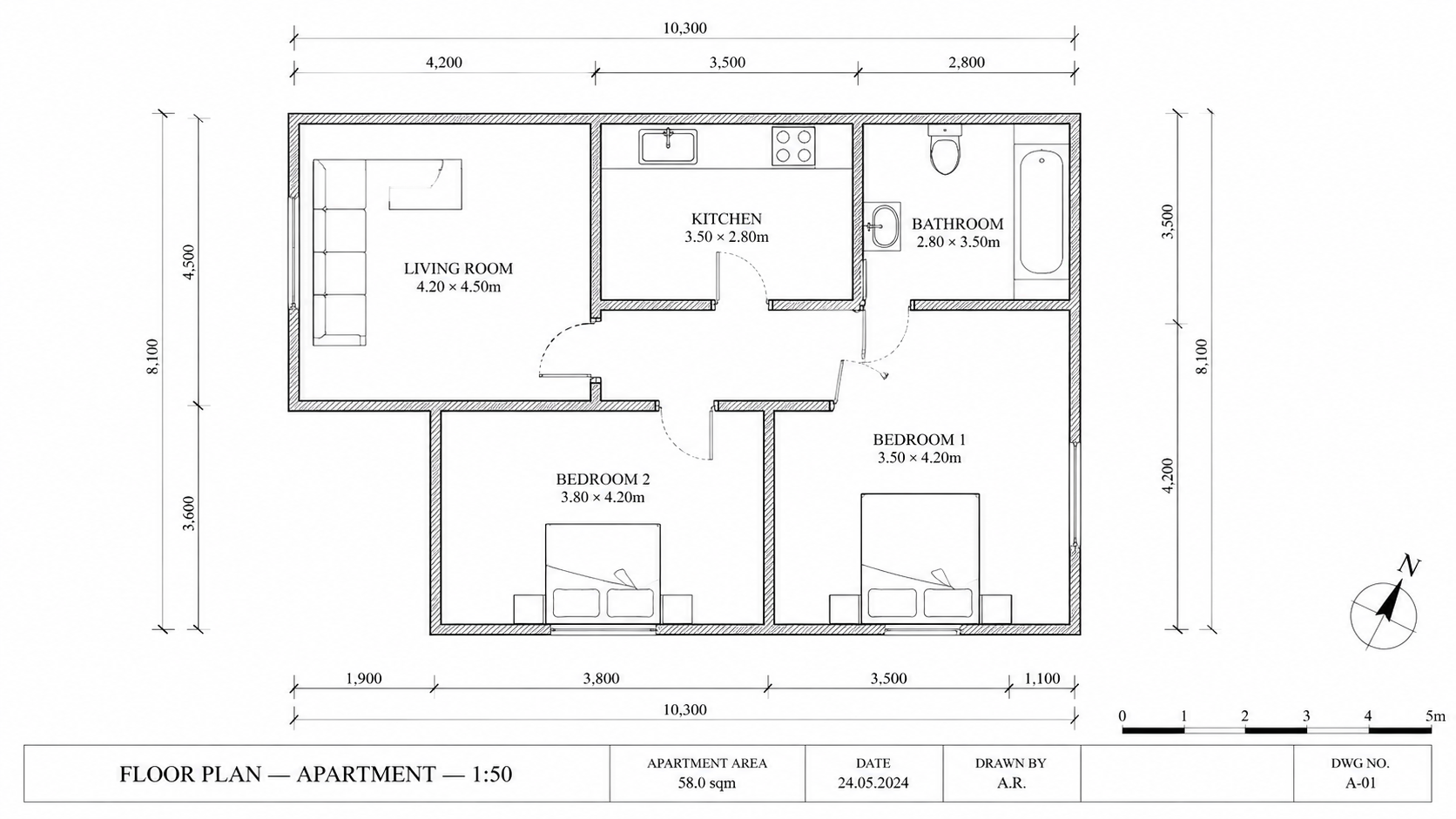
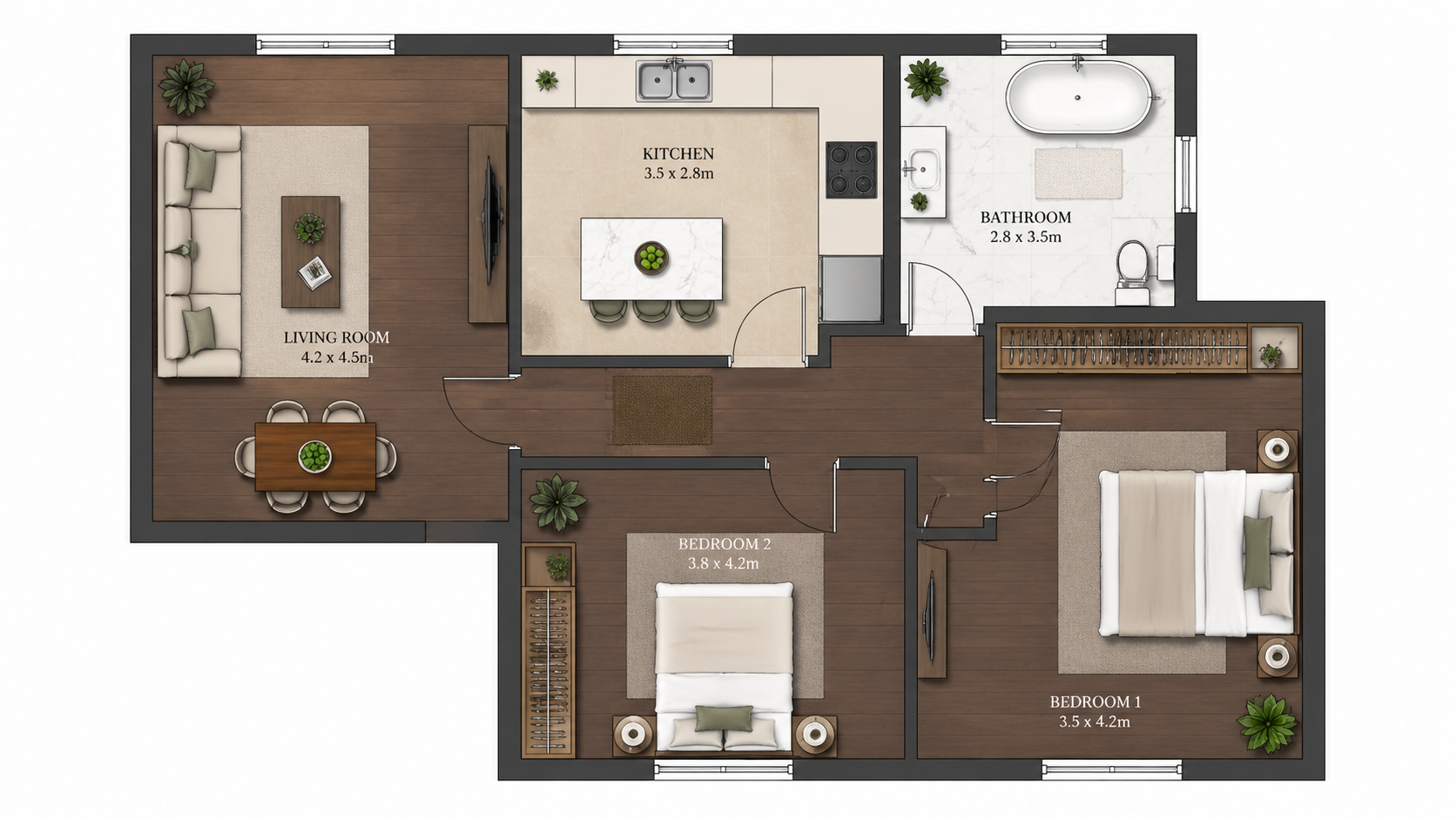
Demo-Beispiel: Das „Vorher“-Bild wurde für diese Website mit KI erstellt; es ist kein Kundenfoto.
Funktionen
Schritt-für-Schritt-Anleitung, um jeden Grundriss mit AI in drei Schritten zu kolorieren. Hochladen, eine der vier Paletten auswählen, den kolorierten Plan herunterladen – Gesamtzeit unter 2 Minuten, einschließlich des erstmaligen Erlernens des Workflows.
Wie kolorieren Sie einen Grundriss in drei Schritten?
Dreistufiger Workflow – Plan hochladen, eine der vier Paletten auswählen, den kolorierten Plan herunterladen – kein Photoshop-Training oder Designhintergrund erforderlich
Welche Plantypen können auf diese Weise koloriert werden?
Erstnutzer schließen eine Kolorierung in unter 2 Minuten ab, einschließlich des Erlernens der Benutzeroberfläche von Grund auf
Warum ist die AI-Methode schneller als Photoshop?
AI übernimmt Raumerkennung, Farbzuordnung und Palettenanwendung automatisch – keine manuelle Maskierung oder Auswahlarbeit erforderlich
So funktioniert's
Professionelle Ergebnisse in drei einfachen Schritten
Fotos hier ablegen
oder Dateien durchsuchen
Fotos hochladen
Ziehen Sie Ihre Fotos per Drag & Drop hierher oder wählen Sie sie über die Dateisuche aus. Roomagen akzeptiert JPEG-, PNG- und WebP-Dateien mit bis zu 50 MB pro Datei.
KI-Verarbeitung
Unsere fortschrittliche KI analysiert Ihre Bilder und wendet automatisch professionelle Verbesserungen an. Wählen Sie zwischen virtuellem Staging, Bildverbesserung, Objektentfernung oder Tag-zu-Dämmerung-Umwandlung.
Ergebnisse herunterladen
Sehen Sie sich eine Vorschau Ihrer transformierten Bilder an und laden Sie hochauflösende Ergebnisse herunter, bereit für Inserate, Marketingmaterialien und soziale Medien. Keine Wasserzeichen bei Premium-Tarifen.
Warum Roomagen wählen
Schritt 1 – Schwarz-Weiß-Plan hochladen
Dreistufiger Workflow – Plan hochladen, eine der vier Paletten auswählen, den kolorierten Plan herunterladen – kein Photoshop-Training oder Designhintergrund erforderlich
Schritt 2 – Eine Designer-Palette auswählen
Erstnutzer schließen eine Kolorierung in unter 2 Minuten ab, einschließlich des Erlernens der Benutzeroberfläche von Grund auf
Schritt 3 – Den kolorierten Plan herunterladen
AI übernimmt Raumerkennung, Farbzuordnung und Palettenanwendung automatisch – keine manuelle Maskierung oder Auswahlarbeit erforderlich
Für wen ist es?
Erstnutzer
Suchen nach „Grundriss kolorieren“ und sind von Photoshop-Tutorials überfordert – Roomagen reduziert den Workflow auf Hochladen, Auswählen, Herunterladen, ohne dass Designkenntnisse erforderlich sind.
Workflow-Trainer
Teammitgliedern das Kolorieren von Grundrissen ohne teures Photoshop-Training beibringen – Roomagen schult neue Benutzer in 5 Minuten ohne Software-Lernaufwand.
Tutorial-Befolger
Wünschen sich einen klaren Schritt-für-Schritt-Prozess für wiederholbare Ergebnisse – Roomagen bietet genau drei Schritte mit gleichbleibender Qualität für jeden Plan.
Photoshop-Tutorials erfordern das Erlernen von Maskierung, Ebenenmischung und Farbtheorie – typischerweise 4–10 Stunden Training, bevor akzeptable Ergebnisse erzielt werden. Die Kolorierung pro Plan dauert nach dem Training immer noch 45–90 Minuten. Roomagen erfordert keine Schulung; die erste Kolorierung dauert unter 2 Minuten für $0.23–$0.40.
| Roomagen AI | Photoshop Tutorial | Designer-Outsourcing | |
|---|---|---|---|
| Erforderliche Schritte | 3 (hochladen, Palette, herunterladen) | 20–40 manuelle Schritte | Briefing + warten + Überprüfung |
| Zeit erster Plan | 2 Minuten inkl. Einarbeitung | 4–10 Stunden Training + 45–90 Min. | 1–3 Tage Bearbeitungszeit |
| Zeit nachfolgende Pläne | Unter 2 Minuten | 45–90 Minuten manuell | Je 1–3 Tage |
| Erforderliche Fähigkeiten | Keine | Photoshop-Expertise | Keine – ausgelagert |
| Kosten pro Plan | $0.23–$0.40 | $240/Jahr + Designzeit | $40–$200 Designergebühr |
Häufig Gestellte Fragen
Alles, was Sie über Roomagen wissen müssen
Melden Sie sich bei Roomagen an, öffnen Sie Grundriss → Farbig und laden Sie den Schwarzweiß-Plan als JPEG-, PNG- oder WebP-Bild bis 50 MB hoch — Foto, Scan oder Bildexport. PDF- und HEIC-Dateien konvertieren Sie zuerst in JPEG oder PNG.
Wählen Sie eine von vier: Real Estate Pastel (Standard), Studio Aquarell, Asian Compact oder Nordic Mono. Jeder Durchlauf erzeugt eine Palette; wählen Sie also nach Zielgruppe — für Inserate ist Real Estate Pastel die übliche Wahl — und starten Sie für 2 Credits eine weitere, wenn Sie vergleichen möchten.
Nein. Die AI erkennt Räume, Wände und Beschriftungen automatisch. Es ist keine Vorverarbeitung, Maskierung oder Annotation erforderlich. Laden Sie den Plan einfach so hoch, wie er ist.
Das Hochladen dauert wenige Sekunden, die AI-Verarbeitung in der Regel unter einer Minute; sobald das Ergebnis fertig ist, können Sie es herunterladen. Vom Start bis zu einem kolorierten Plan auf Ihrem Computer vergehen meist weniger als 2 Minuten. Jede weitere Palette ist ein neuer Durchlauf für 2 Credits.
Konvertieren Sie die Skizze zuerst mit Roomagen Skizze zu Grundriss und kolorieren Sie dann die digitale Ausgabe. Von der Serviettenskizze bis zum kolorierten Plan in insgesamt unter 4 Minuten.
Verarbeiten Sie den Plan erneut — mit derselben oder einer anderen Palette — für 2 Credits; jeder Durchlauf erzeugt eine Palette. Die KI vergibt die Farben anhand dessen, was sie im Plan liest, daher kann ein Raum gelegentlich eine unerwartete Farbe bekommen; behalten Sie die passendste Version.
Ja. Jede Kolorierung kostet 2 Credits ($0.23–$0.40). Laden Sie denselben Plan mit einer anderen Palettenpräferenz erneut hoch, um zusätzliche Variationen zu erhalten.
Laden Sie das kolorierte Bild herunter und versenden Sie es per E-Mail oder über Ihr Kundenportal. Das Ergebnis ist eine JPEG-Datei, die jedes E-Mail-Programm und CRM annimmt.
Der Workflow besteht wirklich aus drei Schritten – hochladen, auswählen, herunterladen. Ein Video wäre 30 Sekunden lang. Lesen Sie diesen FAQ-Bereich, und Sie haben alles Nötige.
Die erste Kolorierung ist mit kostenlosen Startguthaben enthalten. Danach kostet jede Kolorierung 2 Credits ($0.23–$0.40). Der Starter-Plan ($12/Monat, 60 Credits) unterstützt 30 Kolorierungen.
Teil von
Grundriss kolorierenWeitere Tools aus dieser Familie
- Online Grundriss-Kolorierer
- Kostenloses Grundriss-Kolorierungstool
- Grundrisse von Häusern kolorieren
- Grundrisse von Wohnungen kolorieren
- Bürogrundrisse kolorieren
- Restaurant-Grundrisse kolorieren
- Hotelgrundrisse einfärben
- Grundrisse für den Einzelhandel einfärben
- Färben Sie Klinikgrundrisse
- Lagerhallen-Grundrisse einfärben – Lagerzonen, Gänge und Verladung
- Grundriss einfärben für Immobilienmakler
- Grundrisskolorierung für Architekten
Verwandte Tools entdecken
Entdecken Sie weitere KI-gestützte Tools für Ihre Projekte
Grundriss kolorieren — AI-Farbe für Schwarz-Weiß-Pläne in unter einer Minute
Kolorieren Sie Schwarz-Weiß-Grundrisse mit AI. Vier Designer-Paletten, automatisch erkannte Räume, Ausgabe in unter 90 Sekunden fertig für Immobilien, Architektur und Innenarchitektur – keine Photoshop- oder Designkenntnisse erforderlich.
Mehr erfahrenOnline Grundriss-Kolorierer — Browserbasiertes AI, keine Installation erforderlich
Kolorieren Sie Grundrisse online in Ihrem Browser mit AI. Keine Installation, kein Photoshop, kein Adobe-Abonnement — laden Sie einen Schwarz-Weiß-Plan hoch, erhalten Sie einen kolorierten Plan in einer von vier Paletten in unter 90 Sekunden auf jedem Gerät.
Mehr erfahrenKostenloses Grundriss-Kolorierungstool — Probieren Sie AI Colorize mit Startguthaben aus
Kolorieren Sie Grundrisse per AI mit 6 kostenlosen Credits — genug für 3 Pläne, jeweils in einer von vier Paletten. Danach 0,23 $–0,40 $ pro Plan in den Monatsplänen, keine versteckten Gebühren. Kostenlose Ergebnisse tragen ein Wasserzeichen.
Mehr erfahrenProfessionelle 2D- & 3D-Grundrisse — KI-generiert in unter einer Minute
Machen Sie aus einer Skizze, einem Scan oder einem alten Plan einen sauberen 2D-Grundriss oder eine 3D-Ansicht. Maße und Raumnamen behalten oder entfernen, einen von vier Zeichenstilen wählen.
Mehr erfahrenGrundriss visualisieren — AI 3D-Renderings aus 2D-Plänen in unter einer Minute
Visualisieren Sie 2D-Grundrisse als 3D-Renderings mit AI. Fotorealistische, architektonische Skizzen-, stilisierte und monochrome Stile, möbliert oder unmöbliert, Ausgabe in unter 90 Sekunden für 0,23–0,40 $ pro Rendering – kein 3ds Max, Lumion oder Twinmotion erforderlich.
Mehr erfahren