Online Grundriss-Kolorierer — Browserbasiertes AI, keine Installation erforderlich
Roomagen Online Grundriss-Kolorierer läuft vollständig im Browser — laden Sie einen Grundriss hoch, AI koloriert ihn in unter 90 Sekunden in einer von vier Paletten, keine Softwareinstallation oder Adobe Creative Cloud-Abonnement erforderlich.
Die Kolorierung von Grundrissen erfordert traditionell Adobe Photoshop (240 $/Jahr), AutoCAD (1.865 $/Jahr) oder spezielle CAD-Plug-ins — keines davon besitzen die meisten Makler, Immobilienmakler oder Hausbesitzer. Selbst erfahrene Photoshop-Benutzer verbringen 45–90 Minuten pro Plan. Roomagen läuft in jedem modernen Browser auf jedem Gerät — Mac, Windows, iPad, Android — ohne Installation. Laden Sie einen fotografierten Grundriss hoch, erhalten Sie einen kolorierten Plan in einer von vier Paletten in unter 90 Sekunden für 0,23–0,40 $ pro Kolorierung. Gleiches Ergebnis, null Softwarekosten, null Lernkurve.
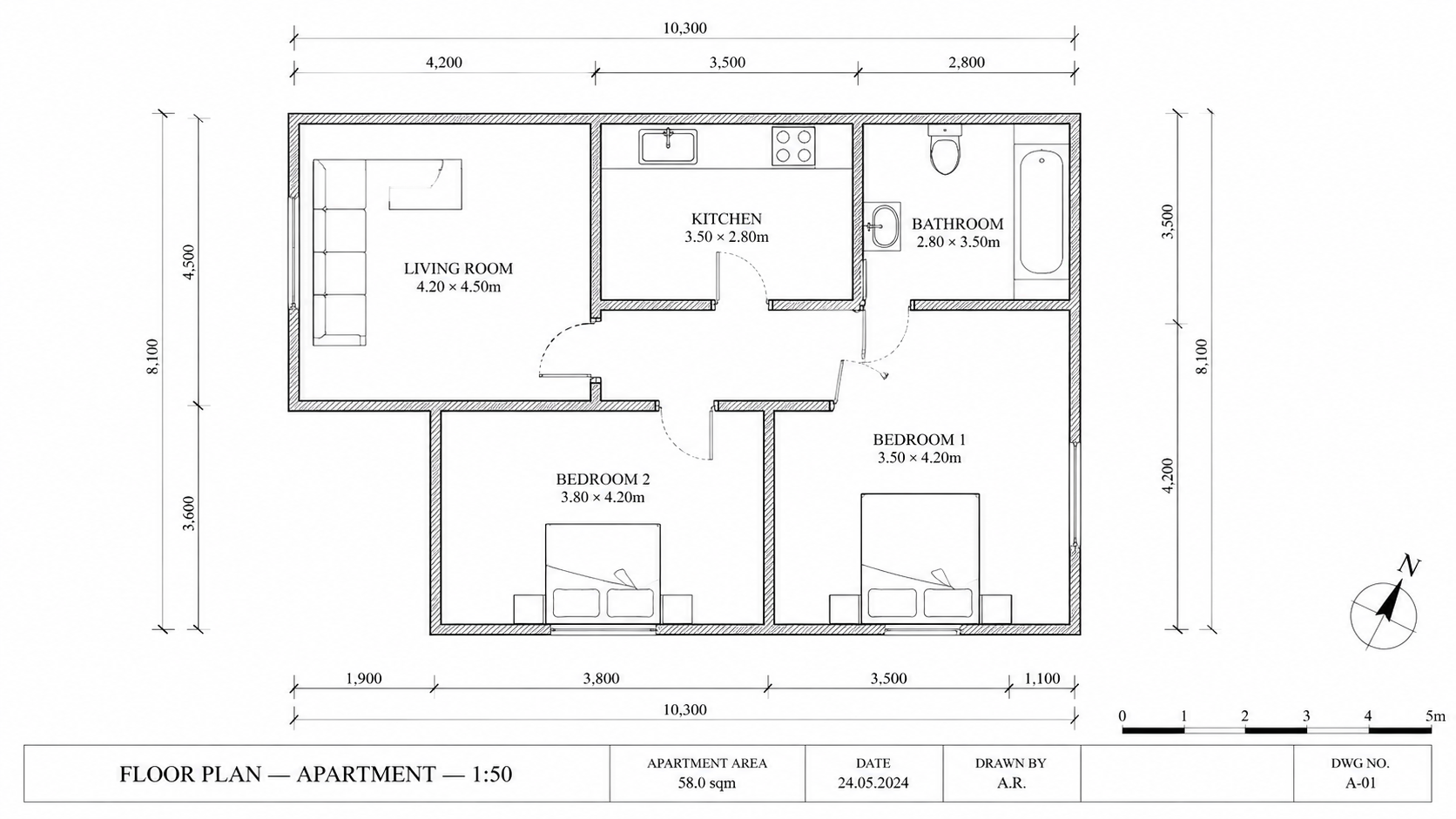
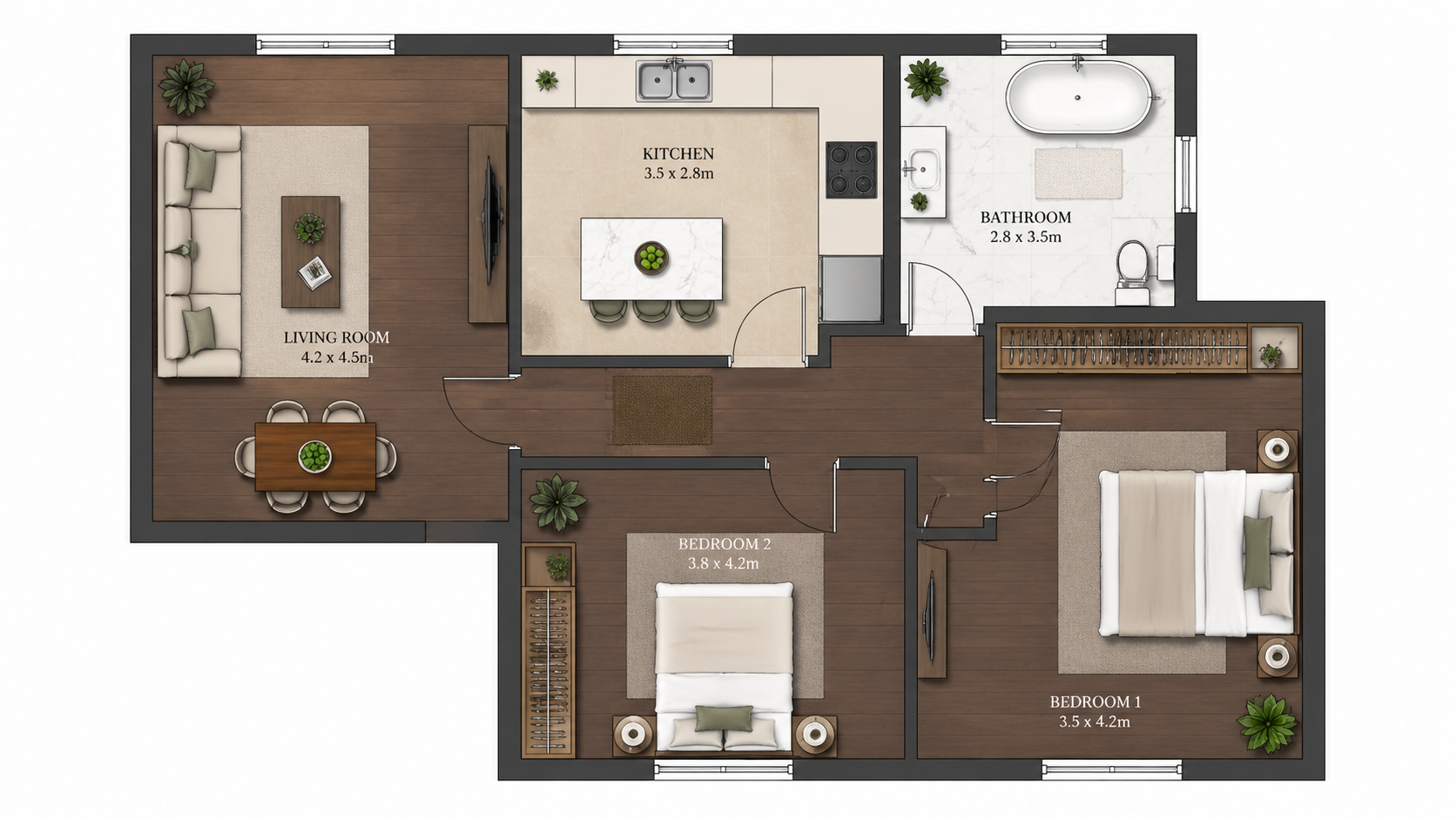
Demo-Beispiel: Das „Vorher“-Bild wurde für diese Website mit KI erstellt; es ist kein Kundenfoto.
Funktionen
Kolorieren Sie Grundrisse online in Ihrem Browser mit AI. Keine Installation, kein Photoshop, kein Adobe-Abonnement — laden Sie einen Schwarz-Weiß-Plan hoch, erhalten Sie einen kolorierten Plan in einer von vier Paletten in unter 90 Sekunden auf jedem Gerät.
Wie funktioniert ein Online-Grundriss-Kolorierer?
Vollständig browserbasierte Grundriss-Kolorierung ohne Softwareinstallation — funktioniert auf jedem modernen Gerät oder Betriebssystem
Welche Browser und Geräte unterstützen das Tool?
iPad- und mobilkompatibel — gleicher Funktionsumfang und gleiche Ausgabequalität wie auf dem Desktop, nützlich für Arbeitsabläufe von Maklern vor Ort
Warum Online-Kolorierung gegenüber Desktop-Software wählen?
Kein Adobe Creative Cloud, kein AutoCAD-Abo — Sie zahlen nur pro Kolorierung, $0.23–$0.40, eine von vier Paletten pro Durchlauf
So funktioniert's
Professionelle Ergebnisse in drei einfachen Schritten
Fotos hier ablegen
oder Dateien durchsuchen
Fotos hochladen
Ziehen Sie Ihre Fotos per Drag & Drop hierher oder wählen Sie sie über die Dateisuche aus. Roomagen akzeptiert JPEG-, PNG- und WebP-Dateien mit bis zu 50 MB pro Datei.
KI-Verarbeitung
Unsere fortschrittliche KI analysiert Ihre Bilder und wendet automatisch professionelle Verbesserungen an. Wählen Sie zwischen virtuellem Staging, Bildverbesserung, Objektentfernung oder Tag-zu-Dämmerung-Umwandlung.
Ergebnisse herunterladen
Sehen Sie sich eine Vorschau Ihrer transformierten Bilder an und laden Sie hochauflösende Ergebnisse herunter, bereit für Inserate, Marketingmaterialien und soziale Medien. Keine Wasserzeichen bei Premium-Tarifen.
Warum Roomagen wählen
Hochladen, Verarbeiten, Herunterladen — vollständig im Browser
Vollständig browserbasierte Grundriss-Kolorierung ohne Softwareinstallation — funktioniert auf jedem modernen Gerät oder Betriebssystem
Kompatibel mit Mac, Windows, iPad und Android
iPad- und mobilkompatibel — gleicher Funktionsumfang und gleiche Ausgabequalität wie auf dem Desktop, nützlich für Arbeitsabläufe von Maklern vor Ort
Kein Photoshop, kein CAD, keine Software-Abonnements
Kein Adobe Creative Cloud, kein AutoCAD-Abo — Sie zahlen nur pro Kolorierung, $0.23–$0.40, eine von vier Paletten pro Durchlauf
Für wen ist es?
iPad-zentrierte Makler
Kolorieren Sie Grundrisse bei Immobilienbesichtigungen oder auf Reisen — kein Laptop erforderlich, läuft in mobile Safari oder Chrome mit der gleichen Ausgabequalität wie auf dem Desktop.
Gelegenheitsnutzer
Einmalige Projekte rechtfertigen keine Photoshop-Lizenz für 240 $/Jahr. Öffnen Sie den Browser, laden Sie einen Plan hoch, laden Sie die kolorierte Version herunter, zahlen Sie nur 0,29 $ pro Plan.
Plattformübergreifende Teams
Gemischte Mac-/Windows-/Linux-Teams arbeiten im selben Online-Tool ohne Kompatibilitätsprobleme. Die Ausgabe ist konsistent, unabhängig davon, welches Gerät sie erstellt hat.
Adobe Photoshop kostet 240 $/Jahr plus einen manuellen Kolorierungs-Workflow von 45–90 Minuten. Desktop CAD-Plug-ins kosten 50–200 $/Jahr und erfordern eine professionelle Schulung. Roomagen ist browserbasiert, erfordert keine Installation und erstellt einen kolorierten Plan in einer von vier Paletten für 0,23–0,40 $ in unter 90 Sekunden.
| Roomagen Online | Photoshop Desktop | AutoCAD Plug-ins | |
|---|---|---|---|
| Kosten pro Plan | $0.23–$0.40 | $240/Jahr Adobe + 45–90 Min. | $1,865/Jahr AutoCAD + Plug-in $50–$200/Jahr |
| Installation erforderlich | Nein — nur Browser | Ja — Adobe Creative Cloud | Ja — AutoCAD Desktop |
| Mobil / iPad | Ja — voller Funktionsumfang | iPad eingeschränkte Funktionen | Keine mobile Unterstützung |
| Plattformübergreifend | Mac, Windows, Linux, iOS, Android | Nur Mac und Windows | Primär Windows |
| Lernkurve | Hochladen und Herunterladen | Photoshop-Expertise | Professionelle CAD-Schulung |
Häufig Gestellte Fragen
Alles, was Sie über Roomagen wissen müssen
Ja. Roomagen läuft in mobile Safari und Chrome auf iPad, iPhone und Android. Laden Sie von Ihrer Kamerarolle oder Dateien hoch, die Ausgabe wird auf das Gerät heruntergeladen. Der volle Funktionsumfang ist auf Mobilgeräten verfügbar.
Ja. Ein kostenloses Konto bietet Ihnen Startguthaben, um das Tool vor der Bezahlung zu testen. Ein Konto ist erforderlich, um kolorierte Pläne über mehrere Sitzungen hinweg zu speichern und herunterzuladen.
Ja. Hochgeladene Pläne und Ergebnisse werden in Ihrer Bibliothek gespeichert, und jedes Bild wird zur Verarbeitung an unseren KI-Anbieter Google gesendet. Ergebnisse bleiben für die Aufbewahrungsdauer Ihres Plans erhalten (3 Tage bei Free, 30 bei Starter, 180 bei Pro, ohne zeitliche Begrenzung bei Business); Details finden Sie in der Datenschutzrichtlinie.
Der Upload dauert je nach Dateigröße 2–10 Sekunden. Die AI-Verarbeitung dauert 60–90 Sekunden. Der Download ist sofort. Ende-zu-Ende unter 90 Sekunden, selbst bei langsamen Verbindungen.
JPEG-, PNG- und WebP-Bilder bis 50 MB — Fotos, Scans oder Bildexporte des Plans. PDF- und HEIC-Dateien werden nicht angenommen; exportieren oder konvertieren Sie sie zuerst in JPEG oder PNG.
Nein. Die AI läuft auf Roomagen Cloud-GPUs — eine Internetverbindung ist für die Verarbeitung erforderlich. Uploads und Downloads benötigen eine stabile Verbindung.
Das ist genau der Punkt. Keine Adobe Creative Cloud, kein AutoCAD, keine speziellen CAD-Plug-ins. Nur ein Browser und ein Grundrissbild. Die AI übernimmt die gesamte Kolorierung.
Schneller. Die manuelle Photoshop-Kolorierung auf dem Desktop dauert 45–90 Minuten. Das Roomagen Browser-Tool liefert einen kolorierten Plan in unter 90 Sekunden — Desktop-AI-Tools haben ähnliche Geschwindigkeit, erfordern aber eine Installation.
Roomagen hat keine Team-Plätze, keinen gemeinsamen Credit-Pool und keine gemeinsame Projektbibliothek — ein Konto hat einen einzigen Login. Der Business-Plan ($79/Monat) gibt einem Konto 700 Credits pro Monat und speichert bis zu 2.000 Ergebnisse ohne Zeitlimit.
Online: 0,23–0,40 $ pro Kolorierung, keine Vorabkosten für Software. Desktop-Alternative: 240 $/Jahr Photoshop + 45–90 Min. pro Plan. Das Browser-Tool spart Zeit und Geld bei jedem Volumen.
Teil von
Grundriss kolorierenWeitere Tools aus dieser Familie
- Grundriss kolorieren – Schritt-für-Schritt-Anleitung mit AI
- Kostenloses Grundriss-Kolorierungstool
- Grundrisse von Häusern kolorieren
- Grundrisse von Wohnungen kolorieren
- Bürogrundrisse kolorieren
- Restaurant-Grundrisse kolorieren
- Hotelgrundrisse einfärben
- Grundrisse für den Einzelhandel einfärben
- Färben Sie Klinikgrundrisse
- Lagerhallen-Grundrisse einfärben – Lagerzonen, Gänge und Verladung
- Grundriss einfärben für Immobilienmakler
- Grundrisskolorierung für Architekten
Verwandte Tools entdecken
Entdecken Sie weitere KI-gestützte Tools für Ihre Projekte
Grundriss kolorieren — AI-Farbe für Schwarz-Weiß-Pläne in unter einer Minute
Kolorieren Sie Schwarz-Weiß-Grundrisse mit AI. Vier Designer-Paletten, automatisch erkannte Räume, Ausgabe in unter 90 Sekunden fertig für Immobilien, Architektur und Innenarchitektur – keine Photoshop- oder Designkenntnisse erforderlich.
Mehr erfahrenProfessionelle 2D- & 3D-Grundrisse — KI-generiert in unter einer Minute
Machen Sie aus einer Skizze, einem Scan oder einem alten Plan einen sauberen 2D-Grundriss oder eine 3D-Ansicht. Maße und Raumnamen behalten oder entfernen, einen von vier Zeichenstilen wählen.
Mehr erfahrenKostenloses Grundriss-Kolorierungstool — Probieren Sie AI Colorize mit Startguthaben aus
Kolorieren Sie Grundrisse per AI mit 6 kostenlosen Credits — genug für 3 Pläne, jeweils in einer von vier Paletten. Danach 0,23 $–0,40 $ pro Plan in den Monatsplänen, keine versteckten Gebühren. Kostenlose Ergebnisse tragen ein Wasserzeichen.
Mehr erfahrenGrundriss kolorieren – Schritt-für-Schritt-Anleitung mit AI
Schritt-für-Schritt-Anleitung, um jeden Grundriss mit AI in drei Schritten zu kolorieren. Hochladen, eine der vier Paletten auswählen, den kolorierten Plan herunterladen – Gesamtzeit unter 2 Minuten, einschließlich des erstmaligen Erlernens des Workflows.
Mehr erfahrenGrundriss visualisieren — AI 3D-Renderings aus 2D-Plänen in unter einer Minute
Visualisieren Sie 2D-Grundrisse als 3D-Renderings mit AI. Fotorealistische, architektonische Skizzen-, stilisierte und monochrome Stile, möbliert oder unmöbliert, Ausgabe in unter 90 Sekunden für 0,23–0,40 $ pro Rendering – kein 3ds Max, Lumion oder Twinmotion erforderlich.
Mehr erfahren