Comment coloriser un plan d'étage — Guide étape par étape avec l'AI
Pour colorer un plan avec Roomagen, importez le plan noir et blanc en image, choisissez l'une des quatre palettes de designer et téléchargez le résultat — généralement moins d'une minute par traitement.
La plupart des tutoriels de colorisation de plans d'étage en ligne supposent une connaissance de Photoshop — masquage, modes de calque, remplissages de couleur, modes de fusion — et décrivent 20 à 40 étapes manuelles. Même après avoir regardé le tutoriel, la colorisation réelle prend 45 à 90 minutes par plan. Le flux de travail Roomagen comporte trois étapes : télécharger, choisir une palette, télécharger. Aucun tutoriel n'est nécessaire car il n'y a rien à apprendre — l'AI gère automatiquement chaque décision de colorisation. Le temps total, y compris la courbe d'apprentissage initiale, est inférieur à 2 minutes par plan pour 0,23 $–0,40 $.
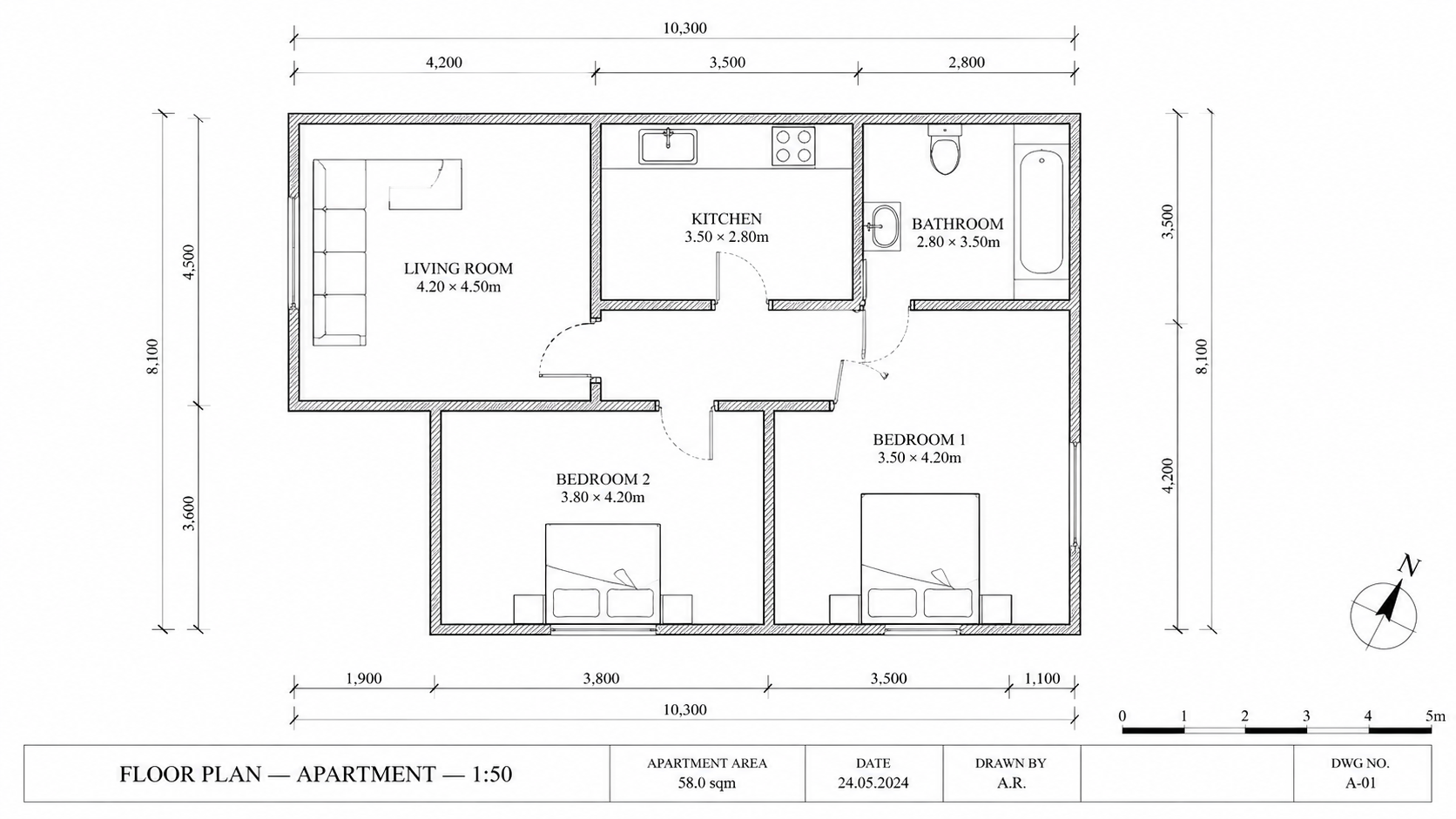
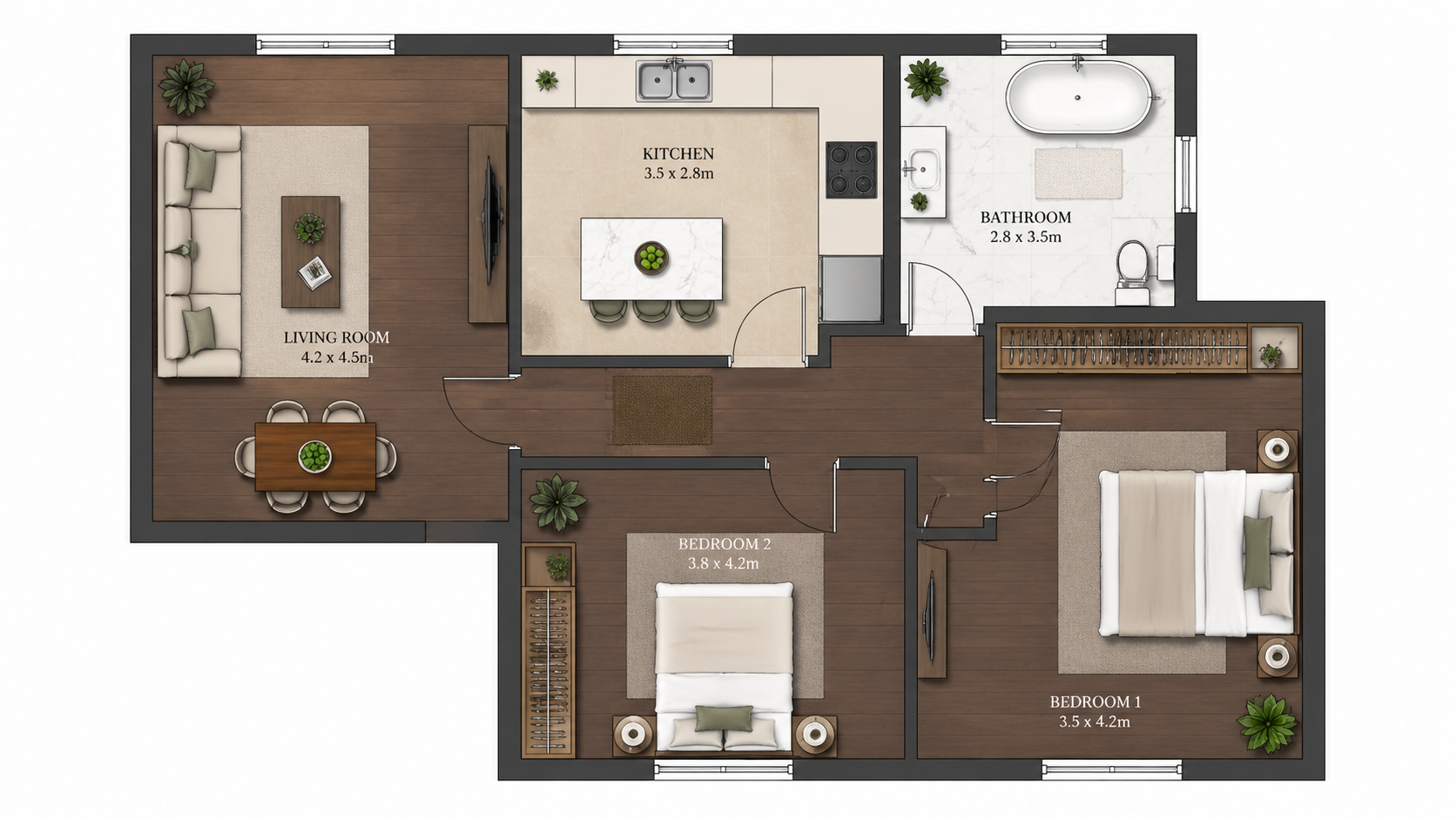
Exemple de démonstration : l'image « Avant » a été générée par IA pour ce site ; ce n'est pas une photo de client.
Fonctionnalités
Guide étape par étape pour coloriser n'importe quel plan d'étage avec l'AI en trois étapes. Importez le plan, choisissez l'une des quatre palettes, téléchargez le plan colorisé — temps total inférieur à 2 minutes, y compris l'apprentissage du flux de travail pour la première fois.
Comment coloriser un plan d'étage en trois étapes ?
Flux de travail en trois étapes — importez le plan, choisissez l'une des quatre palettes, téléchargez le plan colorisé — aucune formation Photoshop ou expérience en design requise
Quels types de plans peuvent être colorisés de cette manière ?
Les premiers utilisateurs réalisent une colorisation en moins de 2 minutes, y compris l'apprentissage de l'interface à partir de zéro
Pourquoi la méthode AI est-elle plus rapide que Photoshop ?
L'AI gère la détection des pièces, le mappage des couleurs et l'application des palettes automatiquement — aucun masquage ou travail de sélection manuel
Comment ça marche
Obtenez des résultats professionnels en trois étapes simples
Déposez vos photos ici
ou parcourir les fichiers
Importez vos photos
Glissez-déposez vos photos ou parcourez vos fichiers pour les importer. Roomagen accepte les fichiers JPEG, PNG et WebP jusqu'à 50 Mo chacun.
Traitement par IA
Notre IA avancée analyse vos images et applique automatiquement des améliorations professionnelles. Choisissez entre le home staging virtuel, l'amélioration, la suppression d'objets ou la conversion jour vers crépuscule.
Téléchargez les résultats
Prévisualisez vos images transformées et téléchargez des résultats haute résolution prêts pour les annonces, les supports marketing et les réseaux sociaux. Sans filigrane sur les forfaits premium.
Pourquoi choisir Roomagen
Étape 1 — Téléchargez le plan en noir et blanc
Flux de travail en trois étapes — importez le plan, choisissez l'une des quatre palettes, téléchargez le plan colorisé — aucune formation Photoshop ou expérience en design requise
Étape 2 — Sélectionnez une palette de designer
Les premiers utilisateurs réalisent une colorisation en moins de 2 minutes, y compris l'apprentissage de l'interface à partir de zéro
Étape 3 — Téléchargez le plan colorisé
L'AI gère la détection des pièces, le mappage des couleurs et l'application des palettes automatiquement — aucun masquage ou travail de sélection manuel
Pour qui est-ce ?
Premiers utilisateurs
Recherchant « comment coloriser un plan d'étage » et submergés par les tutoriels Photoshop — Roomagen réduit le flux de travail à télécharger, sélectionner, télécharger sans aucune connaissance en design requise.
Formateurs de flux de travail
Enseigner la colorisation de plans d'étage aux membres de l'équipe sans formation Photoshop coûteuse — Roomagen intègre les nouveaux utilisateurs en 5 minutes sans apprentissage de logiciel.
Suiveurs de tutoriels
Souhaitant un processus clair étape par étape pour des résultats reproductibles — Roomagen propose exactement trois étapes avec une qualité constante pour chaque plan.
Les tutoriels Photoshop nécessitent l'apprentissage du masquage, du mélange de calques et de la théorie des couleurs — généralement 4 à 10 heures de formation avant de produire des résultats acceptables. La colorisation par plan prend toujours 45 à 90 minutes après la formation. Roomagen ne nécessite aucune formation ; la première colorisation prend moins de 2 minutes pour 0,23 $–0,40 $.
| Roomagen AI | Tutoriel Photoshop | Externalisation à un designer | |
|---|---|---|---|
| Étapes requises | 3 (télécharger, palette, télécharger) | 20–40 étapes manuelles | Brief + attente + révision |
| Temps premier plan | 2 minutes, apprentissage inclus | 4–10 heures de formation + 45–90 min | Délai de 1 à 3 jours |
| Temps plans suivants | Moins de 2 minutes | 45–90 minutes manuelles | 1–3 jours chacun |
| Compétence requise | Aucune | Expertise Photoshop | Aucune — externalisée |
| Coût par plan | $0.23–$0.40 | 240 $/an + temps de conception | Frais de designer de 40 $–200 $ |
Questions Fréquemment Posées
Tout ce que vous devez savoir sur Roomagen
Connectez-vous à Roomagen, ouvrez Plan → Couleur et importez le plan noir et blanc en image JPEG, PNG ou WebP de 50 Mo maximum — photo, scan ou export image. Convertissez d'abord les fichiers PDF et HEIC en JPEG ou PNG.
Choisissez l'une des quatre : Real Estate Pastel (par défaut), Studio Aquarelle, Asian Compact ou Nordic Mono. Chaque traitement produit une seule palette : choisissez selon votre public — Real Estate Pastel est le choix habituel pour les annonces — et lancez-en une autre pour 2 crédits si vous voulez comparer.
Non. L'AI détecte automatiquement les pièces, les murs et les étiquettes. Aucun pré-traitement, masquage ou annotation n'est nécessaire. Il suffit de télécharger le plan tel quel.
L'import prend quelques secondes et le traitement AI généralement moins d'une minute ; vous pouvez télécharger le résultat dès qu'il est prêt. Entre le début et un plan colorisé sur votre ordinateur, comptez généralement moins de 2 minutes. Chaque palette supplémentaire est un nouveau traitement à 2 crédits.
Convertissez d'abord le croquis à l'aide de Roomagen Sketch to Floor Plan, puis colorisez le résultat numérique. De l'esquisse sur serviette au plan colorisé en moins de 4 minutes au total.
Relancez le plan — avec la même palette ou une autre — pour 2 crédits ; chaque traitement produit une seule palette. L'IA attribue les couleurs d'après ce qu'elle lit sur le plan, une pièce peut donc parfois recevoir une couleur inattendue ; gardez la version qui convient le mieux.
Oui. Chaque colorisation coûte 2 crédits (0,23 $–0,40 $). Téléchargez à nouveau le même plan avec une préférence de palette différente pour des variations supplémentaires.
Téléchargez l'image colorée et envoyez-la par e-mail ou via votre portail client. Le résultat est un fichier JPEG, accepté par tous les clients de messagerie et CRM.
Le flux de travail est véritablement en trois étapes — télécharger, sélectionner, télécharger. Une vidéo durerait 30 secondes. Lisez cette section FAQ et vous aurez tout ce dont vous avez besoin.
La première colorisation est incluse avec des crédits de démarrage gratuits. Ensuite, chaque colorisation coûte 2 crédits (0,23 $–0,40 $). Le plan Starter (12 $/mois, 60 crédits) prend en charge 30 colorisations.
Fait partie de
Colorisation de plans d'étagePlus d'outils de cette famille
- Coloriseur de plan d'étage en ligne
- Outil de coloration de plans d'étage gratuit
- Coloriser les plans d'étage de maison
- Coloriser les plans d'appartements
- Coloriser les plans d'étage de bureaux
- Coloriser les plans de restaurant
- Coloriser les plans d'étage d'hôtel
- Coloriser les plans d'étage de magasins
- Coloriser les plans d'étage de cliniques
- Coloriser les plans d'entrepôt
- Colorisation de plans d'étage pour agents immobiliers
- Colorisation de plans d'étage pour architectes
Explorez les outils connexes
Découvrez plus d'outils IA pour améliorer votre marketing immobilier
Colorisation de plans d'étage — Couleurs IA pour plans noir et blanc en moins d'une minute
Colorisez des plans d'étage noir et blanc avec l'IA. Quatre palettes de designer, pièces auto-détectées, résultat prêt en moins de 90 secondes pour l'immobilier, l'architecture et le design d'intérieur — aucune compétence Photoshop ou en design requise.
En savoir plusColoriseur de plan d'étage en ligne — AI basée sur navigateur, aucune installation requise
Colorisez des plans d'étage en ligne dans votre navigateur avec l'AI. Aucune installation, pas de Photoshop, pas d'abonnement Adobe — téléchargez un plan noir et blanc, obtenez un plan colorisé dans l'une des quatre palettes en moins de 90 secondes sur n'importe quel appareil.
En savoir plusOutil de coloration de plans d'étage gratuit — Essayez AI Colorize avec des crédits de démarrage
Colorisez vos plans d'étage par AI avec 6 crédits gratuits — assez pour 3 plans, chacun dans l'une des quatre palettes. Ensuite 0,23 $–0,40 $ par plan avec les abonnements mensuels, sans frais cachés. Les résultats gratuits portent un filigrane.
En savoir plusPlans d'étage 2D et 3D professionnels — Générés par AI en moins d'une minute
Transformez un croquis, un scan ou un ancien plan en plan 2D net ou en vue 3D. Gardez ou retirez les cotes et les noms de pièces, et choisissez l'un des quatre styles de dessin.
En savoir plusVisualisation de plans d'étage — Rendu 3D par AI à partir de plans 2D en moins d'une minute
Visualisez les plans d'étage 2D en rendus 3D avec l'AI. Styles photoréaliste, esquisse architecturale, stylisé et monochrome, meublé ou non meublé, sortie en moins de 90 secondes pour 0,23 $–0,40 $ par rendu — aucun 3ds Max, Lumion ou Twinmotion requis.
En savoir plus