フロアプランのレンダリング方法 — AIによるステップバイステップガイド
Roomagenでフロアプランをレンダリングするには、2Dプランをアップロードし、レンダースタイルと家具のオプションを選択して、3Dレンダリングをダウンロードします — 初めての学習を含めても全プロセスは2分未満で完了し、3ds Max、Lumion、Twinmotionは不要です。
オンラインのほとんどのフロアプランレンダリングチュートリアルは、3ds Max、Revit、またはLumionの知識(壁のモデリング、マテリアルの適用、ライトの設定、レンダーパスの構成など)を前提としており、複数のセッションにわたって40~80の手動ステップを説明しています。チュートリアルを見た後でも、実際のレンダリングにはプランあたり5~10時間かかります。Roomagenのワークフローは、アップロード、スタイル選択、ダウンロードの3つのステップです。学習することは何もないため、チュートリアルは不要です — AIがすべてのモデリング、ライティング、マテリアルの決定を自動的に処理します。初めての学習曲線を含めても、レンダリングあたり$0.23~$0.40で合計2分未満です。
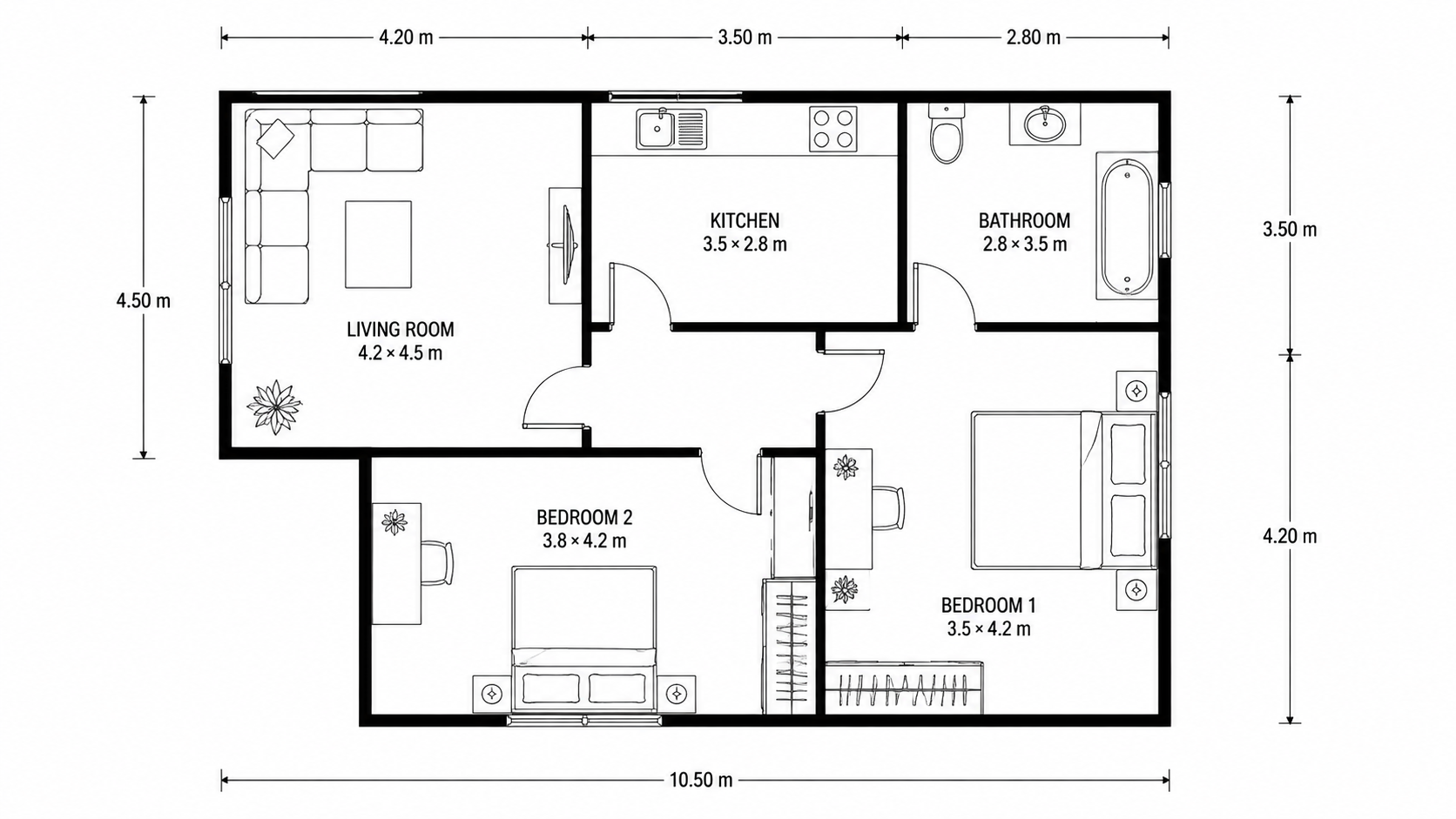
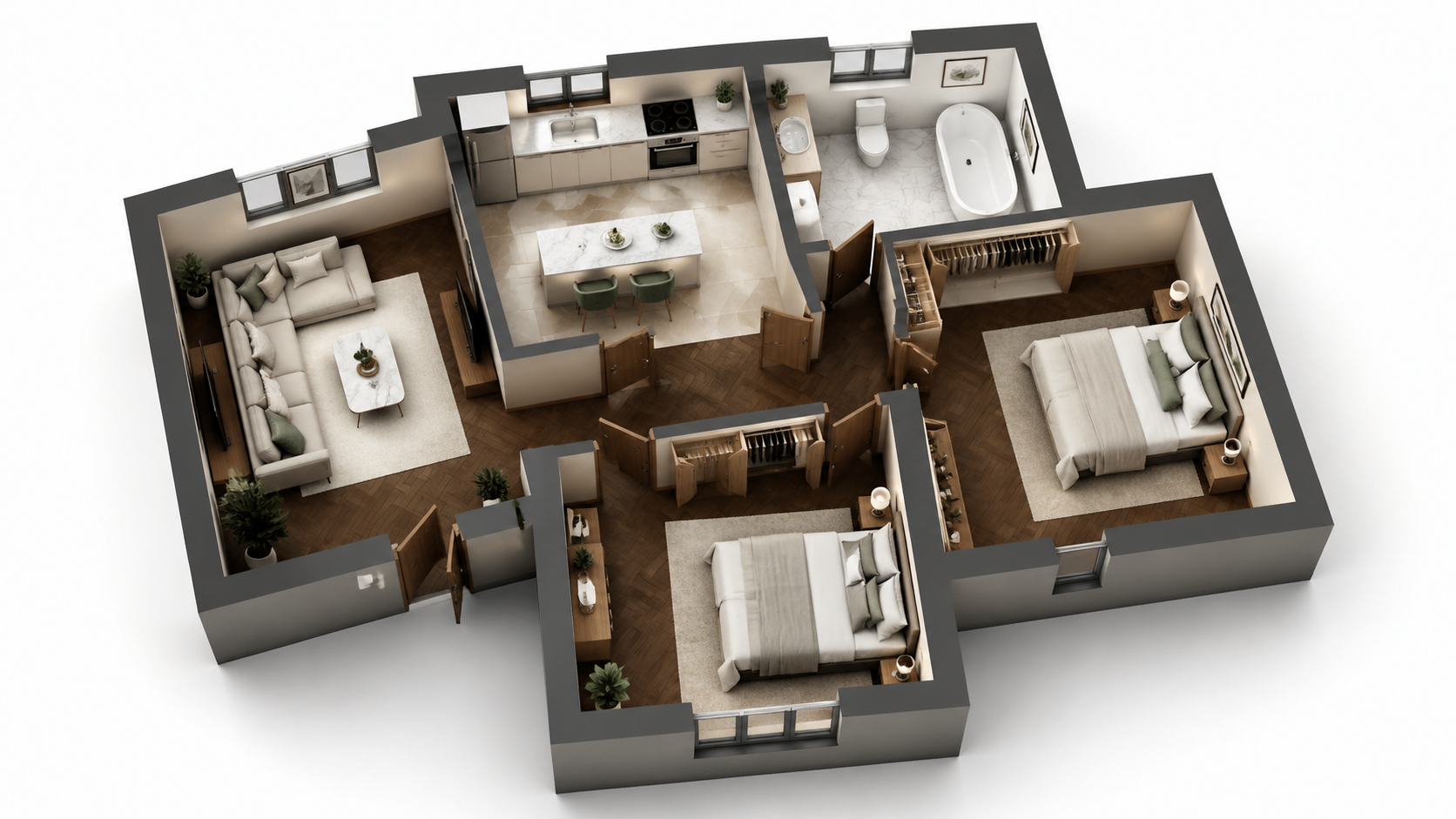
デモ用の作例:「ビフォー」の画像は当サイト用にAIで作成したもので、クライアントの写真ではありません。
機能
AIを使ってあらゆるフロアプランを3つのステップでレンダリングするステップバイステップガイド。アップロード、スタイル選択、ダウンロード — 初めてのワークフロー学習を含め、合計2分未満。3ds MaxやLumionは不要です。
3つのステップでフロアプランをレンダリングする方法は?
3ステップのワークフロー — プランをアップロード、スタイルを選択、レンダリングをダウンロード — 3ds MaxやLumionのトレーニングや3Dのバックグラウンドは不要
この方法でレンダリングできるプランの種類は?
初めてのユーザーでも、インターフェースをゼロから学んで2分以内にレンダリングを完了 — チュートリアルビデオは不要
AIメソッドがLumionや3ds Maxより速いのはなぜですか?
AIが3Dモデリング、ライティング、マテリアル、ポストプロダクションを自動的に処理 — 手作業やレンダリングキュー管理は一切不要
ご利用方法
3つの簡単なステップでプロ品質の仕上がりを実現
写真をここにドロップ
またはファイルを選択
写真をアップロード
写真をドラッグ&ドロップするか、ファイルを選択してアップロードしてください。JPEG、PNG、WebP形式のファイルを1枚あたり最大50MBまでアップロードできます。
AI処理
高度なAIが画像を分析し、プロ品質の補正を自動的に適用します。バーチャルステージング、画像補正、不要物除去、昼から夕暮れへの変換からお選びください。
結果をダウンロード
変換された画像をプレビューし、物件掲載、マーケティング資料、ソーシャルメディア用に高解像度の結果をダウンロードできます。プレミアムプランでは透かしなし。
Roomagenが選ばれる理由
ステップ1 — 2Dプランをアップロード
3ステップのワークフロー — プランをアップロード、スタイルを選択、レンダリングをダウンロード — 3ds MaxやLumionのトレーニングや3Dのバックグラウンドは不要
ステップ2 — レンダースタイルと家具の有無を選択
初めてのユーザーでも、インターフェースをゼロから学んで2分以内にレンダリングを完了 — チュートリアルビデオは不要
ステップ3 — 3Dレンダリングをダウンロード
AIが3Dモデリング、ライティング、マテリアル、ポストプロダクションを自動的に処理 — 手作業やレンダリングキュー管理は一切不要
誰のためのツール?
初めてのユーザー
「フロアプランのレンダリング方法」を検索し、3ds MaxやLumionのチュートリアルに圧倒されている方 — Roomagenは、3Dの知識を必要とせず、アップロード、選択、ダウンロードというワークフローに簡素化します。
ワークフローマスタートレーナー
高価なLumionや3ds Maxのトレーニングプログラムなしで、チームメンバーにフロアプランのレンダリングを教えている方 — Roomagenは、ソフトウェアの学習曲線なしで、新しいユーザーを5分でオンボーディングします。
チュートリアルに従う方
再現性のある結果を得るための明確なステップバイステッププロセスを求めている方 — Roomagenは、すべてのレンダリングで一貫した品質を保ちながら、正確に3つのステップを提供します。
3ds MaxやLumionのチュートリアルでは、3Dモデリング、マテリアル、ライティング、ポストプロダクションの学習が必要で、許容できる結果を出すまでに通常40~100時間のトレーニングが必要です。トレーニング後も、プランあたりのレンダリングには5~10時間かかります。Roomagenはトレーニングが一切不要で、最初のレンダリングは$0.23~$0.40で2分未満で完了します。
| Roomagen AI | 3ds Max / Lumion チュートリアル | 3Dデザイナーへの外注 | |
|---|---|---|---|
| 必要なステップ数 | 3 (アップロード、スタイル、ダウンロード) | 40~80の手動ステップ | 依頼 + 待機 + 修正 |
| 最初のレンダリングまでのトレーニング時間 | 0分 | 40~100時間 | なし (デザイナーがトレーニング済み) |
| レンダリングあたりの時間 | 90秒 | トレーニング後5~10時間 | 3~7日 |
| ソフトウェア費用 | 月額$12~$79 | Adobe/Autodesk 年間$249~$1,800 | 購入者にはなし |
| レンダリングあたりの費用 | $0.23~$0.40 | 限界費用$0 + 5~10時間の労働 | $200~$800 |
よくある質問
Roomagenについて知っておくべきすべてのこと
Roomagenにサインインし、「Floor Plan Visualize」をクリックして2Dプランをアップロードします。対応フォーマット:JPEG、PNG、WebP(最大50MB)。PDFやHEICのファイルは、先にJPEGまたはPNGに変換してください。プランは写真、スキャン、または任意のソースからのデジタルエクスポートで構いません。
4つのスタイルが利用可能です — 物件掲載用のPhotoreal Marketing、概略プレゼンテーション用のArchitectural Sketch、温かみのあるパンフレット用のStylized Marketing、プレミアムポートフォリオ印刷用のEditorial Monochrome。MLS掲載には、Photoreal Marketingが最も安全な選択肢です。
家具付きは物件掲載用のレンダリングやパンフレットに、家具なしは購入者が自分の家具を視覚化したい場合や、建築自体がセールスポイントである場合に適しています。両方のバージョンを合計$0.58でレンダリングできます — 購入者は同じ部屋を2つの方法で見られることを好みます。
いいえ、必要ありません。AIが部屋、壁、ドア、窓を自動的に検出します。前処理、マスキング、注釈付けは不要です。プランをそのままアップロードするだけです。
アップロード:2~10秒。AIレンダリング:60~90秒。ダウンロード:即時。開始から完成した3Dレンダリングまで合計2分未満です。同じ出力の場合、Lumionや3ds Maxでは5~10時間かかるのと比較してください。
まずRoomagen Sketch to Floor Planを使用してスケッチを変換し、そのデジタル出力を視覚化します。手書きスケッチから3Dレンダリングまで、エンドツーエンドで合計4分未満です。
別のスタイルで再レンダリングするか、より高品質なソースプランをアップロードしてください。各レンダリングは2クレジット($0.23~$0.40)です。AIの精度は、よりクリーンなソースプラン(明確なラベル、はっきりした壁、見えるドア)で向上します。
はい、できます。スタイルや家具の有無を変更して再レンダリングしてください。各レンダリングは2クレジットです。ほとんどのユーザーは一度レンダリングするだけで、すぐに必要なものが得られます。
レンダリングされた画像をダウンロードし、既存のクライアントポータル経由でメールまたは共有してください。出力は標準のJPG/PNGで、すべてのメールクライアント、CRM、プレゼンテーションツールと互換性があります。
最初のレンダリングは無料のスタータークレジットに含まれています。その後、各レンダリングは2クレジット($0.23~$0.40)かかります。スタータープラン(月額$12、60クレジット)では30回のレンダリングが可能です。
関連ツール
ビジュアルを強化するAIツールをもっと発見
フロアプランの可視化 — 2DプランからAI 3Dレンダリングを1分以内で
AIで2Dフロアプランを3Dレンダリングとして視覚化します。フォトリアル、建築スケッチ、様式化、モノクロのスタイル、家具付きまたは家具なしで、レンダリングあたり0.23ドル~0.40ドルで90秒以内に出力。3ds Max、Lumion、Twinmotionは不要です。
詳しく見るオンライン間取り図レンダラー — ブラウザベースの3D、インストール不要
AIを使ってブラウザで間取り図をオンラインレンダリング。3ds Max、Lumion、Twinmotion、インストールは不要 — 2Dプランをアップロードするだけで、あらゆるデバイスで90秒以内に3Dレンダリングを$0.23~$0.40で入手できます。
詳しく見る3Dフロアプランレンダリングツール — あらゆる物件タイプに対応するAIビジュアライゼーション
AIを搭載した3Dフロアプランレンダリングツール。あらゆる物件タイプに対応し、90秒以内にフォトリアル、スケッチ、様式化、モノクロの出力が可能です。フロアプランレンダリングのユースケースの95%において、3ds Max($1,800/年)、Lumion($1,499/年)、Twinmotion($249/年)を置き換えます。
詳しく見るプロフェッショナルな2D & 3D間取り図 — AIが1分以内に生成
スケッチ、スキャン、古い図面を、すっきりした2D間取り図や3Dビューに。寸法や部屋名は残すか消すかを選べ、4種類の描画スタイルから選択できます。
詳しく見る間取り図カラー化 — AIが白黒の間取り図を1分以内にカラー化
AIで白黒の間取り図をカラー化。4つのデザイナーパレット、部屋の自動検出、不動産、建築、インテリアデザイン向けに90秒以内で出力準備完了 — Photoshopやデザインスキルは不要です。
詳しく見る