
Drone & Aerial Photo Editing Services
Roomagen Aerial Photo Editing gives drone and aerial photos one finishing pass: it lifts haze, balances color, sharpens detail and opens up shadows, keeping the layout and lot lines as captured, usually in under a minute for 2 credits.
Drone photography has become standard in property, hospitality, and commercial marketing but raw drone footage typically requires extensive post-processing — color correction for atmospheric haze, white balance adjustment for varying altitudes, removal of unwanted objects, overcast sky replacement, and seasonal corrections. An edited aerial photo shows a property's grounds, roofline and surroundings more clearly than a raw drone capture. Professional drone photo editors price each image, and requests such as sky replacement, object removal and color correction are often billed separately. The wide field of view captures uncontrollable elements — neighboring structures, cluttered streets, construction sites, and seasonal vegetation issues all appear in aerial shots regardless of pilot skill. Roomagen's Aerial Photo Editing gives a drone photo a finishing pass in one step for 2 credits: haze lifts, colors balance, rooftops and grounds sharpen and shaded areas open up, usually in under a minute. Sky replacement and object removal are separate tools.
No credit card required. Results usually in under a minute.
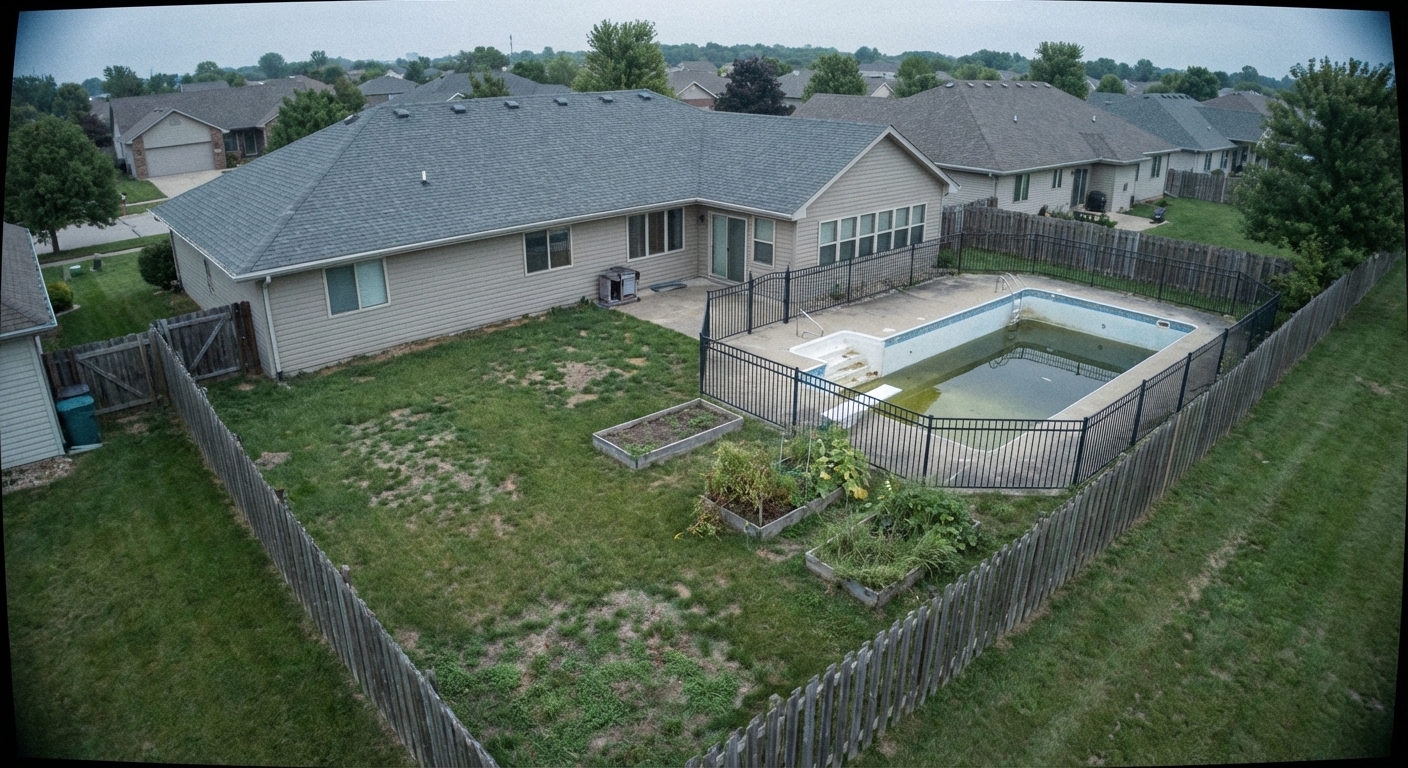
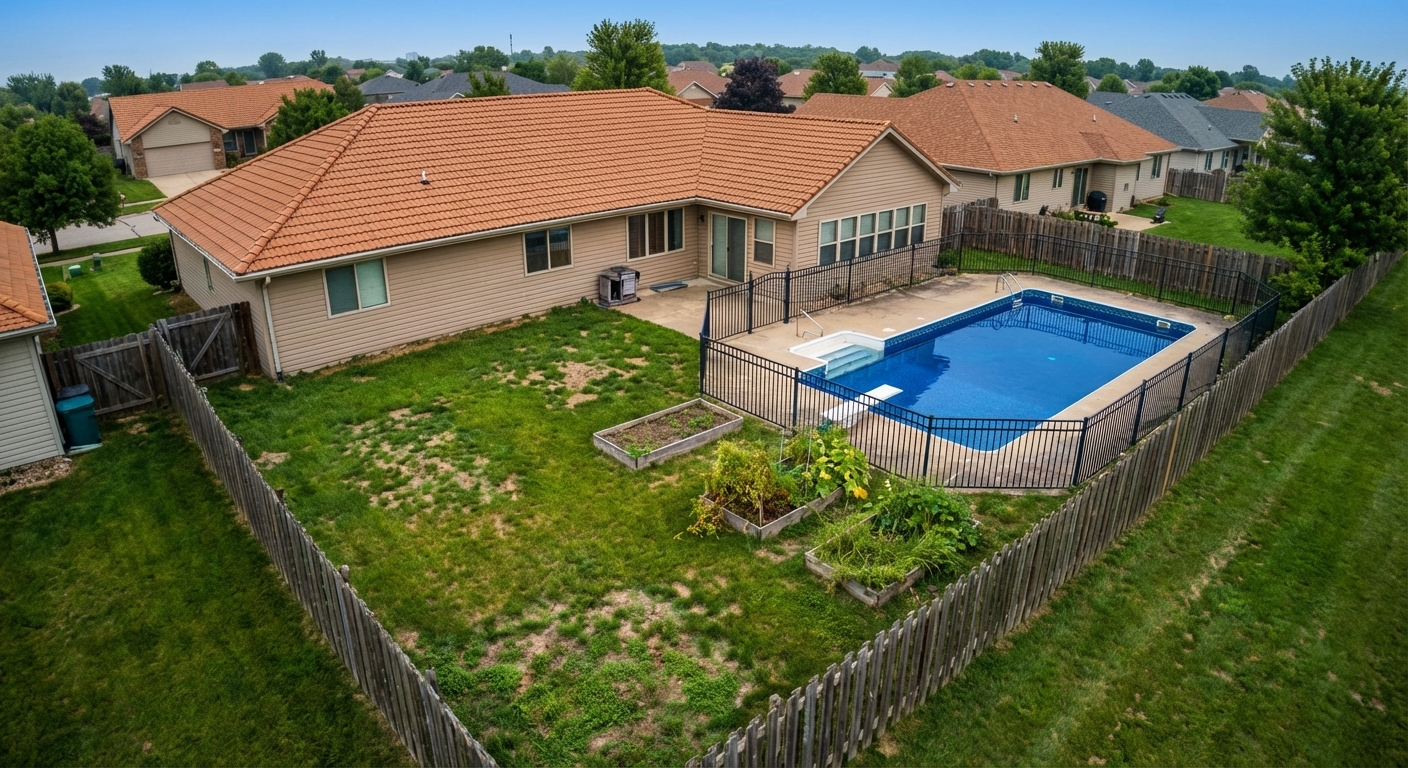
Demo example: the “Before” image was created with AI for this site; it is not a customer photo.
Features
Drone and aerial photo editing: AI lifts haze, balances color and sharpens detail in one pass, usually in under a minute. 6 free credits when you sign up.
Enhance Drone Photography
Lifts atmospheric haze, balances color, sharpens rooftops and grounds, and opens up shadows in one pass
Layout and Lot Lines Unchanged
Keeps the bird's-eye perspective, layout, boundaries and lot lines exactly as captured; it does not add lines or labels
Works with Common Drone Exports
Works with JPEG, PNG or WebP exports from DJI and other drone cameras; RAW files are not accepted
How It Works
Get professional results in three simple steps
Drop your photos here
or browse files
Upload Your Photos
Upload a drone photograph in JPEG, PNG or WebP format (up to 50 MB): straight down, angled or low oblique, from any altitude. Choose a light, medium or heavy edit; medium is the default.
AI Processing
The AI gives the photo one finishing pass: atmospheric haze lifts, colors settle into a neutral balance without the cast that altitude adds, rooftops, landscaping and site features gain detail, and shaded areas open up. The perspective, the layout on the ground and every boundary and lot line stay exactly as captured.
Download Results
Download the result, usually in under a minute, for 2 credits. To change the sky, remove a car or straighten a tilted horizon, run Sky Replacement, Item Removal or Image Straightening on the result; each is a separate tool at 2 credits.
Why Choose Roomagen
Drone Image Enhancement
Lifts atmospheric haze, balances color, sharpens rooftops and grounds, and opens up shadows in one pass
Aerial Perspective Kept
Keeps the bird's-eye perspective, layout, boundaries and lot lines exactly as captured; it does not add lines or labels
JPEG, PNG and WebP Input
Works with JPEG, PNG or WebP exports from DJI and other drone cameras; RAW files are not accepted
Who Is It For?
Real Estate & Hospitality
Enhance aerial photos of properties, hotels, and resorts with haze removal, color correction, and a professional finish.
Commercial & Architecture
Create professional aerial marketing images for commercial buildings, developments, and architectural projects.
Photographers & Drone Operators
Speed up drone photo post-processing with a one-step finishing pass for haze, color, detail and shadows, at a light, medium or heavy strength.
Common Use Cases
Drone Listing Enhancement
Enhance drone exterior photos with corrected exposure, vibrant colors, and balanced lighting. The AI is tuned for the unique characteristics of aerial photography.
Aerial Portfolio Consistency
Process all drone photos from a property shoot through the same enhancement for consistent color grading and exposure across the entire aerial photo set.
Land and Lot Listings
Enhance aerial shots of land, lots and estates so the grounds, tree lines and access roads read clearly. The tool does not draw boundaries; the layout stays exactly as captured, so add lot lines afterwards in mapping software.
Neighborhood Context Enhancement
Improve wide-angle aerial shots that show the property in its neighborhood context — proximity to parks, schools, amenities, and transportation.
Commercial Property Aerial Marketing
Transform drone photographs of commercial properties including office buildings, shopping centers, and industrial areas into professional marketing materials. Parking areas, landscaping, and building facades are enhanced in a single processing step for maximum visual impact.
Construction Progress Documentation
Give drone photographs of a building site a clear, even finish for progress reports to investors and prospective buyers. Equipment and materials stay in the frame, so the photo still shows the site as it was; to remove an item, use Item Removal.
Professional drone photo editors price each image and often treat sky replacement, object removal and color correction as separate jobs with separate fees. DIY editing requires Lightroom combined with Photoshop and demands specialized drone photography editing skills. Built-in drone companion software from DJI, Autel, and other manufacturers is limited in scope. Roomagen Aerial Photo Editing does the finishing pass — haze, color balance, detail and shadows — for 2 credits, usually in under a minute; sky replacement, object removal and straightening are separate Roomagen tools at 2 credits each.
| Roomagen | Professional Drone Photo Editing | |
|---|---|---|
| Cost | $0.23–$0.40 | Priced per photo by the editor |
| Turnaround | Under 90 seconds | Depends on the editor's queue |
| Skill required | None | Color grading expertise |
| Consistency | Same intensity keeps a set consistent | Varies by editor |
| Batch capability | One photo per run | Time-consuming per image |
| Availability | 24/7, usually under a minute | Editor availability |
Technical Specifications
- Supported formats
- JPEG, PNG, WebP
- Max file size
- 50 MB
- Output resolution
- HD / Ultra HD (Pro & Business)
- Enhancement levels
- 3 (light, medium, heavy)
- Optimized for
- Drone and aerial property photography
- Processing time
- Under 90 seconds
- AI model
- Gemini AI
- Credit cost
- 2 credits per image
Pricing
| Plan | Price | Credits/mo | Per Image | Resolution |
|---|---|---|---|---|
| Free | $0 | 6 (one-time) | Free | — |
| Starter | $12/mo | 60 | $0.40 | 2K |
| Pro | $29/mo | 200 | $0.29 | 2K or 4K (4 credits) |
| Business | $79/mo | 700 | $0.23 | 2K or 4K (4 credits) |
Per-image cost = 2 credits. Annual plans reduce cost by ~17%. Credit packages: 60/$19, 180/$45, 360/$79.
Frequently Asked Questions
Everything you need to know about Roomagen
Aerial Photo Editing gives a drone photo one finishing pass: it lifts haze, balances color, sharpens rooftops and grounds, and opens up shadows. Sky replacement, object removal and straightening are separate tools: Sky Replacement, Item Removal and Image Straightening.
No. The tool keeps every boundary, lot line and structure exactly as captured and does not draw boundary lines, lot dimensions or color fills. Add those in mapping or design software after the edit.
Not directly. Export your drone images as JPEG, PNG or WebP from the drone's companion app or your editing software, then upload them — files up to 50 MB are accepted.
Not with this tool. Aerial Photo Editing makes a sky that is already in the frame clearer and more vibrant, but it does not swap it. To replace an overcast sky, run Sky Replacement on the edited photo for another 2 credits.
No. Aerial Photo Editing keeps the perspective and geometry as captured. To straighten a tilted horizon or correct wide-angle distortion, use Image Straightening, at 2 credits per image.
Not with this tool. Item Removal erases the vehicles, dumpsters or equipment you mark and rebuilds the ground behind them. Run it before or after Aerial Photo Editing; each run costs 2 credits.
Roomagen aerial enhancement showcases property scope, neighborhood context, and land features that ground-level photos cannot capture. Professional aerial imagery significantly increases buyer engagement with listings.
No. Roomagen does not add text, labels, distance markers or arrows to photos. Add annotations in your own design or mapping software after the edit.
Roomagen processes each aerial photo enhancement in under 90 seconds. A complete drone photo set from a property shoot can be fully enhanced one photo at a time in a single session.
Real estate agents marketing large properties, drone photography businesses streamlining workflows, and land developers showcasing parcels and communities all benefit from Roomagen's aerial editing tools.
Explore Related Tools
Discover more AI-powered tools to enhance your visual content
AI Sky Replacement — New Skies for Exterior Photos
Replace overcast or bland skies with stunning blue skies or dramatic sunsets. AI-powered sky replacement that looks completely natural — for property listings, hotels, commercial buildings, and any exterior photo.
Learn moreAI Object & Item Removal from Photos
Remove unwanted objects, clutter, and distractions from any photo. AI intelligently fills backgrounds for clean, professional images — for property listings, hotel rooms, product shots, and portfolio photos.
Learn moreAI Image Straightening & Perspective Correction
Fix tilted horizons, converging verticals and wide-angle lens distortion in real estate photos. One-click AI correction for listing-ready photos. Free to try.
Learn moreAI Photo Enhancement — Professional-Looking Results in Under a Minute
Enhance any photo automatically with AI. HDR processing, color correction, lens fix, and professional-grade adjustments, usually in under a minute — for property listings, hotel rooms, product shots, and more.
Learn moreVirtual Landscaping Design
Virtually landscape any outdoor space with plants, trees, gardens, and features. Boost curb appeal for properties, hotels, resorts, and commercial spaces without breaking ground.
Learn moreExterior Home Rendering & Visualization
Create photorealistic exterior renders showing home improvements, new construction, or facade transformations.
Learn moreDay to Dusk Photo Editing
Turn a daytime exterior or room photo into a sunset, dusk or night photo with warm window glow. Pick the hour on a 24-hour slider; 2 credits per photo.
Learn more