Restyle Surfaces - Update Finishes
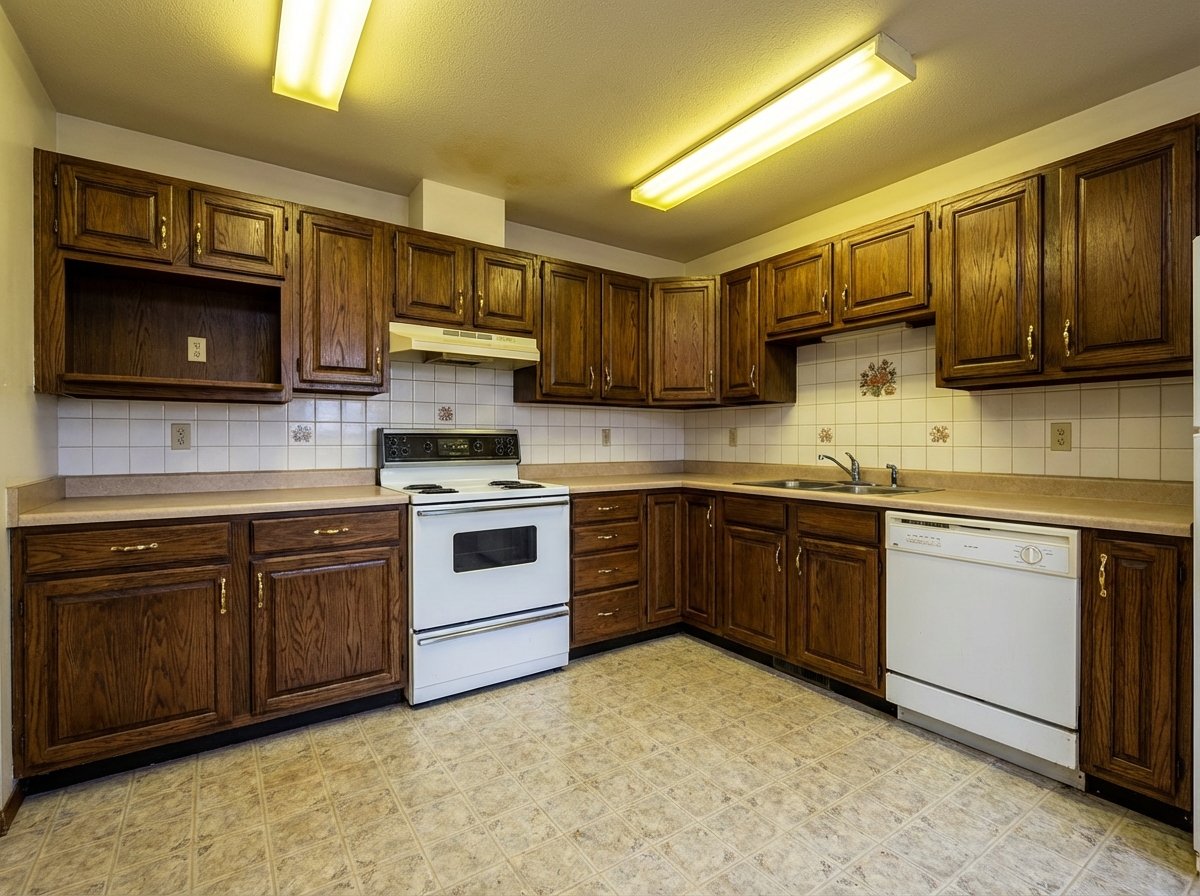
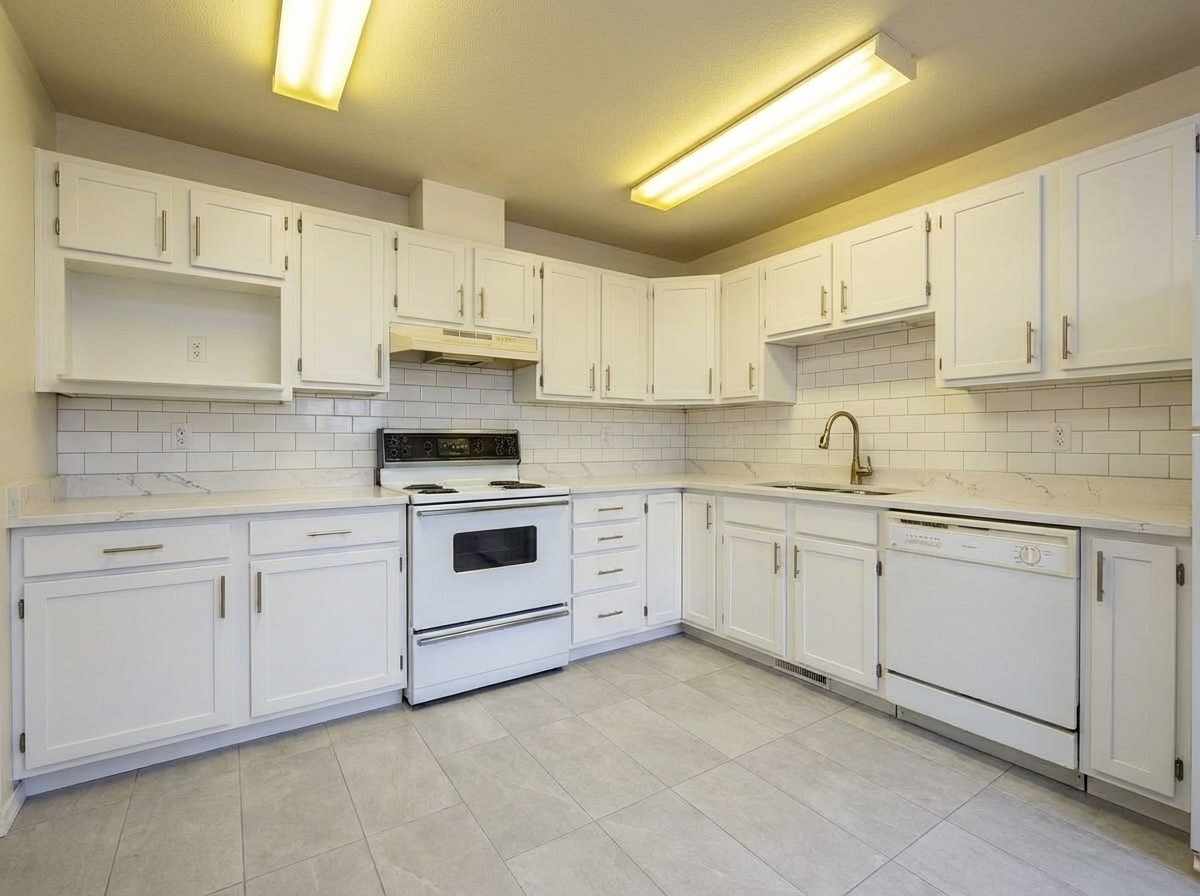
Roomagen Restyle Surfaces is an AI-powered material visualization tool that transforms countertops, backsplashes, and wall finishes in property photos with photorealistic new materials. The output shows the same room with updated surface materials while furniture and layout remain unchanged. Processing takes 15-30 seconds per image using 2 credits per image ($0.23–$0.40 depending on plan), with a free plan offering 6 credits.
Old surface materials on countertops, backsplashes, and cabinet fronts date the entire room and reduce buyer appeal. Surface material replacement is the most expensive component of renovation — granite countertop replacement costs $2,000-5,000, backsplash replacement $1,000-3,000, and cabinet resurfacing $3,000-8,000, totaling $6,000-16,000 per room plus 1-3 weeks of construction disruption. Before committing to physical changes, material selection relies on small showroom samples that cannot show how the material will look in your actual room with your specific lighting, furniture, and wall colors. Choosing the wrong material means an irreversible cost with no practical way to undo the installation. Roomagen AI previews different material, color, and texture combinations photorealistically on your existing surfaces — from marble to granite, laminate to natural stone, see every combination in your actual room before making any purchase commitment.
No credit card required. Results in 30 seconds.
Features
Restyle any surface in your photos - countertops, floors, walls, backsplashes. Preview different materials and finishes instantly.
Transform Countertops & Floors
Applies new materials with accurate grain, veining, and texture
Update Wall Textures
Preserves original surface reflections and light behavior
Surface Material Changes
Supports countertop, backsplash, and floor changes in one pass
How It Works
Get professional results in three simple steps
Drop your photos here
or browse files
Upload Your Photos
Simply drag and drop your photos or browse to upload. We support all major image formats including JPG, PNG, and RAW files up to 50MB each.
Upload a room photo in JPEG, PNG, or WebP format (up to 50 MB) — kitchen, bathroom, or any space with surfaces you want to restyle. The AI automatically detects surface areas separately: countertop surface, backsplash area, cabinet door fronts, and shelf surfaces are each identified independently. The current material type is analyzed (laminate, granite, wood, ceramic, and others) to understand the existing texture and reflective properties. Structural elements including cabinet frames, hardware fixtures, and plumbing are preserved and protected from changes.
AI Processing
Our advanced AI analyzes your images and applies professional enhancements automatically. Choose from virtual staging, enhancement, object removal, or day-to-dusk conversion.
Select a material style or provide custom instructions. Supported materials include natural stone (marble, granite, quartz, travertine), wood (oak, walnut, cherry, maple), ceramic and porcelain, concrete, metal (stainless steel, copper), and laminate — each with multiple color, texture, and pattern variations. Custom mode accepts specific material instructions or a reference image showing the desired material. The AI ensures all surface updates maintain cohesive visual coordination across adjacent surfaces.
Download Results
Preview your transformed images and download high-resolution results ready for listings, marketing materials, social media, and more. No watermarks on premium plans.
Download your restyled surfaces in 10-90 seconds. The output is photorealistic — material texture, light reflection, shadow casting, and perspective alignment are all accurately rendered. Compare different material combinations by reprocessing the same photo with different selections (each version costs 2 credits). The visualizations serve as reliable references for flooring and furniture coordination checks, material purchasing decisions, and interior designer consultations.
Why Choose Roomagen
Countertop Restyling
Applies new materials with accurate grain, veining, and texture
Floor Surface Updates
Preserves original surface reflections and light behavior
Wall Finish Changes
Supports countertop, backsplash, and floor changes in one pass
Who Is It For?
Real Estate Agents
Show buyers renovation potential by visualizing updated countertops and flooring on dated kitchen and bathroom listing photos.
Interior Designers
Present material options to clients using their real room photos instead of generic samples, speeding up decision-making.
Property Managers
Visualize planned renovation upgrades for investor presentations before committing to costly material purchases.
Common Use Cases
Countertop Material Selection
See how marble, granite, quartz, or wood countertops would look in your actual kitchen. Compare materials side by side at 2 credits each for confident purchasing decisions.
Backsplash Design Preview
Visualize subway tile, ceramic, or marble backsplash options behind your existing countertops. The AI renders accurate tile patterns and grout lines.
Kitchen/Bath Surface Upgrade
Preview a complete surface makeover — new countertop and backsplash together — to see how materials coordinate in the actual space before committing to expensive purchases.
Material Comparison Presentation
Designers can generate 3–5 material options on the same surface for client presentations. Each variation shows the exact material in the client’s actual room.
Material Sample Visualization
See a small showroom sample at full room scale before purchasing. Upload your room photo and use a close-up photo of the sample material as a reference image in custom mode. The AI renders that exact material across your countertop or backsplash surface, showing how it interacts with your room's lighting, existing cabinets, and flooring. This eliminates the guesswork between a 6-inch sample and a full room installation.
Kitchen-Bathroom Surface Coordination
Coordinate surface materials between kitchen and bathroom in the same home for a unified design language. Upload photos from both spaces and test the same material family on surfaces in each room. This ensures that the marble selected for the kitchen countertop complements the bathroom vanity top, creating a cohesive material palette throughout the home without requiring physical samples in each location.
Unlike small showroom samples that cannot predict the full-room effect, Roomagen renders surface materials at actual scale with accurate lighting interaction. Physical surface replacement costs $6,000-16,000 per room (countertop $2,000-5,000, backsplash $1,000-3,000, cabinet resurfacing $3,000-8,000) plus 1-3 weeks of construction and material selections that are irreversible once installed. Showroom samples are free but small — they cannot demonstrate how the material interacts with your room's lighting, existing furniture colors, and wall paint. Interior designer renders cost $200-500 per image with 1-week delivery and require CAD model input rather than working from photographs. Roomagen processes at 2 credits per image directly on your existing room photo in 10-90 seconds, with cohesive updates to countertops, backsplash, and cabinet surfaces using AI-generated photorealistic material rendering.
| Roomagen | Surface Replacement | |
|---|---|---|
| Cost | $0.23–$0.40 | $2,000–$10,000+ |
| Turnaround | Under 90 seconds | Days of installation |
| Material options | 7 materials × 4 surface types | Visit showrooms |
| Preview accuracy | Full surface visualization | Small samples only |
| Commitment | 2 credits | Full purchase + labor |
| Mess and disruption | Zero | Significant dust and downtime |
Technical Specifications
- Supported formats
- JPEG, PNG, WebP
- Max file size
- 50 MB
- Output resolution
- HD / Ultra HD (Pro & Business)
- Surface types
- 4 (countertop, backsplash, wall tile, floor)
- Materials
- 7 (marble, granite, quartz, ceramic tile, subway tile, wood, concrete)
- Processing time
- 10–90 seconds
- AI model
- Gemini AI
- Credit cost
- 2 credits per image
Pricing
| Plan | Price | Credits/mo | Per Image | Resolution |
|---|---|---|---|---|
| Free | $0 | 6 (one-time) | Free | HD |
| Starter | $12/mo | 60 | $0.40 | HD |
| Pro | $29/mo | 200 | $0.29 | Ultra HD |
| Business | $79/mo | 700 | $0.23 | Ultra HD |
Per-image cost = 2 credits. Annual plans reduce cost by ~17%. Credit packages: 60/$19, 180/$45, 360/$79.
Frequently Asked Questions
Everything you need to know about Roomagen
Explore Related Tools
Discover more AI-powered tools to enhance your visual content
Virtual Flooring Replacement
Preview new flooring virtually before renovation. See how hardwood, tile, carpet, or vinyl would look in any room.
Learn moreVirtual Wall Repainting
Virtually repaint walls to preview colors before painting. See how different paint colors would look in any room with realistic lighting.
Learn moreVirtual Kitchen Renovation & Remodeling
Virtually renovate kitchens with new cabinets, countertops, backsplashes, and appliances. Show clients, buyers, or guests the kitchen’s full potential without physical construction.
Learn moreVirtual Bathroom Renovation
Transform outdated bathrooms virtually with new tiles, vanities, fixtures, and finishes. Help clients visualize modern possibilities without physical construction.
Learn moreFurniture Facelift - Update Existing Pieces
Give existing furniture a facelift by changing colors, fabrics, or finishes. Update dated pieces without replacing them entirely.
Learn more