
Virtual Renovation & Remodeling
Roomagen Virtual Renovation is an AI-powered remodeling preview tool that digitally updates permanent fixtures including cabinets, countertops, flooring, tile, and fixtures in a single comprehensive pass. Used by real estate agents, homeowners, interior designers, architects, hospitality managers, and renovation contractors, the output shows the room as it would look after a complete renovation with chosen materials and finishes. Processing takes 20-40 seconds using 2 credits per image ($0.23–$0.40 depending on plan), with a free plan offering 6 credits.
Properties and spaces with dated interiors receive lower interest because viewers cannot envision the finished renovation or estimate improvement costs accurately. Spaces requiring renovation generate 40-60% less engagement than move-in-ready alternatives because clients overestimate renovation costs by 30-50%, leading to lower offers or lost bookings. Physical renovation costs $15,000-75,000+ depending on scope and takes 4-12 weeks — during which the space cannot be shown or marketed effectively. Choosing the wrong upgrades creates overcapitalization risk. Roomagen shows what any room would look like after remodeling using AI-generated photorealistic visualizations, helping clients understand the renovation potential — all for 2 credits per image with no physical construction required.
No credit card required. Results usually in under a minute.
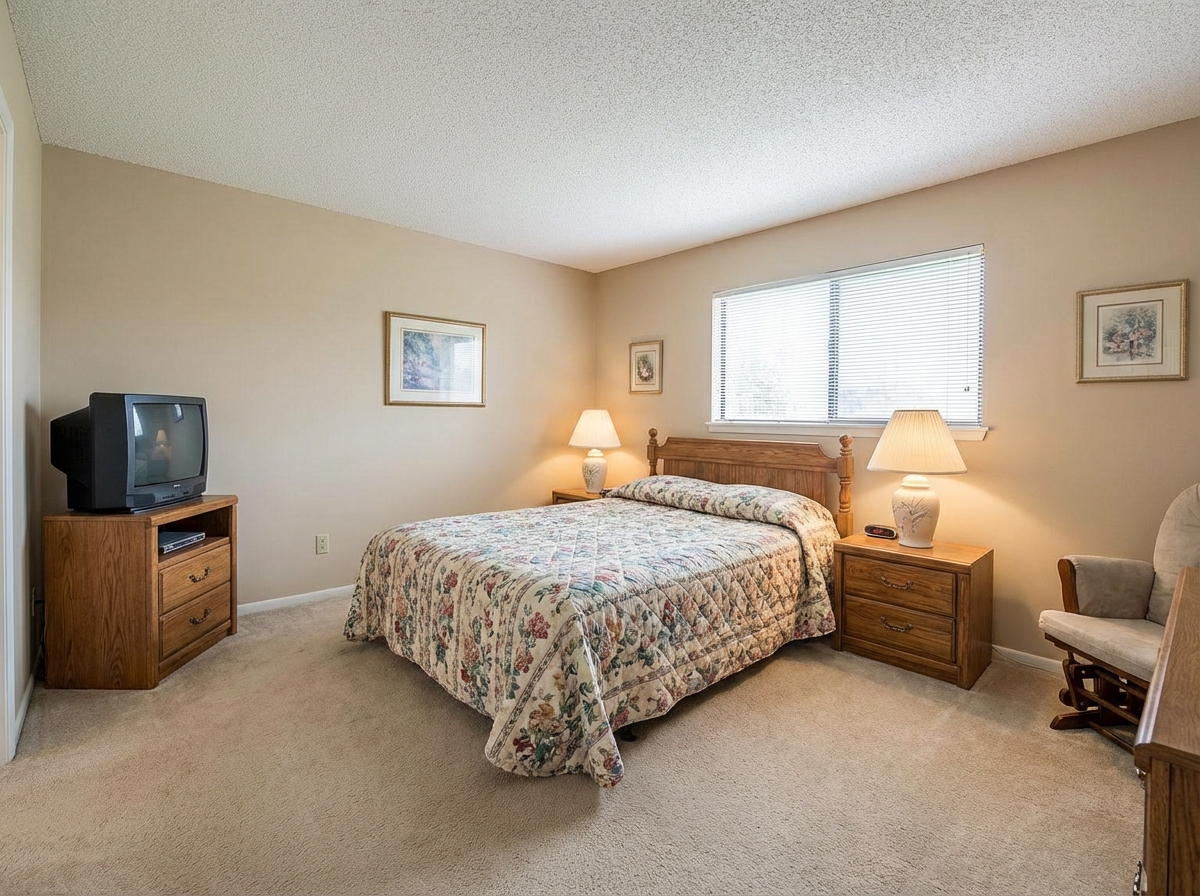
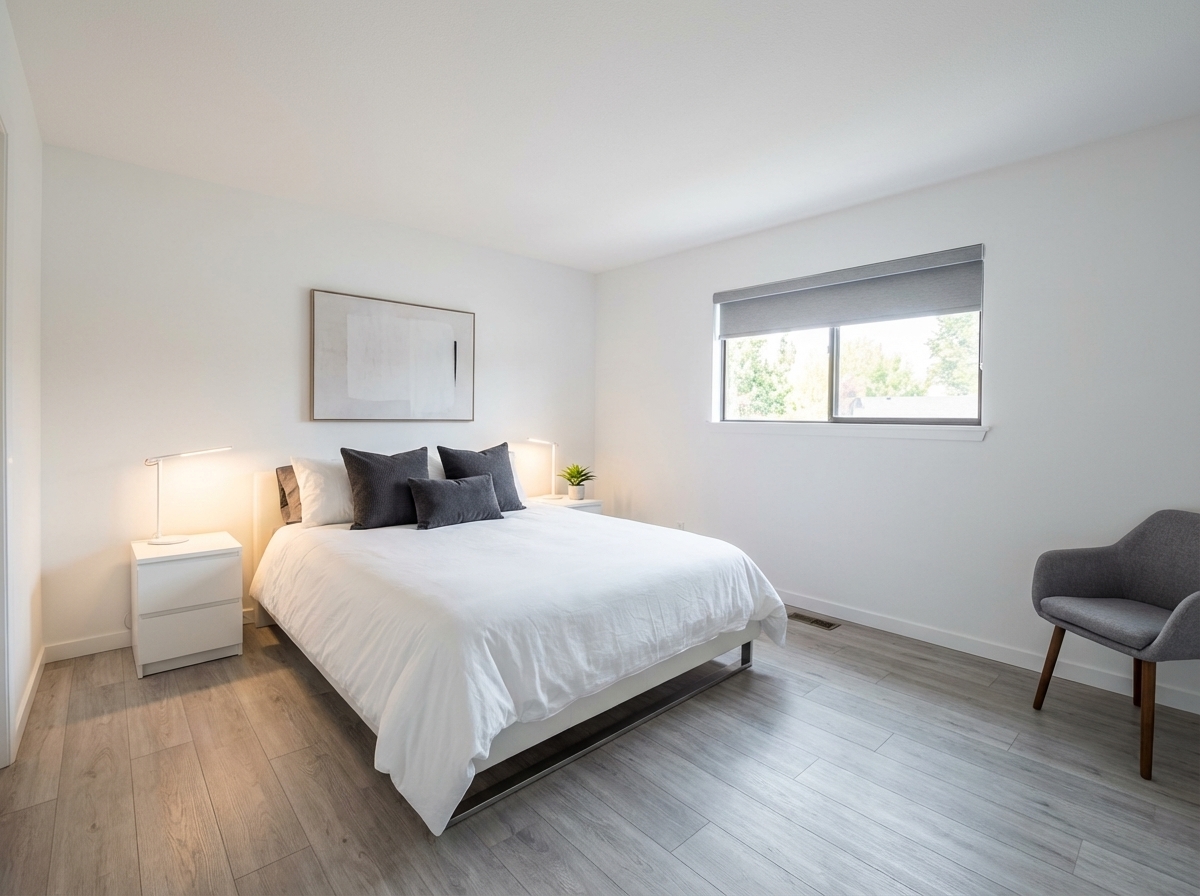
Demo example: the “Before” image was created with AI for this site; it is not a customer photo.
Features
Show clients renovation potential with virtual remodeling. Update kitchens, bathrooms, flooring, and finishes digitally before selling, leasing, or redesigning.
Visualize Home Improvements
Updates permanent fixtures like cabinets, counters, and flooring
Kitchen & Bath Renovations
Creates convincing before-and-after comparisons for fixer-uppers
Before & After Transformations
Helps buyers visualize finished renovation to justify higher offers
How It Works
Get professional results in three simple steps
Drop your photos here
or browse files
Upload Your Photos
Upload a room photo in JPEG, PNG, or WebP format (up to 50 MB). The tool works with any room condition — from mildly outdated to severely dated or damaged spaces, including abandoned properties with visible deterioration. The AI analyzes the current state by identifying each element separately: walls, flooring, ceiling, cabinets, countertops, fixtures, and lighting. Structural elements like window positions, door locations, and ceiling height are preserved and marked as protected, while cosmetic surfaces are flagged for renovation transformation.
AI Processing
Pick the room type — living room, bedroom, kitchen, dining room, bathroom, home office, kids room or studio — and one of 10 styles. The AI updates surfaces, fixtures and finishes in that style as one coordinated design. There is no free-text field or reference image; for a change in your own words, use the Design Companion chat.
Download Results
Download your renovated room, usually in under a minute depending on complexity and mode selection. The output is photorealistic — the same room from the same angle with all surfaces renewed while structural elements remain unchanged. Try multiple style variations by reprocessing the same photo with different modes or instructions, each attempt costing 2 credits. The visualization can be used in listings as 'renovation vision' imagery — for FTC/ASA compliance, labeling as 'AI-generated visualization' is recommended to distinguish from actual property condition.
Why Choose Roomagen
Cabinet Replacement
Updates permanent fixtures like cabinets, counters, and flooring
Countertop Changes
Creates convincing before-and-after comparisons for fixer-uppers
Flooring Updates
Helps buyers visualize finished renovation to justify higher offers
Who Is It For?
Real Estate Agents & Homeowners
Help clients see past dated interiors by showing renovation previews that justify asking prices on fixer-upper properties.
Interior Designers & Architects
Present renovation concepts to clients with photorealistic before-and-after previews that win project approvals.
Hospitality & Property Managers
Evaluate which room renovations deliver the best ROI by previewing different upgrade options before committing funds.
Common Use Cases
Pre-Renovation Visualization
Upload a dated room, pick its room type and a style such as Modern, and see how it would look after a renovation.
Buyer Potential Showcase
Show buyers what a fixer-upper could become after renovation. Include renovation previews alongside current photos in listings to help buyers see past outdated finishes.
House Flip Planning
Visualize renovation outcomes before purchasing a flip property. Test multiple renovation styles to determine which produces the most marketable result for the target neighborhood.
Design Client Approval
Show renovation clients a photorealistic preview before starting work. Upload the current room, apply the planned renovation style, and use the result for client sign-off.
Pre-Renovation Design Testing
Test multiple design concepts digitally before committing to physical construction. Upload the current room photo and generate 3-4 different renovation versions using different styles and material combinations. Share these versions with potential buyers or your real estate network to collect feedback on which design resonates most. Then execute only the most popular version in actual construction, eliminating the risk of investing in upgrades that do not appeal to your target market.
Insurance Claim Visualization
Visualize the post-restoration appearance of damaged properties for insurance companies or property owners. The AI transforms photos of fire, water, or storm-damaged rooms into restored versions showing what the space would look like after professional remediation. Use these visualizations in damage reports, restoration proposals, and insurance claim presentations to provide a clear visual reference for the expected outcome of restoration work.
Unlike paying for a physical renovation — which risks overcapitalizing on the wrong upgrades — Roomagen shows the renovation digitally to gauge client interest without spending a dollar on construction. Physical renovation costs $5,000-25,000+ per room with 2-8 week timelines, during which the space is off-market and material choices are irreversible. Traditional 3D rendering services charge $500-2,000 per room with 1-2 week delivery. DIY Photoshop renovation attempts require 1-2 hours of advanced skills per image. Roomagen processes each image, usually in under a minute, at 2 credits.
| Roomagen | Actual Renovation | |
|---|---|---|
| Cost | $0.23–$0.40 | $5,000–$50,000+ |
| Turnaround | Under 90 seconds | Weeks to months |
| Reversible | Rerun in any of 10 styles, 2 credits each | Permanent changes |
| Style options | 10 styles | One choice, one outcome |
| Risk | Zero | Budget overruns, delays |
| Design trends | 2025–2026 built-in | Depends on contractor |
Technical Specifications
- Supported formats
- JPEG, PNG, WebP
- Max file size
- 50 MB
- Output resolution
- HD / Ultra HD (Pro & Business)
- Room types
- 8 (living room, bedroom, kitchen, dining room, bathroom, home office, kids room, studio)
- Design styles
- 10 built-in + custom text description
- Modes
- Auto (2025–2026 trends) and Custom (your description + reference image)
- Processing time
- Usually under a minute
- AI model
- Gemini AI
- Credit cost
- 2 credits per image
Pricing
| Plan | Price | Credits/mo | Per Image | Resolution |
|---|---|---|---|---|
| Free | $0 | 6 (one-time) | Free | — |
| Starter | $12/mo | 60 | $0.40 | 2K |
| Pro | $29/mo | 200 | $0.29 | 2K or 4K (4 credits) |
| Business | $79/mo | 700 | $0.23 | 2K or 4K (4 credits) |
Per-image cost = 2 credits. Annual plans reduce cost by ~17%. Credit packages: 60/$19, 180/$45, 360/$79.
Frequently Asked Questions
Everything you need to know about Roomagen
Roomagen virtually updates cabinets, countertops, flooring, paint colors, fixtures, tile, and even structural changes like wall removal. Every permanent element of a room can be digitally modernized.
Roomagen renovation changes permanent features like cabinets, countertops, and flooring, while staging adds movable furniture and decor. Renovation is for transforming the structure; staging is for furnishing the space.
Roomagen renovation previews help buyers visualize the finished space, which typically leads to higher offer prices. Showing the potential encourages buyers to invest in properties they might otherwise dismiss.
Roomagen renders updated materials with photorealistic accuracy, including grain patterns, veining, and reflective surfaces. The result looks like an actual post-renovation photo rather than a digital mockup.
Yes, one version per run: process the same photo again with another style (2 credits each) and compare the results side by side.
Roomagen focuses on visual renovation previews rather than cost estimation. However, the detailed material choices shown help homeowners get more accurate contractor quotes.
Roomagen generates each renovation preview in 20-40 seconds per image. Creating multiple material options for comparison takes only a few minutes for a complete room.
Not in Virtual Renovation, which updates the whole room in the chosen style. For one element, use a Renovation mode such as Cabinets, Countertops or Flooring, each of which changes one element.
Roomagen excels at modernizing older homes by replacing dated elements with contemporary alternatives. The AI preserves architectural character while updating finishes to current buyer expectations.
Virtual Renovation changes permanent fixtures like cabinets, countertops, and flooring in a comprehensive remodel preview. Restyle Surfaces changes specific surface materials. Flooring Replacement previews new floors. Repaint Wall changes wall colors. Furniture Facelift updates furniture surfaces without touching built-ins. Choose Virtual Renovation for full remodels, or the specialized tool for single material changes.
Explore Related Tools
Discover more AI-powered tools to enhance your visual content
Virtual Kitchen Renovation & Remodeling
Virtually renovate kitchens with new cabinets, countertops, backsplashes, and appliances. Show clients, buyers, or guests the kitchen’s full potential without physical construction.
Learn moreVirtual Bathroom Renovation
Transform outdated bathrooms virtually with new tiles, vanities, fixtures, and finishes. Help clients visualize modern possibilities without physical construction.
Learn moreVirtual Flooring Replacement
Preview new flooring virtually before renovation. See how hardwood, tile, carpet, or vinyl would look in any room.
Learn moreVirtual Wall Repainting
Virtually repaint walls to preview colors before painting. See how different paint colors would look in any room with realistic lighting.
Learn moreFree AI Virtual Staging — Stage Any Empty Room in Under a Minute
Stage vacant rooms with AI, usually in under a minute. 13 design styles, 15 room types, listing-ready photos for real estate, rentals and hospitality. 6 free credits, no credit card required.
Learn more