AI Sky Replacement — New Skies for Exterior Photos
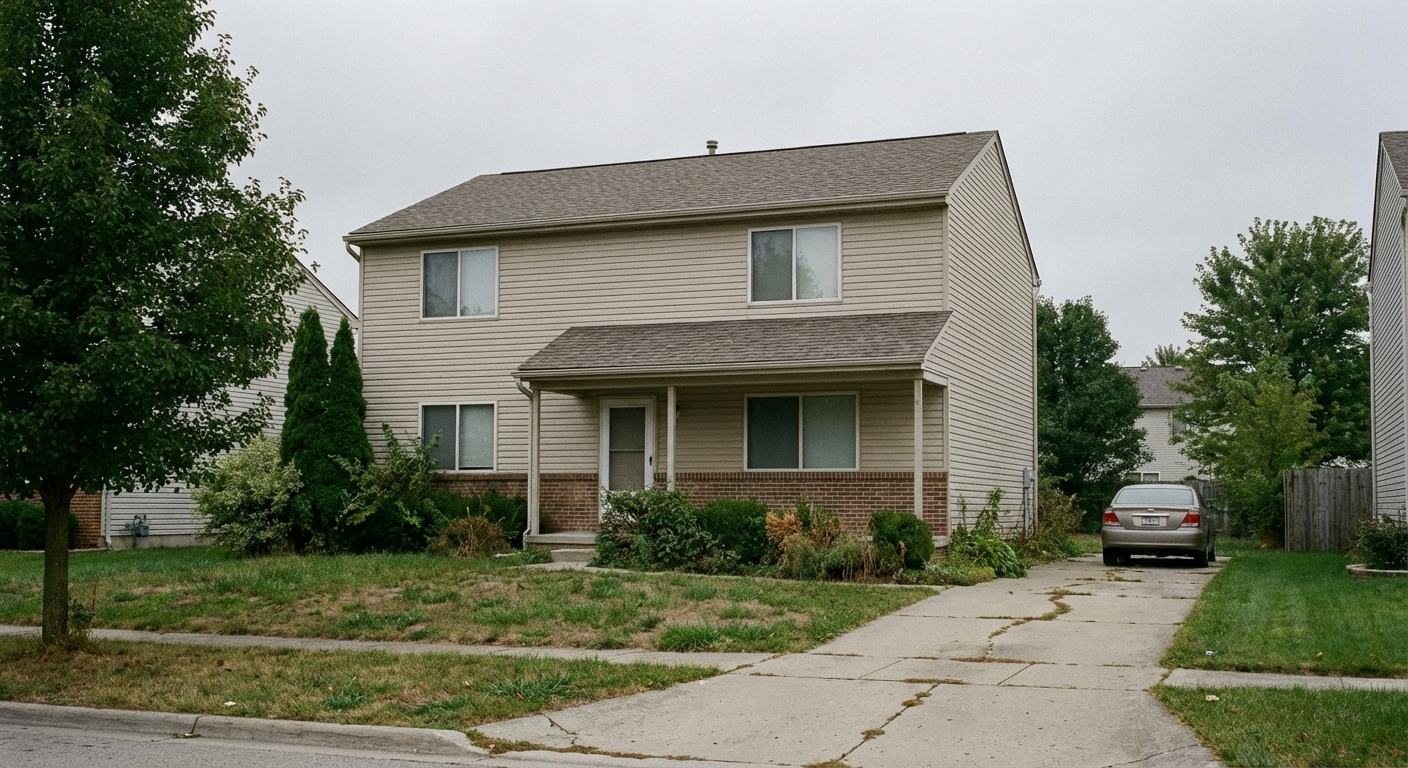
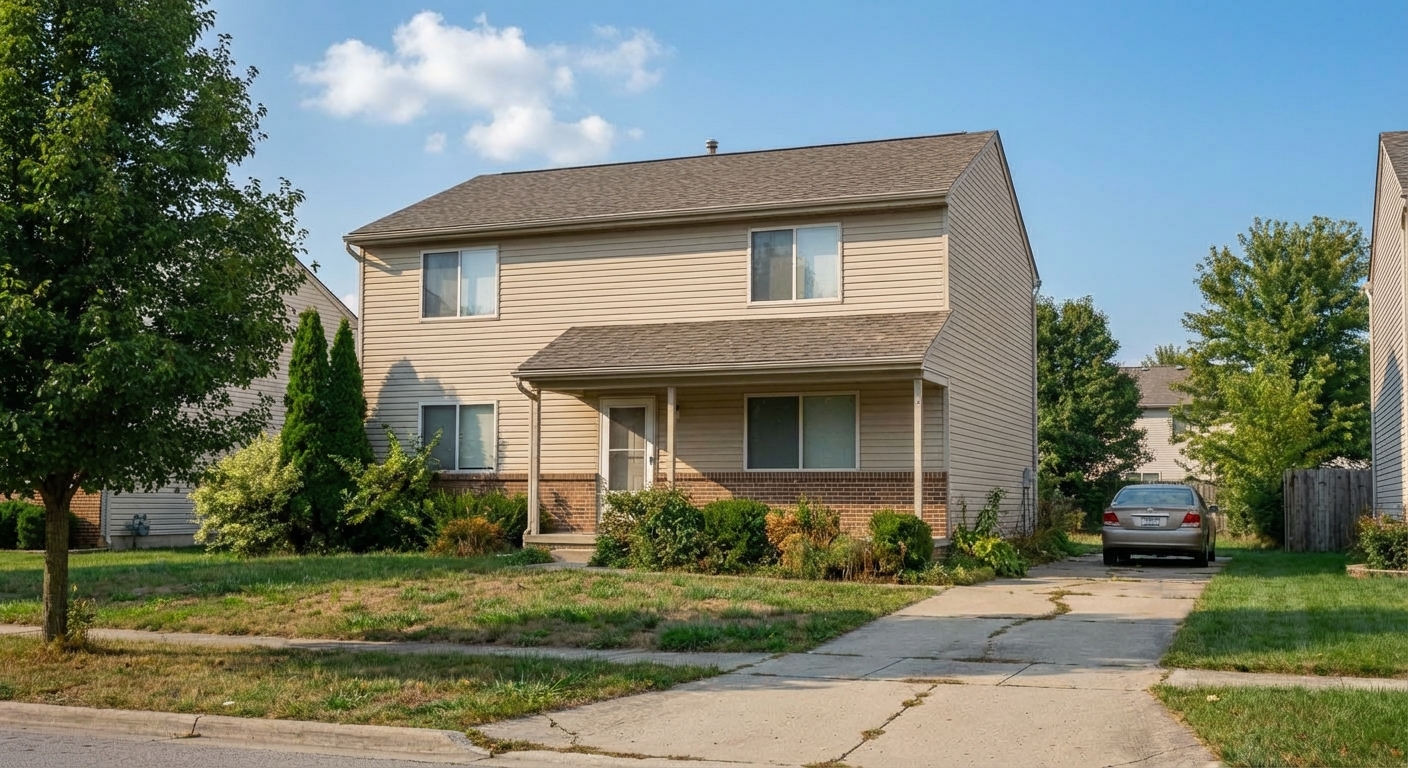
Roomagen Sky Replacement is an AI-powered photo editing tool that swaps overcast, gray, or dull skies with vibrant blue skies or dramatic sunsets in any exterior photo. Used by real estate agents, hotel managers, commercial property owners, photographers, and architects, the output is the same building with a transformed sky that improves visual impact and curb appeal. Processing usually takes under a minute using 2 credits per image ($0.23–$0.40 depending on plan), with a free plan offering 6 credits.
Sky quality in exterior photos is often the first visual element that shapes a viewer’s first impression of a building or space — gray, overcast skies make properties, hotels, and commercial buildings look dreary and uninviting. Waiting for ideal weather conditions to reshoot can take days or weeks depending on season and location, costing $200+ in additional photographer fees plus the opportunity cost of delayed publication. Seasonal mismatches also create problems — winter photos with bare trees and gray skies do not appeal to spring and summer audiences. Roomagen offers 5 distinct sky types that can be applied to any exterior photo instantly, transforming weather-dependent photography into an on-demand service available 24/7.
No credit card required. Results usually in under a minute.
Features
Replace overcast or bland skies with stunning blue skies or dramatic sunsets. AI-powered sky replacement that looks completely natural — for property listings, hotels, commercial buildings, and any exterior photo.
Transform Cloudy Skies to Blue
Detects sky boundaries with precision around trees and rooflines
Dramatic Sunset Skies
Matches replacement sky lighting to ground-level color temperature
Consistent Property Photo Skies
Offers 20+ sky presets from clear blue to dramatic cloudscapes
How It Works
Get professional results in three simple steps
Drop your photos here
or browse files
Upload Your Photos
Upload an exterior property photo in JPEG, PNG, or WebP format (up to 50 MB). The photo should have a clearly visible sky area — the more sky visible, the more dramatic the replacement effect. Interior photos or images with no visible sky are not suitable for this tool. The AI detects the horizon line and precisely maps the boundary between sky and foreground elements including rooflines, trees, power lines, chimneys, and architectural details. This edge detection uses sub-pixel accuracy to avoid visible artifacts where the new sky meets the existing scene.
AI Processing
Select from 5 sky types: blue with scattered clouds (the most popular choice for standard property listings, creating a bright and appealing look), clear blue (a clean, cloudless sky for minimalist architectural photography), dramatic clouds (a textured, dynamic sky for properties with expansive views or dramatic architecture), golden hour (warm sunset-like lighting for luxury and aspirational marketing), or overcast bright (a soft, even light for consistent shadow-free photography). Each sky type includes matched ground-level lighting adjustments — selecting golden hour adds warm tones to the building facade, while clear blue produces neutral daylight on surfaces.
Download Results
Download your sky-replaced photo in under a minute. The AI adjusts ground-level lighting, surface reflections, and shadow tones to match the new sky conditions, ensuring a natural and cohesive result. For portfolio consistency, apply the same sky type across all exterior photos of a property — this ensures uniform conditions regardless of when individual photos were actually taken. Results are delivered in JPEG format at your plan's resolution.
Why Choose Roomagen
Blue Sky Options
Detects sky boundaries with precision around trees and rooflines
Sunset & Twilight Skies
Matches replacement sky lighting to ground-level color temperature
Seasonal Sky Variations
Offers 20+ sky presets from clear blue to dramatic cloudscapes
Who Is It For?
Real Estate & Hospitality
Ensure every exterior photo features a perfect sky regardless of weather — for property listings, hotel facades, and resort marketing.
Commercial & Architecture
Present commercial buildings and architectural projects with consistent, attractive skies that complement professional presentations.
Photographers & Content Creators
Eliminate weather dependency from exterior shoots and deliver consistent sky quality across all client projects.
Common Use Cases
Overcast Listing Rescue
Replace gray, flat, overcast skies in exterior listing photos with vibrant blue skies and natural-looking clouds. The AI automatically adjusts the horizon lighting and building surface tones to match the new sky conditions, producing a natural-looking result. Blue with clouds is the most selected sky type for standard residential listings.
Golden-Hour Curb Appeal
Apply a golden hour sky to any exterior photo for warm, aspirational lighting that enhances curb appeal and creates a premium marketing feel. No need to schedule a shoot during the actual golden hour — convert any midday photo to golden warmth instantly. Particularly effective for luxury listings and waterfront properties.
Consistent Portfolio Sky
Apply the same sky type across an entire property photo set for visual consistency. All exterior photos get matching sky conditions regardless of when they were actually photographed.
Seasonal Marketing Adjustment
Switch between bright summer skies and dramatic autumn skies for seasonal marketing campaigns. Each sky change costs 2 credits, making it easy to create seasonal variations.
New Construction Marketing
Construction timelines rarely align with ideal weather conditions. Replace gray, overcast skies in new construction photos with vibrant blue skies before the project is even complete. Create aspirational marketing materials that show the finished property under perfect conditions, attracting early buyers and investors.
Property Portfolio Standardization
Photos taken across different days and seasons inevitably have inconsistent sky conditions — some bright blue, others gray and flat. Apply the same sky type to all exterior photos in a portfolio or property set to create visual consistency across marketing materials, websites, and listing platforms.
Reshooting on a better day costs $200+ in photographer fees with no guarantee the weather will cooperate. Manual sky replacement in Photoshop costs $30–$80 per image and takes 15–20 minutes of skilled editing requiring precise horizon detection and tree-edge masking. Automated desktop applications like Luminar AI cost $79 but require learning the software and manual adjustment for each image. Roomagen replaces skies for 2 credits ($0.23–$0.40 depending on plan) in under a minute with automatic horizon detection and ground-level lighting adjustment included.
| Roomagen | Reshooting on a Better Day | |
|---|---|---|
| Cost | $0.23–$0.40 | $200+ reshoot fee |
| Turnaround | Usually under a minute | Schedule around weather |
| Sky options | 5 types on demand | Dependent on weather luck |
| Lighting match | Automatic AI | Hope for consistent light |
| Availability | 24/7 any weather | Weather-dependent |
| Consistency | Same sky across all photos | Varies shot to shot |
Technical Specifications
- Supported formats
- JPEG, PNG, WebP
- Max file size
- 50 MB
- Output resolution
- HD / Ultra HD (Pro & Business)
- Sky types
- 5 (blue with clouds, clear blue, dramatic clouds, golden hour, overcast bright)
- Lighting adaptation
- Horizon-aware lighting match to new sky
- Processing time
- Usually under a minute
- AI model
- Gemini AI
- Credit cost
- 2 credits per image
Pricing
| Plan | Price | Credits/mo | Per Image | Resolution |
|---|---|---|---|---|
| Free | $0 | 6 (one-time) | Free | 2K first edit, then 1K |
| Starter | $12/mo | 60 | $0.40 | 2K |
| Pro | $29/mo | 200 | $0.29 | 2K or 4K (4 credits) |
| Business | $79/mo | 700 | $0.23 | 2K or 4K (4 credits) |
Per-image cost = 2 credits. Annual plans reduce cost by ~17%. Credit packages: 60/$19, 180/$45, 360/$79.
Frequently Asked Questions
Everything you need to know about Roomagen
Roomagen's AI detects the sky boundary with precision, even around trees and complex rooflines. It then replaces the sky with a realistic option that matches the scene's lighting direction and color temperature.
Roomagen matches lighting direction, color temperature, and performs pixel-level edge blending for completely natural results. The replaced sky looks like it was photographed on that specific day and time.
Roomagen offers clear blue skies, partly cloudy, dramatic cumulus clouds, golden hour sunset, twilight, and seasonal variations. Over 20 sky presets cover every mood and aesthetic preference.
Roomagen handles complex rooflines, chimneys, trees, and power lines with precision edge detection. Even fine branches and leaves are cleanly separated from the original sky for seamless replacement.
Roomagen adjusts the replacement sky's color temperature and brightness to match the ground-level lighting. A morning photo receives a morning sky, while afternoon shots get appropriate afternoon light.
Roomagen replaces skies in under a minute per image with no manual masking or selection required. This speed makes it practical to enhance an entire portfolio of exterior photos in minutes.
Roomagen only modifies the sky region while preserving the property, landscaping, and ground-level elements untouched. Color temperature adjustments ensure the entire scene looks cohesive with the new sky.
Roomagen processes aerial and drone photos with the same sky replacement quality as ground-level shots. The AI adapts to overhead perspectives and wider sky coverage areas seamlessly.
It depends on the MLS. Some count a replaced sky as a digitally altered photo that needs a label and the original, while others do not. Roomagen does not add a label, so check your MLS rules and label the photo where they require it.
Real estate photographers shooting in frequently overcast regions, listing agents needing consistent exterior photos, and property marketing teams maintaining brand-standard imagery all rely on Roomagen's sky replacement.
Explore Related Tools
Discover more AI-powered tools to enhance your visual content
Day to Dusk Photo Editing
Turn a daytime exterior or room photo into a sunset, dusk or night photo with warm window glow. Pick the hour on a 24-hour slider; 2 credits per photo.
Learn moreAI Photo Enhancement — Professional-Looking Results in Under a Minute
Enhance any photo automatically with AI. HDR processing, color correction, lens fix, and professional-grade adjustments, usually in under a minute — for property listings, hotel rooms, product shots, and more.
Learn moreDrone & Aerial Photo Editing Services
Drone and aerial photo editing: AI lifts haze, balances color and sharpens detail in one pass, usually in under a minute. 6 free credits when you sign up.
Learn moreExterior Home Rendering & Visualization
Create photorealistic exterior renders showing home improvements, new construction, or facade transformations.
Learn moreVirtual Landscaping Design
Virtually landscape any outdoor space with plants, trees, gardens, and features. Boost curb appeal for properties, hotels, resorts, and commercial spaces without breaking ground.
Learn more