Virtual Kitchen Renovation & Remodeling
Roomagen Kitchen Virtual Renovation is an AI-powered kitchen remodeling preview tool that visualizes new cabinets, countertops, backsplashes, and appliances on existing kitchen photos. Used by real estate agents, homeowners, interior designers, architects, and hospitality managers, the output shows the kitchen with selected renovation materials applied photorealistically. Processing takes 20-40 seconds using 2 credits per image ($0.23–$0.40 depending on plan), with a free plan offering 6 credits.
Dated kitchens are a top reason potential buyers, tenants, and guests form negative first impressions of a space. Kitchen remodels cost $15,000-$50,000 with no guarantee the choices will appeal to the target audience. The kitchen is the most scrutinized room across real estate, hospitality, and rental markets — an outdated kitchen adds 15-25 extra days on market for property sales and reduces booking rates for vacation rentals. Physical kitchen renovation requires $15,000-50,000 investment plus 4-8 weeks of construction. The wrong cabinet and countertop choices may not appeal to the target market. Roomagen generates 3-5 different renovation visions of the same kitchen in minutes, allowing owners and designers to test preferences without physical construction.
No credit card required. Results usually in under a minute.
Features
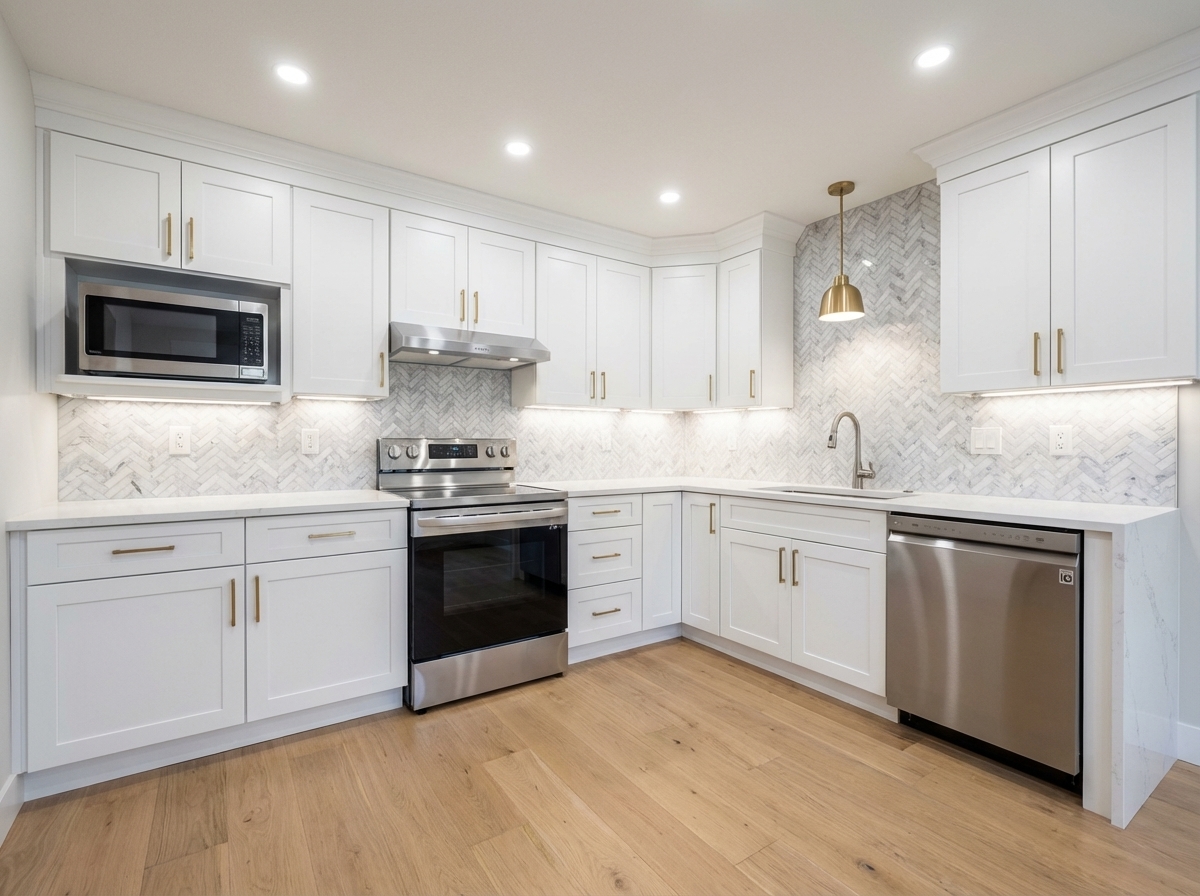
Virtually renovate kitchens with new cabinets, countertops, backsplashes, and appliances. Show clients, buyers, or guests the kitchen’s full potential without physical construction.
Modern Kitchen Transformations
Replaces cabinets, countertops, and backsplashes in one render
Cabinet & Countertop Updates
Shows multiple cabinet finish options side by side
Appliance Visualization
Updates visible appliances to modern stainless or integrated styles
How It Works
Get professional results in three simple steps
Drop your photos here
or browse files
Upload Your Photos
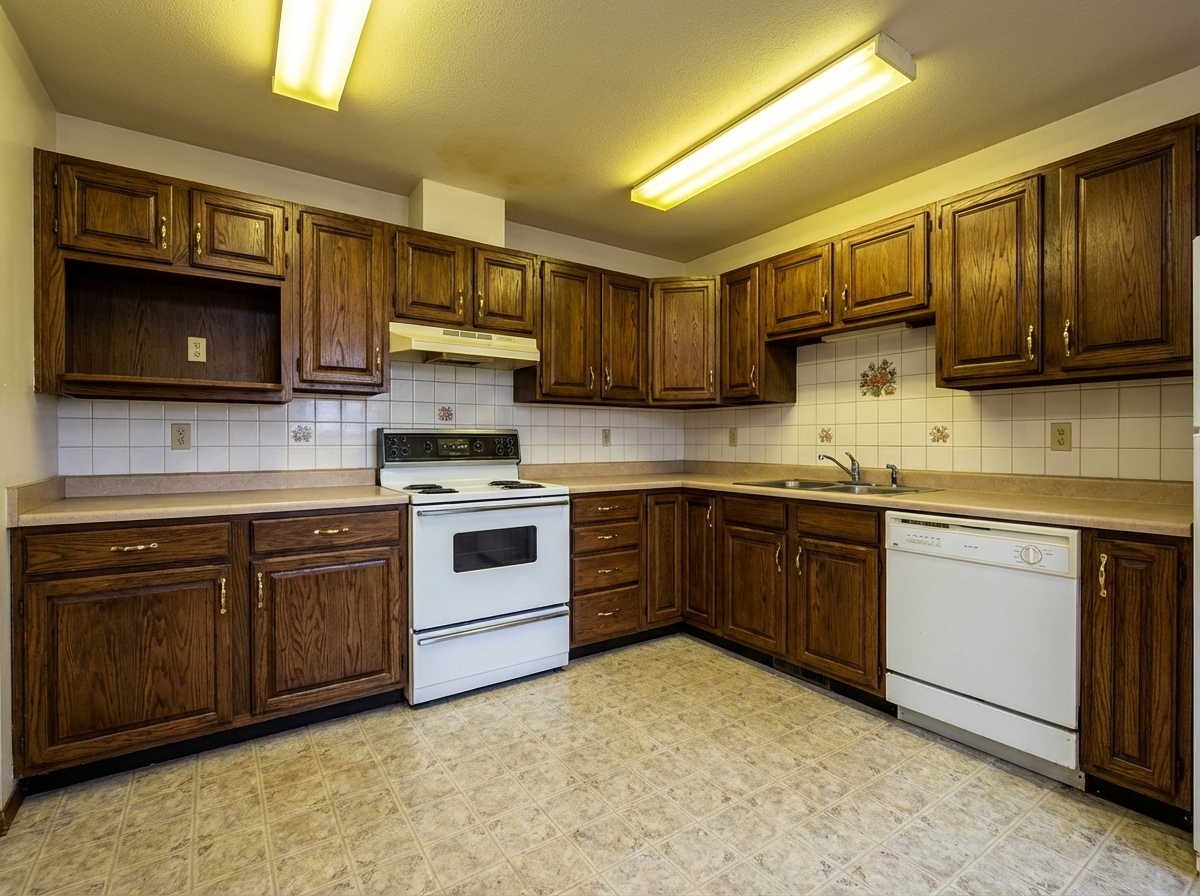
Upload a kitchen photo in JPEG, PNG, or WebP format (up to 50 MB). The tool works with any kitchen condition — from 1970s wood panel cabinets to 1990s laminate, damaged or even abandoned kitchens. The AI identifies each kitchen element separately: upper cabinets, lower cabinets, countertop surface, backsplash, fixtures (faucet, handles), built-in appliances, and lighting. Structural elements including window positions, door locations, and wall positions are preserved as protected zones while cosmetic surfaces are marked for renovation.
AI Processing
Pick Kitchen as the room type and one of 10 styles. The AI updates cabinets, countertops, backsplash and fixtures in that style as one coordinated design. There is no free-text field or reference image; to change a single element, use a renovation mode such as Cabinets or Countertops, or describe the change in the Design Companion chat.
Download Results
Download your renovated kitchen, usually in under a minute depending on kitchen complexity. The output is photorealistic — cabinet doors, countertop surface, backsplash pattern, fixture metals, and even built-in appliance appearance are updated cohesively. Reprocess the same photo with different styles to create A/B comparisons for buyer feedback, each version costing 2 credits. Note the visualization in your listing description as 'AI renovation visualization' to maintain transparency with potential buyers about the current actual condition.
Why Choose Roomagen
Cabinet Refacing Options
Replaces cabinets, countertops, and backsplashes in one render
Countertop Material Changes
Shows multiple cabinet finish options side by side
Backsplash Design
Updates visible appliances to modern stainless or integrated styles
Who Is It For?
Real Estate Agents & Homeowners
Show buyers how a dated kitchen would look with modern finishes to overcome the primary objection to older properties.
Interior Designers & Architects
Present multiple kitchen renovation concepts with different cabinet, countertop, and backsplash combinations for client approval.
Hospitality & Property Managers
Evaluate kitchen upgrade options across rental units and hospitality properties to determine which renovations maximize returns.
Common Use Cases
Cabinet Style Preview
See how different cabinet styles — shaker, flat-panel, raised-panel — would look in your kitchen before ordering. Test white, wood-tone, and colored cabinet options at 2 credits each.
Countertop Material Selection
Visualize marble, granite, quartz, or butcher block countertops in your actual kitchen. Compare materials side by side to make a confident selection before visiting showrooms.
Kitchen Listing Enhancement
Show buyers what an outdated kitchen could become with renovation. Include before-and-after renovation previews in listing materials to help buyers see past dated finishes.
Full Kitchen Modernization Preview
See a complete kitchen transformation — new cabinets, countertops, backsplash, and appliances — in a single preview. The AI applies cohesive design across all kitchen elements.
Kitchen Upgrade ROI Analysis
Visually compare different renovation investment levels to determine the best return on investment. Generate visualizations for budget renovation (cabinet painting plus new handles at approximately $3,000), mid-range renovation (new cabinets plus countertops at approximately $20,000), and premium renovation (complete kitchen overhaul at approximately $45,000). Share all three versions with buyers or your agent network to measure which investment level generates the most interest relative to its cost.
Builder Spec Home Customization
Show construction company standard kitchen plans with different finish packages for buyer selection. Generate versions showing 'standard white' versus 'premium dark wood' versus 'luxury marble' finish packages on the same kitchen layout. Buyers can visually compare upgrade packages and make informed decisions about which premium options to select, eliminating the need for showroom visits and reducing the sales cycle for new construction projects.
Unlike committing to a $30,000 kitchen renovation, Roomagen previews multiple finish combinations digitally in minutes so you invest only in upgrades that attract your target audience. Physical kitchen renovation costs $15,000-50,000 with 4-8 week timelines and irreversible material selections. 3D kitchen design software requires measurement input and CAD modeling — none work from an existing photograph. Manual photomontage by a professional editor costs $100-300 per image and takes 2-4 hours. Roomagen processes at 2 credits per image directly on your existing kitchen photo, usually in under a minute.
| Roomagen | Kitchen Remodel | |
|---|---|---|
| Cost | $0.23–$0.40 | $15,000–$50,000 |
| Turnaround | Under 90 seconds | 4–8 weeks |
| Preview options | Unlimited style variations | One final result |
| Cabinet preview | Usually under a minute | Order and wait 4–6 weeks |
| Countertop options | Test all materials | Visit showrooms |
| Risk | Zero | Budget overruns, back-order delays |
Technical Specifications
- Supported formats
- JPEG, PNG, WebP
- Max file size
- 50 MB
- Output resolution
- HD / Ultra HD (Pro & Business)
- Renovation scope
- Cabinets, countertops, backsplash, appliances, fixtures, lighting
- Design styles
- 10 built-in + custom
- Processing time
- Usually under a minute
- AI model
- Gemini AI
- Credit cost
- 2 credits per image
Pricing
| Plan | Price | Credits/mo | Per Image | Resolution |
|---|---|---|---|---|
| Free | $0 | 6 (one-time) | Free | 2K first edit, then 1K |
| Starter | $12/mo | 60 | $0.40 | 2K |
| Pro | $29/mo | 200 | $0.29 | 2K or 4K (4 credits) |
| Business | $79/mo | 700 | $0.23 | 2K or 4K (4 credits) |
Per-image cost = 2 credits. Annual plans reduce cost by ~17%. Credit packages: 60/$19, 180/$45, 360/$79.
Frequently Asked Questions
Everything you need to know about Roomagen
Roomagen updates cabinets, countertops, backsplashes, appliances, flooring, lighting, and paint colors in kitchen photos. Every visible element can be modernized independently or as a complete transformation.
Roomagen shows multiple cabinet finish options including painted white, navy, sage, and natural wood tones. Shaker, flat-panel, and raised-panel door styles are all available for comparison.
Roomagen replaces visible appliances with modern stainless steel, matte black, or integrated panel options. The AI matches appliance scale and placement to the existing kitchen configuration.
Yes, with the Countertops renovation mode, which offers countertop materials and tones. Virtual Renovation itself picks materials to match the style you choose.
A renovation preview shows buyers what a dated kitchen could become, which addresses a common objection to older homes. Label it as a digitally altered image and keep the original photo in the listing.
Yes, with the Backsplash renovation mode, which offers backsplash styles and tones. In Virtual Renovation, the backsplash follows the style you choose.
Roomagen generates each kitchen renovation preview in 20-40 seconds, making it fast to test multiple combinations. A full comparison set of cabinet and countertop options can be ready in under five minutes.
Roomagen maintains the existing kitchen layout, island position, and cabinet configuration while updating surface finishes. The renovation changes appearances without altering the functional footprint.
Yes, with the Cabinets renovation mode, which changes the cabinet style and color only. Virtual Renovation updates the whole kitchen at once.
Home sellers considering pre-sale kitchen updates, real estate agents marketing dated listings, and kitchen designers presenting remodel concepts all use Roomagen's kitchen renovation visualization tool.
Explore Related Tools
Discover more AI-powered tools to enhance your visual content
Virtual Bathroom Renovation
Transform outdated bathrooms virtually with new tiles, vanities, fixtures, and finishes. Help clients visualize modern possibilities without physical construction.
Learn moreVirtual Renovation & Remodeling
Show clients renovation potential with virtual remodeling. Update kitchens, bathrooms, flooring, and finishes digitally before selling, leasing, or redesigning.
Learn moreRestyle Surfaces - Update Finishes
Restyle any surface in your photos — countertops, floors, walls, backsplashes. Preview different materials and finishes side by side.
Learn moreVirtual Flooring Replacement
Preview new flooring virtually before renovation. See how hardwood, tile, carpet, or vinyl would look in any room.
Learn moreVirtual Wall Repainting
Virtually repaint walls to preview colors before painting. See how different paint colors would look in any room with realistic lighting.
Learn more