
AI Chat Photo Editor — Edit Any Photo by Typing What You Want
Roomagen AI Design Chat is an AI photo editor you prompt in plain language: describe the change and it edits your interior or exterior photo, reaching 40+ tools from one chat.
Traditional photo editing requires learning complex software interfaces, selecting specific tools, and configuring technical parameters for every change. A simple wall color change in Photoshop takes 15-30 minutes and design expertise. Roomagen Design Companion eliminates this friction entirely — type "paint the walls sage green" and the AI selects the correct tool, configures parameters, and delivers a photorealistic result in under 90 seconds for 2 credits.


Original3D furnished3D emptyDark wood


OriginalTidiedNew sofaRestyled


OriginalNavy wallsWood floorHome office
- You:
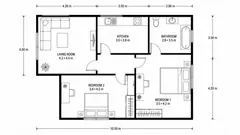
Here's the flat's floor plan.
Design Companion
Two bedrooms, a living room, a kitchen and a bathroom. How would you like to see it?
- Continued from the original
- You:
Show it in 3D, furnished
Design Companion
Design reasoning
I kept the walls and doors where the plan has them and furnished each room for its use: a sofa in the living room, a bed in each bedroom.
- Continued from the original
- You:
Show the rooms empty
Design Companion
Design reasoning
The same layout with nothing inside, so each room's floor and doors read clearly.
- Continued from the original
- You:
Dark floors, a modern kitchen
Design Companion
Design reasoning
Dark wood floors and a kitchen island give the same layout a more modern feel.
- All three versions are in the history. Tap one to compare.

- You:
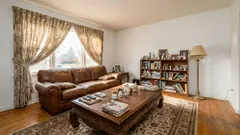
Our living room, for the listing.
Design Companion
Big window, good daylight. Where shall we start?
- Continued from the original
- You:
Clear the table and shelves
Design Companion
Design reasoning
I took the magazines off the table and the ornaments off the bookcase. The furniture and the light stay as they were.
- Continued from the original
- You:
Try a modern sofa
Design Companion
Design reasoning
A dark velvet sofa in place of the leather one, and a glass table in place of the wooden one. The curtains and the window stay.
- Continued from the original
- You:
Restyle the whole room
Design Companion
Design reasoning
Sheer curtains, a light corner sofa and floating shelves. The window and the wood floor stay.
- All three versions are in the history. Tap one to compare.

- You:
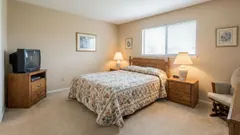
I'd like to refresh my bedroom.
Design Companion
A warm room with carpet. What shall we change first?
- Continued from the original
- You:
Paint the walls navy
Design Companion
Design reasoning
I painted the walls navy. The ceiling, the carpet and the furniture stay as they were.
- Continued from the original
- You:
Wood floor instead of carpet
Design Companion
Design reasoning
I replaced the carpet with a light wood floor and laid a small rug by the bed.
- Continued from the original
- You:
Turn it into a home office
Design Companion
Design reasoning
I took out the bed and put a desk under the window and a bookcase in the corner. The wall colour and the carpet stay.
- All three versions are in the history. Tap one to compare.

Pick a suggestion in this example. In the app, you type your own.
Press and hold the photo to see the original.
A prepared example: the images were made with Roomagen's tools; the replies were written for this page. Each edit is AI-generated, so compare it with your original before you publish.
Demo examples: the before images were created with AI for this site; they are not customer photos.
Features
Type what you want changed and the Design Companion edits your interior or exterior photo: stage, recolor, remove objects. 2 credits per edit, under 90 seconds.
How Does Chat-Based Photo Editing Work?
40+ specialized AI tools accessible through a single conversational interface — no forms, no configuration
What Can You Edit Through Conversation?
Iterative multi-step editing where each change preserves all previous modifications automatically
Why Choose Conversational AI Over Traditional Tools?
AI-powered intent parsing that understands natural language in 9 languages and selects the optimal tool
How It Works
Get professional results in three simple steps
Drop your photos here
or browse files
Upload Your Photos
Drag and drop your photos or browse to upload them. Roomagen accepts JPEG, PNG and WebP files up to 50 MB each.
AI Processing
Our advanced AI analyzes your images and applies professional enhancements automatically. Choose from virtual staging, enhancement, object removal, or day-to-dusk conversion.
Download Results
Preview your transformed images and download high-resolution results ready for listings, marketing materials, social media, and more. No watermarks on premium plans.
Why Choose Roomagen
Upload, Describe, Transform — Three-Step Workflow
40+ specialized AI tools accessible through a single conversational interface — no forms, no configuration
40+ Specialized Tools Accessible from One Chat Interface
Iterative multi-step editing where each change preserves all previous modifications automatically
Each Edit Preserves Previous Changes Automatically
AI-powered intent parsing that understands natural language in 9 languages and selects the optimal tool
Who Is It For?
Real Estate Professionals
Iterate on listing photos quickly — stage, enhance, declutter, and adjust in one conversation without switching between tools or re-uploading images.
Interior Designers
Present multiple design concepts to clients by describing changes in plain language — swap furniture styles, test color palettes, preview material changes through chat.
Homeowners Planning Renovations
Visualize renovation ideas before committing — "what would my kitchen look like with white cabinets and marble countertops?" answered visually in 90 seconds.
Unlike form-based AI tools that require selecting a tool, filling configuration fields, and processing one change at a time, Design Companion understands context. Say "change the floor to oak hardwood" followed by "now add a modern sofa" — each edit builds on the previous result. Traditional workflows require re-uploading and re-configuring for every single change.
| Design Companion | Traditional Photo Editing | Single AI Tools | |
|---|---|---|---|
| Interface | Natural language chat | Complex software UI | Form-based configuration |
| Tools available | 55 in one chat | Manual plugin selection | 1 tool per session |
| Multi-step editing | Automatic context preservation | Manual layer management | Re-upload for each change |
| Learning curve | Zero — type what you want | Weeks to months | Per-tool configuration |
| Cost per edit | 2 credits ($0.23-$0.40) | $30-100/hour designer | 2 credits per tool |
| Processing time | Under 90 seconds | 15-60 minutes per edit | Under 90 seconds |
Frequently Asked Questions
Everything you need to know about Roomagen
Upload a photo, then type what you want changed in plain language. The AI analyzes your request, selects the appropriate tool from 40+ options, and generates the edited image. Each edit costs 2 credits and takes under 90 seconds.
Virtual staging, furniture swapping, wall/floor color changes, object removal, photo enhancement, renovation previews, landscaping, exterior changes, floor plan conversion, and more. All 40+ tools are accessible through natural language.
Yes. Design Companion supports iterative editing — each new instruction builds on the previous result. Change the wall color, then add furniture, then swap the flooring — all in one conversation without re-uploading.
The AI uses intent parsing to analyze your message, identify the correct tool, and configure parameters automatically. It understands context from previous edits and can ask clarifying questions if your request is ambiguous.
Design Companion responds in 9 languages: English, Turkish, French, German, Spanish, Russian, Japanese, Chinese, and Portuguese. Type your instructions in any supported language.
Image generation edits cost 2 credits each ($0.23-$0.40). Asking questions, getting design ideas, and clarification responses are free — only actual image changes deduct credits.
Yes. Every edit includes a Design Reasoning section where the AI explains why it chose specific colors, furniture, or layouts. This feature helps users understand design principles and refine their requests.
You can describe what needs changing and the AI will adjust. If the generation fails entirely, credits are automatically refunded. You can also revert to any previous version in your session history.
Session limits depend on your plan: Free users get limited sessions, Starter allows 25 active sessions, Pro allows 100, and Business allows 500. Sessions are retained based on plan tier.
Individual tools require selecting the right tool, configuring options, and processing one change. Design Companion handles tool selection automatically and supports multi-step editing in one conversation — faster workflow for complex projects.
Browse the Full Collection
Every room, style, and use case in this tool family — each with its own dedicated tool.
Ai Chat-Usecase(7)
Ai Chat-Audience(6)
Ai Chat-Feature(4)
Explore Related Tools
Discover more AI-powered tools to enhance your visual content
Free AI Virtual Staging — Furnish Any Empty Room, Change Walls and Floors
Stage empty rooms online with AI, usually in under a minute: 13 design styles and 15 room types for listings, rentals and hotels. 6 free credits, no credit card.
Learn moreAI Photo Enhancement — Enhance Real Estate, Hotel and Product Photos
Enhance any photo with AI: HDR, color correction, sharpening and lens fixes, usually in under a minute — for listings, hotel rooms, product shots and more.
Learn moreAI Object Removal Service — Remove Objects From Property and Product Photos
Erase unwanted objects from any photo — cars, signs, trash cans, clutter — and AI rebuilds the background, usually in under a minute, for listings and products.
Learn moreVirtual Home Renovation Service — AI Remodeling for Real Estate and More
Show a room after renovation: AI updates cabinets, countertops, flooring, tile and fixtures in one pass, in 20–40 seconds, before you sell, lease or redesign.
Learn moreVirtual Landscaping Design — 12 Garden Styles Added to Your Yard Photo
Add plants, trees, gardens and outdoor features to a photo of any yard or property in 12 landscaping styles, without breaking ground. 2 credits per image.
Learn more