Free AI Virtual Staging — Stage Any Empty Room in Under a Minute
Roomagen Virtual Staging is an AI-powered tool that digitally furnishes empty rooms with photorealistic furniture and decor. Users select from 13 design styles (modern, scandinavian, farmhouse, industrial, and others), 15 room types, and optional wall or floor changes. Each image uses 2 credits on a credit-based system, with plans starting at $12/month for 60 credits. A free plan with 6 credits is available to try any tool without a credit card.
Empty rooms are difficult to visualize as functional, lived-in spaces — whether in a property listing, a design portfolio, or an Airbnb showcase. In NAR's 2025 Profile of Home Staging, 49% of sellers' agents said staging reduced a home's time on market, while a staging service cost a median of $1,500. Every day a property sits vacant on the market represents potential lost value for the seller. Roomagen addresses this by digitally furnishing empty rooms with photorealistic furniture and decor. Users select from 13 design styles, 15 room types, and optional wall or floor changes, receiving staged images in under 90 seconds at 2 credits per image.
No credit card required. 6 free credits included.
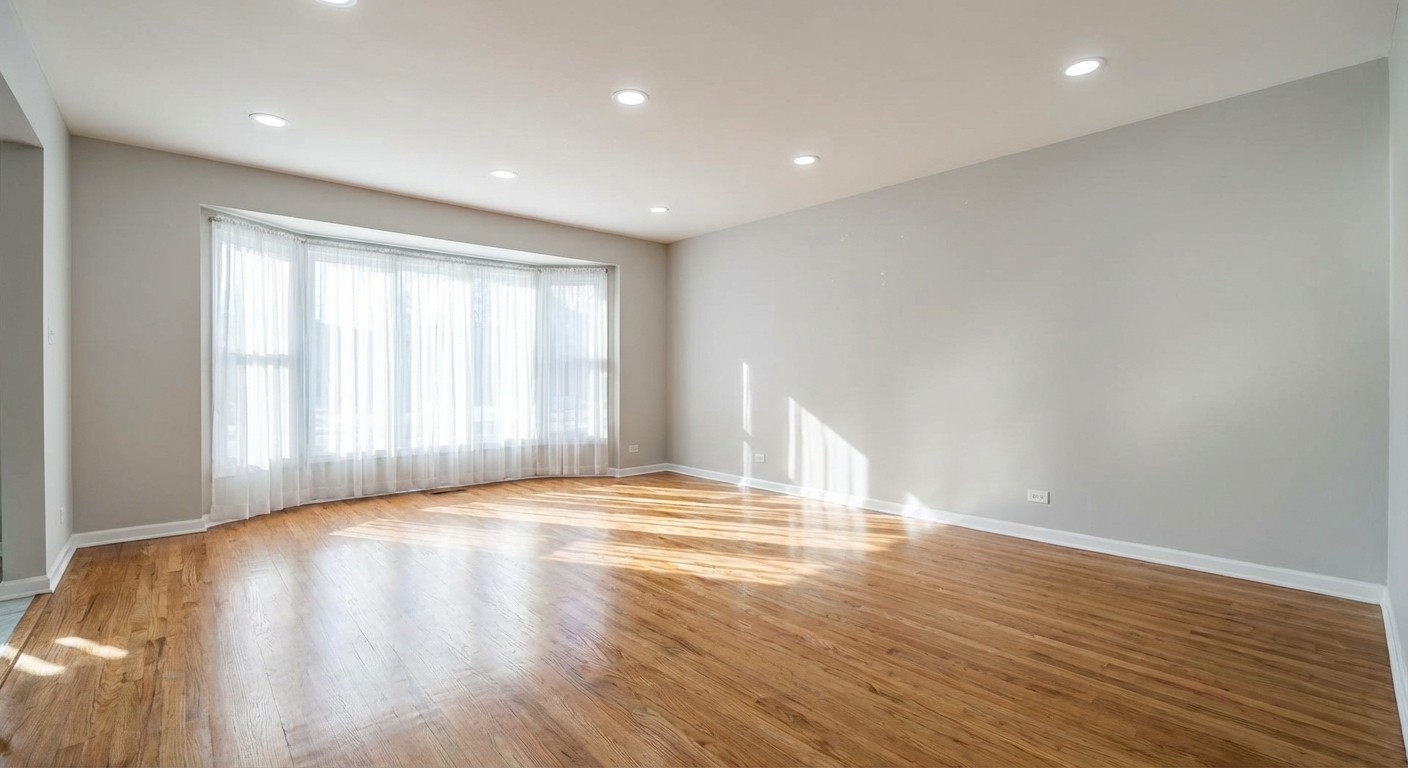
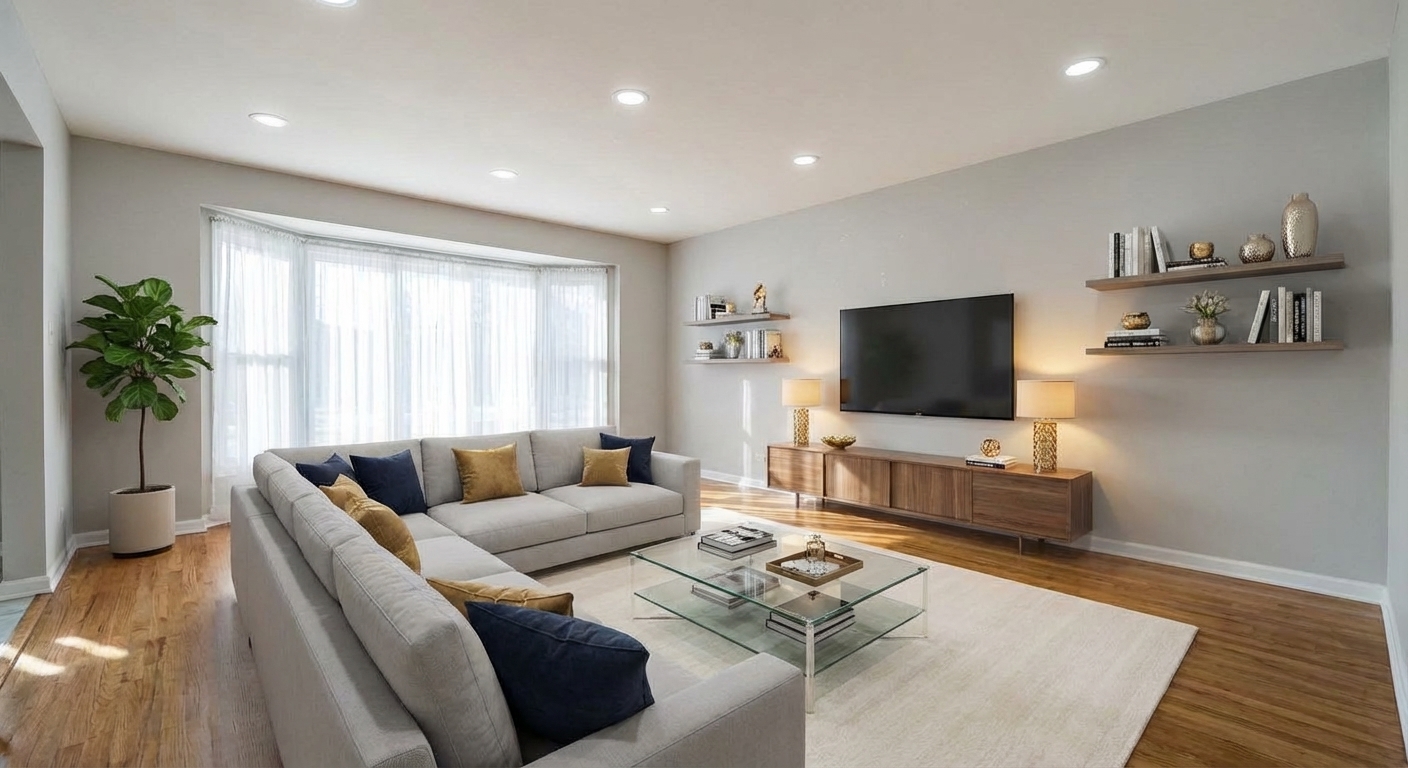
Features
Stage vacant rooms with AI, usually in under a minute. 13 design styles, 15 room types, listing-ready photos for real estate, rentals and hospitality. 6 free credits, no credit card required.
Photorealistic AI Furniture Placement
AI places furniture with accurate perspective and lighting
13 Design Styles, 15 Room Types
13 design styles across 15 supported room types
Flexible Credit-Based Pricing
Optional wall, floor, and individual furniture customization
How It Works
Get professional results in three simple steps
Drop your photos here
or browse files
Upload Your Photos
Drag and drop any room photo in JPEG, PNG, or WebP format (up to 50 MB). The AI works best with well-lit, empty rooms photographed straight-on at chest height. Wide-angle shots that capture most of the room give the AI more spatial context to work with. The system analyzes room geometry, identifies walls, floors, windows, and architectural features, then maps the perspective grid that will be used to place furniture at correct scale and angle. Angled or dark photos may produce less accurate results, but the AI can handle most standard real estate photography conditions.
AI Processing
Select your room type from 15 options (living room, bedroom, kids room, studio, kitchen, dining room, home office, dressing room, laundry room, bathroom, hallway, entryway, balcony, terrace, garage) and a design style from 13 options (modern, scandinavian, minimalist, industrial, traditional, farmhouse, mid-century modern, coastal, luxury, bohemian, japandi, art deco, mediterranean). Then let the AI decide the furniture or choose the pieces yourself — for example, a living room offers sofa, coffee table, rug, side table, floor lamp, bookshelf, and accent chair. Optionally switch on wall color or floor material changes to see how different finishes complement your chosen style; both are off by default.
Download Results
Processing usually takes under a minute, depending on image complexity and selected options. Simple rooms with fewer furniture items process faster, while complex layouts with wall and floor changes take longer. Download the staged image at 2K (on the Free plan, 1K after your first Roomagen edit). You can re-stage the same photo with different settings — a different style, furniture selection, or wall/floor options — for 2 credits per variation. This makes it practical to compare multiple design directions before choosing one for your listing.
Why Choose Roomagen
How AI Virtual Staging Works
AI places furniture with accurate perspective and lighting
Customize Room Type, Style, and Furniture
13 design styles across 15 supported room types
Results in Under 90 Seconds
Optional wall, floor, and individual furniture customization
Who Is It For?
Real Estate Professionals
Stage vacant listings with photorealistic furniture to help potential buyers or renters visualize the space before visiting.
Hospitality & Vacation Rentals
Preview room layouts and decor options for hotel rooms and rental properties before purchasing furniture, reducing trial-and-error costs.
Interior Designers & Homeowners
Test design concepts in actual room photos — choose styles, swap furniture items, and compare wall or floor options before committing.
Common Use Cases
Vacant Property Listing
Upload an empty room photo, select a design style that matches the neighborhood demographic, and download a staged image ready to upload to listing platforms. A typical 10-room property can be fully staged in under 15 minutes.
Airbnb & Rental Decor Planning
Photograph your current empty rental space, try 3–4 different furniture styles, and compare the results side by side. Use the staged images to plan your furniture purchases before spending any money.
Interior Design Client Presentation
Stage a client's room in multiple styles to present options during a consultation. Toggle wall colors and floor materials to show how different finishes change the room's character. Each variation costs 2 credits.
Home Sale Preparation
Homeowners selling a vacant property can stage rooms themselves without hiring a professional stager. Upload photos, choose a style, and share staged images with your real estate agent for listing use.
Real Estate Marketing Package
Stage all rooms of a single property with coordinated design styles to create a complete marketing package. A typical 10-room property uses 20 credits ($2.30–$4.00 on monthly plans) and takes under 15 minutes. Upload each room, select a consistent style across the property, and download a cohesive set for listing sites, portals such as Zillow and Realtor.com, and print brochures.
Before-After Comparison Content
Create compelling before-and-after comparisons by pairing the original empty room photo with the staged version. Use these side-by-side images for Instagram carousels, Facebook listing posts, YouTube property tours, or real estate blog content. Before-after visuals consistently generate higher engagement than single staged images.
Physical home staging typically costs $1,500–$5,000 per property according to HomeAdvisor, plus 1–2 weeks of coordination with stagers, movers, and photographers. Roomagen stages a single image for 2 credits ($0.23–$0.40 depending on plan), with results delivered in under 90 seconds. For a 10-photo property, this translates to roughly $7–$13 versus thousands for physical staging. DIY staging — purchasing furniture from retailers like IKEA — runs $500–$2,000 per room plus weeks of shopping, assembly, and eventual resale or disposal. Freelance 3D rendering artists charge $200–$500 per image and require 2–5 business days per room. Roomagen produces comparable photorealistic results at a fraction of the cost and time of all three alternatives.
| Roomagen | Physical Staging | |
|---|---|---|
| Cost per room | $0.23–$0.64 | $500–$800 |
| Turnaround time | Under 90 seconds | 1–2 weeks |
| Style changes | 13 styles, 2 credits per run | Re-hire stager |
| Room types | 8 supported | Limited by inventory |
| Minimum commitment | 2 credits | Full property |
| Output resolution | 2K | Depends on photographer |
Technical Specifications
- Supported formats
- JPEG, PNG, WebP
- Max file size
- 50 MB
- Output resolution
- 2K on every plan (Free: 2K for your first Roomagen edit, then 1K)
- Design styles
- 13 built-in
- Room types
- 15 (living room, bedroom, kids room, studio, kitchen, dining room, home office, dressing room, laundry room, bathroom, hallway, entryway, balcony, terrace, garage)
- Customization
- Wall color, floor material, individual furniture selection
- Processing time
- Usually under a minute
- AI model
- Gemini AI
- Credit cost
- 2 credits per image
- Optional add-ons
- None — a flat 2 credits per image
Pricing
| Plan | Price | Credits/mo | Per Image | Resolution |
|---|---|---|---|---|
| Free | $0 | 6 (one-time) | Free | 2K first edit, then 1K |
| Starter | $12/mo | 60 | $0.40 | 2K |
| Pro | $29/mo | 200 | $0.29 | 2K |
| Business | $79/mo | 700 | $0.23 | 2K |
Per-image cost = 2 credits. Annual plans reduce cost by ~17%. Credit packages: 60/$19, 180/$45, 360/$79.
Frequently Asked Questions
Everything you need to know about Roomagen
Roomagen AI virtual staging uses machine learning to digitally place photorealistic furniture and decor into empty room photos. The technology analyzes room dimensions, lighting, and architecture to produce naturally staged results.
Roomagen processes virtual staging images, usually in under a minute, depending on image complexity and selected options. Results are available for immediate download once processing completes.
Free plan images include a Roomagen watermark. Paid plans (Starter, Pro, Business) produce watermark-free images. Users should add any disclosure labels required by their listing platform.
Each virtual staging image uses 2 credits. Per-image cost ranges from $0.19 on the Business yearly plan to $0.64 on credit packages. The free plan includes 6 one-time credits for 3 staged images. Paid plans start at $12/month with 60 credits.
Roomagen offers 13 design styles: modern, scandinavian, minimalist, industrial, traditional, farmhouse, mid-century modern, coastal, luxury, bohemian, japandi, art deco, and mediterranean. For a look that is not on the list, describe it to the Design Companion chat.
Roomagen supports 15 room types: living room, bedroom, kids room, studio, kitchen, dining room, home office, dressing room, laundry room, bathroom, hallway, entryway, balcony, terrace, and garage. The AI selects furniture appropriate to each room's function and scales items to the space.
Results are photorealistic: the AI keeps the room's perspective, lighting and shadows. Like any generative AI it can get a detail wrong, so compare each result with your original before you publish.
Yes, the same photo can be restaged in any available style. Each restaging uses 2 credits. Users can also toggle wall color changes, floor material changes, and select specific furniture items for each attempt.
It can help. In NAR's 2025 Profile of Home Staging, 49% of sellers' agents said staging reduced a home's time on market; the figure covers home staging in general, not virtual staging specifically. Virtual staging lets every listing photo show furnished rooms, labeled as staged where your market requires it.
Virtual Staging adds a complete furniture set to an empty room. Redesign Furnished Rooms replaces all existing furniture with a new style. Add Furniture inserts specific pieces into a room. Swap Furniture exchanges selected items while keeping the rest. Room Repurpose changes a room's function entirely. Choose based on whether you start with an empty or furnished room.
Browse the Full Collection
Every room, style, and use case in this tool family — each with its own dedicated tool.
Tour Photos(1)
Room-Specific Staging(58)
- Virtual Staging for Living Rooms
- Bedroom Virtual Staging
- Kitchen Virtual Staging
- Dining Room Virtual Staging
- Bathroom Virtual Staging
- Home Office Virtual Staging
- Kids Room Virtual Staging
- Studio Apartment Virtual Staging
- Modern Living Room Virtual Staging
- Scandinavian Living Room Staging
- Farmhouse Living Room Staging
- Coastal Living Room Staging
- Minimalist Living Room Staging
- Luxury Living Room Staging
- Industrial Living Room Staging
- Bohemian Living Room Staging
- Modern Bedroom Virtual Staging
- Scandinavian Bedroom Staging
- Farmhouse Bedroom Staging
- Coastal Bedroom Staging
- Minimalist Bedroom Staging
- Bohemian Bedroom Staging
- Luxury Bedroom Staging
- Japandi Bedroom Staging
- Modern Kitchen Virtual Staging
- Farmhouse Kitchen Staging
- Scandinavian Kitchen Staging
- Industrial Kitchen Staging
- Mediterranean Kitchen Staging
- Coastal Kitchen Staging
- Modern Dining Room Virtual Staging
- Farmhouse Dining Room Staging
- Traditional Dining Room Staging
- Luxury Dining Room Staging
- Scandinavian Dining Room Staging
- Mediterranean Dining Room Staging
- Modern Bathroom Virtual Staging
- Minimalist Bathroom Staging
- Scandinavian Bathroom Staging
- Coastal Bathroom Staging
- Luxury Bathroom Staging
- Modern Home Office Virtual Staging
- Scandinavian Home Office Staging
- Minimalist Home Office Staging
- Industrial Home Office Staging
- Japandi Home Office Staging
- Modern Kids Room Virtual Staging
- Scandinavian Kids Room Staging
- Bohemian Kids Room Staging
- Modern Studio Virtual Staging
- Scandinavian Studio Staging
- Minimalist Studio Staging
- Mid-Century Modern Living Room Staging
- Art Deco Living Room Staging
- Japandi Living Room Staging
- Traditional Living Room Staging
- Traditional Bedroom Staging
- Mid-Century Modern Bedroom Staging
Design Styles(14)
- Modern Virtual Staging
- Scandinavian Virtual Staging
- Minimalist Virtual Staging
- Farmhouse Virtual Staging
- Coastal Virtual Staging
- Industrial Virtual Staging
- Luxury Virtual Staging
- Bohemian Virtual Staging
- Mid-Century Modern Virtual Staging
- Japandi Virtual Staging
- Traditional Virtual Staging
- Art Deco Virtual Staging
- Mediterranean Virtual Staging
- Custom Style Virtual Staging in the Design Companion Chat
Audience(6)
Explore Related Tools
Discover more AI-powered tools to enhance your visual content
AI Empty Room — Remove All Furniture From a Photo in 30 Seconds
Clear any furnished room for virtual restaging, renovation previews or tenant turnover. Fills in walls and floors behind furniture. 6 free credits included.
Learn moreRedesign a Furnished Room With AI — 13 Styles, Usually Under a Minute
Restyle any furnished room without moving a thing. Modern, Scandinavian, farmhouse, luxury and 9 more styles. Used by interior designers and realtors. Free to try.
Learn moreAdd Furniture or Objects to Any Photo
Add a sofa, TV, plant or any object to a room photo with AI. Realistic scale and lighting, no Photoshop skills needed. 6 free credits when you sign up.
Learn moreAI Photo Enhancement — Professional-Looking Results in Under a Minute
Enhance any photo automatically with AI. HDR processing, color correction, lens fix, and professional-grade adjustments, usually in under a minute — for property listings, hotel rooms, product shots, and more.
Learn moreAI Object & Item Removal from Photos
Remove unwanted objects, clutter, and distractions from any photo. AI intelligently fills backgrounds for clean, professional images — for property listings, hotel rooms, product shots, and portfolio photos.
Learn more