Floor Plan Redraw — Convert Old Plans to Digital
Roomagen Floor Plan Redraw turns old floor plans, scanned blueprints and hand sketches into clean digital floor plans in four drawing styles. Each run costs 2 credits ($0.23–$0.40 per image on monthly plans); check the redrawn numbers before publishing.
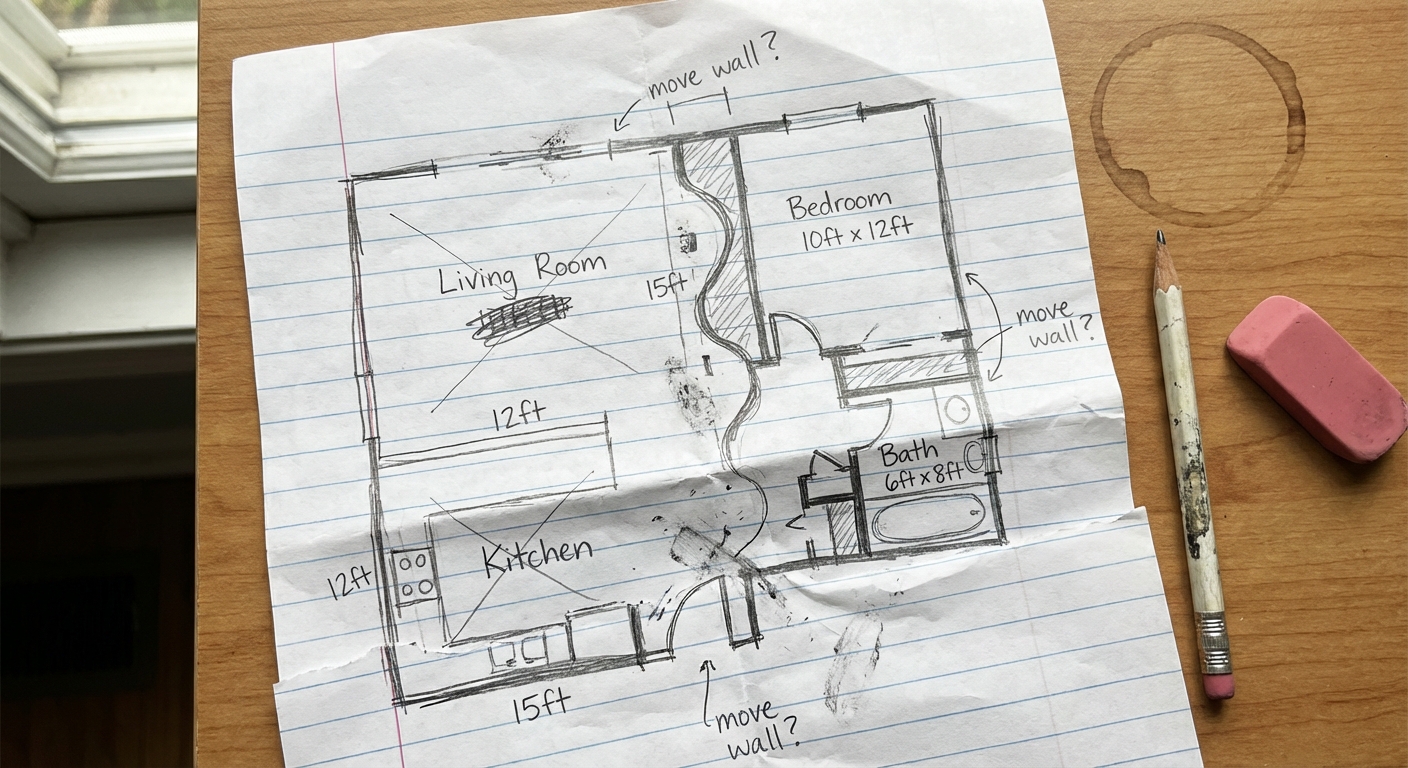
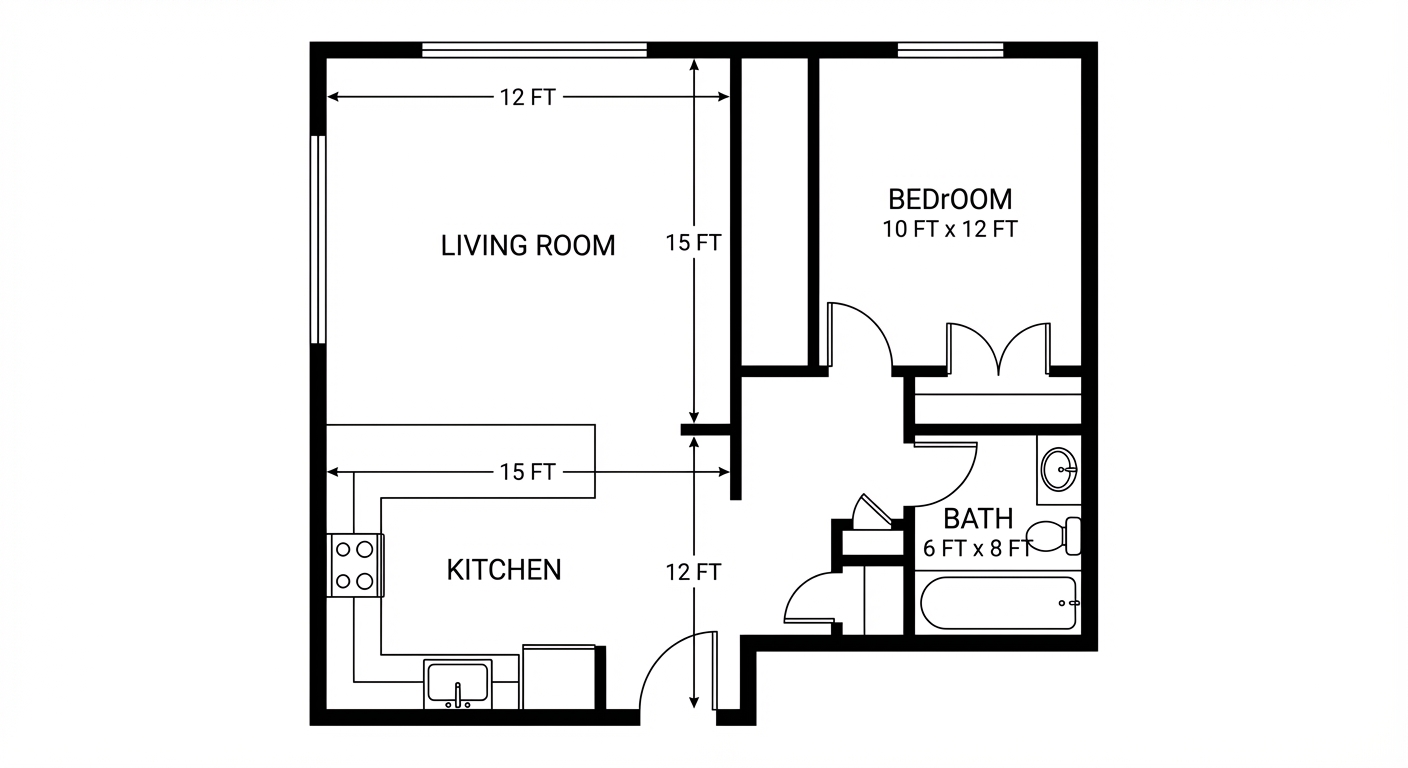
Existing floor plans are often outdated, low-quality or inconsistent — hand-drawn plans from the 1990s, low-resolution scans, faded blueprint photocopies and mismatched formats from different agents are common in property archives. Agencies accumulate plans from decades of transactions, so no two share the same look or quality, and outdated plans look unprofessional next to modern listing photos. Professional redrawing services charge per plan and take days, recreating each plan in CAD software. Roomagen redraws old or low-quality floor plans in a clean, modern style for 2 credits, usually in under a minute, and using the same style for every plan gives a portfolio a consistent look. The AI redraws text and numbers too, so check them against the original before you publish.
No credit card required. Results usually in under a minute.
Features
Convert old floor plans, scanned blueprints and hand sketches into clean digital floor plans with AI. Keep or remove measurements and room names; 6 free one-time credits when you sign up.
Convert Sketches to Professional Plans
Converts hand sketches and old blueprints to polished digital plans
Digitize Old Blueprints
Keeps, removes or estimates measurements and room labels
Upgrade Existing Floor Plans
Turns low-quality scans into clean, readable floor plans
How It Works
Get professional results in three simple steps
Drop your photos here
or browse files
Upload Your Photos
Upload a photo or scan of the existing floor plan — hand-drawn sketches, old CAD printouts and low-resolution photocopies all work, as a JPEG, PNG or WebP image. The AI reads wall positions, doors, windows, room labels and measurements from the plan. Illegible or ambiguous areas are filled in by the AI's best estimate, so check them in the result.
AI Processing
Choose what to keep: measurements and room names can be kept, removed or completed by the AI, and furniture kept, removed or added. Then pick one of four output styles and a page size. The AI redraws the plan with clean lines and standard door and window symbols; because text and numbers are redrawn too, check them against the original.
Download Results
Processing usually takes under a minute. The output is a redrawn JPEG floor plan that follows the original's layout — not a CAD or vector file. Using the same style for every property gives your listings a consistent look, ready for listing sites, brochures and websites after download.
Why Choose Roomagen
Sketch to Digital Conversion
Converts hand sketches and old blueprints to polished digital plans
Blueprint Modernization
Keeps, removes or estimates measurements and room labels
Floor Plan Restyling
Turns low-quality scans into clean, readable floor plans
Who Is It For?
Real Estate Agents & Brokerages
Convert old builder blueprints or hand sketches into professional floor plans suitable for listings and client presentations.
Architects & Interior Designers
Digitize client-provided floor sketches into clean plans for space planning and furniture layout.
Property Managers & Commercial Facilities
Standardize floor plans across older property portfolios by converting legacy blueprints to a consistent modern format.
Common Use Cases
Old Blueprint Modernization
Convert a faded or yellowed architectural blueprint into a clean, modern digital floor plan. The AI reads the layout and redraws it with consistent styling and clear labels.
Hand-Drawn Plan Digitization
Photograph a hand-drawn floor plan and convert it to a professional digital version. Useful for agents who sketch layouts during property visits.
Listing-Ready Floor Plan
Turn a source plan into a clean floor plan for listing platforms and marketing materials. The clearer the original, the more reliable the redraw, so check it before you publish.
Archive Document Preservation
Digitize aging paper floor plans before they deteriorate further. The AI redraw produces a clean digital version that preserves the layout information.
Legacy Plan Digitization
Convert old paper floor plans from the 1970s-1990s era into modern digital professional format. Photograph paper plans from property archives and convert them to clean digital versions with AI — store digitized plans for future listings and reuse across marketing materials.
Multi-Listing Format Standardization
Bring all floor plans in an agency's portfolio to the same format standard. Transform plans from different sources and varying quality levels into a uniform professional appearance — brand consistency and professional image across every listing in the portfolio.
Professional redrawing services charge per plan with a turnaround of days, recreating the original in CAD software and charging extra for agency-specific formatting. DIY redrawing with software like Floorplanner or RoomSketcher means entering every dimension from the original by hand, plus hours of drawing to make it look professional. Photocopying or scanning the original is free but keeps faded lines and illegible labels that read poorly on listing sites and in print. Roomagen redraws the old plan from a photo or scan for 2 credits, usually in under a minute — clean lines, standard door and window symbols, and redrawn labels you should check against the original.
| Roomagen | CAD Redrafting Service | |
|---|---|---|
| Cost | $0.23–$0.40 | Paid per plan |
| Turnaround | Under 90 seconds | 2–5 business days |
| Input accepted | Any legible sketch or old plan | Clean source required |
| Style options | 4 output styles | One standard output |
| Revisions | Rerun for 2 credits | Additional fees |
| Digital format | Ready for marketing | May need conversion |
Technical Specifications
- Supported formats
- JPEG, PNG, WebP
- Max file size
- 50 MB
- Output resolution
- HD / Ultra HD (Pro & Business)
- Render styles
- 4 output styles (Pure Line Art, Light Grey Fills, Hatched Walls, Symbolized + Colored)
- Input types
- Hand-drawn sketches, old blueprints, faded plans, photos of plans
- Processing time
- Usually under a minute
- AI model
- Gemini AI
- Credit cost
- 2 credits per image
Pricing
| Plan | Price | Credits/mo | Per Image | Resolution |
|---|---|---|---|---|
| Free | $0 | 6 (one-time) | Free | 2K first edit, then 1K |
| Starter | $12/mo | 60 | $0.40 | 2K |
| Pro | $29/mo | 200 | $0.29 | 2K or 4K (4 credits) |
| Business | $79/mo | 700 | $0.23 | 2K or 4K (4 credits) |
Per-image cost = 2 credits. Annual plans reduce cost by ~17%. Credit packages: 60/$19, 180/$45, 360/$79.
Frequently Asked Questions
Everything you need to know about Roomagen
Hand sketches, old blueprints, builder drawings and scans, uploaded as a JPEG, PNG or WebP image of up to 50 MB. For a PDF plan, export or photograph the page first. Faded or wrinkled originals can work, but unclear lines and numbers may be redrawn wrongly or left out, so check the result.
Usually under a minute. Each run redraws one page, so process multi-page sets page by page.
You choose: keep the measurements on the original (the default), remove them, or let the AI estimate the missing ones — estimates are approximate only. Room names work the same way, and the AI can write them in your language. There is no square-footage calculation, so check every number against the original.
It follows the original's room layout, wall positions and door placements, but it is a redraw, so small differences are possible. Doors and windows are drawn only where the original shows them unless you ask the AI to complete obvious missing ones. Compare the result with the original before you publish.
Yes. There are four styles — Pure Line Art (the default), Light Grey Fills, Hatched Walls, and Symbolized + Colored — on an A4 landscape or portrait, square or wide 16:9 page. There is no branded style; add logos afterwards in an image editor.
It can redraw office, retail and other commercial plans. Detail can drop as drawings get larger and more complex, so split big plans into single floors or sections when you can.
Process each floor as a separate run. Using the same output style keeps the set consistent, but staircase positions and scale are not aligned between floors automatically, so compare the plans before you publish.
Redrawn plans are JPEG images — 2K on paid plans, or 4K on Pro and Business. They are raster files, not vectors, so they do not stay sharp at every size; for large prints, check the image at full size first.
The result is a JPEG, so you can add branding or notes in Canva, Photoshop or GIMP. It is not a CAD or vector file, so walls and labels cannot be edited as separate objects.
Agents listing older homes without digital plans, property managers standardizing portfolio documentation, and architects digitizing legacy client drawings all benefit from Roomagen's floor plan redraw capabilities.
Explore Related Tools
Discover more AI-powered tools to enhance your visual content
Professional 2D & 3D Floor Plans — AI-Generated in Under a Minute
Turn a sketch, scan or old plan into a clean 2D floor plan or a 3D view. Keep or remove measurements and room names, and pick one of four drawing styles.
Learn more3D Floor Plans with Furniture
Create stunning 3D floor plans with realistic furniture and finishes. Help viewers visualize the entire layout in three dimensions — for real estate, architecture, interior design, and hospitality.
Learn moreAI Image Upscaling - Increase Resolution
Upscale low-resolution real estate photos to print-quality resolution. AI enhancement increases image size while adding detail and sharpness.
Learn moreAI Interior Rendering — Finished Rooms From Construction Photos
Turn photos of unfinished interiors into finished, furnished room images for new construction, renovations or design reviews. Pick the room type and one of 13 styles.
Learn moreFree AI Virtual Staging — Stage Any Empty Room in Under a Minute
Stage vacant rooms with AI, usually in under a minute. 13 design styles, 15 room types, listing-ready photos for real estate, rentals and hospitality. 6 free credits, no credit card required.
Learn moreFloor Plan Visualize — AI 3D Renders From 2D Plans in Under a Minute
Visualize 2D floor plans as 3D renders with AI. Photoreal, architectural sketch, stylized, and monochrome styles, furnished or unfurnished, output in under 90 seconds for $0.23–$0.40 per render — no 3ds Max, Lumion, or Twinmotion required.
Learn moreFloor Plan Colorize — AI Color for Black-and-White Plans in Under a Minute
Colorize black-and-white floor plans with AI. Four designer palettes, auto-detected rooms, output ready in under 90 seconds for real estate, architecture, and interior design — no Photoshop or design skills required.
Learn more