AI Empty Room — Remove All Furniture From a Photo in 30 Seconds
Roomagen Empty Your Space clears furniture and belongings from room photos and fills in walls and floors behind them. Used in real estate and hospitality, it usually takes under a minute per image at 2 credits ($0.23–$0.40 on monthly plans).
Occupied spaces can be hard to market because existing furnishings distract from the space itself — whether it is a listing full of personal belongings, a hotel room being redesigned, or a commercial space being repurposed. Physically emptying a space means moving, storage and time with the space offline, and in tenant-occupied properties or active hotel rooms it may not be possible on demand. Roomagen digitally clears the furniture and belongings and fills in the walls and floors they covered, usually in under a minute, without moving a single item. The filled-in areas are generated, so check them and disclose the edit where your market requires it.
No credit card required. Results usually in under a minute.
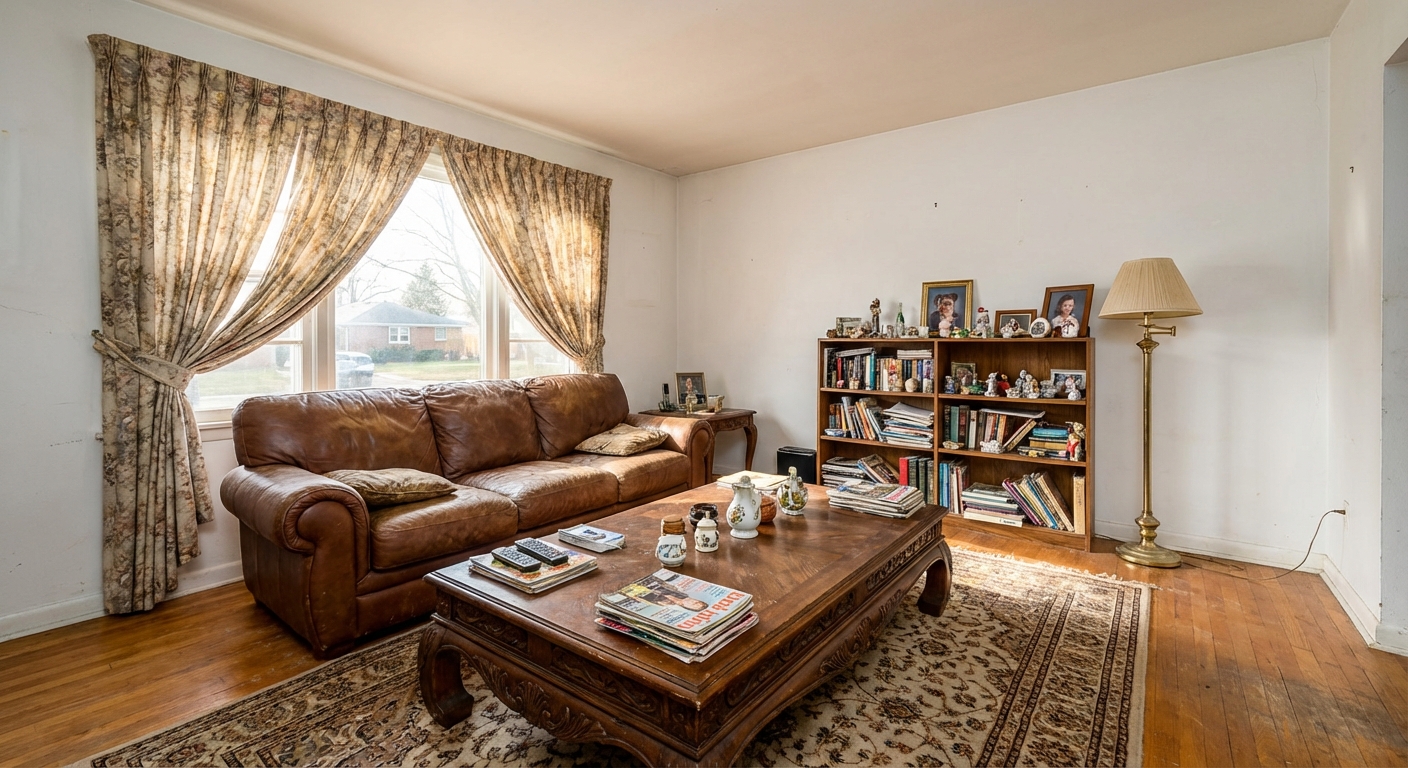
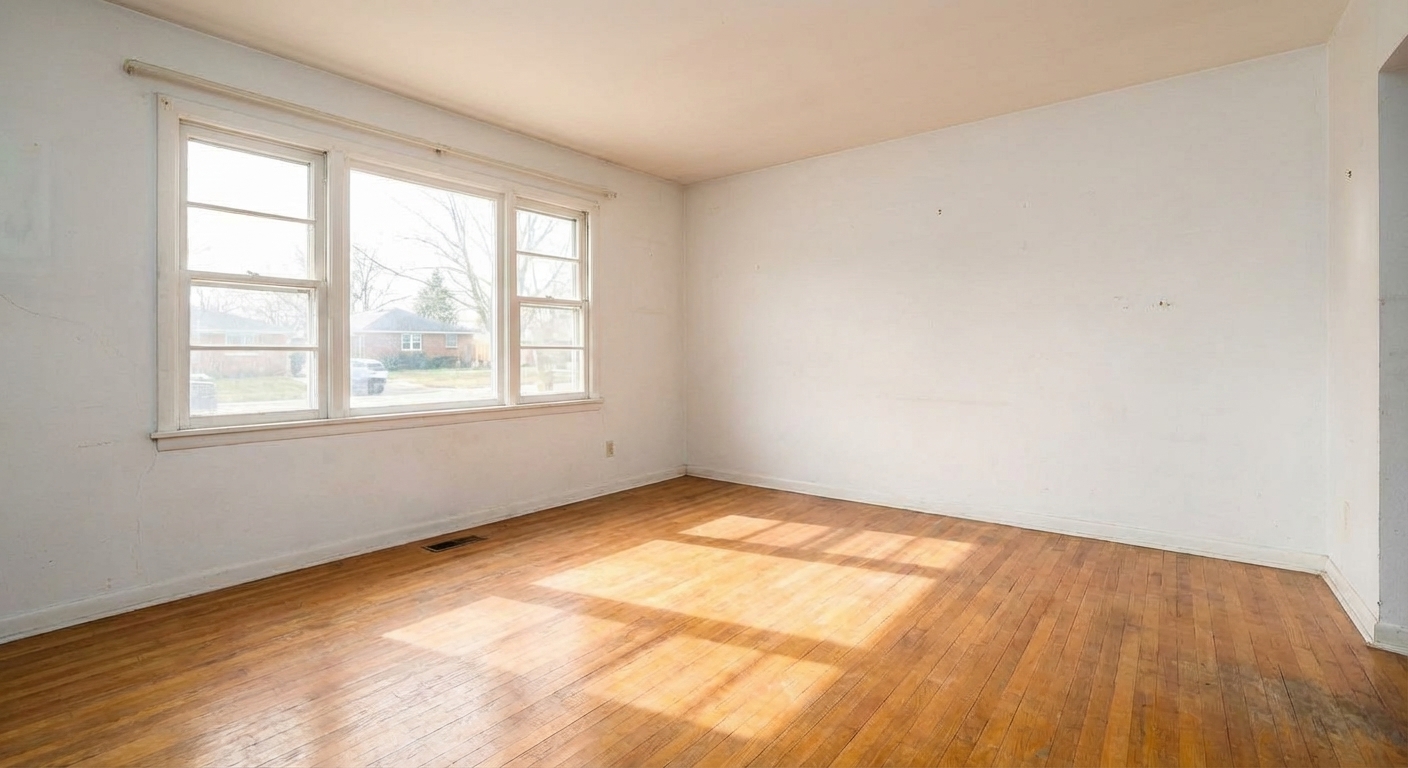
Features
Clear any furnished room for virtual restaging, renovation previews or tenant turnover. Fills in walls and floors behind furniture. 6 free credits included.
Remove All Furniture
Removes all furniture and decor in one click
Create Blank Canvas Photos
Fills in hidden walls, floors, and baseboards behind objects
Prepare Rooms for Virtual Restaging
Prepares clean canvas for immediate virtual restaging
How It Works
Get professional results in three simple steps
Drop your photos here
or browse files
Upload Your Photos
Upload a furnished room photo in JPEG, PNG, or WebP format (up to 50 MB). The AI handles any level of furnishing — from minimally decorated rooms with a few items to completely packed spaces with floor-to-ceiling belongings. The system identifies and classifies every object in the frame, distinguishing between removable items (furniture, decor, personal belongings, electronics, rugs, curtains) and permanent architectural elements (walls, windows, doors, fireplaces, built-in cabinetry, light fixtures) that should remain in the empty result.
AI Processing
Choose the type of space: rooms, kitchen, bathroom, utility or technical room, outdoor, or commercial and other (office, shop, restaurant, reception). The choice tells the AI what is fixed: in a kitchen, cabinets, counters and built-in appliances stay while everything on the counters goes; in a bathroom, the bath, shower, toilet and vanity stay while towels, toiletries and decor go. If you upload a floor plan drawing instead, you are sent to the floor-plan tools and nothing is charged.
Download Results
Download your empty room, usually in under a minute. The AI fills in wall, baseboard, floor and ceiling areas that furniture hid, matching texture and color from the visible parts of the same surfaces — these areas are generated, not revealed, so check them. Many agents use Empty Your Space and then Virtual Staging as a two-step pipeline: empty the occupied room first, then furnish it digitally in one of 13 styles.
Why Choose Roomagen
Complete Room Clearing
Removes all furniture and decor in one click
Furniture-Free Visualization
Fills in hidden walls, floors, and baseboards behind objects
Before Restaging Preparation
Prepares clean canvas for immediate virtual restaging
Who Is It For?
Real Estate & Hospitality
Create vacant-look photos from occupied listings and hotel rooms to enable virtual restaging and redesign visualization.
Interior Designers & Architects
Start with a clean slate to present redesign concepts without existing furniture competing for attention.
Property Managers & Commercial Spaces
Prepare photos for new tenant or client marketing before the current occupant vacates the space.
Common Use Cases
Occupied Listing Virtual Vacancy
Photograph an occupied room and digitally remove all furniture to create a vacant-look photo while the tenant still lives there. Use the empty result for virtual restaging or to show room dimensions accurately.
Pre-Staging Blank Canvas
Clear a furnished room to create a clean starting point for Virtual Staging. First empty the space with this tool, then furnish it in your preferred style — a powerful two-step workflow for occupied properties.
Renovation Planning
Remove all furniture from room photos to clearly see the architectural bones — wall condition, floor material, window placement. This helps contractors and designers plan renovations without on-site visits.
Room Dimension Showcase
Empty rooms photograph larger and more spacious than furnished ones. Remove furniture to help buyers accurately assess room size, especially in smaller spaces where furniture can make rooms appear cramped.
Tenant-Occupied Property Marketing
In rental properties where physical vacancy is not possible during the lease term, photograph the occupied space and digitally remove all tenant belongings. The listing photos show an empty, clean room while the tenant continues living undisturbed. This approach is legally simpler than requesting early move-out and produces consistent marketing materials regardless of tenant cooperation.
Architectural Assessment
Architects and interior designers need to see wall conditions, floor materials, window placements, and structural elements that are hidden behind furniture in occupied spaces. Digital emptying reveals the architectural bones of a room without requiring a physical site visit to an empty property — useful for remote renovation planning and design consultations.
Physically emptying a space means moving costs, storage fees and weeks of coordination while the space is offline. Removing furniture by hand in Photoshop takes an experienced editor a long time per image. Waiting for a tenant to move out or a hotel room to free up can take days to months. Roomagen empties a room for 2 credits ($0.23–$0.40 per image on monthly plans), usually in under a minute, and fills in the walls and floors behind the furniture.
| Roomagen | Waiting for Move-Out | |
|---|---|---|
| Cost | $0.23–$0.40 | Lost marketing time |
| Turnaround | Under 30 seconds | Weeks until vacancy |
| Room types | 6 space types | Unpredictable condition |
| Wall/floor quality | AI-reconstructed | May need cleaning/repair |
| Marketing start | Immediate | Delayed until vacant |
| Restaging ready | Yes — ready to restage | Requires separate staging |
Technical Specifications
- Supported formats
- JPEG, PNG, WebP
- Max file size
- 50 MB
- Output resolution
- HD / Ultra HD (Pro & Business)
- Room types
- 6 space types (rooms, kitchen, bathroom, utility / technical room, outdoor, commercial / other)
- Clearing logic
- Room-specific — kitchen keeps fixed appliances, bathroom keeps fixtures
- Reconstruction
- AI rebuilds walls and floors hidden behind furniture
- Processing time
- 15–30 seconds
- AI model
- Gemini AI
- Credit cost
- 2 credits per image
Pricing
| Plan | Price | Credits/mo | Per Image | Resolution |
|---|---|---|---|---|
| Free | $0 | 6 (one-time) | Free | 2K first edit, then 1K |
| Starter | $12/mo | 60 | $0.40 | 2K |
| Pro | $29/mo | 200 | $0.29 | 2K or 4K (4 credits) |
| Business | $79/mo | 700 | $0.23 | 2K or 4K (4 credits) |
Per-image cost = 2 credits. Annual plans reduce cost by ~17%. Credit packages: 60/$19, 180/$45, 360/$79.
Frequently Asked Questions
Everything you need to know about Roomagen
Roomagen Empty Your Space uses AI to remove all furniture, decor, and personal items from room photos. The tool leaves clean empty spaces with reconstructed walls and floors, ready for virtual restaging or showcasing room dimensions.
Emptying a furnished photo lets you restage it in a different furniture style, show buyers the bare space, or let prospects picture their own decor. This is especially useful for occupied listings where physical staging is impossible.
Usually under a minute per image. Upload your furnished photo, pick the type of space, and download the empty-room result.
Usually, yes. The AI generates the walls, baseboards and flooring that furniture hid, rather than revealing what was really there, so check those areas before you publish.
Yes, from lightly furnished rooms to fully packed ones. The more the furniture hides, the more the AI has to fill in, so check walls, floors and fixed features in the result.
JPEG, PNG and WebP images up to 50 MB. For best results, use well-lit photos taken from a room corner so the whole space is visible.
Often, if you disclose it. A photo with furniture removed counts as digitally altered, and many MLSs and laws such as California's AB 723 require a label and the original photo. Roomagen does not add a label, so add the one your MLS asks for.
Empty Your Space removes everything including furniture, while virtual decluttering selectively removes clutter and excess items but keeps attractive furnishings. Choose clearing for a complete blank canvas or decluttering for a tidier version.
Yes — choose Outdoor as the type of space. For a single object outside, Item Removal is the better fit, and AI Landscaping restyles a yard.
Empty Your Space clears movable furniture, decor and personal items from the whole room, keeping fixed features such as kitchen cabinets or a bathroom's bath and vanity. Item Removal erases only the object you mark. Virtual Decluttering removes mess but keeps the furniture. Use Empty Your Space when you need a blank room to restage.
Explore Related Tools
Discover more AI-powered tools to enhance your visual content
Free AI Virtual Staging — Stage Any Empty Room in Under a Minute
Stage vacant rooms with AI, usually in under a minute. 13 design styles, 15 room types, listing-ready photos for real estate, rentals and hospitality. 6 free credits, no credit card required.
Learn moreRoom Repurpose - Change Room Function
Repurpose any room to show its potential as a different space. Convert bedrooms to offices, dining rooms to playrooms, and more.
Learn moreAI Object & Item Removal from Photos
Remove unwanted objects, clutter, and distractions from any photo. AI intelligently fills backgrounds for clean, professional images — for property listings, hotel rooms, product shots, and portfolio photos.
Learn moreRedesign a Furnished Room With AI — 13 Styles, Usually Under a Minute
Restyle any furnished room without moving a thing. Modern, Scandinavian, farmhouse, luxury and 9 more styles. Used by interior designers and realtors. Free to try.
Learn moreVirtual Decluttering Service
Virtually declutter messy rooms for cleaner photos. Remove countertop clutter, scattered items and visual distractions while the furniture stays — for listings, hotel rooms, and commercial spaces.
Learn more