Virtual Wall Repainting
Roomagen Repaint Wall is an AI-powered paint color visualization tool that previews specific paint colors on room walls with realistic lighting simulation, including support for Benjamin Moore and Sherwin-Williams colors. The output shows the room with the selected wall colors applied under the existing lighting conditions. Processing takes 10-20 seconds using 2 credits per image ($0.23–$0.40 depending on plan), with a free plan offering 6 credits.
A fresh coat of paint is the highest-ROI cosmetic improvement for home sales — a $200-500 paint investment can add $5,000-10,000 in perceived property value. Wall paint color is one of the most impactful yet difficult decisions in home improvement. The biggest challenge is that small paint swatch cards from the store cannot predict how a color will actually look in your room — lighting conditions, room dimensions, existing furniture colors, and adjacent wall interactions all dramatically change color perception. Choosing the wrong color means repainting at another $200-500 plus 1-2 days of additional labor. Research shows 35% of homeowners are dissatisfied with their paint color choice after application. Roomagen lets you digitally test any color on your actual room photo using a hex color picker — see the exact shade in your room's natural lighting conditions before buying a single can of paint.
No credit card required. Results in 30 seconds.
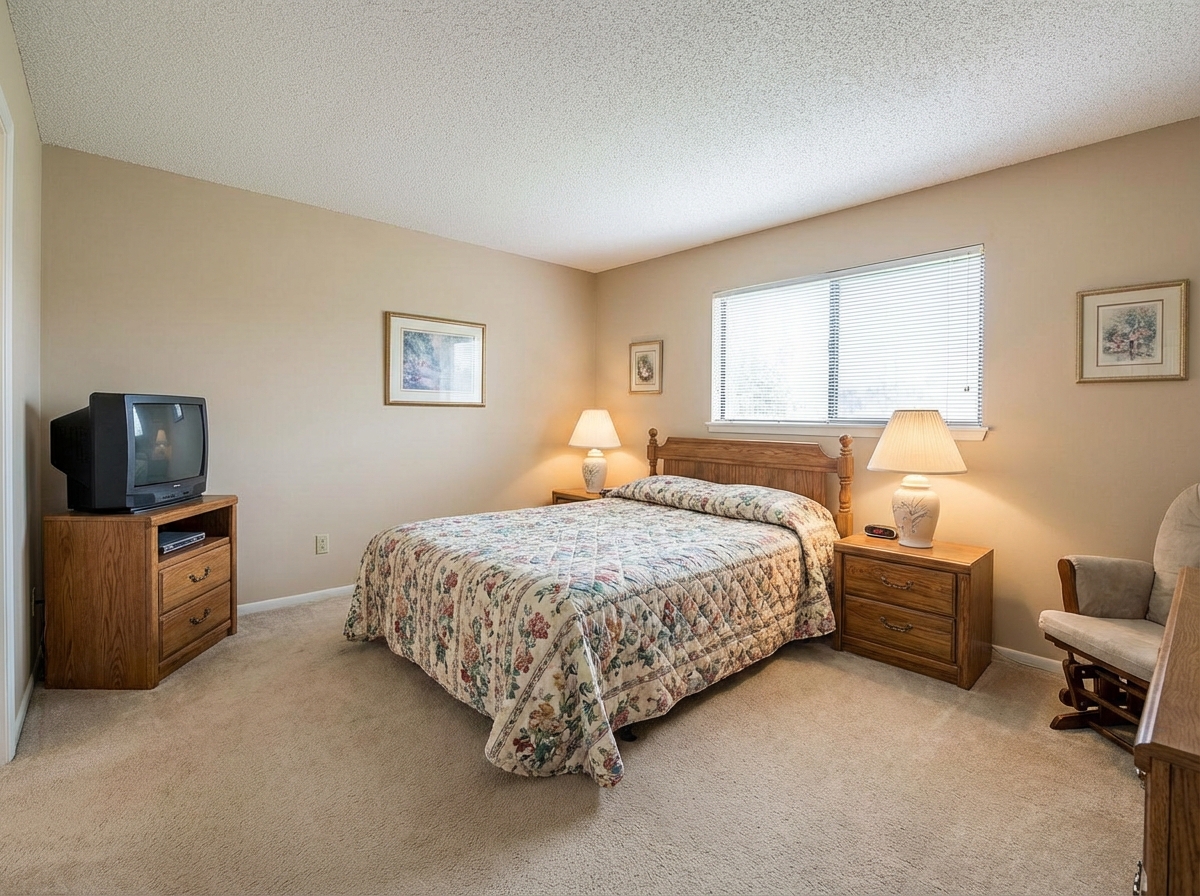
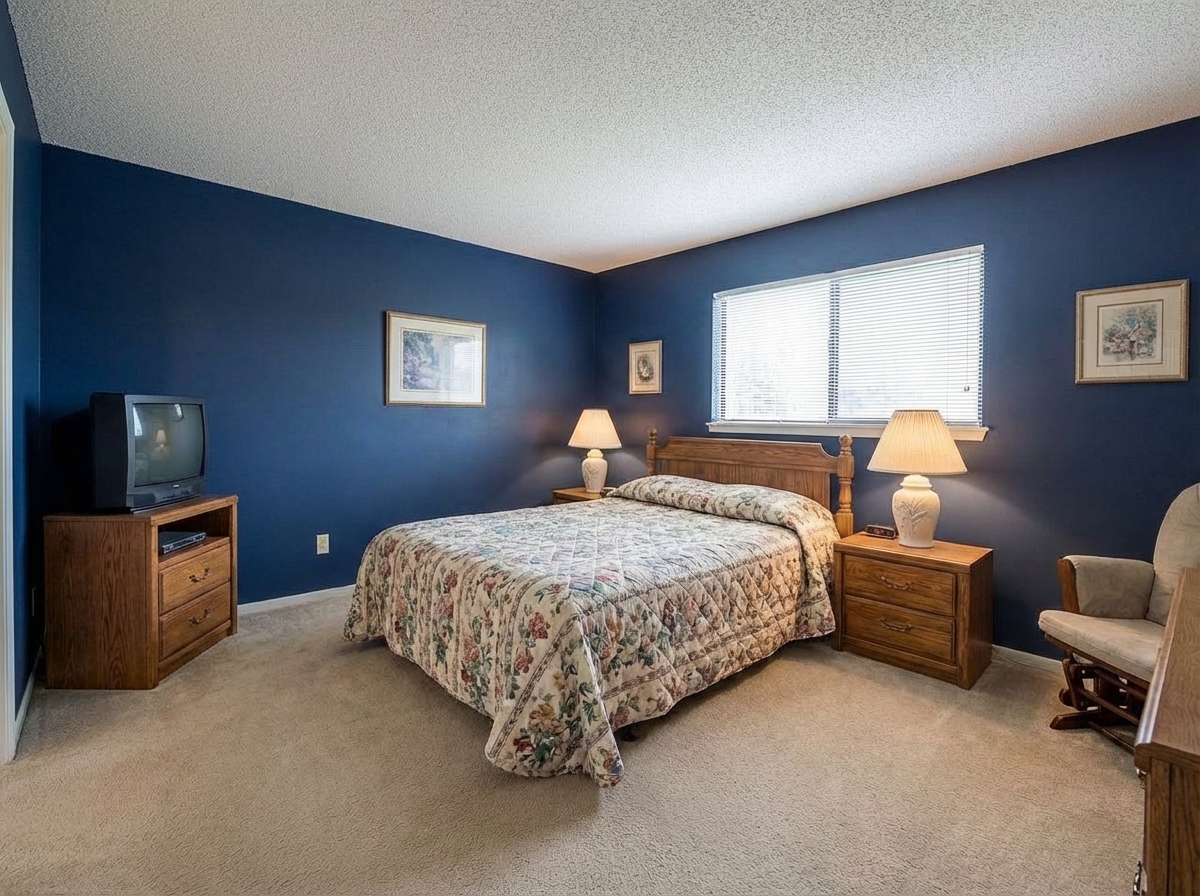
Features
Virtually repaint walls to preview colors before painting. See how different paint colors would look in any room with realistic lighting.
Preview Paint Colors Instantly
Applies paint colors with accurate room-lighting simulation
Accent Wall Visualization
Supports accent wall isolation without affecting adjacent surfaces
Full Room Color Change
Matches specific paint brand colors by name or hex code
How It Works
Get professional results in three simple steps
Drop your photos here
or browse files
Upload Your Photos
Simply drag and drop your photos or browse to upload. We support all major image formats including JPG, PNG, and RAW files up to 50MB each.
Upload a room photo in JPEG, PNG, or WebP format (up to 50 MB) — any room type and any current wall condition works including painted walls, wallpapered surfaces, faded or stained areas. The AI automatically detects wall areas and separates them at pixel level from ceiling, floor, window and door frames, furniture, and wall-mounted accessories. If multiple walls are visible in the photograph, all wall surfaces are identified. Light sources and shadow zones within the room are analyzed to ensure accurate color rendering across varying illumination.
AI Processing
Our advanced AI analyzes your images and applies professional enhancements automatically. Choose from virtual staging, enhancement, object removal, or day-to-dusk conversion.
Select your desired color using the hex color picker for precise shade selection, or draw inspiration from popular paint color palettes. The AI adapts the selected color to the room's actual lighting conditions: walls facing windows appear brighter, corners render darker, and shadow areas show natural color gradation. Differences between matte, satin, and glossy paint finishes are rendered — glossy paint reflects more light creating visible sheen near windows, while matte paint shows even diffuse color across the entire surface.
Download Results
Preview your transformed images and download high-resolution results ready for listings, marketing materials, social media, and more. No watermarks on premium plans.
Download your repainted room in under 30 seconds. The output is photorealistic — the color appears natural under the room's lighting, realistic beside furniture and flooring, and consistent with the room's overall color temperature. Create A/B comparisons by reprocessing the same photo with different colors (each version costs 1 credit). The visualization serves as a reliable reference for paint store purchases and interior designer consultations. Combine with other tools: repaint first, then apply virtual staging or furniture facelift for a complete room transformation.
Why Choose Roomagen
Single Wall Updates
Applies paint colors with accurate room-lighting simulation
Whole Room Repainting
Supports accent wall isolation without affecting adjacent surfaces
Color Scheme Preview
Matches specific paint brand colors by name or hex code
Who Is It For?
Real Estate Agents
Show sellers and buyers how a fresh paint job could modernize a dated room without any physical work.
Interior Designers
Present clients with multiple color scheme options rendered on their actual room photos for confident decision-making.
Property Managers
Preview paint refresh options for rental turnover to choose colors that appeal to the broadest tenant pool.
Common Use Cases
Paint Color Testing Before Buying
Visualize any paint color on your walls before purchasing a single can. Enter a hex code from Benjamin Moore, Sherwin-Williams, or any brand to see the exact color in your room’s actual lighting.
Listing Neutral-Tone Refresh
Digitally repaint bold or dated wall colors to neutral tones for listing photos. Greige, white, and warm beige consistently appeal to the broadest range of buyers.
Accent Wall Visualization
See how a feature wall in navy, forest green, or terracotta would look before committing. Compare the accent wall against the existing room colors and furniture.
Finish Comparison
Compare how the same color looks in matte, eggshell, satin, and semi-gloss finishes. The AI renders finish-specific light reflection, making it easy to choose the right sheen level.
Accent Wall Color Testing
Test different accent wall color options to find the shade that best defines and enhances the space. Generate multiple versions of the same room with different bold accent wall colors — navy blue, deep green, warm terracotta — while keeping the other walls neutral. Visual comparison across multiple options helps identify which color creates the most appealing contrast with existing furniture and decor without committing to painting.
Rental Property Refresh Planning
Plan quick between-tenant paint refreshes for rental properties. Show the property owner a side-by-side comparison of current wall color versus proposed new color to support rent increase potential with visual evidence. Test whether neutral colors or bold statement colors perform better in the local rental market by generating both options and gathering feedback from prospective tenants or property management professionals.
Unlike small swatch cards that cannot show full-wall appearance under your room's lighting, Roomagen renders paint colors at actual wall scale with realistic lighting interaction. Physical painting costs $200-500 per room in materials and labor plus 1-2 days of work, furniture protection, and drying time — choosing the wrong color means repeating the entire process at the same cost. Paint brand digital simulators (Sherwin-Williams ColorSnap, Benjamin Moore Color Portfolio) use generic stock room images rather than your actual space, limiting the accuracy of color interaction predictions. Physical swatch card tests are free but only 2x3 inches — they cannot show full-wall appearance, and store lighting differs significantly from home lighting, causing color perception shifts. Roomagen processes at 1 credit per image on your own room photograph with hex color picker precision and delivers results in under 30 seconds.
| Roomagen | Paint Samples & Painter | |
|---|---|---|
| Cost | $0.23–$0.40 | $200–$800/room |
| Turnaround | Under 30 seconds | 1–2 days per room |
| Color options | Any hex color — unlimited | Buy individual samples |
| Finish preview | 4 finishes visualized | Hard to visualize from a chip |
| Accuracy | Full wall at actual lighting | Tiny swatch on wall |
| Decision confidence | See full room first | Hope it looks right |
Technical Specifications
- Supported formats
- JPEG, PNG, WebP
- Max file size
- 50 MB
- Output resolution
- HD / Ultra HD (Pro & Business)
- Color selection
- Hex color picker — any color
- Finish options
- 4 (matte, eggshell, satin, semi-gloss)
- Finish rendering
- Finish-specific lighting reflection
- Processing time
- Under 30 seconds
- AI model
- Gemini AI
- Credit cost
- 1 credit per image
Pricing
| Plan | Price | Credits/mo | Per Image | Resolution |
|---|---|---|---|---|
| Free | $0 | 6 (one-time) | Free | HD |
| Starter | $12/mo | 60 | $0.40 | HD |
| Pro | $29/mo | 200 | $0.29 | Ultra HD |
| Business | $79/mo | 700 | $0.23 | Ultra HD |
Per-image cost = 2 credits. Annual plans reduce cost by ~17%. Credit packages: 60/$19, 180/$45, 360/$79.
Frequently Asked Questions
Everything you need to know about Roomagen
Explore Related Tools
Discover more AI-powered tools to enhance your visual content
Virtual Renovation & Remodeling
Show clients renovation potential with virtual remodeling. Update kitchens, bathrooms, flooring, and finishes digitally before selling, leasing, or redesigning.
Learn moreVirtual Flooring Replacement
Preview new flooring virtually before renovation. See how hardwood, tile, carpet, or vinyl would look in any room.
Learn moreRestyle Surfaces - Update Finishes
Restyle any surface in your photos - countertops, floors, walls, backsplashes. Preview different materials and finishes instantly.
Learn moreAI Photo Enhancement — Professional Quality in Seconds
Enhance any photo automatically with AI. HDR processing, color correction, lens fix, and professional-grade adjustments in seconds — for property listings, hotel rooms, product shots, and more.
Learn moreFurniture Facelift - Update Existing Pieces
Give existing furniture a facelift by changing colors, fabrics, or finishes. Update dated pieces without replacing them entirely.
Learn more