
Convert a Room for a New Use — Bedroom to Office, Dining Room to Playroom
Roomagen Room Conversion is an AI-powered room conversion tool that transforms any space into a different functional room, such as converting a bedroom into a home office or a dining room into a playroom. Used by real estate agents, interior designers, homeowners, hotel managers, and commercial space planners, the output shows the same room with function-appropriate furniture for the new purpose. Processing usually takes under a minute per image using 2 credits per image ($0.23–$0.40 depending on plan), with a free plan offering 6 credits.
Viewers struggle to envision how they would use spare rooms or oddly shaped spaces, leading to lost interest in otherwise suitable properties, hotel suites, or commercial spaces. Room function flexibility is among the top factors evaluated during space selection — a spare room can appeal to far more viewers when shown as a home office, gym, studio, or meeting room. Physical room conversion costs $2,000–$10,000 and takes weeks of construction, and the result is permanent. Roomagen converts any room photo into multiple functional alternatives instantly, so every viewer can see a configuration that matches their needs without any physical changes.
No credit card required. 6 free credits included.
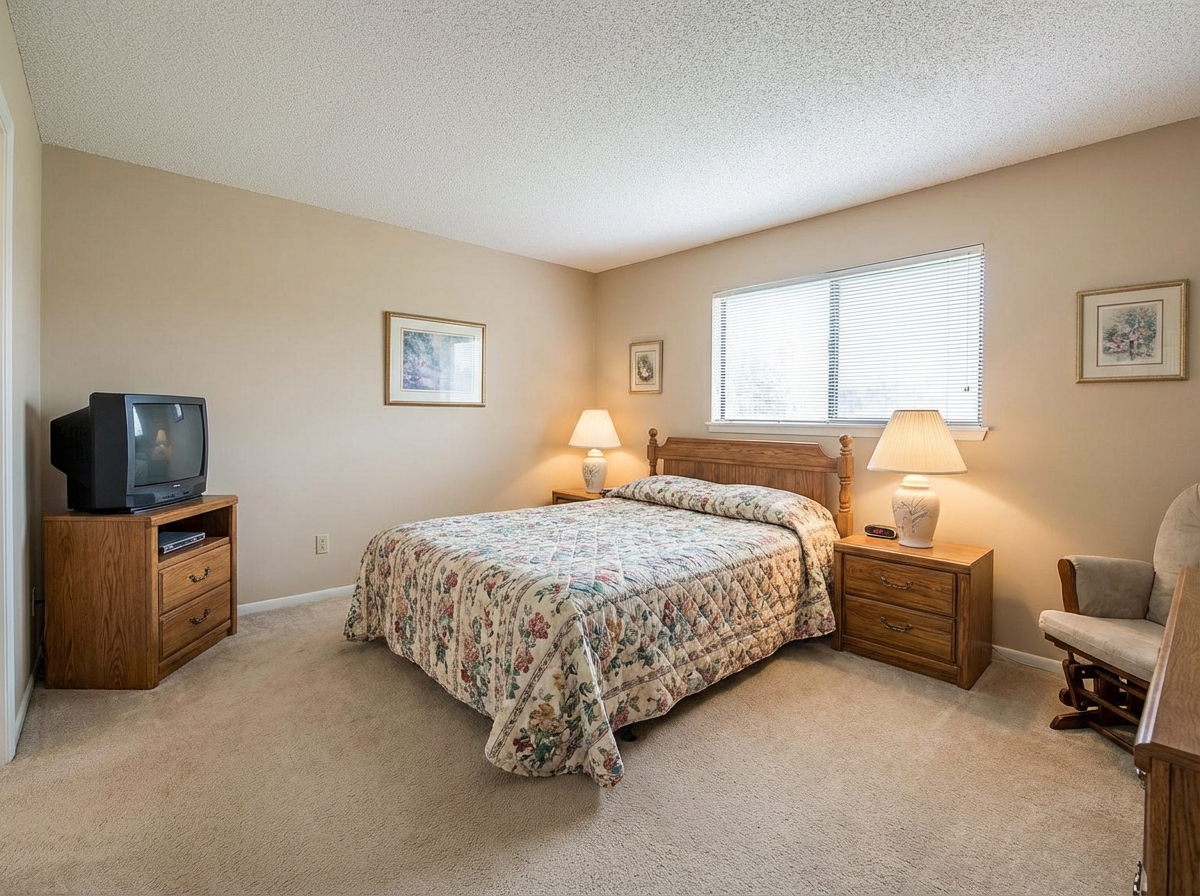
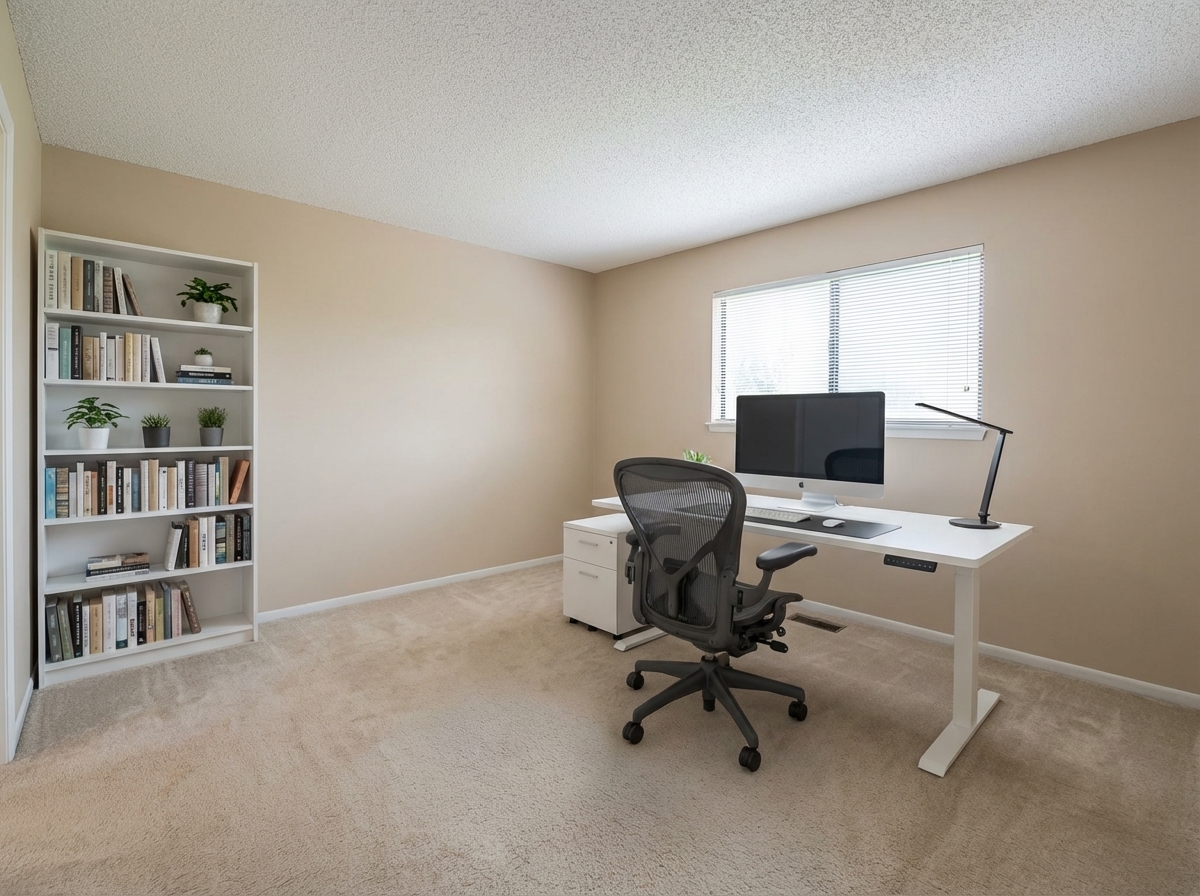
Demo example: the “Before” image was created with AI for this site; it is not a customer photo.
Features
Show a room as a different space: AI converts a bedroom into an office or a dining room into a playroom with fitting furniture, usually in under a minute.
Convert Rooms to New Uses
Generates multiple room-function variants from a single photo
Bedroom to Office Transformation
Automatically selects category-appropriate furniture layouts
Show Multi-Use Potential
Ideal for marketing flex spaces to diverse buyer demographics
How It Works
Get professional results in three simple steps
Drop your photos here
or browse files
Upload Your Photos
Upload a room photo in JPEG, PNG, or WebP format (up to 50 MB). The tool works with both furnished and empty rooms. For furnished rooms, the AI first removes all existing moveable furniture before placing function-appropriate pieces for the target room type. Clear, well-lit photos with visible walls and floor produce the most accurate conversions. The AI maps the room's dimensions, ceiling height, and architectural features to ensure new furniture fits naturally within the actual space.
AI Processing
Select the target room type from 15 options, from living room, bedroom and home office to dressing room, laundry room and garage. Each room type gets furniture suited to its function — for example, a home office gets a desk, office chair, shelving and task lighting. The AI analyzes the room's architecture and proportions to place furniture at appropriate positions with correct scale, so a dining table fits without blocking doorways or a bed leaves adequate walkway space.
Download Results
Download your converted room, usually in under a minute. Processing time depends on whether the AI needs to remove existing furniture (furnished rooms take longer). You can convert the same room to multiple target types for 2 credits each — showing bedroom, office, and gym versions side by side helps buyers see the room's versatility. Include all variations in your listing to appeal to different buyer demographics and maximize the property's perceived flexibility.
Why Choose Roomagen
Office Conversion
Generates multiple room-function variants from a single photo
Nursery Transformation
Automatically selects category-appropriate furniture layouts
Gym & Studio Setups
Ideal for marketing flex spaces to diverse buyer demographics
Who Is It For?
Real Estate Agents & Homeowners
Show flex spaces as home offices, nurseries, or gyms to appeal to diverse needs and expand your potential audience.
Interior Designers & Architects
Present clients with multiple room-function concepts from a single photo to speed up design decisions.
Hospitality & Commercial Spaces
Showcase how hotel suites, office spaces, or retail units can serve various configurations and purposes.
Common Use Cases
Home Office Conversion Preview
Upload a spare bedroom photo and select 'home office' as the target room type. The AI removes the bed and bedroom furniture, then places a desk, ergonomic office chair, shelving unit, and work-appropriate task lighting scaled to the room's dimensions. Share the converted result with buyers who prioritize work-from-home functionality in their home search.
Nursery Planning
Photograph an existing bedroom and convert it to a kids room configuration. The AI places a crib or child's bed, changing table, toy storage, and age-appropriate furniture while preserving the room's architecture, windows, and built-in features. Use the visualization to plan furniture purchases and room layout before the baby arrives.
Listing Versatility
Show the same room as multiple types — bedroom, home office, studio, and gym — to appeal to different buyer demographics. Each conversion costs 2 credits and uses the same source photo, making it practical to generate 4–8 variations for a comprehensive listing that addresses diverse buyer needs.
Rental Value Optimization
Test whether a spare room functions better as a dining room, living room, or home office for rental listings by comparing conversions side by side. Determine which configuration maximizes perceived value for prospective tenants and highlight the room's flexibility in your marketing materials.
Multi-Generational Living Showcase
Show how a ground-floor bedroom can serve as an in-law suite, accessible living space, or caregiver room. Convert the same room into configurations that appeal to multi-generational families — a growing demographic in real estate. Include these options in listings to attract a broader buyer pool.
Work-From-Home Conversion Planning
Photograph a spare bedroom and convert it to a professional home office configuration. The AI places a desk, ergonomic chair, shelving, and task lighting appropriate for remote work. Use the visualization to plan furniture purchases, determine if the room's dimensions work for an office setup, and estimate the layout before committing to any physical changes.
Physical room conversion — remodeling a bedroom into a home office, for example — costs $5,000–$15,000 depending on scope, often requires building permits, and takes weeks of construction. Hiring a staging company to set up different room configurations costs $800–$2,000 per setup, meaning showing three functional options costs $2,400–$6,000. Commissioning 3D renders from a freelance artist runs $300–$800 per visualization and takes several business days. Roomagen converts a room from one function to another for 2 credits ($0.23–$0.40), generating photorealistic results in under 90 seconds. Showing five room type options costs 10 credits ($1.15–$2.00).
| Roomagen | Physical Conversion | |
|---|---|---|
| Cost | $0.23–$0.40 | $2,000–$10,000+ |
| Turnaround time | Under 90 seconds | Weeks of renovation |
| Reversible | Try another room type for 2 credits | Permanent changes |
| Preview options | 15 room types | Build and hope |
| Risk | Zero | Construction delays, budget overruns |
| Permit required | No | Often required |
Technical Specifications
- Supported formats
- JPEG, PNG, WebP
- Max file size
- 50 MB
- Output resolution
- 2K on every paid plan
- Target room types
- 15 (living room, bedroom, kids room, studio, kitchen, dining room, home office, dressing room, laundry room, bathroom, hallway, entryway, balcony, terrace, garage)
- Furniture selection
- Function-appropriate pieces auto-selected
- Processing time
- Usually under a minute
- Credit cost
- 2 credits per image
- Input flexibility
- Works with both furnished and empty rooms
Pricing
| Plan | Price | Credits/mo | Per Image | Resolution |
|---|---|---|---|---|
| Free | $0 | 6 (one-time) | Free | — |
| Starter | $12/mo | 60 | $0.40 | 2K |
| Pro | $29/mo | 200 | $0.29 | 2K |
| Business | $79/mo | 700 | $0.23 | 2K |
Per-image cost = 2 credits. Annual plans reduce cost by ~17%. Credit packages: 60/$19, 180/$45, 360/$79.
Frequently Asked Questions
Everything you need to know about Roomagen
Roomagen can convert any room type to another: bedroom to office, dining room to playroom, spare room to gym, garage to studio, and many more combinations. The AI selects appropriate furniture for each conversion automatically.
Repurposed room photos help buyers visualize how they would actually use the space, which is especially important for remote workers seeking home offices. Showing multiple possibilities increases emotional connection and broadens buyer appeal.
Yes, Roomagen can create several versions showing different potential uses for the same space. This lets you present a spare bedroom as an office, nursery, and yoga studio all from one original photo.
Upload your room photo and select the desired room function. The AI clears existing furniture and places function-appropriate items — desks for offices, cribs for nurseries, or equipment for home gyms — all matched to the room's dimensions.
Roomagen maintains all architectural features including windows, doors, moldings, and built-ins. Only the furniture and decor change, ensuring the result looks like a realistic room setup within the existing space.
Bedroom-to-office is the most requested conversion, followed by spare-room-to-nursery and dining-room-to-playroom. Home gym and creative studio conversions are also increasingly popular with remote-working buyers.
Yes, the tool works for commercial properties too. Convert empty retail spaces to office layouts, warehouses to studios, or conference rooms to break areas to help tenants visualize their business setup.
Each room conversion usually takes under a minute to generate. You can create multiple function variants rapidly, making it practical to prepare several options for a single listing presentation.
Virtual staging furnishes empty rooms in their current function, while room repurposing changes the fundamental purpose of the space. Repurposing is ideal when a room's current function doesn't match what buyers are seeking.
Use Roomagen Room Conversion when you want to change what a room is used for, such as converting a bedroom into a home office or a dining room into a playroom. Use Virtual Staging when the room is empty and you want to furnish it for its current function. Repurpose changes the room's purpose and adds function-appropriate furniture, while staging furnishes an empty room in its existing role.
Explore Related Tools
Discover more AI-powered tools to enhance your visual content
How to Add Furniture to a Photo — Place Any Object with Realistic Shadows
Add a sofa, TV, plant or any object to a room photo with AI, matched to the room's perspective with realistic shadows. No Photoshop needed; 6 free credits.
Learn moreRedesign Your Room With AI — 13 Styles, Usually in Under a Minute
Restyle a furnished room without moving a thing: AI replaces the furniture in one of 13 styles, from modern to farmhouse and luxury, while walls and floors stay.
Learn moreFree AI Virtual Staging — Furnish Any Empty Room, Change Walls and Floors
Stage empty rooms online with AI, usually in under a minute: 13 design styles and 15 room types for listings, rentals and hotels. 6 free credits, no credit card.
Learn moreRemove All Furniture From a Room Photo — Empty Room AI in 30 Seconds
Clear a furnished room photo for restaging, renovation previews or tenant turnover. AI fills in the walls and floor behind the furniture. 6 free credits included.
Learn moreAI Interior Rendering — Finished, Furnished Rooms from Construction Photos
Turn a photo of an unfinished interior into a finished, furnished room for new construction, renovations or design reviews, in one of 13 styles.
Learn more