Virtual Flooring Replacement
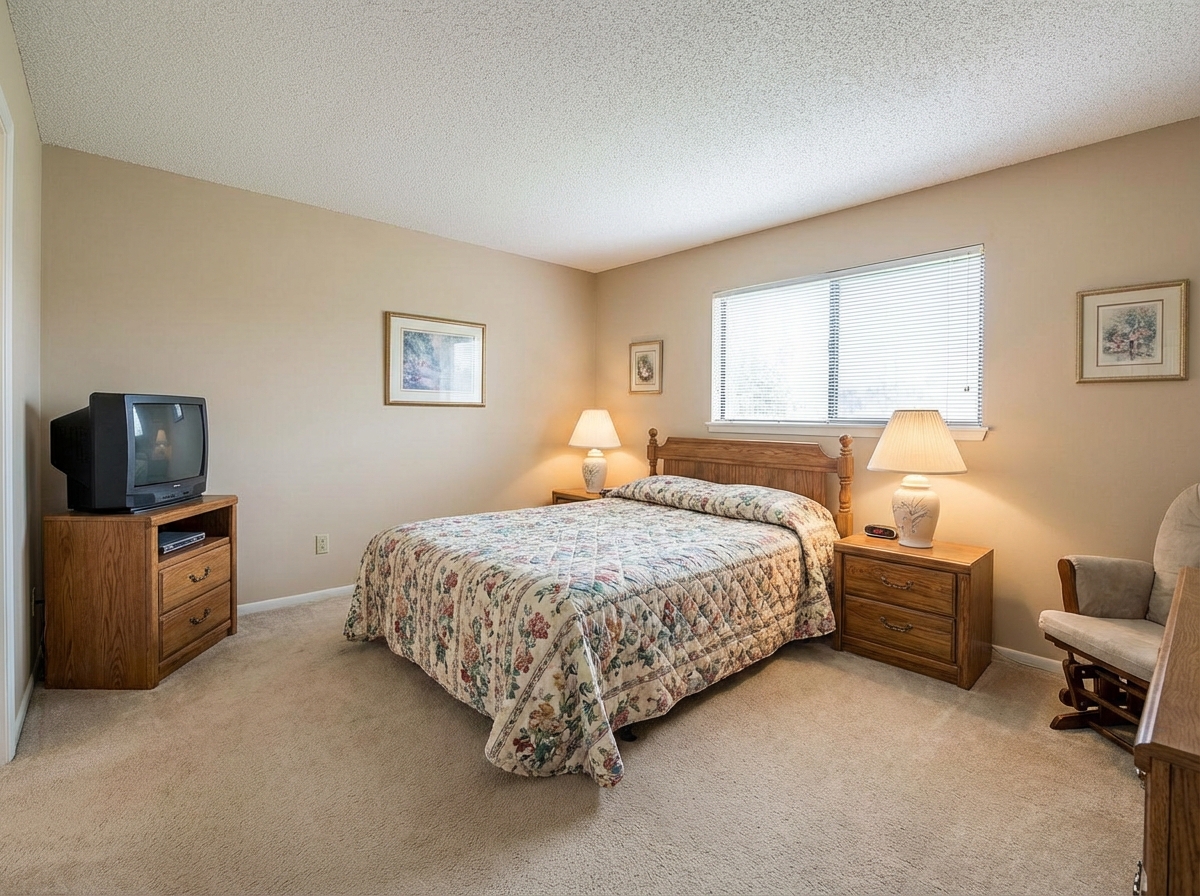
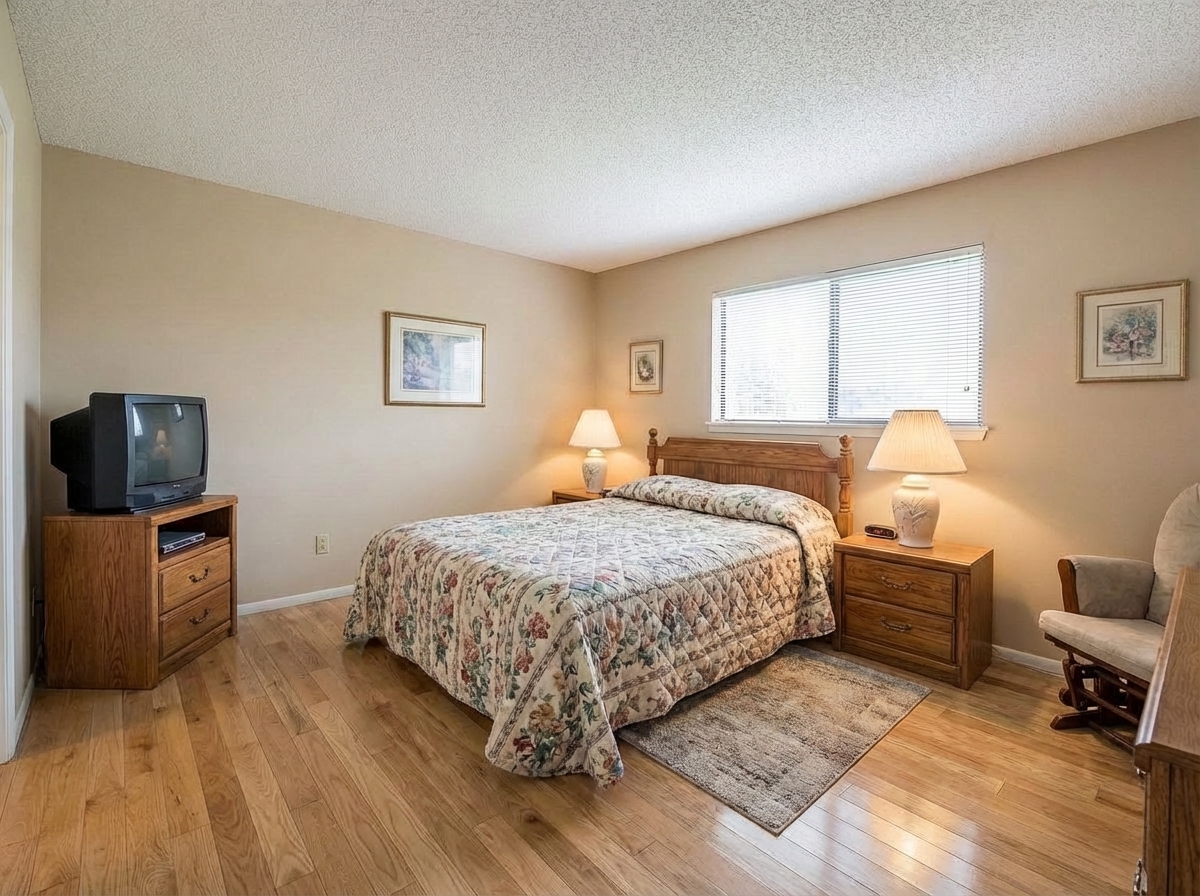
Roomagen Flooring Replacement is an AI-powered floor visualization tool that previews hardwood, tile, carpet, vinyl, and stone flooring options at full room scale with accurate grain patterns and grout lines. The output shows the room with the selected flooring material replacing the existing floor. Processing takes 15-30 seconds using 2 credits per image ($0.23–$0.40 depending on plan), with a free plan offering 6 credits.
Choosing new flooring from small showroom samples leaves homeowners guessing how the material will actually look in their rooms at full scale and under their lighting. The biggest challenge in the flooring industry is the disconnect between a 6-inch showroom sample and the actual appearance in a real room. Lighting conditions, room dimensions, existing furniture colors, and wall paint all dramatically change how flooring is perceived. A wrong flooring choice means $3,000-15,000 in installation costs wasted — flooring replacement is one of the most expensive home improvement reversals. Research indicates that 40% of homeowners express dissatisfaction with their flooring selection after installation, often citing unexpected color differences between the sample and the installed result. Roomagen renders any of 7 flooring types directly onto your actual room photograph at full scale with accurate grain patterns, color rendering, and realistic lighting interaction — see exactly how each option looks in your space before making a purchase commitment.
No credit card required. Results in 30 seconds.
Features
Preview new flooring virtually before renovation. See how hardwood, tile, carpet, or vinyl would look in any room.
Visualize New Flooring Options
Visualizes hardwood, tile, carpet, and vinyl with correct grain patterns
Hardwood, Tile & Carpet Preview
Handles room transitions and thresholds between flooring types
Room-by-Room Flooring Changes
Matches specific product SKUs from manufacturer reference images
How It Works
Get professional results in three simple steps
Drop your photos here
or browse files
Upload Your Photos
Simply drag and drop your photos or browse to upload. We support all major image formats including JPG, PNG, and RAW files up to 50MB each.
Upload a room photo in JPEG, PNG, or WebP format (up to 50 MB). The tool works with any existing floor condition — old carpet, cracked tile, worn hardwood, bare concrete, or damaged surfaces all work equally well. The AI automatically detects the floor area boundary including areas under furniture, at doorway thresholds, and room transitions. Wall-to-floor and furniture-to-floor edges are separated at pixel level for precise replacement. The photograph angle and perspective information are calculated automatically to ensure the new flooring pattern renders with correct spatial alignment.
AI Processing
Our advanced AI analyzes your images and applies professional enhancements automatically. Choose from virtual staging, enhancement, object removal, or day-to-dusk conversion.
Select from 7 floor types — hardwood, laminate, tile, carpet, vinyl, concrete, or stone. Within each type, the AI renders detailed material characteristics: for hardwood, plank direction, width, and pattern options (herringbone, chevron, straight plank); for tile, size, grout color, and layout pattern; for carpet, pile height and texture density. Color options within each type are extensive — from light oak to dark walnut for wood, from white marble to dark granite for stone. The AI calculates brightness and shadow interactions based on the room's lighting angle for photorealistic material rendering.
Download Results
Preview your transformed images and download high-resolution results ready for listings, marketing materials, social media, and more. No watermarks on premium plans.
Download your refloored room in 10-90 seconds. The output is photorealistic — flooring pattern aligns with room perspective, material color responds naturally to the room's lighting, and furniture shadows fall correctly on the new surface. Doorway thresholds and room transitions render with natural transition details. Reprocess the same photo with different materials for direct A/B comparison (each version costs 2 credits). The visualizations are suitable for interior designer presentations, flooring retailer consultations, and personal decision-making before committing to purchase and installation.
Why Choose Roomagen
Hardwood Floor Options
Visualizes hardwood, tile, carpet, and vinyl with correct grain patterns
Tile & Stone Flooring
Handles room transitions and thresholds between flooring types
Carpet & Vinyl Choices
Matches specific product SKUs from manufacturer reference images
Who Is It For?
Real Estate Agents
Show buyers how replacing worn carpet or dated tile with modern flooring would transform a room and justify the listing price.
Interior Designers
Present multiple flooring options to clients rendered on their actual room photos for confident material selection.
Property Managers
Compare flooring upgrade options across rental units to choose materials that balance durability, cost, and aesthetic appeal.
Common Use Cases
Material Selection Before Purchase
See how hardwood, tile, marble, or carpet would look in your actual room at full scale. Compare 7 materials side by side at 2 credits each to make a confident flooring decision.
Listing Photo Enhancement
Replace stained carpet or damaged flooring in listing photos with clean, appealing alternatives. Hardwood floors consistently test as the most attractive flooring in buyer surveys.
Rental Upgrade Planning
Visualize flooring upgrades for rental properties before investing. Test whether vinyl plank or tile would produce better rental returns for your specific units.
Design Client Presentation
Show clients exactly how their floor selection will look in the actual space. The full-room visualization is far more convincing than small showroom samples.
Renovation Budget Planning
Visually compare flooring options across different price segments to find the best balance of cost and appearance. Generate side-by-side comparisons of budget laminate ($2-5 per square foot), mid-range hardwood ($6-12 per square foot), and premium stone ($15-30 per square foot) in the same room. This visual comparison helps homeowners determine whether the visual improvement of premium materials justifies the additional cost in their specific space and lighting conditions.
Open Concept Flooring Continuity
Plan flooring transitions in open-concept homes where kitchen, living room, and dining areas flow together without walls. Test the same flooring material across photos taken from different rooms to verify visual continuity and consistency. This ensures that the chosen material maintains its intended appearance from every viewing angle and under different lighting conditions throughout the connected spaces.
Unlike viewing 6-inch flooring samples in a store, Roomagen shows the full-room effect of any flooring material with accurate grain patterns, color, and lighting interaction at actual scale. Showroom samples are free but only 15x15cm — they cannot demonstrate room-scale appearance, lighting interaction, or how the material coordinates with your existing furniture and wall colors. In-store lighting differs significantly from your home lighting, making color perception unreliable. Flooring manufacturer digital simulators are typically free but use generic stock room images rather than your actual space, offer limited material selections, and produce non-photorealistic results. Interior designer consultations cost $100-300 per hour and involve bringing samples for in-person evaluation over 1-2 weeks, but still cannot show the complete room-scale visual effect. Roomagen renders at 2 credits per image on your own room photograph with 7 flooring types (hardwood, laminate, tile, carpet, vinyl, concrete, stone) in 10-90 seconds.
| Roomagen | Floor Installation | |
|---|---|---|
| Cost | $0.23–$0.40 | $3–$15/sqft + labor |
| Turnaround | Under 90 seconds | 1–3 days per room |
| Material options | 7 types instantly | Visit showrooms + order samples |
| Preview accuracy | Full room visualization | Small samples only |
| Commitment | 2 credits | Full purchase + installation |
| Room disruption | Zero | Major — furniture moved, room unusable |
Technical Specifications
- Supported formats
- JPEG, PNG, WebP
- Max file size
- 50 MB
- Output resolution
- HD / Ultra HD (Pro & Business)
- Floor types
- 7 (hardwood, tile, carpet, vinyl, marble, laminate, concrete)
- Detail rendering
- Grain patterns, grout lines, pile texture
- Seam handling
- Proper seaming at room boundaries and transitions
- Processing time
- 10–90 seconds
- AI model
- Gemini AI
- Credit cost
- 2 credits per image
Pricing
| Plan | Price | Credits/mo | Per Image | Resolution |
|---|---|---|---|---|
| Free | $0 | 6 (one-time) | Free | HD |
| Starter | $12/mo | 60 | $0.40 | HD |
| Pro | $29/mo | 200 | $0.29 | Ultra HD |
| Business | $79/mo | 700 | $0.23 | Ultra HD |
Per-image cost = 2 credits. Annual plans reduce cost by ~17%. Credit packages: 60/$19, 180/$45, 360/$79.
Frequently Asked Questions
Everything you need to know about Roomagen
Explore Related Tools
Discover more AI-powered tools to enhance your visual content
Restyle Surfaces - Update Finishes
Restyle any surface in your photos - countertops, floors, walls, backsplashes. Preview different materials and finishes instantly.
Learn moreVirtual Renovation & Remodeling
Show clients renovation potential with virtual remodeling. Update kitchens, bathrooms, flooring, and finishes digitally before selling, leasing, or redesigning.
Learn moreVirtual Wall Repainting
Virtually repaint walls to preview colors before painting. See how different paint colors would look in any room with realistic lighting.
Learn moreVirtual Bathroom Renovation
Transform outdated bathrooms virtually with new tiles, vanities, fixtures, and finishes. Help clients visualize modern possibilities without physical construction.
Learn moreVirtual Kitchen Renovation & Remodeling
Virtually renovate kitchens with new cabinets, countertops, backsplashes, and appliances. Show clients, buyers, or guests the kitchen’s full potential without physical construction.
Learn more