
AI Season Change — Turn Any Photo Into Spring, Summer, Fall or Winter
Roomagen Season Change is an AI photo tool that changes the season in exterior and landscape photos, such as winter to summer or the reverse, with matching vegetation, light and sky, usually in under a minute for 2 credits.
Listing photos taken in the wrong season reduce the property's visual appeal when buyers search during a different time of year. The real estate sales process averages 3-6 months — during which seasons change but listing photographs remain static. Photos taken in winter show bare trees, brown grass, and overcast skies, making the property look uninviting to buyers searching in spring. Summer photos appear stale when buyers view them during autumn or winter months. Re-photography costs $150-400 per session plus scheduling coordination and waiting for the right seasonal conditions — if the seasonal window is missed, it means months of delay. NAR data shows that listings with green lawns and flowering landscaping receive 30% more click-through engagement than those with dormant winter vegetation. Roomagen AI completely transforms the season in exterior photographs — winter to spring, summer to autumn, or any seasonal direction you need to show the property at its most appealing.
No credit card required. Results usually in under a minute.
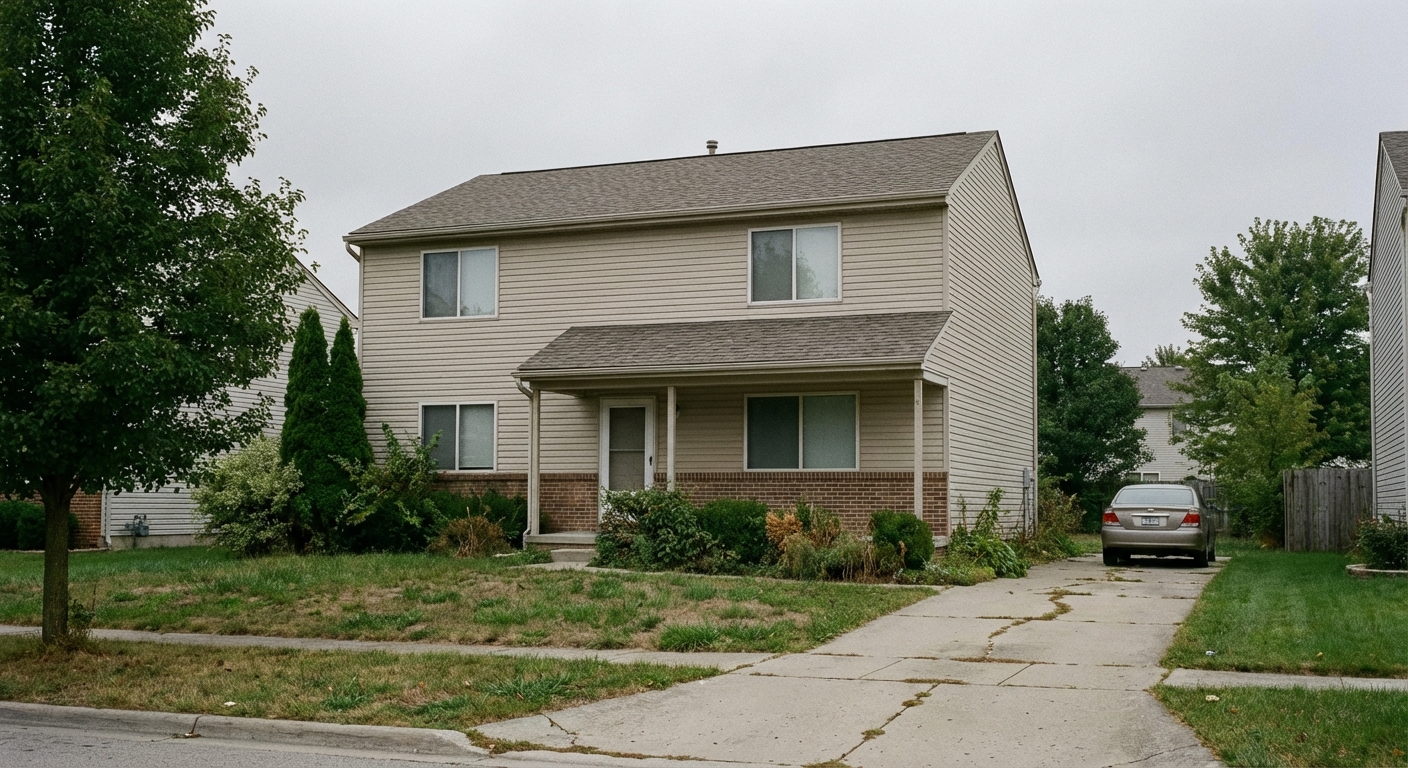
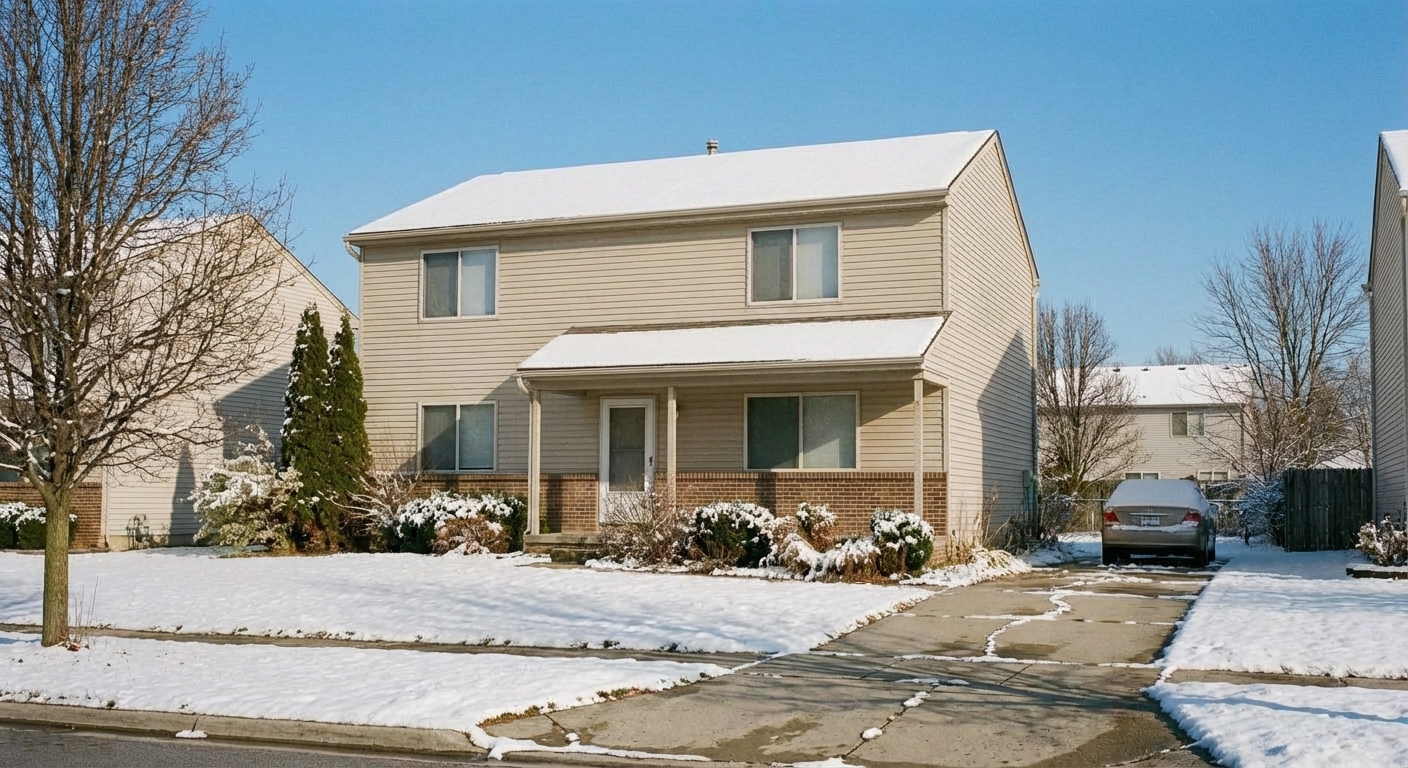
Demo example: the “Before” image was created with AI for this site; it is not a customer photo.
Features
Change the season in any exterior photo: add fall foliage, fresh snow, spring blooms or summer green, usually in under a minute. For realtors and Airbnb hosts.
Winter to Summer Transformation
Converts snow-covered properties to lush summer scenes
Year-Round Property Appeal
Adds season-appropriate foliage, flowers, and ground cover
Seasonal Landscape Updates
Keeps listings evergreen regardless of when photos were taken
How It Works
Get professional results in three simple steps
Drop your photos here
or browse files
Upload Your Photos
Upload an exterior photo in JPEG, PNG, or WebP format (up to 50 MB) — taken in any season (winter, spring, summer, or autumn). The AI performs detailed scene analysis identifying: trees (leafed or bare), grass condition (green, brown, or snow-covered), plant coverage status, sky conditions, light angle direction, and overall seasonal indicators. Structural elements including the house, fences, pathways, and garage are marked as protected and will not be modified during the seasonal transformation process.
AI Processing
Select the target season. The AI transforms all natural elements from the source season to the target: tree foliage (green leaves, yellow-orange autumn colors, bare branches, spring buds), grass color and texture, plant coverage (flowering, dormant, or lush), sky appearance (clear blue, partly cloudy, overcast winter gray), and light temperature (warm summer tones versus cool winter tones). All changes are applied cohesively — a single unified seasonal atmosphere is created rather than individual element changes that might appear inconsistent.
Download Results
Download your seasonally transformed exterior, usually in under a minute. The output is photorealistic — the seasonal change appears natural and convincing with all elements maintaining temporal consistency. Process the same photo in all 4 seasons to create a year-round property portfolio (4 versions at 2 credits each equals 8 credits total). Refresh listing photos every 3 months with season-appropriate versions to maintain fresh visual appeal. Spring and summer versions typically generate the highest click-through rates for property listings.
Why Choose Roomagen
Summer Greenery Addition
Converts snow-covered properties to lush summer scenes
Fall Color Enhancement
Adds season-appropriate foliage, flowers, and ground cover
Winter to Spring Conversion
Keeps listings evergreen regardless of when photos were taken
Who Is It For?
Real Estate Agents
Keep listings looking their best year-round by converting winter exterior photos to appealing summer scenes that attract more buyer interest.
Interior Designers
Present outdoor design concepts with the ideal seasonal backdrop regardless of when the property photos were taken.
Property Managers
Maintain fresh, seasonally appropriate listing photos without scheduling new photography sessions every few months.
Common Use Cases
Year-Round Listing Freshness
Keep listings looking current regardless of when the photos were taken. Convert winter exterior photos to summer for spring listings, or add fall colors for autumn marketing.
Seasonal Marketing Campaign
Create 4 seasonal versions of the same exterior photo for year-round social media and email marketing. At 2 credits each, a full seasonal set costs $0.92–$1.60 on monthly plans.
Buyer Emotional Appeal
Show the property in its most appealing seasonal context — lush summer greenery for family buyers, colorful fall foliage for aesthetic appeal, or cozy winter snow for holiday marketing.
Listing Refresh Without Reshoot
Update exterior photos for a new season without scheduling a new photography session. Convert existing photos to match the current time of year.
Year-Round Listing Portfolio
Create all four seasonal versions of the same property — buyers can see the property in spring bloom, summer greenery, autumn foliage colors, and winter atmosphere. Present these as a 'seasonal gallery' on the property detail page so buyers understand how the property looks throughout the year. This comprehensive presentation demonstrates the property's year-round appeal and helps buyers who are relocating from different climates understand the local seasonal experience.
Holiday Season Marketing
Create season-specific exterior visuals for holiday marketing campaigns — a snowy winter scene for Christmas promotions, spring bloom for Easter open house events, autumn leaves for Thanksgiving marketing. Generate seasonal visual content that aligns with holiday marketing calendars to create emotionally resonant listing presentations that connect with buyers during culturally significant periods throughout the year.
Unlike re-photography that requires waiting for the right season and scheduling a photographer, Roomagen transforms any exterior photo to any target season instantly. Re-photography costs $150-400 per session, requires waiting for the correct seasonal window, and involves photographer coordination — missing the seasonal timing means waiting additional months. Photoshop seasonal manipulation costs $100-300 per image and takes 2-4 hours because adding leaves, changing grass color, and replacing skies each require separate manual work with difficult consistency across elements. Stock photo overlays are cheap or free but are not property-specific, create perspective mismatches, and appear visibly artificial. Roomagen processes at 2 credits per image with AI automatic seasonal transformation delivered in under 90 seconds, cohesively updating grass, plants, trees, sky, and lighting to match the target season.
| Roomagen | Reshooting Each Season | |
|---|---|---|
| Cost | $0.23–$0.40 | $200+/session per season |
| Turnaround | Usually under a minute | Schedule around weather |
| Seasons available | 4 on demand | Wait for actual season |
| Weather dependency | None | Completely weather-dependent |
| Year-round marketing | Any season, usually under a minute | 4 separate photo sessions |
| Consistency | Same angle, different season | Camera angle may vary |
Technical Specifications
- Supported formats
- JPEG, PNG, WebP
- Max file size
- 50 MB
- Output resolution
- HD / Ultra HD (Pro & Business)
- Seasons
- 4 (spring, summer, autumn, winter)
- Transformation
- Vegetation, sky, lighting, and ground cover
- Processing time
- Usually under a minute
- Credit cost
- 2 credits per image
Pricing
| Plan | Price | Credits/mo | Per Image | Resolution |
|---|---|---|---|---|
| Free | $0 | 6 (one-time) | Free | — |
| Starter | $12/mo | 60 | $0.40 | 2K |
| Pro | $29/mo | 200 | $0.29 | 2K or 4K (4 credits) |
| Business | $79/mo | 700 | $0.23 | 2K or 4K (4 credits) |
Per-image cost = 2 credits. Annual plans reduce cost by ~17%. Credit packages: 60/$19, 180/$45, 360/$79.
Frequently Asked Questions
Everything you need to know about Roomagen
Yes, Roomagen transforms snow-covered landscapes to lush green summer scenes with full foliage, green grass, and blooming gardens. The AI replaces bare trees with leafy canopies and snow with healthy lawns.
Listings photographed in winter with bare trees and brown lawns attract fewer buyers. Summer greenery adds warmth, curb appeal, and emotional connection, helping your property stand out regardless of when it was actually photographed.
Transform to spring blooms with flowering trees and fresh green, summer greenery with full foliage, fall colors with warm orange and red leaves, or festive winter scenes with tasteful holiday accents.
The AI matches seasonal elements to the property's geographic region, climate zone, and existing vegetation types. Foliage, ground cover, and sky conditions all adjust consistently for a naturally convincing result.
Season Change works on trees, lawns, plants, ground cover, sky and light, for example turning green leaves orange or adding snow. The building's shape, windows, roofline, fences and paths are meant to stay as photographed. Small edits can still reach the house, so inspect it closely before publishing.
Yes. Label it digitally altered and keep the original available, since buyers or guests arriving in winter will not see that summer garden. In California, AB 723 has required since 1 January 2026 a statement that the image was altered, plus a link to the original, in real estate ads.
Yes, season change works on aerial and drone photography as well. The AI transforms large landscape areas including tree canopies, lawns, and gardens visible from above.
Most seasonal conversions complete in under a minute. Complex scenes with extensive landscaping may take slightly longer as the AI processes multiple vegetation areas and ground cover types.
It is not meant to. The AI focuses on vegetation, ground cover and sky and is told to keep the house as photographed, but small changes can slip in, so compare the result with your original.
Yes, generate spring, summer, and fall versions of the same property photo to choose which season presents your listing most attractively or to show year-round appeal.
Properties with minimal landscaping benefit less from seasonal changes, but the AI can still adjust sky conditions, add appropriate ground cover, and modify any existing vegetation for a seasonal update.
Real estate agents listing properties during winter months, property marketers maintaining year-round listing content, and developers showcasing planned landscaping in ideal seasonal conditions are the primary users.
Explore Related Tools
Discover more AI-powered tools to enhance your visual content
Virtual Landscaping Design — 12 Garden Styles Added to Your Yard Photo
Add plants, trees, gardens and outdoor features to a photo of any yard or property in 12 landscaping styles, without breaking ground. 2 credits per image.
Learn moreAI Grass Replacement — Add Grass to Real Estate and Yard Photos Online
Replace dead, brown or patchy grass with a lush green lawn in property photos, so homes look cared for in any season. Usually under a minute, 2 credits per image.
Learn moreSky Replacement Service — Change the Sky in Exterior Images with AI
Swap gray or dull skies for blue skies or sunsets in any exterior photo, from listings and hotels to commercial buildings. Usually under a minute, 2 credits.
Learn moreDay to Dusk Conversion Service — Day to Night Photos for Real Estate & More
Turn a daytime exterior or room photo into a sunset, dusk or night shot with warm window glow. Pick the hour on a 24-hour slider; 2 credits per photo.
Learn moreHoliday Virtual Staging — Christmas Trees and Fall Decor on Your Photo
Add holiday decorations to a room photo with AI, from Christmas trees to fall decor and spring flowers, for seasonal listings and marketing. 2 credits per image.
Learn more