
Virtual Decluttering Service
Roomagen Virtual Decluttering is an AI-powered tidying tool that selectively removes clutter, mess, and excess items from occupied room photos while keeping attractive furniture in place. Used by real estate agents, hotel managers, photographers, interior designers, and property managers, the output is a cleaner, organized version of the same furnished room. Processing usually takes under a minute using 2 credits per image ($0.23–$0.40 depending on plan), with a free plan offering 6 credits.
One of the most common challenges professionals face is dealing with cluttered spaces before a photography session — whether it is a homeowner's personal belongings, hotel room turnover mess, or commercial space with temporary equipment. Scattered items, cluttered countertops, and disorganized shelves significantly reduce photo quality and viewer appeal across every industry. Hiring a professional organizer costs $200–$500 per room and takes hours. Roomagen’s AI automatically distinguishes between attractive furnishings that should be preserved and visual clutter that should be removed — producing a professionally organized appearance in under a minute without any physical intervention.
No credit card required. Results usually in under a minute.
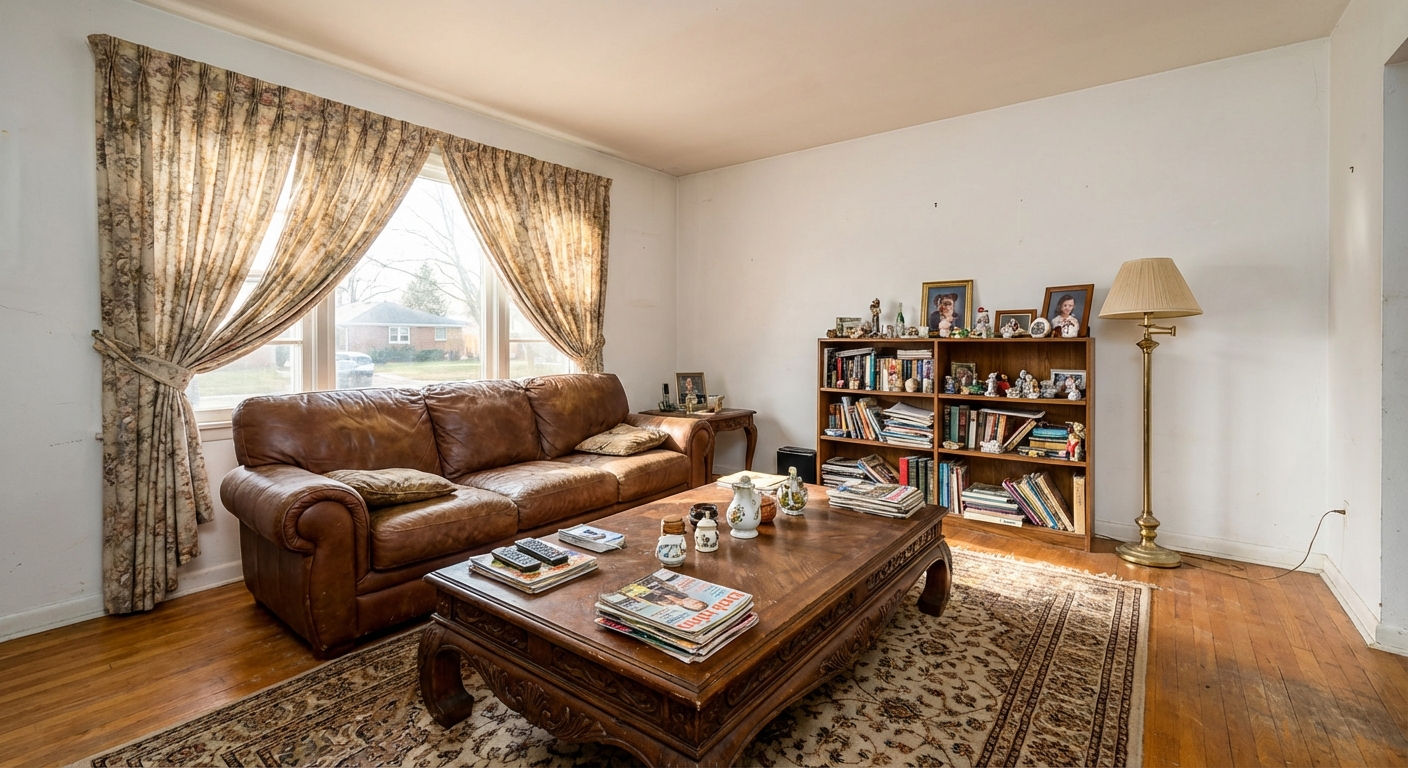
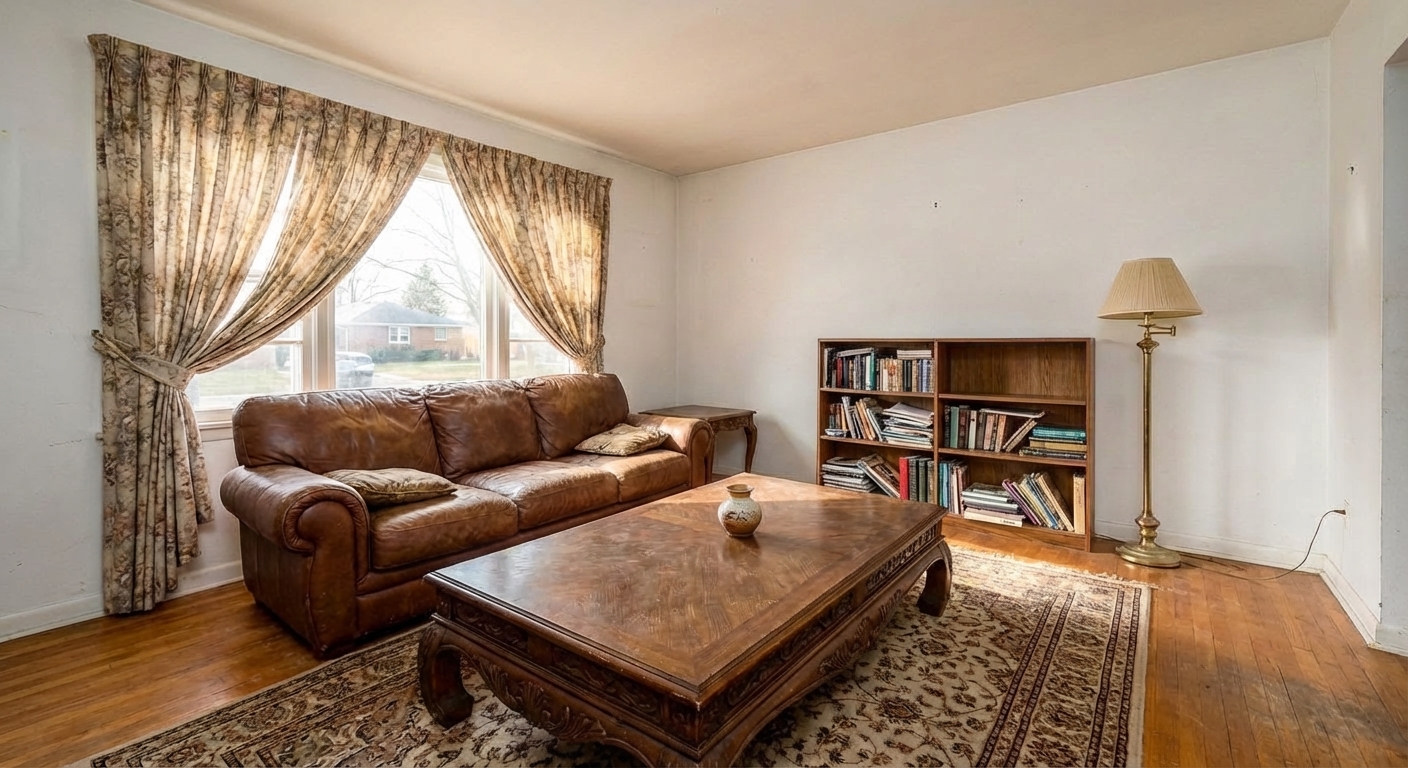
Demo example: the “Before” image was created with AI for this site; it is not a customer photo.
Features
Virtually declutter messy rooms for cleaner photos. Remove countertop clutter, scattered items and visual distractions while the furniture stays — for listings, hotel rooms, and commercial spaces.
Remove Excess Furniture
Selectively removes clutter while keeping attractive furnishings
Clear Counter Clutter
Clears countertops, shelves, and floors of visual distractions
Simplify Busy Rooms
Preserves lived-in warmth without the mess of everyday items
How It Works
Get professional results in three simple steps
Drop your photos here
or browse files
Upload Your Photos
Upload a furnished room photo in JPEG, PNG, or WebP format (up to 50 MB). The tool works best with occupied rooms that have visible clutter or excess items — from lightly messy spaces with a few items out of place to heavily cluttered rooms with belongings covering most surfaces. The AI scans the entire room and classifies every visible object into two categories: attractive furnishings that contribute to the room's aesthetic appeal (furniture, decorative items, plants, well-placed accessories) and clutter that diminishes visual quality (mail, magazines, shoes, toiletries, excess small items, cables, and general mess).
AI Processing
First choose how far the tidy-up goes: "Tidy + light styling" (the default) clears the clutter, straightens beds and cushions and adds a few neutral touches, while "Tidy only — add nothing" only clears the clutter. In both modes the furniture stays where it is. Clutter includes mail and paper stacks, scattered magazines, shoes and clothing, toiletries, children's toys, crowded countertops (small appliances, condiments, dishes), cables, pet items and general mess; sofas, tables, chairs, lamps, plants and wall art stay. No manual selection is needed.
Download Results
Processing usually takes under a minute. The result is the same room with the furniture in place, but tidier — countertops cleared, floors clean, surfaces organized — and the AI fills the cleared areas to match the surrounding countertops, shelves and floors. In the default "Tidy + light styling" mode it also straightens beds and cushions and adds a few neutral touches; choose "Tidy only — add nothing" to avoid that. Compare the result with the original before you publish, and label it where your MLS asks.
Why Choose Roomagen
Kitchen Decluttering
Selectively removes clutter while keeping attractive furnishings
Bathroom Cleanup
Clears countertops, shelves, and floors of visual distractions
Living Space Simplification
Preserves lived-in warmth without the mess of everyday items
Who Is It For?
Real Estate & Hospitality
Clean up occupied rooms digitally so owners and hotel staff don't need to physically declutter before every photo session.
Interior Designers & Photographers
Remove everyday clutter from client spaces to showcase the underlying design and architectural features more clearly.
Property Managers & Commercial Spaces
Tidy up occupied unit and office photos for marketing without requiring occupants to declutter for a photo shoot.
Common Use Cases
Occupied Listing Cleanup
Photograph an occupied home as-is and let the AI remove clutter — mail piles, shoes by the door, countertop mess — while keeping attractive furniture and decor. No need to ask homeowners to tidy up before the shoot.
Challenging Property Marketing
Properties with excessive belongings or hoarding tendencies become marketable without confronting the occupant. The AI selectively removes visual clutter while maintaining the room’s livable appearance.
Quick Showing Preparation
Prepare listing photos for an upcoming showing without a return visit to the property. Upload existing photos and download decluttered versions that present the home at its best.
Rental Turnover Photos
Between tenants, quickly prepare marketing photos by removing leftover items and mess. The AI produces clean, inviting images ready for rental listing platforms.
Hoarder Property Marketing
Properties with excessive belongings or hoarding conditions become marketable without confronting the occupant or arranging physical cleanup. The AI removes the majority of visual clutter, transforming overwhelming spaces into presentable rooms. For heavily cluttered rooms, running multiple passes progressively cleans up additional detail with each iteration at 2 credits per pass.
Last-Minute Listing Preparation
Listing photos are needed tomorrow but the home is not presentation-ready. Upload existing photos of the messy space and download digitally decluttered versions in under a minute each. No return visit to the property, no homeowner coordination, and no scheduling delays — a tidier presentation from the photos you already have.
Asking occupants to physically declutter provides no quality guarantee — results are inconsistent and the process must be repeated before every session. Professional organizers charge $200–$500 per room and require hours of on-site work. Manual clutter removal in Photoshop costs $50–$100 per image and takes 20–30 minutes. Roomagen declutters any room for 2 credits ($0.23–$0.40 depending on plan) in under a minute, using AI that automatically classifies objects as clutter or attractive furnishing.
| Roomagen | Asking Homeowner to Tidy | |
|---|---|---|
| Cost | $0.23–$0.40 | Awkward conversation |
| Time | Usually under a minute | Unpredictable |
| Consistency | AI applies uniform standards | Depends on homeowner’s effort |
| Furniture kept | Attractive pieces preserved | Risk of over-removal |
| Professional result | Clean look; check each result | No quality guarantee |
| Repeat visits | None needed | May need multiple requests |
Technical Specifications
- Supported formats
- JPEG, PNG, WebP
- Max file size
- 50 MB
- Output resolution
- HD / Ultra HD (Pro & Business)
- Intelligence
- Distinguishes clutter from attractive decor
- Preservation
- Keeps furniture, removes mess and excess items
- Processing time
- Usually under a minute
- AI model
- Gemini AI
- Credit cost
- 2 credits per image
Pricing
| Plan | Price | Credits/mo | Per Image | Resolution |
|---|---|---|---|---|
| Free | $0 | 6 (one-time) | Free | — |
| Starter | $12/mo | 60 | $0.40 | 2K |
| Pro | $29/mo | 200 | $0.29 | 2K or 4K (4 credits) |
| Business | $79/mo | 700 | $0.23 | 2K or 4K (4 credits) |
Per-image cost = 2 credits. Annual plans reduce cost by ~17%. Credit packages: 60/$19, 180/$45, 360/$79.
Frequently Asked Questions
Everything you need to know about Roomagen
Roomagen's decluttering selectively removes excess items while keeping furniture that enhances the space, whereas item removal targets specific unwanted objects entirely. Decluttering creates a tidier version of the current room layout.
Roomagen specializes in decluttering lived-in homes by removing personal items, excess furniture, and visual distractions. The result preserves the warm, furnished feel while eliminating the messy, lived-in appearance.
Roomagen strategically removes clutter while keeping attractive furnishings, rugs, and art that make the space feel welcoming. The goal is a professionally organized room, not a stripped-down vacant space.
Roomagen removes toys, laundry, papers, kitchen counter appliances, bathroom toiletries, shoe piles, and general mess. The AI identifies clutter patterns and removes items that create visual noise.
Roomagen excels at clearing kitchen countertops of small appliances, cutting boards, and dish clutter. The result is clean counters that showcase the kitchen's actual surface area and material quality.
Roomagen's AI is trained to identify items that create visual clutter versus furnishings that enhance a room's appeal. The algorithm removes personal items and excess objects while preserving staged-looking elements.
Not item by item. Virtual Decluttering has no selection step: it decides what counts as clutter and keeps furniture and decor. To keep chosen pieces and clear the rest, use Empty Room (Advanced) with "Keep them — clear the rest"; to remove a single object, use Item Removal.
Roomagen processes decluttering in under a minute per image, making it practical to clean up an entire property's photos quickly. This is far faster than asking homeowners to physically tidy every room.
Roomagen decluttering is preferred for occupied homes where the furniture is attractive but the space feels messy. Complete emptying is better when you want to restage with entirely different furniture.
Roomagen Virtual Decluttering tidies the room while keeping attractive furniture in place — producing a cleaner, magazine-worthy version of the same furnished room. Empty Your Space removes absolutely everything including furniture, leaving a completely bare room. Item Removal erases only specific selected objects. Choose Decluttering for occupied homes that just need tidying, Empty Your Space for total clearing before restaging, and Item Removal for removing one or two eyesores.
Explore Related Tools
Discover more AI-powered tools to enhance your visual content
AI Object & Item Removal from Photos
Remove unwanted objects, clutter, and distractions from any photo. AI intelligently fills backgrounds for clean, professional images — for property listings, hotel rooms, product shots, and portfolio photos.
Learn moreAI Empty Room — Remove All Furniture From a Photo in 30 Seconds
Clear any furnished room for virtual restaging, renovation previews or tenant turnover. Fills in walls and floors behind furniture. 6 free credits included.
Learn moreFree AI Virtual Staging — Stage Any Empty Room in Under a Minute
Stage vacant rooms with AI, usually in under a minute. 13 design styles, 15 room types, listing-ready photos for real estate, rentals and hospitality. 6 free credits, no credit card required.
Learn moreRedesign a Furnished Room With AI — 13 Styles, Usually Under a Minute
Restyle any furnished room without moving a thing. Modern, Scandinavian, farmhouse, luxury and 9 more styles. Used by interior designers and realtors. Free to try.
Learn moreAI Photo Enhancement — Professional-Looking Results in Under a Minute
Enhance any photo automatically with AI. HDR processing, color correction, lens fix, and professional-grade adjustments, usually in under a minute — for property listings, hotel rooms, product shots, and more.
Learn more