
Professional 2D & 3D Floor Plans — AI-Generated in Under a Minute
Roomagen Floor Plans redraws a sketch, scan or old plan as a clean 2D floor plan, with four drawing styles and a 3D option. Each run costs 2 credits ($0.23–$0.40 per image on monthly plans); check the numbers before publishing.
Floor plans help across industries — buyers use them to understand a property's layout, architects need quick layout drafts for client presentations, interior designers plan furniture around room shapes, and property managers need consistent unit layouts for tenants. Professional floor plan drafting usually means an on-site measurement visit, CAD software and a wait of days. DIY floor plan software has a learning curve and takes hours of manual drawing. Roomagen redraws a hand sketch, a scan or a photo of an existing plan as a clean 2D floor plan — no CAD skills needed, usually in under a minute for 2 credits. The AI redraws text and numbers too, so check them against your original before you publish.
No credit card required. Results usually in under a minute.
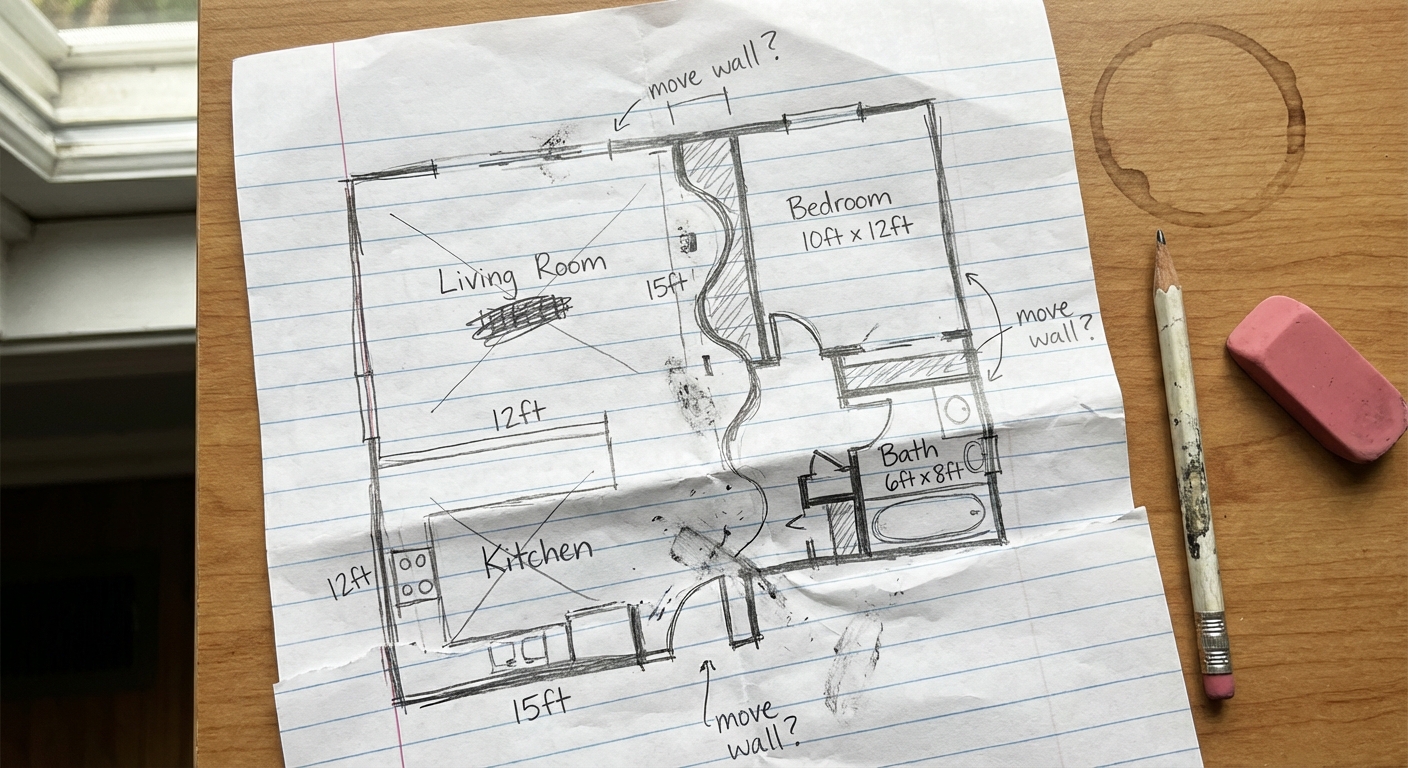
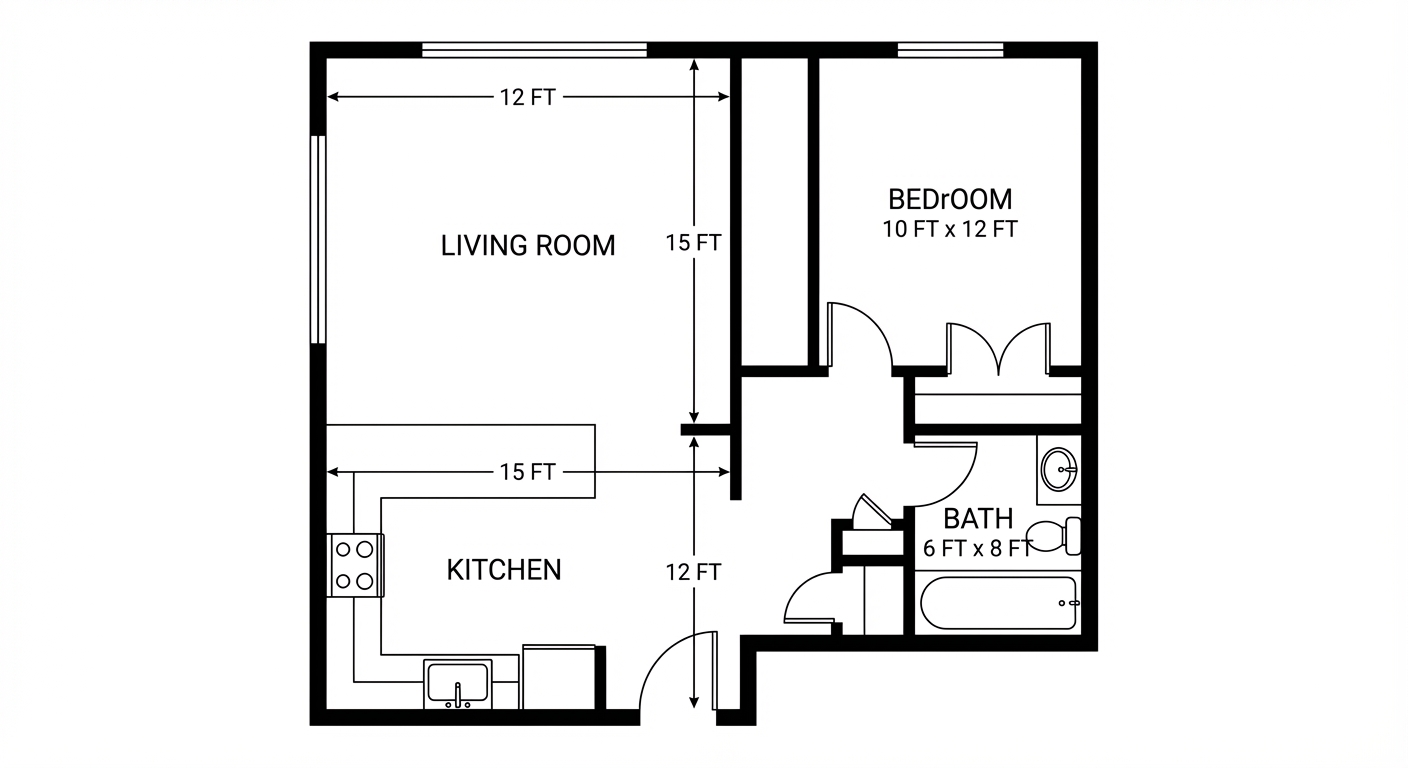
Demo example: the “Before” image was created with AI for this site; it is not a customer photo.
Features
Turn a sketch, scan or old plan into a clean 2D floor plan or a 3D view. Keep or remove measurements and room names, and pick one of four drawing styles.
Measurements You Control
Redraws your plan as a clean 2D layout, keeping, removing or estimating measurements and room names
Interactive Floor Plan Design
Four drawing styles, from pure line art to pastel colors with furniture symbols
Listing-Ready Floor Plans
Works from hand sketches, scans and photos of existing plans
How It Works
Get professional results in three simple steps
Drop your photos here
or browse files
Upload Your Photos
Upload a hand-drawn sketch, a scan or a photo of an existing plan (JPEG, PNG or WebP, up to 50 MB). Then choose what happens to what is on it: keep, remove or let the AI estimate measurements; keep, remove or let the AI write room names; keep, remove or let the AI add furniture. Doors and windows are drawn only where you drew them, unless you ask the AI to complete obvious missing ones.
AI Processing
Pick an output style — Pure Line Art (the default), Light Grey Fills, Hatched Walls, or Symbolized + Colored — and a page: A4 landscape or portrait, square, or wide 16:9. The AI redraws the plan with walls, doors, windows and fixed elements such as counters. It redraws the text and numbers as well, so check them against your original before you publish.
Download Results
Processing usually takes under a minute. The result is a JPEG image ready to download — not a CAD, DWG or vector file. For multi-story properties, process each floor separately. A floor plan next to the listing photos helps buyers understand how the rooms connect.
Why Choose Roomagen
2D Floor Plans
Redraws your plan as a clean 2D layout, keeping, removing or estimating measurements and room names
3D Floor Plans
Four drawing styles, from pure line art to pastel colors with furniture symbols
Furnished Floor Plans
Works from hand sketches, scans and photos of existing plans
Who Is It For?
Real Estate Agents & Property Managers
Add professional floor plans to listings and rental units to increase engagement and reduce unnecessary showings.
Architects & Builders
Generate quick layout drafts from sketches or scans for client presentations and preliminary design work.
Interior Designers
Create clean room layouts for space planning, furniture arrangement proposals, and client design presentations.
Common Use Cases
Listing Floor Plan Creation
Upload a rough sketch or a photo of the existing plan and get a clean 2D floor plan for your listing. The AI converts hand-drawn plans into polished digital output — check the numbers before you publish.
Open House Handouts
Generate printed floor plans for open house visitors. A clear layout helps buyers understand room flow and make informed comparisons between properties.
Property Marketing Package
Include a floor plan in listing materials alongside photos, so buyers can see how the rooms connect before they visit.
Buyer Spatial Understanding
Help remote or international buyers understand the property layout without visiting in person. Floor plans communicate room relationships that photos alone cannot.
Pre-Listing Documentation
Create professional floor plans during the listing preparation process — you can start even before the photographer visit. The floor plan is ready from day one of the listing, providing differentiation from competing agents who skip this step.
Remote Property Evaluation
Provide spatial information for investors and buyers evaluating properties remotely. A floor plan redrawn from your sketch or an existing plan shows room layout and flow without a visit — useful for out-of-state and international buyers.
Professional floor plan services usually need an on-site measurement visit and CAD drafting by trained technicians, with a turnaround of days. DIY software such as Floorplanner and RoomSketcher offers free tiers with paid upgrades, and both need manual measurement input plus hours of careful drawing. Roomagen redraws the sketch or plan you already have for 2 credits, usually in under a minute — no measuring equipment, no CAD skills, no scheduling. It does not measure the property for you: measurements come from your drawing or are estimated by the AI, so check them before you publish.
| Roomagen | Professional Floor Plan Service | |
|---|---|---|
| Cost | $0.23–$0.40 | $100–$300 per plan |
| Turnaround | Under 90 seconds | 1–3 business days |
| Input needed | Sketch, scan or plan photo | On-site measurement visit |
| Revisions | Rerun for 2 credits | Additional fees |
| Style options | 4 output styles | One standard format |
| Availability | 24/7 | Business hours only |
Technical Specifications
- Supported formats
- JPEG, PNG, WebP
- Max file size
- 50 MB
- Output resolution
- HD / Ultra HD (Pro & Business)
- Render styles
- 4 output styles (Pure Line Art, Light Grey Fills, Hatched Walls, Symbolized + Colored)
- Output type
- Professional 2D floor plan with room labels
- Processing time
- Usually under a minute
- AI model
- Gemini AI
- Credit cost
- 2 credits per image
Pricing
| Plan | Price | Credits/mo | Per Image | Resolution |
|---|---|---|---|---|
| Free | $0 | 6 (one-time) | Free | — |
| Starter | $12/mo | 60 | $0.40 | 2K |
| Pro | $29/mo | 200 | $0.29 | 2K or 4K (4 credits) |
| Business | $79/mo | 700 | $0.23 | 2K or 4K (4 credits) |
Per-image cost = 2 credits. Annual plans reduce cost by ~17%. Credit packages: 60/$19, 180/$45, 360/$79.
Frequently Asked Questions
Everything you need to know about Roomagen
Measurements you wrote on your drawing are redrawn, not copied, and unreadable ones are left out. If you let the AI estimate missing measurements, those are approximate only. Check every number against your original before you publish, and use a professional measurement for legal or construction purposes.
Sketch → Floor Plan has four drawing styles: Pure Line Art, Light Grey Fills, Hatched Walls, and Symbolized + Colored. Floor Plan → Colored adds a color palette to a finished plan, and Floor Plan → 3D turns a plan into a 3D view, furnished or empty.
Not from room photos. Roomagen needs a drawing to work from: a hand sketch, a scan or a photo of an existing plan, which it redraws as a clean digital floor plan. It cannot measure rooms from interior photos.
They can. For room names and for measurements you choose: keep what is on your drawing (the default), remove it, or let the AI add the missing ones — room names in your language, measurements as approximate estimates. There is no square-footage calculation. Check all text and numbers before you publish.
Yes, one floor at a time: upload each level's drawing as a separate run, at 2 credits each. Scale and staircase positions are not matched between floors automatically, so compare the plans side by side before you publish.
Usually under a minute. Complex plans can take a little longer.
Usually. The output is a JPEG image, a format MLS photo uploads generally accept, but upload limits and floor plan rules differ by MLS, so check yours. The AI redraws text and numbers, so check them before you publish.
Yes. Set furniture to "let AI add" and standard furniture symbols are drawn in rooms that have none; furniture you drew can be kept or removed (the default). AI placement follows standard conventions, not professional interior design, so treat it as a guide to how a room could be used.
Outdoor areas that are on your drawing, such as patios, decks and garages, are redrawn with the rest of the plan. Property boundaries and yard sizes are not measured.
Real estate agents enhancing listings, property developers marketing new builds, and architectural firms presenting concepts to clients all benefit from Roomagen's rapid floor plan generation.
Explore Related Tools
Discover more AI-powered tools to enhance your visual content
3D Floor Plans with Furniture
Create stunning 3D floor plans with realistic furniture and finishes. Help viewers visualize the entire layout in three dimensions — for real estate, architecture, interior design, and hospitality.
Learn moreFloor Plan Redraw — Convert Old Plans to Digital
Convert old floor plans, scanned blueprints and hand sketches into clean digital floor plans with AI. Keep or remove measurements and room names; 6 free one-time credits when you sign up.
Learn morePhotos for Virtual Tours — Stage and Enhance the Stills Next to Your 360° Tour
Roomagen does not create 360° virtual tours yet. Use it to stage, declutter and enhance the still photos that go next to a tour made with a dedicated tour service.
Learn moreFree AI Virtual Staging — Stage Any Empty Room in Under a Minute
Stage vacant rooms with AI, usually in under a minute. 13 design styles, 15 room types, listing-ready photos for real estate, rentals and hospitality. 6 free credits, no credit card required.
Learn moreAI Interior Rendering — Finished Rooms From Construction Photos
Turn photos of unfinished interiors into finished, furnished room images for new construction, renovations or design reviews. Pick the room type and one of 13 styles.
Learn moreFloor Plan Visualize — AI 3D Renders From 2D Plans in Under a Minute
Visualize 2D floor plans as 3D renders with AI. Photoreal, architectural sketch, stylized, and monochrome styles, furnished or unfurnished, output in under 90 seconds for $0.23–$0.40 per render — no 3ds Max, Lumion, or Twinmotion required.
Learn moreFloor Plan Colorize — AI Color for Black-and-White Plans in Under a Minute
Colorize black-and-white floor plans with AI. Four designer palettes, auto-detected rooms, output ready in under 90 seconds for real estate, architecture, and interior design — no Photoshop or design skills required.
Learn more