AI Tools for Real Estate Agents — Virtual Staging, Photo Enhancement & Marketing
The Roomagen Realtors Toolkit is a collection of AI tools designed specifically for real estate agents: virtual staging for vacant properties, photo enhancement for existing listing photography, item removal for occupied homes, day-to-dusk conversion for exterior appeal, and floor plan visualisation. Used by agents handling 10 to 200+ listings per year, the toolkit replaces $2,000–$5,000 per-listing physical staging with $1–$3 per-listing AI workflow.
Real estate agents spend $40,000–$100,000 per year on listing marketing — staging, photography, enhancement, decluttering, and floor plans — from separate vendors with separate timelines. The Roomagen Realtors Toolkit consolidates these into a single AI workflow, reducing both cost and coordination time by roughly 95% while preserving the marketing outcomes (faster sales, higher prices) that good listing marketing produces.
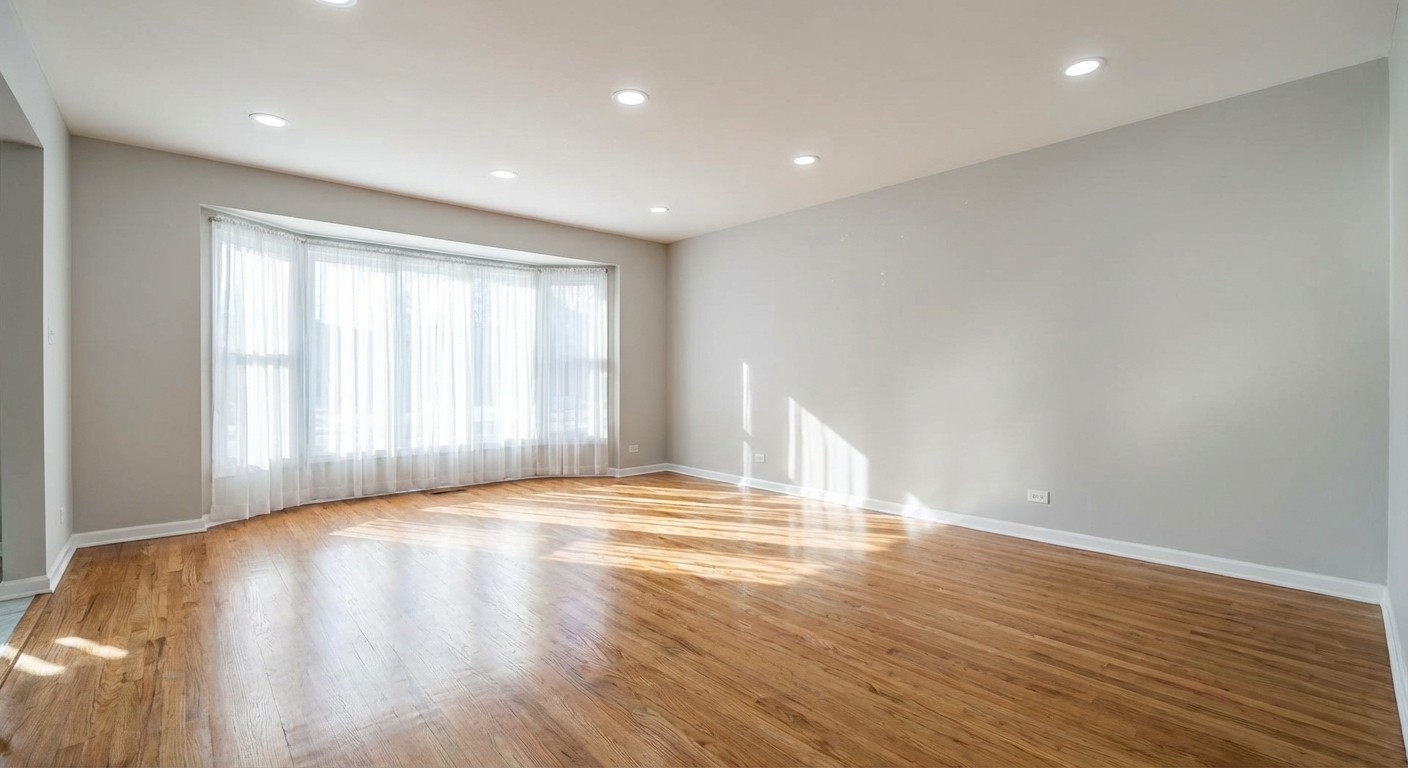
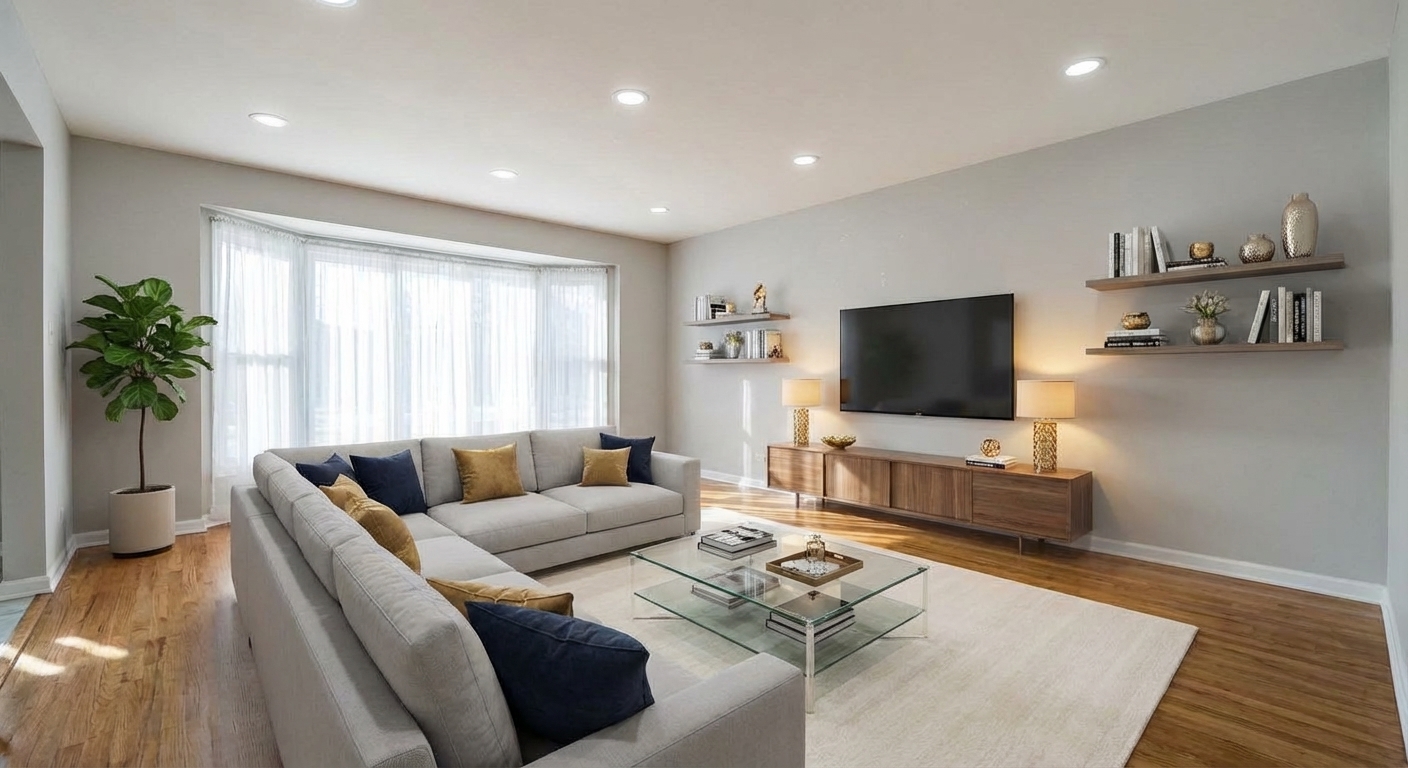
Demo example: the “Before” image was created with AI for this site; it is not a customer photo.
Features
AI toolkit built for real estate agents. Virtual staging, photo enhancement, item removal, floor plans and more — everything needed to polish listings from vacant to listing-ready. Free to start.
What Does an AI Toolkit for Realtors Actually Do?
Stage vacant listings in under 60 seconds — no furniture delivery, no physical stager fee
The Five Tools Every Real Estate Agent Uses Weekly
Enhance low-light and overcast listing photos with one-click HDR and colour correction
How Much Time and Money Does This Save Per Listing?
Remove clutter, personal items, and occupant belongings while showings are still active
When to Use Each Tool in a Listing Workflow
Convert 2D floor plans to 3D visuals buyers can actually understand
Pricing and Realistic Return on Investment
Full listing staged for under $3 on the Pro plan — vs $2,000+ traditional
What Realtors Are Saying After 60 Days
Upload a photo, pick the options and download the edited image, usually in under a minute.
How It Works
Get professional results in three simple steps
Drop your photos here
or browse files
Upload Your Photos
Sign up for a free account — 6 credits included, no credit card required. That covers three full staged photos for evaluation.
AI Processing
Upload a listing photo (JPEG, PNG, or WebP up to 50 MB, minimum 1200px recommended for best results).
Download Results
Select the tool that matches your task: Virtual Staging for vacant rooms, Item Removal for occupied, Image Enhancement for lighting fixes, Floor Plan tools for layout visuals.
Why Choose Roomagen
Virtual Staging for Vacant Listings
Stage vacant listings in under 60 seconds — no furniture delivery, no physical stager fee
Photo Enhancement for Existing Photography
Enhance low-light and overcast listing photos with one-click HDR and colour correction
Day-to-Dusk for Exterior Marketing Punch
Remove clutter, personal items, and occupant belongings while showings are still active
Item Removal for Cluttered or Occupied Properties
Convert 2D floor plans to 3D visuals buyers can actually understand
Floor Plans for Buyer Clarity
Full listing staged for under $3 on the Pro plan — vs $2,000+ traditional
Who Is It For?
Solo Agents and New Realtors
Run a full listing marketing workflow on a single subscription. Stage vacant properties, enhance existing photos, and compete with teams that spend 10x on physical staging.
Experienced Agents with Listing Volume
Handle 20–50+ listings per year without scaling physical staging costs proportionally. Keep a small physical budget for flagship listings and use AI for the rest.
Team Leads and Broker-Owners
Standardise marketing quality across your agents. Every listing on the team gets the same professional staging treatment regardless of the individual agent's budget.
Common Use Cases
Vacant Listing — Full Virtual Staging
Photograph the empty property, upload to Virtual Staging, pick the style that matches your buyer demographic (modern for urban, farmhouse for suburban, luxury for high-end), generate staged photos in 30–60 seconds each, disclose with a "Virtually Staged" label on the MLS.
Occupied Listing — Quiet Decluttering
Shoot the home while the seller is still living there, use Item Removal to digitally clear personal items and clutter, keep the actual furniture in place to show scale, list immediately without asking the seller to move anything.
Price Reduction — Fresh Photo Refresh
Re-upload the existing listing photos, apply Image Enhancement for a brightness and colour boost, run Day-to-Dusk on the exterior hero shot, relist with updated media to re-activate the listing and reach buyers who skipped it the first time.
Investor Property — Renovation Preview
Use Virtual Renovation to show buyers what the kitchen, flooring, or walls could look like with upgrades. Particularly effective for fixer-uppers where the current condition turns off buyers who can't visualise potential.
Floor Plan Modernisation
Convert existing 2D floor plans into 3D visualisations using Sketch to Floor Plan or Floor Plan to 3D, include them in the MLS listing for buyers who need help understanding layout from paper plans.
A typical listing requires coordination with a stager (7–10 days, $3,000), a photographer (2–3 days, $300), a photo editor (1–2 days, $100), and sometimes a separate floor plan service ($150). The Roomagen workflow collapses this into a single afternoon of work using one tool per task, at 5% of the combined cost.
| Roomagen Realtors Toolkit | Traditional Workflow | |
|---|---|---|
| Cost per listing | $1–$3 | $2,000–$5,000 |
| Time to first staged photo | Under 60 seconds | 7–10 business days |
| Style testing | Unlimited — try 4 styles instantly | One style per engagement |
| Vacant staging | Included | Requires separate stager |
| Photo enhancement | Included | Requires separate editor |
| Item removal | Included | Requires separate editor |
| Floor plan visualisation | Included | Requires separate service |
| Portfolio consistency | Same across all listings | Varies by vendor |
| Annual cost (20 listings) | ~$348 (Pro plan) | $40,000+ combined services |
Technical Specifications
- Supported formats
- JPEG, PNG, WebP
- Max file size
- 50 MB
- Minimum resolution
- 1200px long edge (1600px+ recommended)
- Processing time
- 30–60 seconds per image
- AI models
- Google Gemini image models
- Credit cost per image
- 2 credits (except enhancement which is 1)
- Monthly volume at Pro plan
- ~100 staged images
Pricing
| Plan | Price | Credits/mo | Per Image | Resolution |
|---|---|---|---|---|
| Free | $0 | 6 (one-time) | Free | 2K first edit, then 1K |
| Starter | $12/mo | 60 | $0.40 | 2K |
| Pro | $29/mo | 200 | $0.29 | 2K or 4K (4 credits) |
| Business | $79/mo | 700 | $0.23 | 2K or 4K (4 credits) |
Per-image cost = 2 credits. Annual plans reduce cost by ~17%. Credit packages: 60/$19, 180/$45, 360/$79.
Frequently Asked Questions
Everything you need to know about Roomagen
The five highest-impact tools for a solo agent are Virtual Staging (vacant listings), Item Removal (occupied listings), Image Enhancement (brightening existing photos), Day-to-Dusk (exterior appeal), and Sketch to Floor Plan (buyer-friendly layouts). The Starter or Pro plan covers all five for most listing volumes.
Virtual staging costs $1–$10 per listing vs $2,000–$5,000 for traditional. Traditional staging still holds an edge for ultra-luxury and open-house-heavy campaigns.
Usually, with disclosure. Rules differ: many MLSs want a label such as "Virtually Staged" in the photo description, some want it on the image, and laws such as California's AB 723 also require access to the original. Roomagen does not add a label, so follow your MLS rules.
The Pro plan includes 200 credits per month. A typical listing uses 10–20 credits (5–10 photos at 2 credits each), so Pro supports roughly 12–24 complete listings per month. Most solo agents do not exceed this volume.
Yes. Use Item Removal to digitally clear clutter and personal items without asking the seller to move anything, or use Redesign Furnished Rooms to restyle existing furniture into a more modern aesthetic. Empty Your Space can remove all furniture if a full restage is preferred.
Professional photography helps but is not required. A straight, well-lit smartphone photo taken from hip height with the camera level produces usable source material. Avoid wide-angle distortion, tilted horizons, and dim lighting for best AI output.
Use the wording and place your MLS requires: many want a label such as "Virtually Staged" in the photo description, some on the image, and some forbid text on photos. Many also require the original next to the edited photo.
Common causes: source photo resolution too low, harsh single-source lighting, severe perspective distortion, or large mirrors in the frame. Re-shoot with better conditions, or leave that specific room unstaged in the listing. Not every room benefits from virtual staging.
Yes. Plans are month-to-month with no commitment. Upgrade to add more credits or cancel any time without penalty. Subscription credits roll over up to one month's allowance, and credit packs never expire.
There is no trial of the paid plans, but every new account gets 6 one-time free credits — enough for 3 staged photos, with no credit card required. Use them to test output quality on your own listing photos; free results carry a small watermark.
Explore Related Tools
Discover more AI-powered tools to enhance your visual content
Free AI Virtual Staging — Stage Any Empty Room in Under a Minute
Stage vacant rooms with AI, usually in under a minute. 13 design styles, 15 room types, listing-ready photos for real estate, rentals and hospitality. 6 free credits, no credit card required.
Learn moreRedesign a Furnished Room With AI — 13 Styles, Usually Under a Minute
Restyle any furnished room without moving a thing. Modern, Scandinavian, farmhouse, luxury and 9 more styles. Used by interior designers and realtors. Free to try.
Learn moreAI Empty Room — Remove All Furniture From a Photo in 30 Seconds
Clear any furnished room for virtual restaging, renovation previews or tenant turnover. Fills in walls and floors behind furniture. 6 free credits included.
Learn moreAI Object & Item Removal from Photos
Remove unwanted objects, clutter, and distractions from any photo. AI intelligently fills backgrounds for clean, professional images — for property listings, hotel rooms, product shots, and portfolio photos.
Learn moreAI Photo Enhancement — Professional-Looking Results in Under a Minute
Enhance any photo automatically with AI. HDR processing, color correction, lens fix, and professional-grade adjustments, usually in under a minute — for property listings, hotel rooms, product shots, and more.
Learn moreDay to Dusk Photo Editing
Turn a daytime exterior or room photo into a sunset, dusk or night photo with warm window glow. Pick the hour on a 24-hour slider; 2 credits per photo.
Learn moreHDR Photo Editor — Balanced Exposure in Under a Minute
Professional HDR editing for interior and exterior photos. Recover window views, balance lighting, and create magazine-quality images for property listings, hotel rooms, and commercial spaces.
Learn moreSketch to Floor Plan — Convert Hand Drawings to Digital in Under a Minute
Turn a rough hand sketch into a clean 2D floor plan with AI. For architects, designers and realtors who need fast layout visualisation. 6 free credits when you sign up.
Learn more