Add Furniture or Objects to Any Photo
Roomagen Add Furniture & Objects is an AI-powered object placement tool that inserts one or more specific furniture pieces into a room photo with pixel-accurate perspective matching. The output is the original room plus the added items with realistic shadows and lighting. Processing takes 10-20 seconds per item using 2 credits per image ($0.23–$0.40 depending on plan), with a free plan offering 6 credits.
Partially furnished rooms are one of the most common problems in listing photography — the room is not empty enough for virtual staging, but not complete enough to photograph well. A missing coffee table, accent chair, or bookshelf makes the space feel unfinished to potential buyers. Full virtual staging costs $1,500 or more per property and replaces everything, which is unnecessary when only 2–3 pieces are needed. Manual Photoshop compositing requires perspective and shadow-matching expertise, costing $50–$150 per image with inconsistent quality. Roomagen lets you add exactly the pieces a room needs with AI-matched perspective, lighting, and shadows in under 90 seconds.
No credit card required. 6 free credits included.
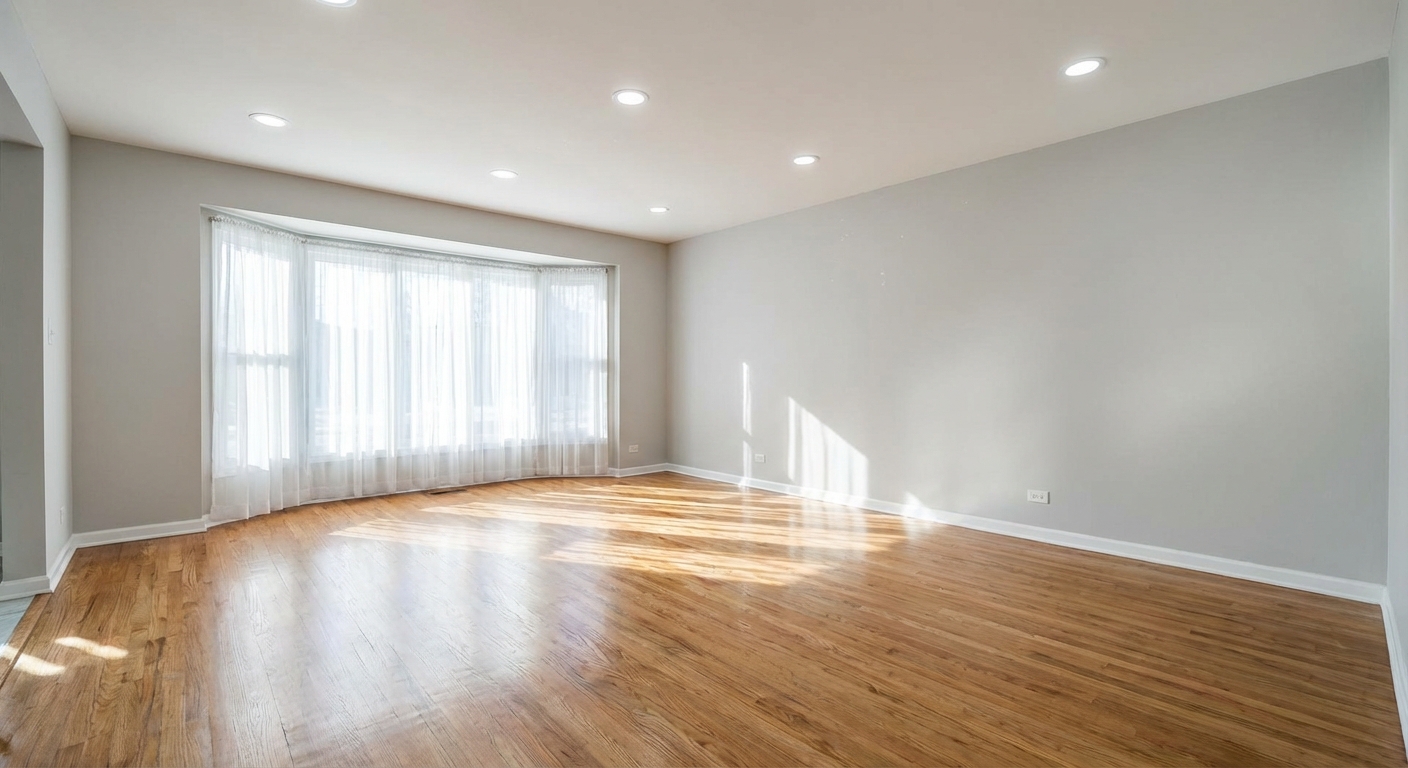
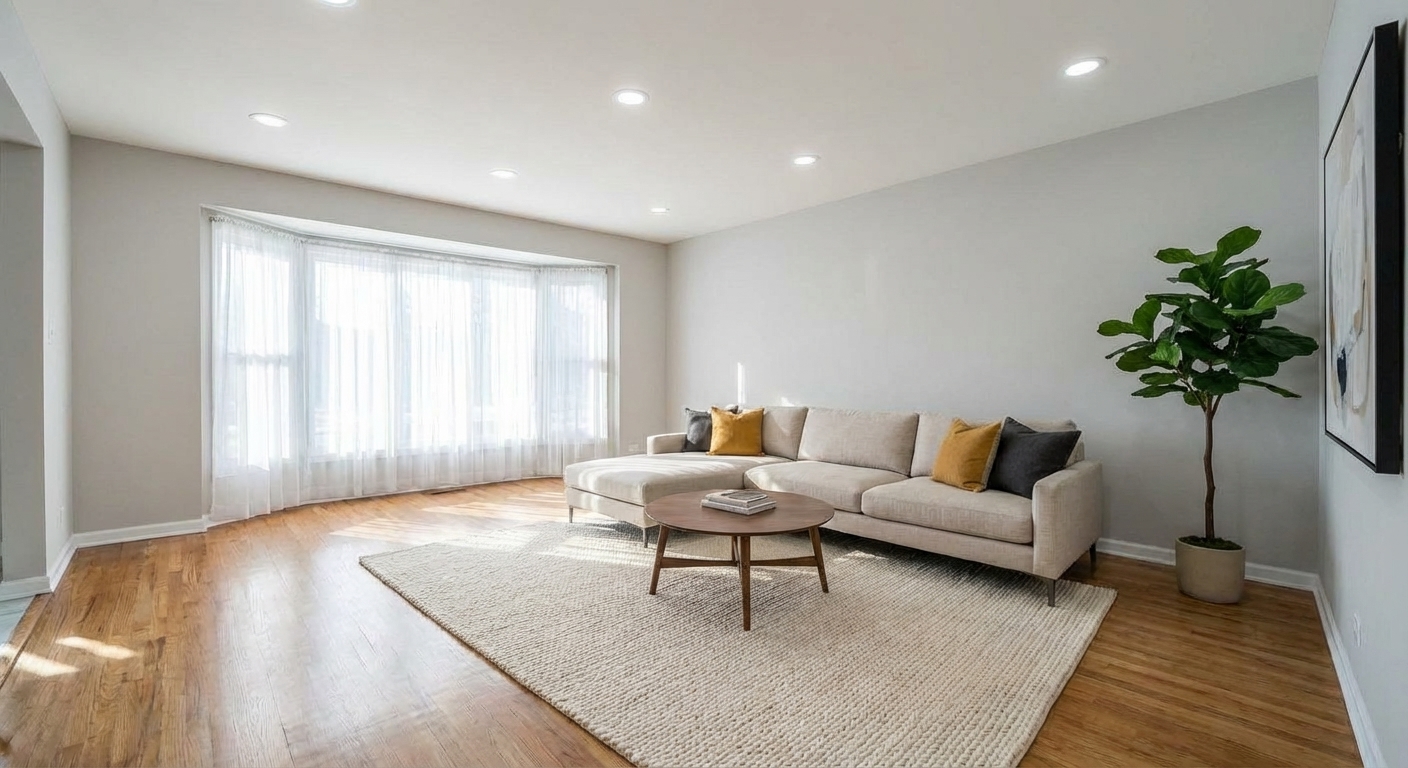
Features
Add a sofa, TV, plant or any object to a room photo with AI. Realistic scale and lighting, no Photoshop skills needed. 6 free credits, no sign-up required.
Place Single Items Precisely
Places individual items with pixel-accurate perspective matching
Add Specific Furniture Pieces
Accepts reference images to replicate specific furniture pieces
Custom Object Placement
Casts realistic shadows and reflections based on room lighting
How It Works
Get professional results in three simple steps
Drop your photos here
or browse files
Upload Your Photos
Simply drag and drop your photos or browse to upload. We support all major image formats including JPG, PNG, and RAW files up to 50MB each.
Upload a room photo in JPEG, PNG, or WebP format (up to 50 MB). Optionally, mark the desired placement area with a red overlay mask directly on the image to guide the AI on where to position the furniture. The mask acts as a positioning suggestion — paint a red area on the floor or wall where you want the item placed. If no mask is provided, the AI analyzes the room layout and selects a contextually appropriate location based on furniture type, available space, and room flow. Well-lit photos with clear floor space produce the best placement accuracy.
AI Processing
Our advanced AI analyzes your images and applies professional enhancements automatically. Choose from virtual staging, enhancement, object removal, or day-to-dusk conversion.
Select an object type from 8 options: sofa, dining table, bed, desk, bookshelf, accent chair, coffee table, or nightstand. Choose a design style from 10 available options to match the room's existing aesthetic. For more specific requests, type a description of the exact piece you want — for example, 'round marble coffee table with gold legs' — or upload a reference image of a specific furniture item you are considering purchasing. The AI will attempt to place an object matching your description or reference with appropriate style and proportions.
Download Results
Preview your transformed images and download high-resolution results ready for listings, marketing materials, social media, and more. No watermarks on premium plans.
The AI renders the object with perspective-matched scale, directional lighting consistent with the room's existing light sources, and naturally cast shadows. Download the result in 10–90 seconds. If the placement is not where you intended, re-run the process with a different mask position or adjusted description for 2 additional credits. Each subsequent addition builds on the previous output, allowing you to iteratively furnish a room piece by piece.
Why Choose Roomagen
Add Single Furniture
Places individual items with pixel-accurate perspective matching
Place Decor Items
Accepts reference images to replicate specific furniture pieces
Custom Additions
Casts realistic shadows and reflections based on room lighting
Who Is It For?
Real Estate Agents
Complete partially furnished rooms by adding missing key pieces to create a polished, move-in-ready impression for buyers.
Interior Designers
Test specific furniture pieces in client spaces before purchasing by placing virtual items into real room photos.
Property Managers
Add essential furniture to common areas and model units for marketing photos without purchasing physical items.
Common Use Cases
Partial Room Staging
Upload a mostly empty room and add 2–3 key furniture pieces — a sofa, coffee table, and rug — without fully staging the entire room. Each addition costs 2 credits, giving you precise control over which items appear.
Listing Photo Enhancement
Add a missing accent piece to an otherwise complete room photo. Place a bookshelf against an empty wall or add a nightstand beside a bed to improve composition and make the space feel finished.
Furniture Fit Testing
Upload your room photo along with a reference image of a specific furniture piece you’re considering buying. The AI places it in the room with correct scale and perspective so you can see if it fits before purchasing.
E-Commerce Lifestyle Context
Place furniture products into realistic room settings for catalog photography. Upload a clean room and add the product with matched lighting and shadows for professional lifestyle imagery.
Home Staging Complement
After virtual staging, add finishing touches that complete the room's composition. Place a floor lamp beside a reading chair, add a decorative vase on a console table, or include a bookshelf against an empty wall. These accent pieces elevate staged images from good to professionally polished at 2 credits per addition.
Furniture Store Product Visualization
Furniture retailers can showcase products in realistic room settings without expensive photography studios. Upload a clean room photo, then use the reference image feature to place specific catalog items into the scene. The AI matches lighting and perspective, producing lifestyle imagery suitable for e-commerce listings and marketing materials.
Purchasing and placing physical furniture costs $200–$2,000 per piece plus delivery fees and assembly time, with the added inconvenience of returns if the item does not fit the space. Manual Photoshop compositing by a skilled editor costs $50–$150 per hour and takes 30–60 minutes per object, with high risk of perspective errors and unnatural shadow placement. Full virtual staging services replace all furniture, which is unnecessarily comprehensive when only a few accent pieces are needed. Roomagen adds individual items for 2 credits each ($0.23–$0.40), with optional mask-based placement control and reference image matching for specific furniture pieces.
| Roomagen | Photoshop Compositing | |
|---|---|---|
| Cost per item | $0.23–$0.40 | $50–$150/hour designer |
| Turnaround time | Under 90 seconds | 30–60 minutes per item |
| Perspective matching | Automatic AI | Manual transform skills |
| Shadow & lighting | Auto-matched to room | Manual creation required |
| Skill required | None | Advanced Photoshop |
| Revisions | Instant, 2 credits | Re-do from scratch |
Technical Specifications
- Supported formats
- JPEG, PNG, WebP
- Max file size
- 50 MB
- Output resolution
- HD / Ultra HD (Pro & Business)
- Object types
- 8 (sofa, dining table, bed, desk, bookshelf, accent chair, coffee table, nightstand)
- Design styles
- 10 built-in styles
- Placement guidance
- Optional red mask annotation for precise positioning
- Reference image
- Optional — upload a photo of the exact furniture piece
- Processing time
- 10–90 seconds
- AI model
- Gemini AI
- Credit cost
- 2 credits per image
Pricing
| Plan | Price | Credits/mo | Per Image | Resolution |
|---|---|---|---|---|
| Free | $0 | 6 (one-time) | Free | HD |
| Starter | $12/mo | 60 | $0.40 | HD |
| Pro | $29/mo | 200 | $0.29 | Ultra HD |
| Business | $79/mo | 700 | $0.23 | Ultra HD |
Per-image cost = 2 credits. Annual plans reduce cost by ~17%. Credit packages: 60/$19, 180/$45, 360/$79.
Frequently Asked Questions
Everything you need to know about Roomagen
Explore Related Tools
Discover more AI-powered tools to enhance your visual content
Swap Furniture & Objects
Swap specific furniture or objects in your photos. Replace an outdated couch with a modern one, or exchange any item while keeping the rest.
Learn moreFree AI Virtual Staging — Stage Any Empty Room in 30 Seconds
Stage vacant listings with AI in 30 seconds. 14 design styles, MLS-ready photos, used by realtors and photographers. 6 free credits, no credit card required.
Learn moreRoom Repurpose - Change Room Function
Repurpose any room to show its potential as a different space. Convert bedrooms to offices, dining rooms to playrooms, and more.
Learn moreRedesign a Furnished Room With AI — 14 Styles in 30 Seconds
Restyle any furnished room without moving a thing. Modern, Scandinavian, farmhouse, luxury and 10 more styles. Used by interior designers and realtors. Free to try.
Learn moreFurniture Facelift - Update Existing Pieces
Give existing furniture a facelift by changing colors, fabrics, or finishes. Update dated pieces without replacing them entirely.
Learn more