
AI Architectural Rendering — Turn a 3D Model View into a Real-Looking Photo
Roomagen AI Architectural Rendering turns a view of any 3D model (SketchUp, Revit, Archicad, Rhino, Blender, clay or textured) into a real-looking photo that keeps the camera and the design, for 2 credits per image.
A 3D model shows the design, but clients, buyers and juries respond to images that look real. Getting there usually means a render engine with materials and lights set up by hand and a powerful computer, or a render studio's fees and waiting. Roomagen starts from the view you already have: export it from SketchUp, Revit, Archicad, Rhino or Blender, upload it, choose the light, weather and people, and get a photoreal image of the same design from the same camera for 2 credits. If one spot is off, fix it with the brush instead of starting again.
No credit card required. Results usually in under a minute.
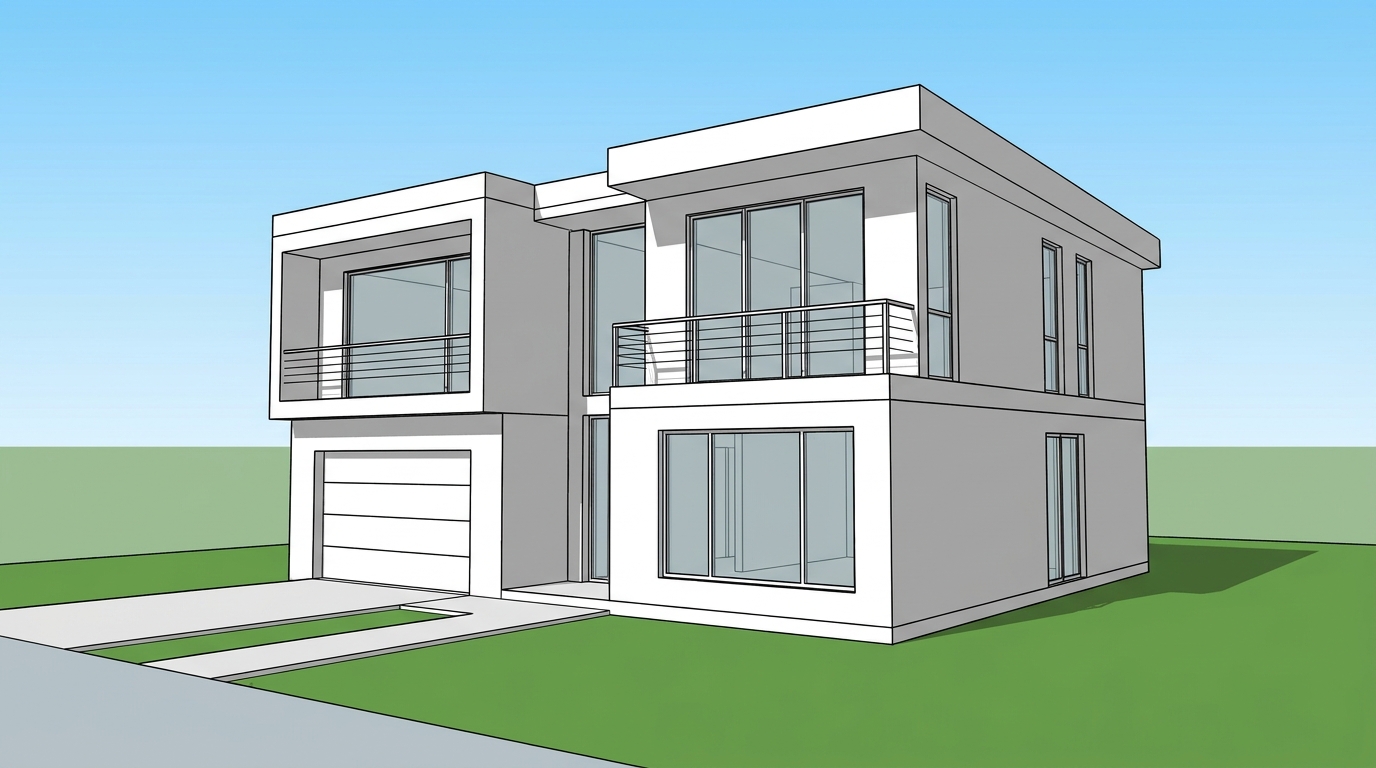
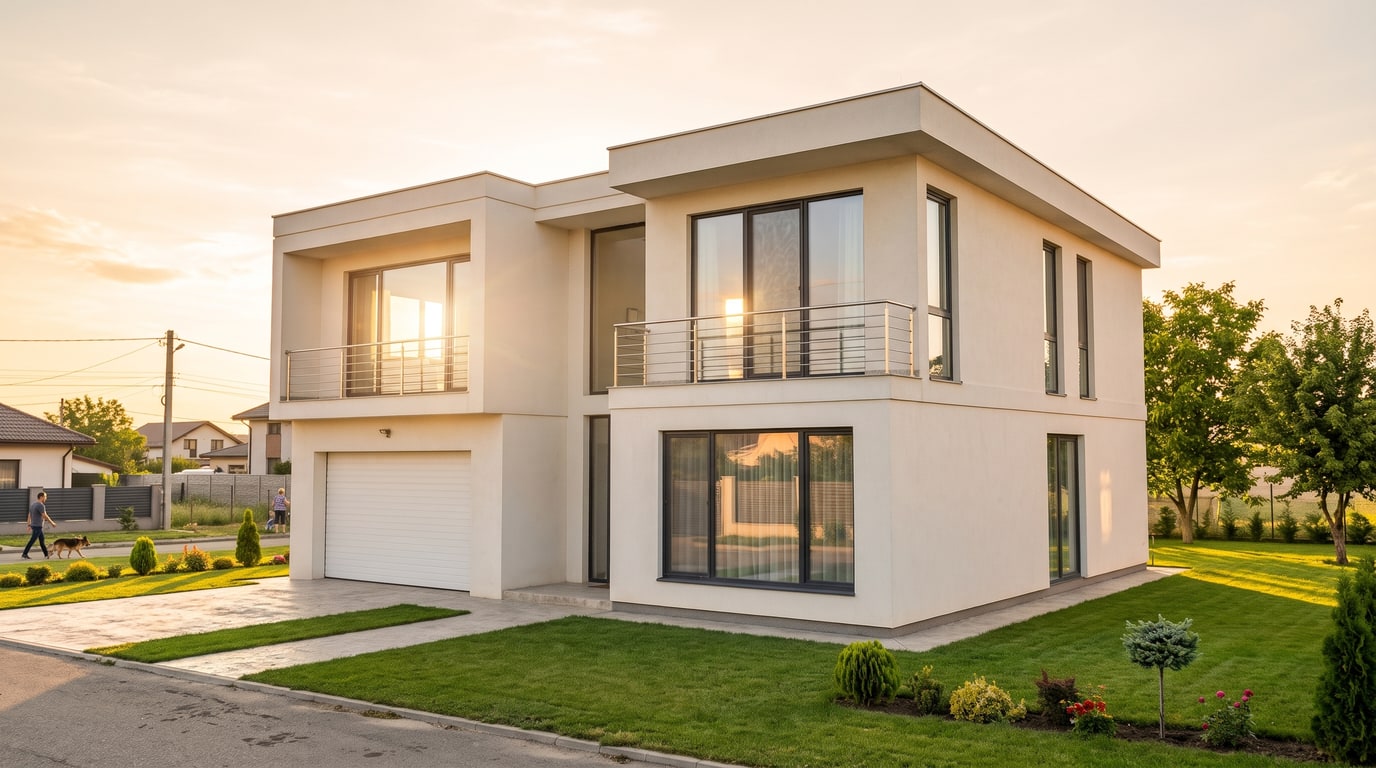
Demo example: the “Before” image was created with AI for this site; it is not a customer photo.
Features
Turn a view of your SketchUp, Revit, Archicad, Rhino or Blender model into a photoreal image with AI. Choose the light, weather and people; 2 credits per image.
How Does AI Rendering Work From a 3D Model?
Turns any 3D model view — clay, shaded or textured — into a real-looking photo
Which Programs and Views Can You Render?
Keeps your camera and design; you choose the light, weather, people and surroundings
What Can You Change in the Render?
No plugin: works in the browser with views from SketchUp, Revit, Archicad, Rhino and Blender
How It Works
Get professional results in three simple steps
Drop your photos here
or browse files
Upload Your Photos
Export or screenshot the view you want from your 3D program — a clay model, a shaded view, a textured view or a plain render — and upload it as a JPEG, PNG or WebP image up to 50 MB. A free check confirms it is a 3D view and picks Interior or Exterior for you.
AI Processing
Choose the light, weather, people, vehicles, surroundings and greenery, or for interiors the light source and the furniture. Keep the materials as modelled or renew them in one of seven styles, and add a short note if something matters to you.
Download Results
Create the image for 2 credits at 2K, or at 4K on Pro and Business. The camera and the design stay the same. Fix any spot with the brush, compare versions in your history, or place an exterior on a photo of your real plot.
Why Choose Roomagen
Light, Weather and Ground
Turns any 3D model view — clay, shaded or textured — into a real-looking photo
People, Cars and Surroundings
Keeps your camera and design; you choose the light, weather, people and surroundings
Fix One Spot With the Brush
No plugin: works in the browser with views from SketchUp, Revit, Archicad, Rhino and Blender
Who Is It For?
Architects
Turn working views from SketchUp, Revit, Archicad or Rhino into client-ready images without setting up a render engine.
Interior Designers
Show a modelled room with real materials and light, and try another style before the client meeting.
Developers & Builders
Market a project before it is built with images made from the architect's model, then place it on a photo of the real plot.
Common Use Cases
Concept Images for Clients
Show a client how the design will look once built: export the current view, choose golden hour or evening light and present a real-looking image. Try several moods from the same model at 2 credits each.
Presale Marketing
Show a project before construction starts, from the architect's model, with people, cars and street life around it. Label the images as visualizations in sales materials.
Competitions and Portfolios
Turn clay or massing studies into atmospheric images for boards and portfolios, with the weather and light that fit the story of the project.
Comparing Materials and Moods
Renew the materials in another style, or switch from daytime to night, to compare directions before you commit to them in the model.
Render engines such as V-Ray, Enscape, Lumion or D5 run on your own computer and need materials, lights and settings prepared in the model. Render studios work from your files and charge per image and per revision. Many AI render tools work through plugins for specific programs. Roomagen works in the browser from any exported view, keeps the camera and the design, and costs 2 credits per image, with a brush to change one spot.
| Roomagen | Render engine (V-Ray, Enscape, Lumion) | Render studio | |
|---|---|---|---|
| Cost | $0.23–$0.40 per image | Software license and a capable computer | A fee per image and per revision |
| What you need | An image of the view | Materials, lights and render settings in the model | Model files and a brief |
| Skill required | None | Rendering know-how | None |
| Changes | Rerun, or fix one spot with the brush (2 credits) | Adjust the scene and render again | Revision rounds |
| Works with | A view exported from any program | Plugins for supported programs | Depends on the studio |
Technical Specifications
- Supported formats
- JPEG, PNG, WebP
- Max file size
- 50 MB
- Input
- A view of a 3D model: clay, shaded, textured or a plain render
- Settings
- Space, light, weather, people, vehicles, surroundings, greenery, ground, materials (7 styles), note
- Output resolution
- 2K; 4K on Pro & Business
- Output
- A photoreal image from the same camera
- Credit cost
- 2 credits per image, at 2K or 4K
Pricing
| Plan | Price | Credits/mo | Per Image | Resolution |
|---|---|---|---|---|
| Free | $0 | 6 (one-time) | Free | — |
| Starter | $12/mo | 60 | $0.40 | 2K |
| Pro | $29/mo | 200 | $0.29 | 2K or 4K (2 credits) |
| Business | $79/mo | 700 | $0.23 | 2K or 4K (2 credits) |
Per-image cost = 2 credits. Annual plans reduce cost by ~17%. Credit packages: 60/$19, 180/$45, 360/$79.
Frequently Asked Questions
Everything you need to know about Roomagen
It turns a view of a 3D model into an image that looks like a photo of the finished building or room. Roomagen keeps your camera angle and your design and adds real materials, light and surroundings, so you get a presentation image without setting up a render engine.
Any program that can export or screenshot a view: SketchUp, Revit, Archicad, Rhino, Blender, 3ds Max, Vectorworks and others. Upload the image as JPEG, PNG or WebP up to 50 MB. There is no plugin to install; it runs in the browser.
No. Walls, windows, roofs, furniture and their positions and sizes stay as modelled, and the camera stays the same. With Keep, plain white or grey clay surfaces get the real material they most likely are, such as plaster, glass, paving or grass.
For exteriors you choose the light, weather, people, vehicles, surroundings, greenery and ground; for interiors the light source and the furniture. You can also renew all materials in one of seven styles and add a note of up to 300 characters.
Yes. Choose Interior and upload a view of the room from your model; the layout, furniture and camera stay, and you choose natural light, lamps or both. For a photo of a real unfinished room, use Interior Rendering instead.
Each image costs 2 credits, at 2K and at 4K; 4K is available on the Pro and Business plans. On monthly plans that is $0.23–$0.40 per image, and new accounts start with 6 free credits.
Use the brush: paint the spot, write what it should be, and only that area changes, for 2 credits. The eraser removes a painted object the same way. Results are saved in your history, so you can go back to an earlier version.
Yes. From an exterior result, choose Place on my site, upload a photo of the land and paint where the building goes; it appears in the photo's angle and light for 3 credits. You can then add landscaping, a fence or a free edit.
No. The result is a visualization for design decisions, presentations and marketing, not a technical drawing. Sizes are not measured, so use your drawings for anything that must be exact, and label the images as visualizations when you publish them.
A clear, sharp view at the camera angle you want, with the whole building or room in frame and no toolbars on top. Clay, shaded and textured views all work; very small or blurry exports lose detail in the result.
Browse the Full Collection
Every room, style, and use case in this tool family — each with its own dedicated tool.
Explore Related Tools
Discover more AI-powered tools to enhance your visual content
Visualize a House on Your Land — Place Your Building on a Photo of the Plot
Upload a photo of your land and a view of your building, paint where it goes and see it standing there. Then add a lawn, trees, a path or a fence. From 3 credits.
Learn moreFloor Plan to 3D Render — From a Sketch to a Photoreal Image in One Studio
Turn a sketch into a floor plan, the plan into a 3D view and the 3D view into a photoreal render, then place it on your land. Steps 2 credits; land placement 3.
Learn moreSketchUp Render AI — Turn Any SketchUp Scene Into a Photoreal Image
Render a SketchUp model with AI online: export a scene as an image, upload it and get a photoreal picture from the same camera. No install; 2 credits per image.
Learn moreRevit Render AI — Turn a Revit 3D View Into a Real-Looking Image
Revit AI render: export a 3D view as an image, upload it in the browser and get a photoreal picture with people, cars and real light. 2 credits per image.
Learn moreAI Render Enhancer — Make a Computer-Looking Render Realistic
Make a render realistic with AI: upload a render with flat light or plain materials and get a real-looking photo from the same camera. 2 credits each.
Learn more