AI Rendering for Architects — Concept, Client and Competition Images From Your Model
Roomagen's AI rendering for architects turns views of your model into photoreal images for concept reviews, client meetings and competitions, with several moods from one camera at 2 credits each, and a brush for single spots.
Architects need images at every stage, not only at the end: a massing study for the first client talk, options for a design meeting, atmosphere for a competition board. Full renders at each stage cost time in a render engine or fees at a render studio, so many decisions are made from clay views. Roomagen turns the views you already have into photoreal images, keeps the camera and the design, and lets you run the same view at golden hour, at night or in the rain for 2 credits each. A brush fixes single spots, and an exterior can be placed on a photo of the real site.
No credit card required. Results usually in under a minute.
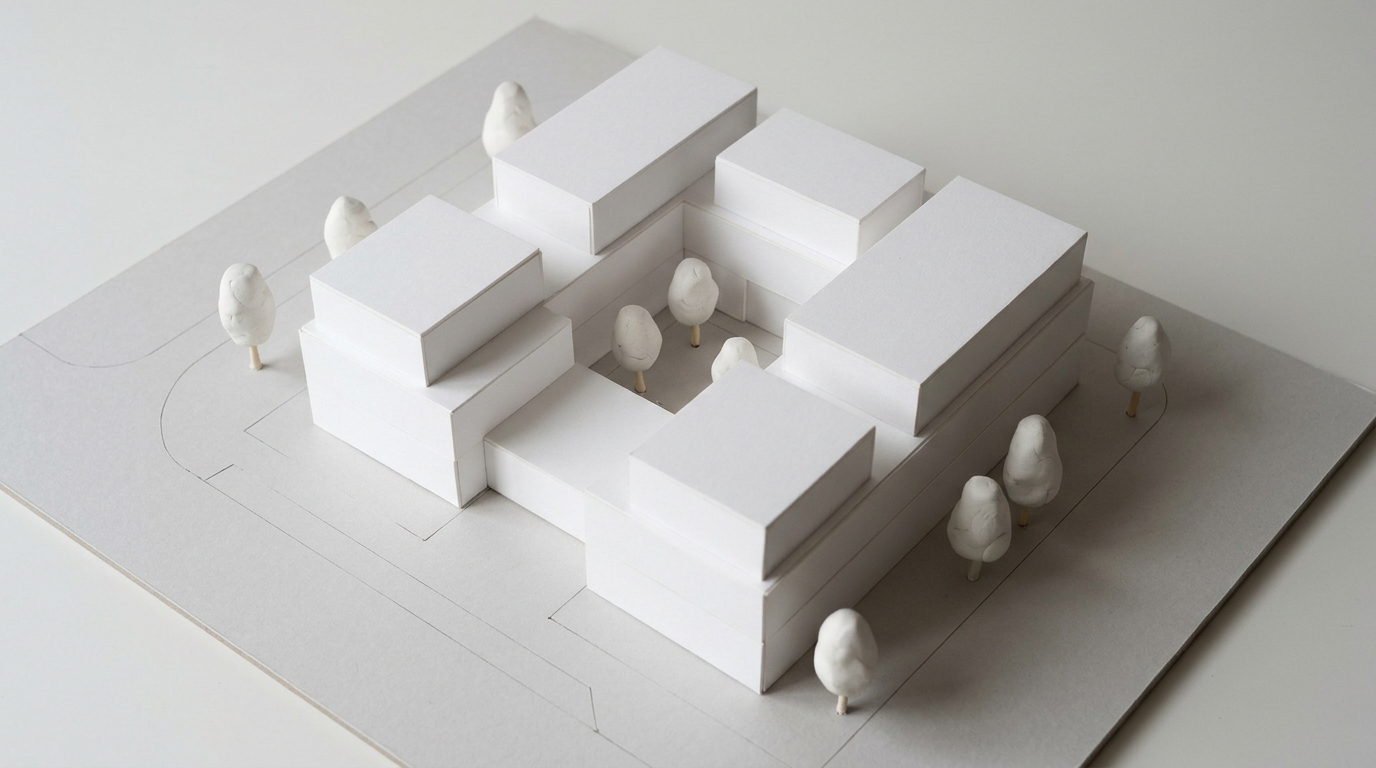
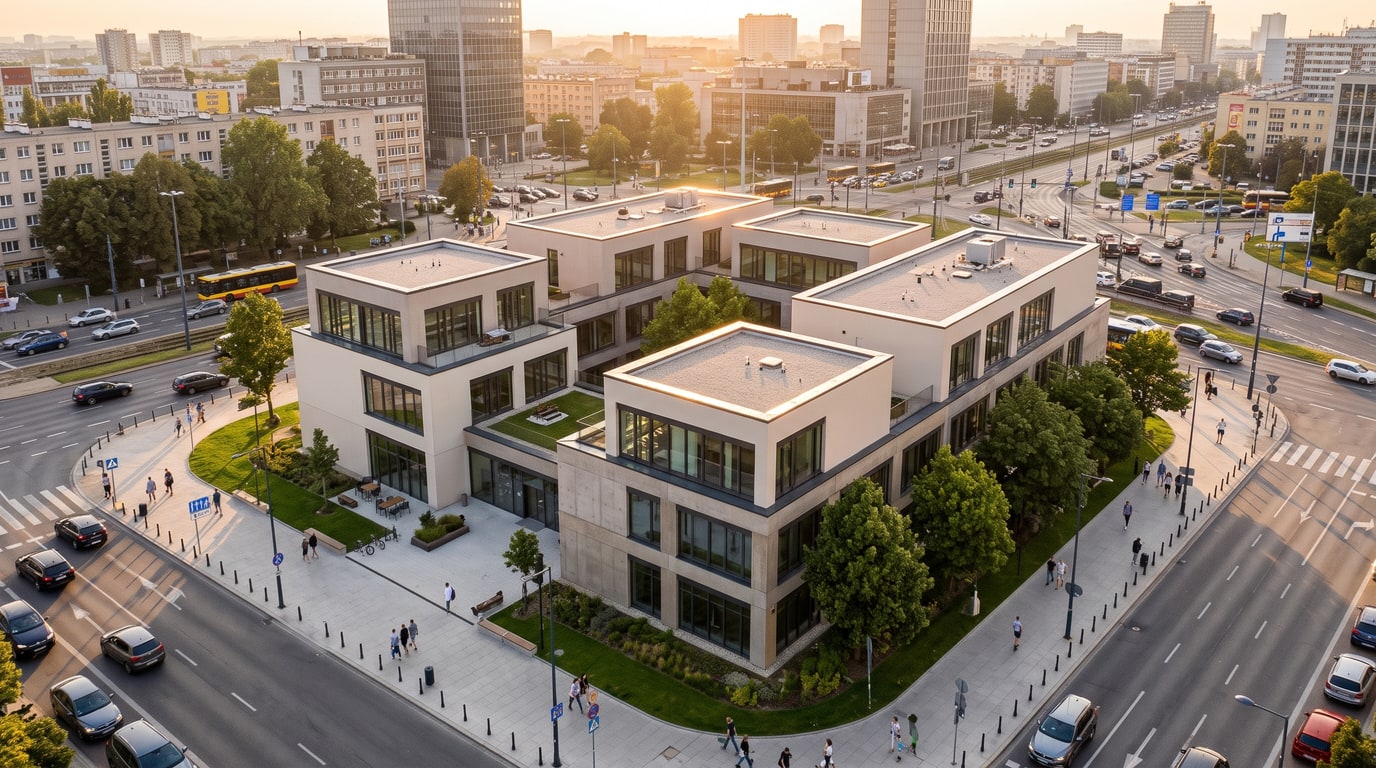
Demo example: the “Before” image was created with AI for this site; it is not a customer photo.
Features
AI rendering for architects: turn concept, design and competition views into photoreal images with your chosen light and weather. Same camera, 2 credits each.
Where Does AI Rendering Fit in an Architect's Work?
Concept, client and competition images from views of any 3D program
Several Moods From One Model
Several moods and material styles from one camera at 2 credits each
What It Will Not Replace
A brush for single spots and Place on my site for the real plot
How It Works
Get professional results in three simple steps
Drop your photos here
or browse files
Upload Your Photos
Drag and drop your photos or browse to upload them. Roomagen accepts JPEG, PNG and WebP files up to 50 MB each.
AI Processing
Our advanced AI analyzes your images and applies professional enhancements automatically. Choose from virtual staging, enhancement, object removal, or day-to-dusk conversion.
Download Results
Preview your transformed images and download high-resolution results ready for listings, marketing materials, social media, and more. No watermarks on premium plans.
Why Choose Roomagen
Concept Stage: Massing in Real Light
Concept, client and competition images from views of any 3D program
Client Meetings: Options Side by Side
Several moods and material styles from one camera at 2 credits each
Competitions: Atmosphere for the Boards
A brush for single spots and Place on my site for the real plot
Who Is It For?
Small Practices
Get presentation images for every project from the models the office already makes, without a render engine or an outside studio.
Competition Teams
Turn massing and clay views into atmospheric board images, with the weather, light and people that tell the story of the scheme.
Project Architects
Show clients two or three moods or material styles from one view, so decisions about the facade or interior are made from realistic images.
A render engine gives full control over every material and light but needs a prepared scene for each image, and a render studio delivers finished images for a fee per image and per revision. AI plugins such as Veras, ArkoAI or mnml.ai work inside programs like Revit, SketchUp and Rhino. Roomagen is a web app for views from any program, keeps camera and design, and costs 2 credits per image, so trying several moods costs little.
| Roomagen | Render engine | Visualization studio | |
|---|---|---|---|
| Suited to | Concept, option and meeting images | Final images with full control | Final images for a fee |
| Input | An image of any view | A prepared scene | Model files and a brief |
| Trying moods | 2 credits per version | Change the scene and render again | A revision round |
| Install | Nothing; a web app | Software and a capable computer | Nothing |
| Cost | Plans from $12 to $79 a month | A software license | A fee per image |
Frequently Asked Questions
Everything you need to know about Roomagen
To turn working views of a model into realistic images at each stage: concept massing for first talks, design options for client meetings and atmospheric images for competitions. The camera and design stay, so the image shows the design as modeled.
Any program you can export or screenshot a view from, including SketchUp, Revit, Archicad, Rhino, Blender, 3ds Max and Vectorworks. Roomagen is a web app, so nobody in the office has to install anything.
Yes. Run the same view with different light, weather or materials, such as golden hour against night, or Modern against Mediterranean materials. Each version costs 2 credits and is saved in the history, so you can compare them.
Yes. White or grey massing gets the real material it most likely is, along with real trees, cars and paving. Early studies become easier to discuss with clients, while the volumes stay as modeled.
It makes atmospheric images from your views, with the light, weather, people and surroundings you choose, at 2K or at 4K on the Pro and Business plans. Check each competition's rules on AI-generated images before you submit.
No. Walls, windows, the roof, furniture and their positions and sizes stay, and the camera is kept. With Keep, the modeled materials stay too, and plain clay surfaces receive the real material they most likely are.
Not for every job. A render engine or studio gives full control over every material and light, while Roomagen offers set choices and a brush for single spots. It suits concept, option and meeting images.
Each image costs 2 credits, at 2K or at 4K on Pro and Business. Plans are Starter at $12 a month for 60 credits, Pro at $29 for 200 and Business at $79 for 700, which is $0.23–$0.40 per image.
Yes. From an exterior result, choose Place on my site, upload a photo of the site and paint where the building goes; it is placed in the photo's angle and light for 3 credits. Landscaping and fences follow for 2 credits each.
Not as technical content. The images are visualizations, sizes are not measured, and they do not check setbacks, heights or zoning. Use your drawings for anything that must be exact, and label the images as visualizations.
Explore Related Tools
Discover more AI-powered tools to enhance your visual content
AI Architectural Rendering — Turn a 3D Model View into a Real-Looking Photo
Turn a view of your SketchUp, Revit, Archicad, Rhino or Blender model into a photoreal image with AI. Choose the light, weather and people; 2 credits per image.
Learn moreSketchUp Render AI — Turn Any SketchUp Scene Into a Photoreal Image
Render a SketchUp model with AI online: export a scene as an image, upload it and get a photoreal picture from the same camera. No install; 2 credits per image.
Learn moreRevit Render AI — Turn a Revit 3D View Into a Real-Looking Image
Revit AI render: export a 3D view as an image, upload it in the browser and get a photoreal picture with people, cars and real light. 2 credits per image.
Learn moreArchicad Render AI — Turn Your Archicad 3D View Into a Photoreal Image
Render an Archicad 3D view with AI in the browser: upload the view, keep its camera and design, and choose the light, weather and people. 2 credits per image.
Learn moreAI Exterior Render — See a House or Building From Outside in Real Light and Weather
AI exterior render for houses and buildings: upload an outside 3D view, pick light, weather, people and surroundings, and get a real-looking photo. 2 credits.
Learn more