
AI Exterior Render — See a House or Building From Outside in Real Light and Weather
Roomagen's AI exterior render turns an outside view of a house or building from your 3D model into a real-looking photo, in the light, weather and surroundings you pick, with the camera and design kept, for 2 credits.
An exterior is judged in context: the light on the facade, the sky, the street and the garden around it. A 3D model shows the building alone, often against an empty background, and setting up sky, vegetation and lighting in a render engine takes skill. Roomagen keeps the building and the camera from your view and builds the rest from your choices: daytime, golden hour, evening or night; clear, overcast, rain, snow or fog; city, suburban or nature surroundings, with people and cars if you want them. Each image costs 2 credits, and the result can then be placed on a photo of the real plot.
No credit card required. Results usually in under a minute.
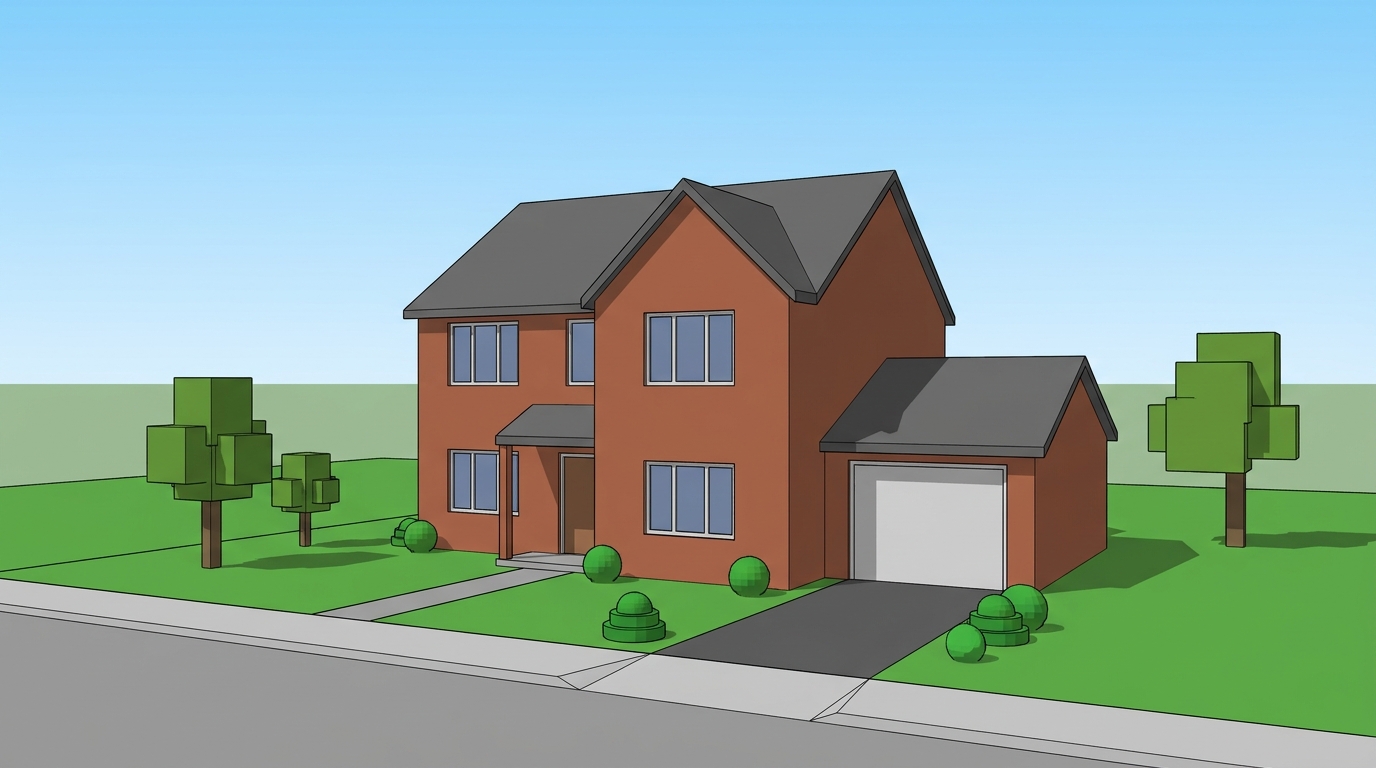
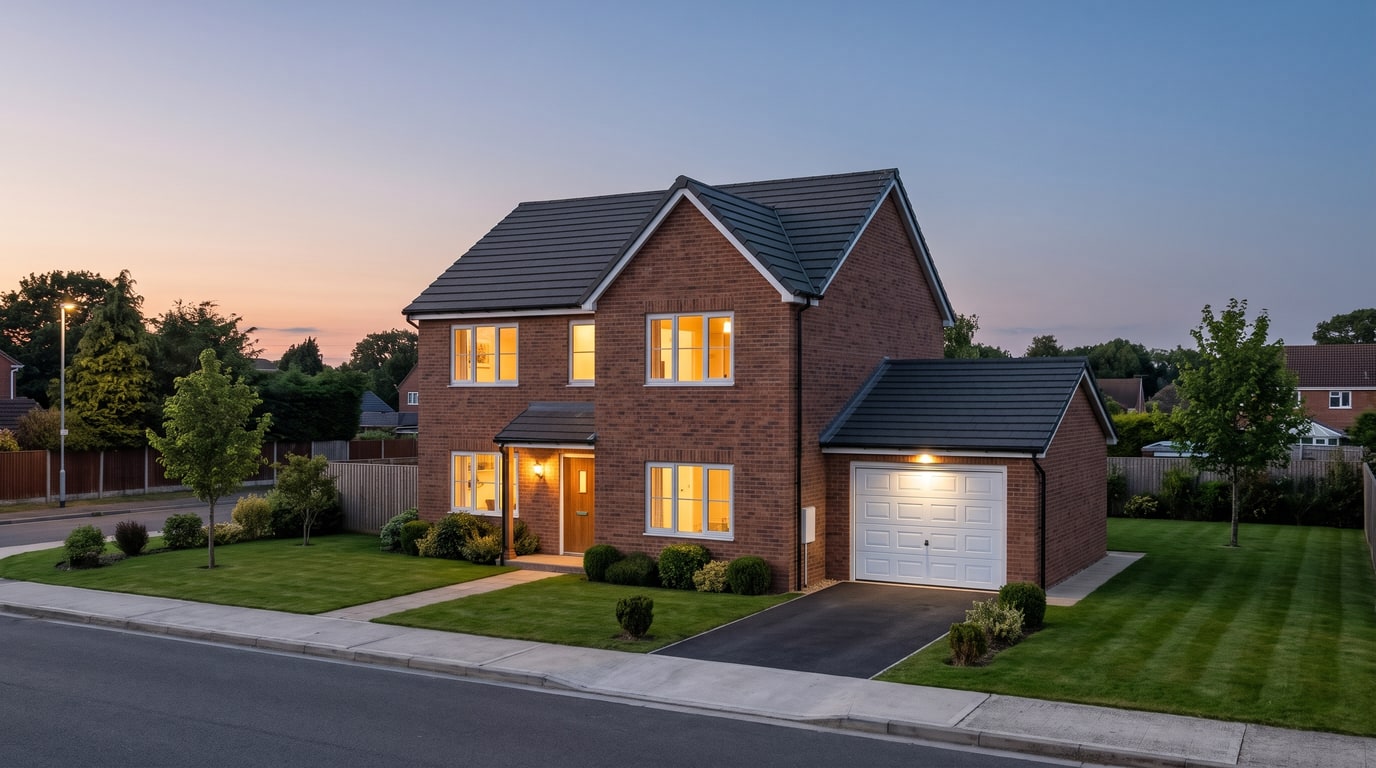
Demo example: the “Before” image was created with AI for this site; it is not a customer photo.
Features
AI exterior render for houses and buildings: upload an outside 3D view, pick light, weather, people and surroundings, and get a real-looking photo. 2 credits.
How Does an AI Exterior Render Work?
Exterior views of houses and buildings rendered in real light, weather and surroundings
Light, Weather and Ground for Every Mood
Daytime to night, clear to snow or fog, with people, cars and greenery on request
From the Render to the Real Plot
Place the result on a photo of your land, then add a garden or a fence
How It Works
Get professional results in three simple steps
Drop your photos here
or browse files
Upload Your Photos
Drag and drop your photos or browse to upload them. Roomagen accepts JPEG, PNG and WebP files up to 50 MB each.
AI Processing
Our advanced AI analyzes your images and applies professional enhancements automatically. Choose from virtual staging, enhancement, object removal, or day-to-dusk conversion.
Download Results
Preview your transformed images and download high-resolution results ready for listings, marketing materials, social media, and more. No watermarks on premium plans.
Why Choose Roomagen
Golden Hour, Evening and Night
Exterior views of houses and buildings rendered in real light, weather and surroundings
Rain, Snow, Fog and Wet Ground
Daytime to night, clear to snow or fog, with people, cars and greenery on request
Streets, Gardens and Neighbors
Place the result on a photo of your land, then add a garden or a fence
Who Is It For?
Homeowners Building a House
See the house your architect modeled in daylight and in the evening, in rain or snow, before construction starts.
Architects
Show a facade in the light and weather that suit the story of the project, with streets, people and greenery around it.
Builders and Developers
Make exterior images of a planned house or block for brochures and listings, labeled as visualizations, then place it on the real plot.
Exterior renders from a render engine depend on the sky, vegetation, people and lights you add to the scene, and a photomontage on a site photo is matched by hand. Roomagen sets light, weather, ground, people, vehicles, surroundings and greenery from a few choices, keeps the building and camera, costs 2 credits per image, and can place the result on a photo of your land for 3 credits.
| Roomagen | Render engine | Photomontage | |
|---|---|---|---|
| Sky and light | Daytime, golden hour, evening or night | Set up in the scene | Taken from the site photo |
| Weather | Clear, overcast, rain, snow or fog | Built by hand | As photographed |
| People, cars, greenery | Choose how many | Added as models | Cut out and placed by hand |
| On the real plot | Place on my site, 3 credits | A separate photomontage | Matched by hand |
| Cost | 2 credits per image ($0.23–$0.40) | A license and a capable computer | Editing time |
Frequently Asked Questions
Everything you need to know about Roomagen
Upload an exterior view of your 3D model, such as a house, an apartment block or an office building. Choose the light, weather, people, vehicles and surroundings, and Roomagen returns a real-looking photo with the same building and camera.
Light: daytime, golden hour, evening or night. Weather: clear, overcast, rain, snow or fog, on dry or wet ground. Combining them gives anything from a clear day to a snowy evening.
Yes. Set people to a few or many and vehicles to some, then choose city, suburban or nature surroundings, or leave them on Automatic. Greenery can be less, normal or plenty.
Yes. Plain white or grey surfaces get the real material they most likely are, such as plaster walls, glass, paving and grass, and modeled trees and cars become real ones. The building and the camera stay as modeled.
No. Walls, windows, the roof and their positions and sizes stay as modeled, and the camera angle is kept. To try other facade materials, choose Renew and pick one of seven styles, from Modern to Mediterranean.
Choose snow as the weather, with wet or dry ground, to see the house in a winter scene. There is no separate season setting, so describe details such as bare trees in the note of up to 300 characters.
Each exterior image costs 2 credits, at 2K or 4K, with 4K on the Pro and Business plans. That works out at $0.23–$0.40 per image on monthly plans, and new accounts get 6 free credits.
Yes. From an exterior result, choose Place on my site, upload a photo of the land and paint where the house stands. It is placed in the photo's angle and light for 3 credits, or 5 at 4K.
Yes, on the land result. Paint an area for a lawn, flower beds, trees, a stone path, gravel or garden lights, or draw a line for a metal, wood, stone, hedge or glass fence. Each step costs 2 credits.
No. It is a picture for deciding and presenting, not a survey, a site plan or a permit drawing. Heights, distances and setbacks are not measured, so check them with your architect and the local rules.
Explore Related Tools
Discover more AI-powered tools to enhance your visual content
AI Architectural Rendering — Turn a 3D Model View into a Real-Looking Photo
Turn a view of your SketchUp, Revit, Archicad, Rhino or Blender model into a photoreal image with AI. Choose the light, weather and people; 2 credits per image.
Learn moreNew Construction Rendering — Market a Home or Project Before It Is Built
New construction renderings from the architect's model: real-looking exterior and interior images for presales, then the building on a photo of the real plot.
Learn moreAI Render Enhancer — Make a Computer-Looking Render Realistic
Make a render realistic with AI: upload a render with flat light or plain materials and get a real-looking photo from the same camera. 2 credits each.
Learn moreRevit Render AI — Turn a Revit 3D View Into a Real-Looking Image
Revit AI render: export a 3D view as an image, upload it in the browser and get a photoreal picture with people, cars and real light. 2 credits per image.
Learn moreSketchUp Render AI — Turn Any SketchUp Scene Into a Photoreal Image
Render a SketchUp model with AI online: export a scene as an image, upload it and get a photoreal picture from the same camera. No install; 2 credits per image.
Learn more