
AI Visualization Chat for Architects — Concepts on Real Site Photos
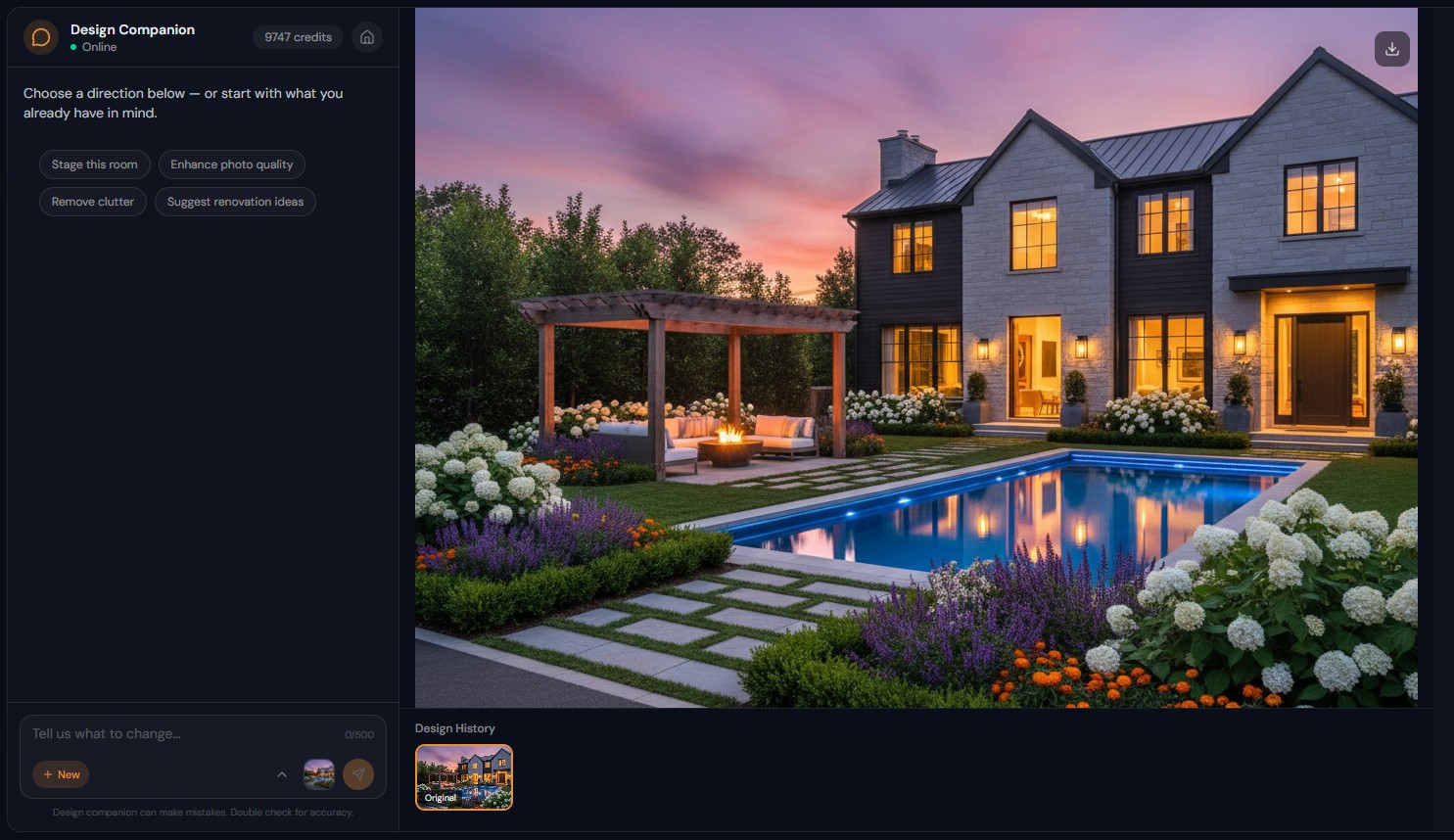
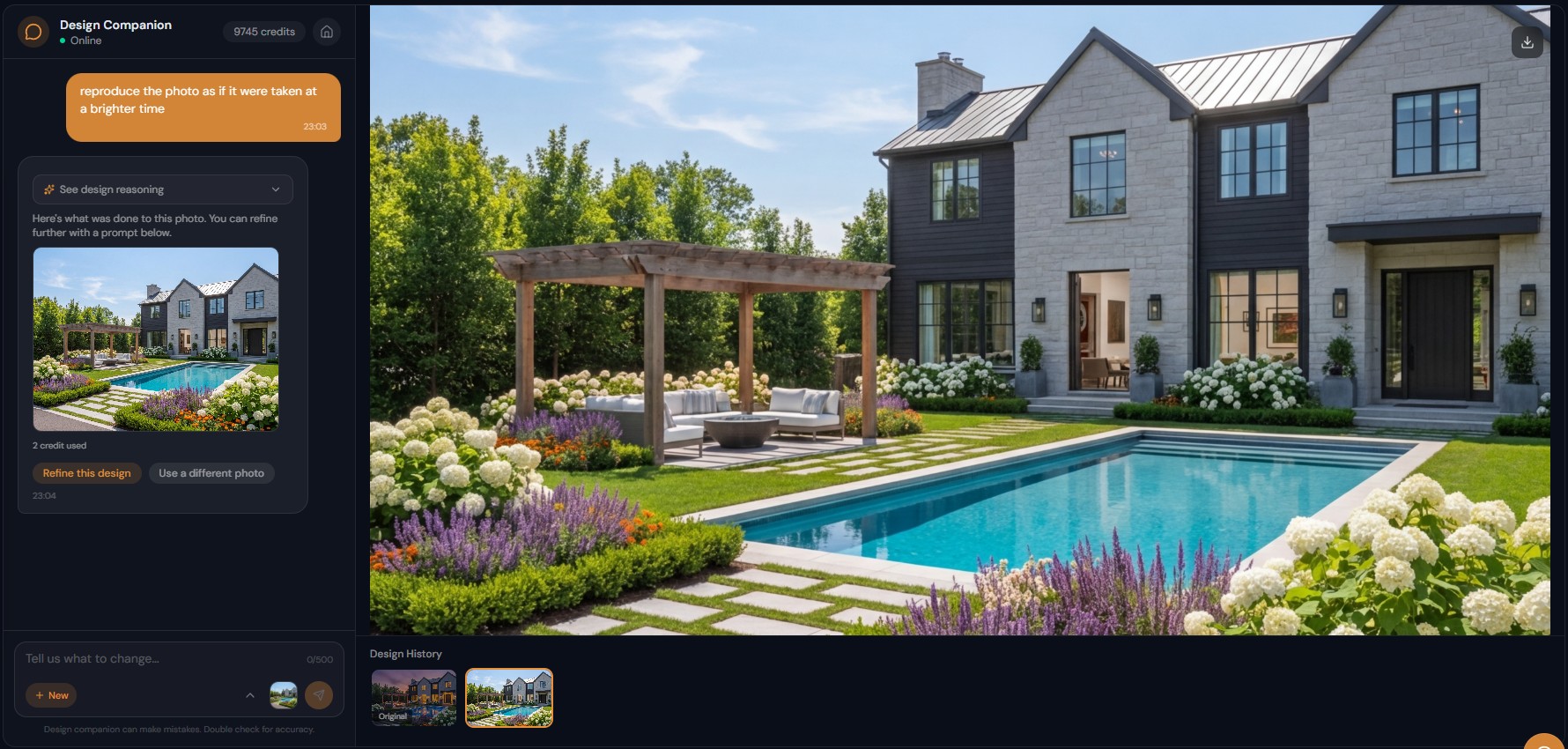
Roomagen AI Visualization Chat for Architects renders design ideas from text: describe facade materials, interior finishes or landscape integration and see the concept on actual site or building photos.
Architectural visualization traditionally requires detailed 3D modeling in Revit, ArchiCAD, or SketchUp before any visual output exists. A single exterior concept render takes 1-3 days. Chat-based visualization generates concept-level previews from descriptions in 90 seconds — ideal for early-stage exploration before committing modeling resources.
Features
Architects describe a concept, such as "glass facade with steel accents", and see it on their own site or building photo, with no CAD model needed.
How Do Architects Use Conversational AI Visualization?
Rapid concept visualization from text — "glass curtain wall with steel frame" rendered on actual site photos in 90 seconds
What Architectural Tasks Does Chat Accelerate?
Material exploration on existing structures — brick, stone, glass, metal cladding compared visually through conversation
When Is Chat-Based Visualization Better Than CAD Rendering?
Construction-to-completion visualization — show stakeholders the finished building using current construction-phase photos
How It Works
Get professional results in three simple steps
Drop your photos here
or browse files
Upload Your Photos
Drag and drop your photos or browse to upload them. Roomagen accepts JPEG, PNG and WebP files up to 50 MB each.
AI Processing
Our advanced AI analyzes your images and applies professional enhancements automatically. Choose from virtual staging, enhancement, object removal, or day-to-dusk conversion.
Download Results
Preview your transformed images and download high-resolution results ready for listings, marketing materials, social media, and more. No watermarks on premium plans.
Why Choose Roomagen
Describe Design Concepts and See Them Rendered on Site Photos
Rapid concept visualization from text — "glass curtain wall with steel frame" rendered on actual site photos in 90 seconds
Exterior Facades, Interior Finishes, Landscape Integration — Through Text
Material exploration on existing structures — brick, stone, glass, metal cladding compared visually through conversation
Rapid Concept Exploration Before Committing to Detailed Drawings
Construction-to-completion visualization — show stakeholders the finished building using current construction-phase photos
Who Is It For?
Design Architects
Explore facade materials, color schemes, and massing options on actual site photos during early design phases — iterate rapidly before committing to 3D modeling.
Construction Project Managers
Visualize completed projects from construction-phase photos — show stakeholders what the finished building will look like using current site conditions.
Renovation Architects
Preview exterior renovation concepts on existing buildings — "replace the siding with fiber cement, update windows, and add a modern entry canopy" visualized on the current structure.
CAD-to-render workflow takes 1-3 days for a single concept. Design Companion generates concept visualizations in 90 seconds from site photos and text descriptions. The AI handles early exploration; detailed documentation remains in CAD.
| Chat Visualization | CAD Rendering (Revit/SketchUp) | Hand Sketching | |
|---|---|---|---|
| Setup | Upload site photo + type | Model building in 3D | Paper and pencil |
| Per-concept time | 90 seconds | 1-3 days | 30-60 minutes |
| Realism | Photorealistic concept-level | Photorealistic detailed | Schematic |
| Material exploration | Instant text changes | Re-texture and re-render | Verbal description |
| Best for | Early concept exploration | Final presentation | Napkin sketches |
Frequently Asked Questions
Everything you need to know about Roomagen
Upload site or building photos and describe the design concept — "modern glass and steel facade with cantilevered upper floors" or "transform this construction site to a finished residential building." The AI generates concept-level visualizations.
For concept exploration and early-stage presentations, yes. For construction documentation and photorealistic final renders, CAD-based rendering remains necessary. Chat visualization accelerates the exploration phase.
Yes. "Curtain wall glazing," "cantilevered volume," "fiber cement cladding," "green roof" — the AI interprets architectural language and generates appropriate visual representations.
Yes. Upload construction-phase photos and describe the finished building — "completed with landscaping, glass entries, and illuminated signage." The AI renders the finished vision over the construction reality.
Concept-level — suitable for client discussions, design charrettes, and early presentations. Not a replacement for detailed construction renders but excellent for exploring directions and communicating ideas.
Yes. "Show this building with brick facade" then "try zinc cladding" then "limestone base with glass upper" — compare material choices on the actual building rapidly through conversation.
Yes. Visualize interior finishes, spatial configurations, lighting concepts, and material selections on photos of existing or under-construction interiors.
Yes. Download high-resolution images from chat sessions for inclusion in presentations, proposals, and design review meetings.
The Business plan at $79/month provides 700 credits — approximately 350 concept visualizations per month. Sufficient for multiple active projects with extensive exploration.
Yes. "Add mature landscaping, stone pathway, and water feature to the building entry" — landscape elements integrate with architectural visualization in a single conversation.
Part of
AI Chat Photo EditorMore From This Family
- AI Real Estate Photo Editing Chat
- AI Design Chat for Interior Designers
- AI Home Design Assistant for Homeowners
- AI Airbnb Listing Photo Editor
- AI Photo Editor Chat for Photographers
- AI Virtual Staging by Chat
- AI Room Redesign Chat
- Enhance Photo Quality by Chat
- AI Home Remodel Visualizer Chat
- AI Room Cleaner Chat
- AI Landscaping Chat
- Change Room Colors by Chat
Explore Related Tools
Discover more AI-powered tools to enhance your visual content
AI Chat Photo Editor — Edit Any Photo by Typing What You Want
Type what you want changed and the Design Companion edits your interior or exterior photo: stage, recolor, remove objects. 2 credits per edit, under 90 seconds.
Learn moreVirtual Staging for Apartments and Homes Still Under Construction
Marketing images of rooms still under construction: AI turns site photos with framing, pipes or drywall into finished, furnished interiors in under 90 seconds.
Learn moreFloor Plan AI — Turn a Sketch, Scan or Old Plan into a 2D or 3D Floor Plan
Turn a sketch, scan or old plan into a clean 2D floor plan or a 3D view. Keep or remove measurements and room names, and pick one of four drawing styles.
Learn moreExterior Home Rendering — New Siding, Roof and Trim on the Existing Facade
Preview new siding, roofing, windows and trim on a photo of an existing building; the structure and surroundings stay the same. 2 credits per image.
Learn moreAI Interior Rendering — Finished, Furnished Rooms from Construction Photos
Turn a photo of an unfinished interior into a finished, furnished room for new construction, renovations or design reviews, in one of 13 styles.
Learn more