
Table of Contents(16)
Nano Banana 2.1 is the cheaper model: US$0.0504 per 2K image at Google's list price, against US$0.134 for Nano Banana Pro. In our nine property photo edits on 10 October 2026, both models changed details nobody asked for.
Free AI Virtual Staging — Stage Any Empty Room in Under a Minute
Stage vacant rooms with AI, usually in under a minute. 13 design styles, 15 room types, listing-ready photos for real estate, rentals and hospitality. 6 free credits, no credit card required.
The Short Answer
Nano Banana 2.1 costs much less than Nano Banana Pro, and on our property photos neither model was free of mistakes. At Google's list prices, a 2K output image costs US$0.0504 with Nano Banana 2.1 and US$0.134 with Nano Banana Pro, 62% less. With the input photo and thinking tokens included, the median cost per edited image in our run on 10 October 2026 was US$0.0572 and US$0.1392, about 59% less.
Google released Nano Banana 2.1 (gemini-nano-banana-2.1) on 6 October 2026 and calls it "the more efficient counterpart" to Nano Banana Pro (gemini-3-pro-image). In this article, "2.1" means Nano Banana 2.1 and "Pro" means Nano Banana Pro. For this Nano Banana 2.1 review, we gave both models the same nine edits of licensed property photos at 2K. One judge from our team, blind to model and order, compared the seven pairs where both models returned an image. In this small test, our judge preferred Nano Banana 2.1 in five of the seven pairs (clearly in one), preferred Pro slightly in one and rated one pair equal. With one judge and one image per model for each photo, this is a first look, not a score.
| Task | What we saw on 10 October 2026 | Blind vote (one judge) | What to check |
|---|---|---|---|
| Removing a marked object (3 photos; a 4th returned no image) | Both removed the objects and the red outline. Pro left a removed lamp's light and shadow on the wall; 2.1 left a dark smudge where the lamp stood | 2.1 preferred in 2, Pro in 0, equal in 1 | Light and shadows where the object stood |
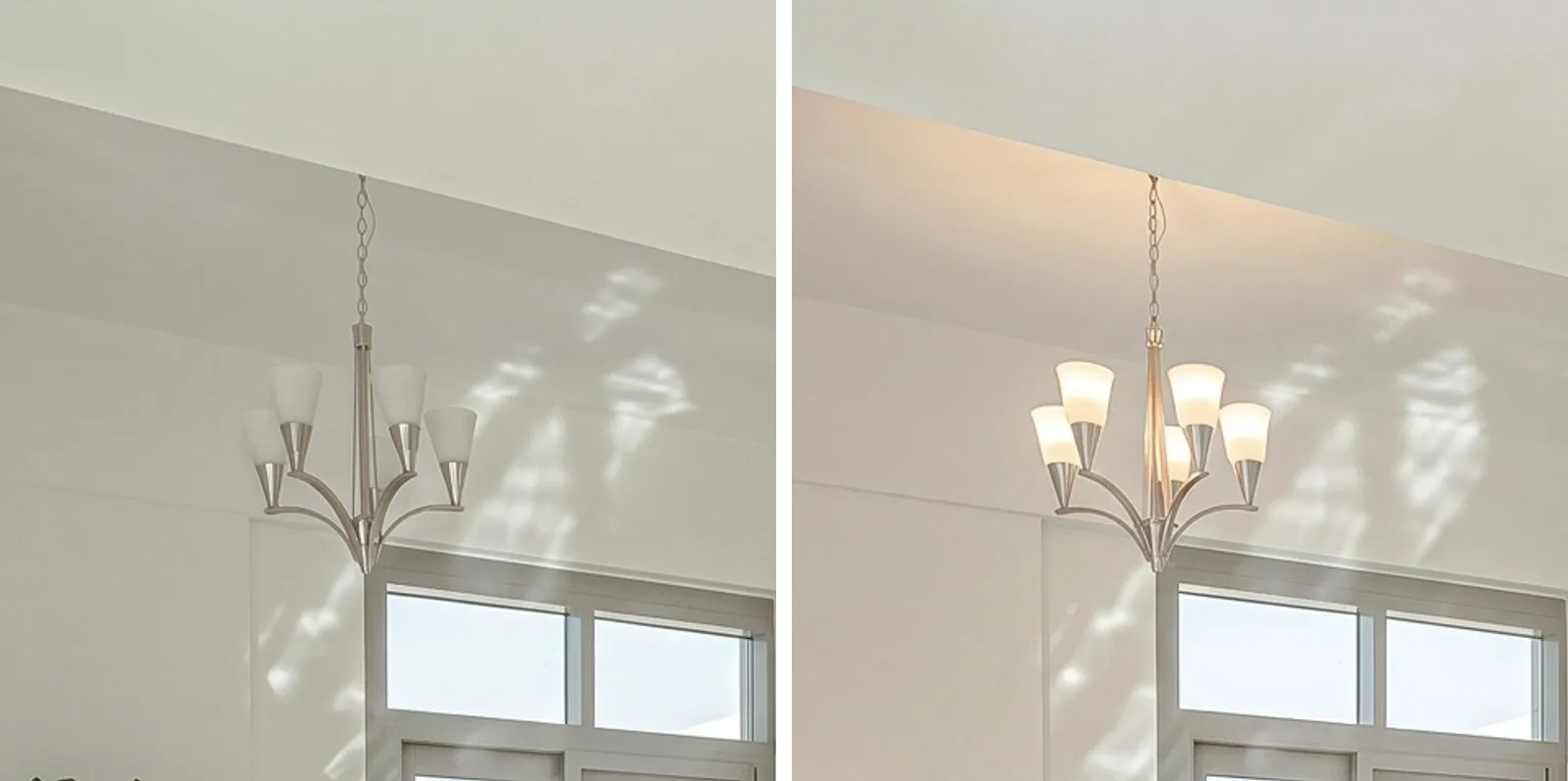
| Staging an empty room (3 rooms) | Both put furniture or decor in front of a door, closet or window. Pro also switched on a chandelier | 2.1 preferred in 2, Pro in 1, equal in 0 | Doors, closets, windows and light fixtures |
| Decluttering (1 kitchen) | Both cleared the table and the floor, and both rewrote jar labels that the prompt did not mention | 2.1 preferred (slightly better) | Labels and small items you did not mention |
| HDR-style exposure fix (1 hotel room) | 2.1 brightened the room. Pro returned no image | Not voted: no pair | The window, the view and the fixtures |
For the Gemini app, Google AI plans and client privacy, see our Nano Banana 2.1 real estate guide.
Nano Banana 2.1 vs Pro at a Glance: Specs and Prices
Google's documentation, checked on 12 October 2026, lists these differences:
| Nano Banana 2.1 | Nano Banana Pro | |
|---|---|---|
| API model code | gemini-nano-banana-2.1 | gemini-3-pro-image |
| Status in the Gemini API | Stable, released 6 October 2026 | Stable, released 28 May 2026 |
| Price per output image, 1K / 2K / 4K | US$0.0336 / US$0.0504 / US$0.113 | US$0.134 / US$0.134 / US$0.24 |
| Price per 2K image with Batch | US$0.0252 | US$0.067 |
| Input tokens, per million | US$1.50 | US$2.00 |
| Text and thinking tokens, per million | US$7.50 | US$12.00 |
| Thinking: a reasoning step before the image, billed like text, cannot be disabled in the API | Minimal, medium (default) or high | No level setting in Google's guide |
| Reference images | Up to 10 object images and 4 character images | Up to 6 object images, 5 character images and 3 style images |
| Inputs | Text, images, video and PDF | Text and images |
| Aspect ratios | The same 10 ratios, plus 1:4, 4:1, 1:8 and 8:1 | 10 ratios, from 1:1 to 21:9 |
Sources: Google's pricing page (updated 9 October 2026), its image generation guide and the Nano Banana 2.1 model page.
Nano Banana 2.1 vs Nano Banana 2
Google calls 2.1 an update to Nano Banana 2 (gemini-3.1-flash-image), which it deprecated on 6 October 2026 without a shutdown date. A 2K image costs US$0.0504 with 2.1 and US$0.101 with Nano Banana 2, although input and thinking tokens cost more. Our real estate guide compares the two models at 1K on two of the photos used here.
How We Tested
We ran the test on 10 October 2026, between 19:05 and 19:13 UTC, through the Gemini API, with two requests in flight at a time. The nine photos made 18 requests: four object removals, three empty rooms to stage, one kitchen to declutter and one HDR-style fix, each sent to both models. Nano Banana 2.1 returned 8 images, and Pro returned 7.
- Photos: nine licensed Pexels photos, eight of homes and one of a hotel room; the Pexels license allows changes. They are not client photos, and none shows people. Stock photos are often shot by professionals, so results may look better than with a phone photo (shooting checklist).
- Input check: each photo's Pexels page shows camera details (EXIF), and the downloaded files carried no C2PA or AI-generation metadata.
- Settings: 2K output at 3:2, the ratio of every photo, each model's default thinking, no temperature or seed, one image per request and no retries.
- Prompts: written before the run and sent unchanged to both models (below). For removals, we drew a red outline around the object on a copy of the photo.
- Judging: one judge from our team, blind to model and order, compared the seven pairs after the run, in October 2026. The judge saw the original, the marked copy for removals and the two results as "A" and "B" in random order, without file names or metadata, at up to 1,280 pixels on the long side. Each pair came with a question written before the run, for example which result removed the marked object better and kept the rest better. A list based on the prompt showed what had to stay the same. The judge chose one of five answers: A clearly better, A slightly better, equal, B slightly better or B clearly better. The judge could also tick boxes for problems they noticed: room structure changed, unmarked object removed or changed, red mark left, framing changed, light or scale unrealistic, door or window blocked, and other.
- Limit of the vote: one judge is not enough for a firm result; two or more independent judges would be more reliable.
- Objective checks: a count of red pixels inside the outline band, and a framing check that aligns each output with its original.
- Our review: we also compared every pair side by side at full size; this review was not blind.
- Cost: usage data multiplied by Google's list prices. This is an estimate, not an invoice.
- Independence: Google did not sponsor or review this test.
The exact prompts:
REMOVAL (4 photos):
Using the provided photo, remove only the object outlined in red,
and remove the red outline as well. Fill the area with what would
naturally be behind the object, matching the surrounding surfaces
and light. Keep everything else in the image exactly the same,
preserving the original style, lighting, and composition.

STAGING (3 rooms; {room}, {style} and {items} listed below):
Using the provided photo of an empty room, furnish it as a {room}
in a {style} style: {items}. Arrange the furniture so that every
door and window stays clear. Keep the walls, windows, doors, floor,
ceiling, light fixtures and camera framing exactly the same; only
add furniture and decor.
- living room, warm modern: a sofa, a coffee table, an armchair,
  a rug, a floor lamp and two plants
- bedroom, calm Scandinavian: a double bed with bedding, two
  nightstands with lamps, a rug and a plant
- dining room, modern: a dining table with six chairs, a sideboard,
  a rug and a vase of flowers

DECLUTTER (1 kitchen):
Using the provided photo, remove the loose clutter: items lying on
the floor, on tables and on counters, plus any loose cables and
bags. Keep all furniture, appliances, built-ins, artwork, curtains,
walls, windows, doors and lighting exactly as they are, preserving
the original style, lighting, and composition.

HDR (1 hotel room):
Using the provided photo, edit it like a professional real estate
HDR photo: brighten the dark areas, bring back detail in the bright
windows, make the white balance neutral and keep vertical lines
straight. Do not add, remove or move anything, and keep the framing
exactly the same.
Our sample is small: nine photos, one image per request, one run and one judge. It shows what can happen on these photos, not how often it happens.
Results by Task
Each "Vote" line gives the judge's answer. The other observations come from our own review.
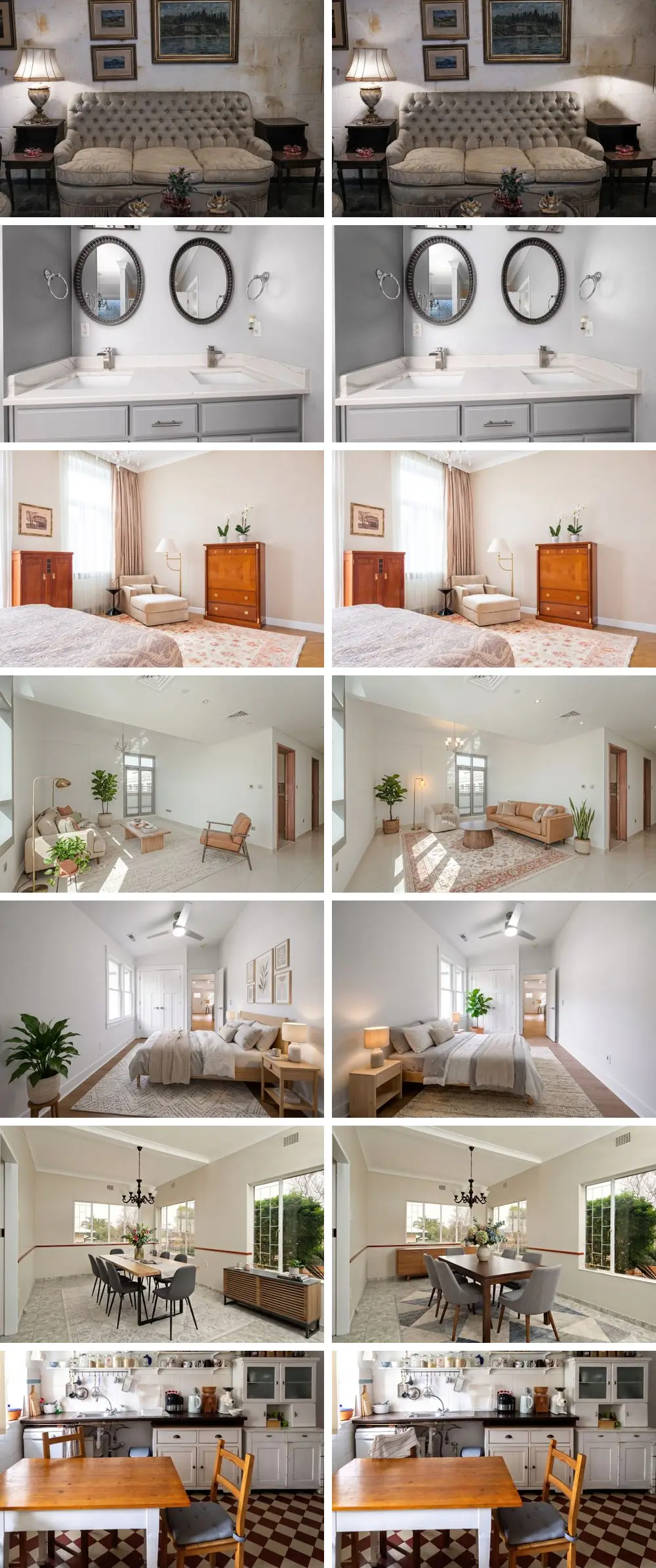
Object removal with Nano Banana 2.1 and Pro
Both models removed all three marked objects for which they returned an image. For the fourth photo, a kettle on a kitchen counter, neither model returned an image (see "Speed and Reliability").
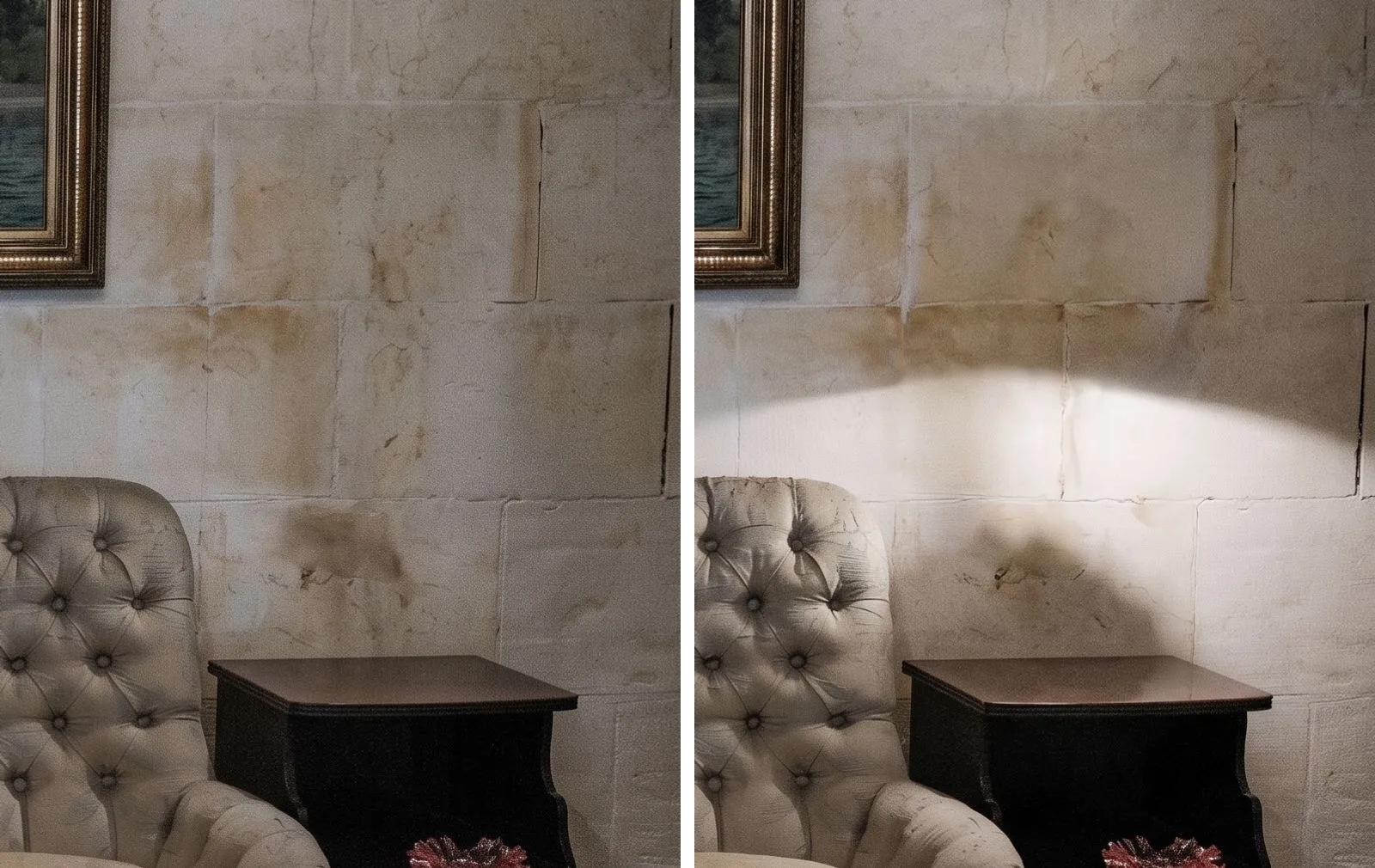
- Table lamp, living room: both removed the lamp, its cord and the lace doily, and kept the matching lamp on the other side of the sofa. Pro left the lamp's light and the shadow of its body on the wall. Nano Banana 2.1 removed the light too, which darkened the end of the sofa, and left a dark smudge where the lamp had stood. Vote: our judge clearly preferred Nano Banana 2.1; problem boxes ticked for Pro: "light or scale unrealistic" and "other".
- Orchid between two sinks, bathroom: both removed the plant and its pot, rebuilt the lower edges of both mirror frames and filled in the counter. The faucets, towel rings, outlet and air freshener stayed. Vote: our judge slightly preferred Nano Banana 2.1; no problem boxes ticked.
- Side chair, bedroom: both removed the chair and rebuilt the corner of the rug with its fringe, the skirting board and the wall behind it. Vote: our judge rated the two as equal; no problem boxes ticked.
Our guide to removing objects and clutter explains what to remove and what to leave.
Staging an empty room
The prompt asked both models to keep every door and window clear and the light fixtures the same.
- Living room: neither model covered the two interior doors. Pro switched on the existing chandelier, and its new armchair stands in front of the lower corner of the balcony door. Nano Banana 2.1 left the chandelier off and the balcony door clear. Vote: our judge slightly preferred Nano Banana 2.1; no problem boxes ticked.
- Narrow bedroom: Pro put a tall potted plant in front of the closet doors and a nightstand under the window, and its lamp rises in front of the bottom of the glass. Nano Banana 2.1 kept the window clear, but its far nightstand stands right next to the open room door, and its bed hides the threshold of that doorway. Seen from the camera, both beds also hide the foot of the closet doors. Vote: our judge slightly preferred Nano Banana 2.1; no problem boxes ticked.
- Dining room: both put the sideboard under a window. Nano Banana 2.1 placed a plant and books on it, and Pro placed a small vase of greenery. In both images, this decor rises in front of the bottom of the glass. Seen from the camera, the flowers on both tables also cover part of a back window. Both kept the doorway clear. Vote: our judge slightly preferred Nano Banana Pro; no problem boxes ticked.
Our Nano Banana 2.1 real estate guide tests how the furniture list changes the result, and our guide to staging an empty room covers the full workflow.
Decluttering a kitchen
Both models cleared the table, the bag hanging on a chair and the items on the floor, and kept the appliances, the open shelves and the dresser. Pro cleared more of the counters, removing a spray bottle, a dish soap bottle, a glass, a white tub and a bowl that 2.1 left. Nano Banana 2.1 removed a striped towel from a chair and drew in the chair back that the towel had covered; Pro left the towel. Vote: our judge slightly preferred Nano Banana 2.1; no problem boxes ticked.
For a full cleanup routine, see our photo cleanup workflow.
HDR-style exposure fix
Pro returned no image for this photo of a dark hotel room, so there was no pair to vote on. Nano Banana 2.1 brightened the walls, the ceiling and the desk and toned down a blue cast on the curtain, while the furniture, the window and the view stayed in place. For hotel photo updates, see our post-renovation hotel photography guide.
Floor plans
On a dense floor plan from the same run, both models made dimension errors, and both wrote a decimal point as a comma. In a 3D view of another plan, both drew a door where the plan shows a window; our floor plan API comparison covers tools built for plans.
The Flaw Both Share: Every Edit Redraws the Whole Image
Google's image guide describes inpainting, or "semantic masking", as a way "to edit a specific part of an image while leaving the rest untouched". Our removal prompt ended with the last sentence of Google's editing template, which asks to keep everything else exactly the same. Still, every edit came back as a newly generated image, and in several of them, details far from the edit changed.
The Nano Banana 2.1 model card lists "partial instruction following and ink persistence in masked/doodle based editing" among its known limitations. Atlas Cloud, an AI model provider, describes the same behavior: the model "regenerates the whole frame on every edit".
What changed in our run, although nobody asked for it:
- Labels and small text: in the kitchen, both models rewrote the printed and handwritten labels on storage jars into made-up letters. Both also turned the printed measuring lines on a small hanging cup into made-up handwriting.
- Pictures on the wall: both redrew a framed print in the bedroom and a small painting above the sofa, far from the chair and the lamp they removed. The changes to the print were easier to see in the 2.1 image.
- Light fixtures: Pro switched on the living room chandelier, although the prompt asked to keep the light fixtures exactly the same.
- An extra removal: Nano Banana 2.1 took a towel off a chair, which the prompt did not list as clutter.
- Areas that look unchanged: at full size, the trees outside the dining room window and the reflections in the bathroom mirrors were redrawn, not copied.
What we did not see: no image kept red ink from an outline, the "ink persistence" that the model card warns about, and none was rotated by more than 0.02 degrees. Each image lost about 0.3% of its width on each side, which matches the slightly narrower shape of a 2,528 × 1,696-pixel output. In our review, no wall, window or door was added or removed.
How to check an edit before you use it:
- Name what must stay, near the edit and far from it, and say whether lights are on or off. Naming a detail does not always protect it: our staging prompt named the light fixtures, and Pro still switched on the chandelier. Our real estate guide tested this on two furnished rooms with Nano Banana 2.1: a prompt that named what to keep did not give a better result than a short prompt.
- Make one change per request. Every extra edit is another chance for details to change.
- Compare at full size: the area you edited, light sources, objects next to the edit, labels and small text, and the edges of the photo.
- Keep the original and label the edit where your market requires it; see our MLS photo requirements guide and our AB 723 guide.
Product and catalog photos can change in the same way, from logos to small parts; our guide to AI furniture catalog backgrounds covers that workflow.
Cost per Image and per Usable Image
List prices count only the output image. A real edit also pays for the input photo and for thinking and text tokens. At Google's list prices, our 2K edits cost:
- Nano Banana 2.1: a median of US$0.0572 per image over 8 images (US$0.0555 to US$0.0666), 13% above the US$0.0504 list price. The median parts were US$0.0504 for the image, about US$0.0018 for the input photo and prompt, and about US$0.0050 for thinking and text.
- Nano Banana Pro: a median of US$0.1392 per image over 7 images (US$0.1387 to US$0.1398), 4% above the US$0.134 list price. Google's pricing page sets each Pro input image at 560 tokens, while the usage data reported 258; at 560 tokens, the Pro median would be US$0.1398.
- The gap: about US$0.08 per image, so 2.1 cost about 59% less. At these medians, 100 edits cost about US$5.72 with 2.1 and US$13.92 with Pro, before retries.
Thinking makes the cost of 2.1 depend on the task. Its three removals used 142 to 168 thinking tokens, while its stagings and the declutter used 291 to 1,421; every 1,000 thinking tokens add US$0.0075. Pro used 164 to 237 thinking tokens per image. These counts cover only the requests that returned an image.
| Task | Photos | Cost per returned image, 2.1 | Cost per returned image, Pro | Cost per usable image, 2.1 / Pro |
|---|---|---|---|---|
| Removal | 4 | US$0.0565 | US$0.1397 | US$0.1696 / US$0.4191 |
| Staging | 3 | US$0.0632 | US$0.1393 | US$0.0949 / US$0.4180 |
| Decluttering | 1 | US$0.0623 | US$0.1398 | No usable image / no usable image |
| HDR-style fix | 1 | US$0.0568 | No image (US$0.0029 spent) | Not voted |
Both cost columns include the requests that returned no image. Cost per usable image divides everything spent on a task by the images you could actually use. We count an image as usable when the judge ticked no problem box for it and our own full-size review found none of those problems either. By this rule, 5 of the 14 images in the seven voted pairs were usable: the orchid removal and the dining room from both models, and the living room from 2.1. The other nine each had a problem described above, such as a leftover light or smudge, a redrawn print, a chandelier switched on, a blocked door or closet, or rewritten jar labels. Decor in front of part of a window, such as the dining room flowers, did not count as blocking it; furniture or a plant in front of a door or closet did. Details that were redrawn but look the same unless you zoom in, such as the mirror reflections and a small outlet label in the bathroom, did not count as changed. Your own rule may differ: rewritten jar labels may not matter in a listing photo, but they would in a product photo.
To compare the Nano Banana 2.1 API cost with finished staging services, see our virtual staging API pricing guide and our ranking of virtual staging APIs by price.
Speed and Reliability
Speed. We timed each request on our side, from sending the photo to receiving the image, with two requests in flight.
- In this comparison, the median was 19.4 seconds for 2.1 (8 images, 17.4 to 24.9 seconds) and 22.2 seconds for Pro (7 images, 21.1 to 24.3 seconds). In four of the seven pairs, the 2.1 request took less time.
- Across all 2K images of the same run, including tests for our other articles, the medians were 22.4 seconds for 2.1 (21 images) and 21.8 seconds for Pro (11 images).
Neither model was clearly faster; the order changed with the mix of tasks. The model card warns of "occasional slowness or timeout issues" for 2.1, so measure on your own workload.
Requests without an image. Our whole run sent 39 requests, including tests for other articles, and 36 returned an image. The 3 that did not were all in this comparison:
| Photo and task | Model | Finish reason | Time | Estimated cost |
|---|---|---|---|---|
| Kettle on a kitchen counter, removal | Nano Banana 2.1 | IMAGE_RECITATION |
14.8 s | US$0.0023 |
| Kettle on a kitchen counter, removal | Nano Banana Pro | IMAGE_RECITATION |
21.0 s | US$0.0024 |
| Dark hotel room, HDR-style fix | Nano Banana Pro | IMAGE_RECITATION |
21.3 s | US$0.0029 |
Google's API reference defines IMAGE_RECITATION as "Image generation stopped due to recitation." It gives no further explanation, and we do not guess at one. Each answer came back as a normal HTTP 200 response with no image and no text, but its usage data listed input and thinking tokens. Google's billing FAQ says only that requests failing with a 400 or 500 error are not charged, so our estimate counts these tokens. Under a rule we set before the run, we did not retry.
Our advice for API workflows: read the finish reason, not only the HTTP status, and log the usage of every request without an image. Decide in advance whether to retry, change the prompt or switch models. Our virtual staging API tutorial covers retries and credit budgets, and our comparison of virtual staging APIs shows how providers handle failed jobs.
We saw no MAX_TOKENS answers, although a developer reported such answers without an image from 2.1 on Google's developer forum on 7 October 2026; the thread had no reply when we checked.
Where Pro Still Wins, and What the Leaderboards Say
Pro keeps real advantages in its specifications. Google calls it "the premium choice for the most complex visual tasks, offering the highest level of world knowledge, advanced localization, accurate brand consistency, and precision creative control". It also takes style reference images and a fifth character image.
Two reviewers found points where Pro did better. The Decoder wrote on 6 October 2026 that "in practice, Nano Banana Pro often still produces noticeably better images". In its own side-by-side test, Pro's image looked "more realistic and natural, particularly in its colors and proportions". Fuser, a vendor of creative AI tools, ran each model once per task. Nano Banana 2.1 won two of Fuser's five tasks and tied two, and it was the only model that followed the lighting brief; Pro won the fifth, with the closest match to a reference face. Our test had no faces and no lighting brief, so we cannot confirm either result. In our own blind vote, the judge slightly preferred Pro in one of the seven pairs: the staged dining room.
Google's own evaluation and the public leaderboards rank 2.1 above Pro. The overall boards use general prompts, not property photos, and they change daily. Positions as we read them on 12 October 2026:
| Board | Nano Banana 2.1 | Nano Banana Pro | Notes |
|---|---|---|---|
| Google's side-by-side human evaluation (model card) | Editing 1026, mask/ink editing 1049, text-to-image 1050 | Editing 939, mask/ink editing 927, text-to-image 935 | Google's own evaluation, not independent; results as of October 2026 |
| Arena image editing | 6th of 59, score 1428 | 12th, score 1390 (2K version) | 2.1 marked "Preliminary" after 12,985 votes; page dated 6 October 2026 |
| Artificial Analysis image editing | 4th, Elo 1140 | 14th, Elo 1103 | 2.1 has the same Elo as the third model |
| Artificial Analysis image editing, "Architecture & Real Estate" category | 9th, Elo 1079 | 20th, Elo 1047 | Fewer votes: ±26 Elo for 2.1, against ±9 on the overall board |
Only the Artificial Analysis category is about architecture and real estate, and the leaderboard page does not say which images it uses. OpenAI's GPT Image 2.5 models lead both public editing boards; our GPT-6 Astra article explains how OpenAI's image models fit into staging.
Which Model Should You Use? A Decision Checklist
- Cost first: for high volume, start with 2.1, and use Batch when a 24-hour turnaround works for you.
- Object removal: both models removed every marked object they returned an image for. Check the light and shadows where the object stood, and the objects around it.
- Staging: neither model was free of placement mistakes in our three rooms. Write the furniture list yourself, then check every door, closet, window and light fixture.
- References and formats: use Pro for style reference images or five character images, and 2.1 for ten object images, video or PDF input, or the 1:4, 4:1, 1:8 and 8:1 formats.
- API pipelines: read the finish reason, budget for retries and keep a second model as a fallback.
- Old model codes: Google's deprecation table marks gemini-3-pro-image-preview as already shut down (shutdown date 25 June 2026), and Nano Banana 2 is deprecated. Call gemini-3-pro-image or gemini-nano-banana-2.1 instead.
- Your own photos: run five to ten of them through both models and count the usable results before you commit.
Disclosure: Roomagen, which publishes this test, makes photo editing tools built on Google's Gemini image models. If you prefer fixed steps to prompts, our tools for object removal, virtual staging, decluttering and HDR editing wrap a model in a workflow, and the same checks apply.
The Bottom Line
Nano Banana 2.1 is the lower-cost choice: in our run, it cost about 59% less per 2K image than Nano Banana Pro, at a similar speed. In this small test, our one judge also preferred 2.1 in five of the seven pairs, most clearly in object removal, and Pro in one. Pro still accepts style reference images and a fifth character image, offers what Google calls "the highest level of world knowledge", and one reviewer, The Decoder, still found its images more realistic.
Both models redraw the whole image, so details can change whether or not you name them, from jar labels to a light fixture. Whichever model you choose, compare every edit with the original at full size before you publish it.
Prices, model status, finish-reason definitions and leaderboard positions checked against the sources below on 12 October 2026. Test results come from one run on 10 October 2026 with nine licensed photos and one judge, as described in "How We Tested".
Ready to transform your listings?
Try Roomagen's AI virtual staging for free. Upload your first photo and see the result, usually in under a minute.
Start FreeSources & References
- 1.Google AI for Developers – Gemini Developer API pricing: Nano Banana 2.1, Nano Banana 2 and Nano Banana Pro (updated 9 Oct 2026)
- 2.Google AI for Developers – Image generation with Gemini (Nano Banana): models, reference images, thinking levels, output sizes and the editing template
- 3.Google AI for Developers – Gemini Nano Banana 2.1 model page (updated 6 Oct 2026)
- 4.Google AI for Developers – Gemini 3 Pro Image (Nano Banana Pro) model page
- 5.Google AI for Developers – Gemini API deprecations: Nano Banana models and preview codes; already-shut-down models in gray (updated 9 Oct 2026)
- 6.Google AI for Developers – Gemini API release notes: Nano Banana 2.1 GA and Nano Banana 2 deprecation (6 Oct 2026)
- 7.Google AI for Developers – API reference, generateContent: FinishReason values, including IMAGE_SAFETY, NO_IMAGE and IMAGE_RECITATION
- 8.Google AI for Developers – Gemini API billing FAQ: charges for failed requests (updated 28 Sep 2026)
- 9.Google AI for Developers – Batch API: 50% of the standard cost, 24-hour target turnaround
- 10.Google DeepMind – Nano Banana 2.1 model card (published 6 Oct 2026): evaluation results and known limitations
- 11.Google Cloud – Gemini 3.1 Flash Image (Nano Banana 2) on Gemini Enterprise Agent Platform: release and retirement dates
- 12.Arena – Image Edit leaderboard, single-image editing (page dated 6 Oct 2026)
- 13.Artificial Analysis – AA-Image-Editing v2.0 leaderboard: overall and the "Architecture & Real Estate" category
- 14.The Decoder – Google's new image model Nano Banana 2.1 generates better images for less money (Matthias Bastian, 6 Oct 2026)
- 15.Fuser – Nano Banana 2.1 vs Nano Banana 2 vs Pro: five tasks, one run each; 2.1 won two and tied two, Pro won the character test (6 Oct 2026)
- 16.Atlas Cloud – Nano Banana interior design: room photos and prompts (9 Oct 2026)
Frequently Asked Questions

Written by
Roomagen Team
The Roomagen team creates in-depth guides about AI virtual staging, real estate photography, and property marketing strategies to help agents and professionals stay ahead.