
Table of Contents(30)
Nano Banana 2.1, Google's image model released 6 October 2026, can stage and declutter real estate photos. The Gemini app offers it on Google AI plans. The API charges US$0.0504 per 2K output image, plus input and thinking tokens.
Free AI Virtual Staging — Stage Any Empty Room in Under a Minute
Stage vacant rooms with AI, usually in under a minute. 13 design styles, 15 room types, listing-ready photos for real estate, rentals and hospitality. 6 free credits, no credit card required.
Nano Banana 2.1 in One Minute
Nano Banana 2.1 (model code gemini-nano-banana-2.1) is Google's newest image generation and editing model, generally available since 6 October 2026. Google calls it an update to Nano Banana 2 and "the more efficient counterpart" to Nano Banana Pro. Its model card says it is based on Gemini 3.6 Flash.
Can Gemini do virtual staging? Yes. Nano Banana 2.1 edits photos from plain-language instructions, so it can be used to stage, declutter and retouch real estate photos. Google's documentation does not mention real estate, but its own editing example is a living room where a blue sofa becomes a leather chesterfield. Every edited photo still needs a door, window and label check.
| Nano Banana 2.1 | |
|---|---|
| Where to use it | Gemini app with a Google AI plan, AI Mode in Search (rolling out), the Gemini API, Google Cloud |
| API list price | US$0.0336, US$0.0504 or US$0.113 per output image at 1K, 2K or 4K; Batch costs half |
| What to check | Doors, windows and closets after staging; small text; left and right; details away from the edit |
| Rules | Some markets require a label and the original photo, for example California since 1 January 2026 |
How to Get It: Gemini App, AI Mode or API
The table shows the four routes that matter most for listing photos; Google also lists Flow, Stitch and Google Ads as channels.
| Route | Image model | Cost | Marks on the image | Limits |
|---|---|---|---|---|
| Gemini app, free account | Nano Banana 2 | Free | Visible watermark, SynthID and C2PA metadata | "Limits apply"; no number published |
| Gemini app, Google AI Plus, Pro or Ultra | Nano Banana 2.1, plus a "Redo with Pro" option | From US$4.99 a month in the US | Same as the free app | Stated only as multiples of the free plan |
| AI Mode in Search (Google app) | Nano Banana 2.1, rolling out since 6 October 2026 | Free to use; 2.1 for free users not stated | Not stated | Not stated |
| Gemini API | Nano Banana 2.1 (gemini-nano-banana-2.1) |
Per token; no free tier for this model | Invisible SynthID; C2PA, see below | Per project, including images per minute |
The Gemini app: free accounts use Nano Banana 2 (gemini-3.1-flash-image), which Google now calls "previous-generation". On Google AI plans, the "Redo with Pro" option uses Nano Banana Pro (Gemini image page). Limits are "compute-based" and refresh every 5 hours until you reach a weekly limit; AI credits can extend them. Google publishes no image count for any plan.
AI Mode in Search: on 6 October 2026, Robby Stein, Google's VP of Product for Search, posted that the model "is rolling out in AI Mode in Search" (Search Engine Roundtable). Google has not said whether free users get 2.1 there.
The Gemini API: Google's pricing page lists no free tier for Nano Banana 2.1, so every call is billed. Without code, you can try the model in Google AI Studio, in a browser. Google Cloud also offers it, on the Gemini Enterprise Agent Platform.
Plan prices vary by country. On 12 October 2026, Google's US subscription page listed Google AI Plus at US$4.99 a month, Google AI Pro at US$19.99 and Google AI Ultra from US$99.99, with a second Ultra tier at US$199.99.
Client Photos and Privacy
Listing photos can show family pictures, documents, a tenant's belongings or a license plate, so choose or crop photos without them. Google also asks users to "only upload, generate, and edit content you have rights and permissions to"; check that your photographer's license allows edits.
Client photos and privacy in the Gemini app
What happens to your uploads depends on the Keep Activity setting (names may differ in your app language). According to the Gemini Apps Privacy Hub, updated 24 September 2026:
- Keep Activity on: your chats and the photos you share are saved in your activity, which Google uses "to provide, develop, and improve its services (including training generative AI models)".
- Human review: human reviewers read a subset of chats. Reviewed chats are disconnected from your account and kept for up to three years.
- Keep Activity off, or a temporary chat: chats are kept for 72 hours and are not used to train Google's AI models, unless you send feedback with Keep Activity off. Google still uses them to respond and to protect users and the public, including with human reviewers.
- Google's advice: "Please don't enter confidential information that you wouldn't want a reviewer to see or Google to use to improve our services".
- Work or school accounts may have different terms.
Client photos through the paid API
For paid services, Google's Gemini API terms say that Google "doesn't use your prompts (including ... files such as images, videos, or documents) or responses to improve our products". Because Nano Banana 2.1 has no free API tier, its API calls fall under these paid terms. Prompts and responses are logged "for a limited period of time" to detect misuse, and may be cached in any country where Google has facilities. Three more points:
- Google AI Studio: Google's terms treat it as a paid service only if your account has access to a Google Cloud project with active billing, or is a Workspace enterprise account. Otherwise, uploads can be used to improve Google's products and read by human reviewers. In the European Economic Area, Switzerland and the UK, the paid-service data terms apply in all cases.
- Stored requests: the Interactions API, used in Google's current image examples, stores requests for 55 days on the paid tier by default. Send
store=false, or set 7, 14, 28 or 55 days in Google AI Studio. - Region: on Google Cloud the model runs only on the global endpoint, with no EU region (Google Cloud documentation). Check this first if you must keep data in the EU.
What a Listing Costs
The app costs a flat monthly fee. The API charges per token, so you can price a listing. The table shows the output images only: 25 photos, one edit each, no retries, at the per-image list prices on Google's pricing page (updated 9 October 2026).
| Model | 1K | 2K | 4K | 2K with Batch |
|---|---|---|---|---|
| Nano Banana 2.1 | US$0.84 | US$1.26 | US$2.83 | US$0.63 |
| Nano Banana 2 | US$1.68 | US$2.53 | US$3.78 | US$1.25 |
| Nano Banana Pro | US$3.35 | US$3.35 | US$6.00 | US$1.68 |
Batch costs half, but Google's target turnaround is 24 hours, so it suits overnight work. At 3:2, a 2K output is 2,528 × 1,696 pixels, larger than the 2,048-pixel long side that our MLS photo requirements guide suggests as a safe export. A 1K output (1,264 × 848) is smaller.
Why one edit costs more than the image price
- Your photo is input. Google Cloud counts 1,120 tokens per input image for Nano Banana 2.1, about US$0.0017 at US$1.50 per million.
- Thinking is always on. Google's image generation guide says thinking "cannot be disabled in the API"; of the three levels (minimal, medium and high), medium is the default. At US$7.50 per million, every 1,000 thinking tokens add US$0.0075.
- Retries are billed too. A photo that needs three attempts costs three times as much.
Compared with Nano Banana 2, only image output got cheaper: input tokens cost three times as much, and text and thinking tokens 2.5 times as much.
In our sample run (see "How We Tested"), a 2K edit with Nano Banana 2.1 at default settings cost US$0.0603 (median of 21 edits; Nano Banana Pro: US$0.1395, median of 11). At that rate, a 25-photo listing costs about US$1.51 before retries. A 2K edit took a median of 22.4 seconds (21 edits, timed on a computer in Turkey, upload included) from request to finished file.
For a few photos a month, the app is simpler. For listings every week, the API gives you a cost per photo that you can measure and bill to your client.
How We Tested
This guide includes three small tests, plus a declutter edit, an exposure edit and a file check from the same run. We ran them through the Gemini API on 10 October 2026.
| Test | Model and size | Photos | Images |
|---|---|---|---|
| Furniture plan: over-full vs fitting | Nano Banana 2.1, 2K | 2 empty rooms | 4 |
| Keep-list: short prompt vs keep-list prompt | Nano Banana 2.1, 2K | 2 furnished rooms | 4 |
| Free-app model vs Nano Banana 2.1 | Nano Banana 2 and 2.1, 1K | 1 removal, 1 empty room | 4 |
| Declutter and exposure edit | Nano Banana 2.1, 2K | 2 photos | 2 |
- Inputs: licensed photos from Pexels, whose license allows changes. They are not client photos. Stock photos are often taken by professionals, so results may look better than with an average phone photo.
- Input check: each photo's Pexels page lists the camera used, and none of the downloaded files carried a C2PA manifest.
- Settings: each model's default thinking level (minimal for Nano Banana 2, medium for Nano Banana 2.1), one image per prompt. Figures show the outputs resized for this page; apart from blurring framed pictures of people that the model added in one figure, we did not retouch them.
- Judging: one team member judged the keep-list and 1K pairs blind, in shuffled order, with model and prompt names hidden.
- Cost: API usage multiplied by Google's list price. This is an estimate, not an invoice. The cost and time figures are medians of all 2K edits per model in the run, including tests for our other articles.
- Independence: Google did not sponsor or review these tests.
One image per prompt shows what can happen, not how often it happens. Use these results as a reason to check your own photos, not as a score.
Is the Free Gemini Model Enough? Nano Banana 2 vs 2.1 at 1K
Free Gemini users get Nano Banana 2, so we ran the same two edits through both models at 1K in the API: removing one marked object and staging one empty room. The app may use other settings, so read this as an indication, not as a test of the app.
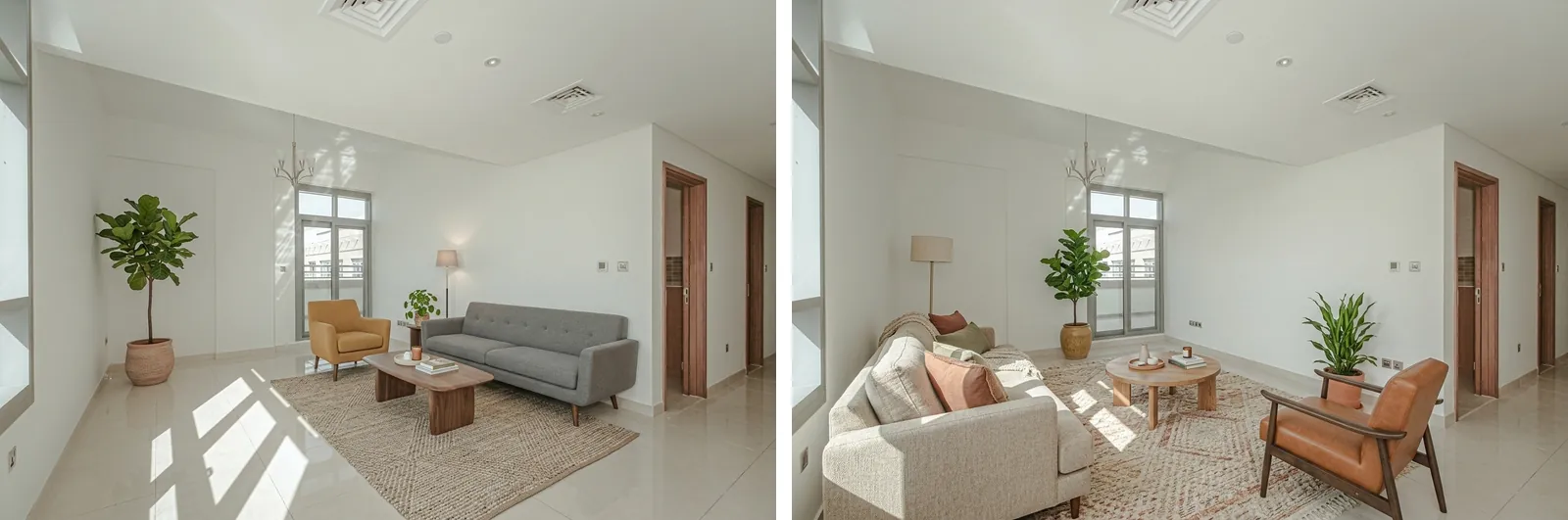
- Removing a marked object: both removed the lamp and outline but left brown stains where it stood; Nano Banana 2 also kept its glow and removed an unmarked dish.
- Staging an empty room: Nano Banana 2 put an armchair in front of the balcony door; Nano Banana 2.1 put a plant beside it. Neither blocked the other doors.
For the removal, we checked that the object and the mark are gone and that nothing unmarked disappeared. For both edits, we checked the walls, windows, light and framing. Our one judge, who did not know which model made which image, clearly preferred Nano Banana 2.1's removal and slightly preferred its staging.
Before you pay for a plan, run two or three of your own photos through the free app and apply the checks at the end of this guide.
Real Estate Photo Edits to Try With Nano Banana 2.1
Google calls editing in plain words "semantic masking": you describe what to change and what to keep. These listing jobs fit that pattern.
Decluttering and removing a marked object
Name the object and where it is, or draw an outline around it on a copy of the photo and ask the model to remove what is inside. The model card lists "ink persistence" as a known issue, so check that the outline is gone. Name the objects next to it that must stay, such as "keep the countertop, the cabinets and the window". In our sample run, a declutter edit with Nano Banana 2.1 cleared the table, the floor and a chair, but also rewrote the labels on storage jars.
Under CRMLS rules in California, removing furniture, appliances or decor makes a photo digitally altered, so it needs a label; when in doubt, CRMLS advises disclosing. Our guide to removing objects and clutter covers what to remove first.
Exposure and white balance
CRMLS exempts light and color fixes such as exposure and white balance when the property looks the same, but MLS Now asks for an on-image label even for these edits. If anything besides light and color changed, it is no longer a minor adjustment. In our sample run, an HDR-style exposure edit with Nano Banana 2.1 brightened the room, kept the furniture and window view, but redrew the brochures on the desk.
Cleaning up a sketched floor plan
The model can redraw a hand sketch as a clean plan image, but treat the result as a drawing, not a measurement. Check every room, door, window and number against your sketch.
Previewing paint, finishes and furniture
A new wall color, floor or kitchen front can help a design conversation or a renovation quote. Nano Banana 2.1 accepts up to 10 object reference images, so a photo of a real product can guide a swap; check its proportions against the real item. In listing photos, such changes are allowed only in narrow cases. CRMLS bans them "unless the listed property will be improved to match the altered photo at time of close". MLS Now bans showing upgrades that are not present, except in a labeled "Virtual Remodel" of new construction or of a clearly marked proposed improvement. Our AI virtual renovation guide covers this kind of work.
Where It Fails on Property Photos
After any large change in lighting, check that the windows and the view through them still match the original.
Furniture across doors, closets and windows
Atlas Cloud, an AI model provider that tried Nano Banana 2.1 on room photos, notes that a furnishing prompt "reads open floor as space to fill" (Atlas Cloud). Furniture may then end up across a door, in front of a closet or over a window. In our test, an over-full furniture plan did this in both empty rooms. Google's model card also lists limits in "3D reasoning", so check the scale of the furniture against the doors and windows. CRMLS and MLS Now both ban changes to doors, windows and other permanent features.
Frame drift and changed details
An edit can come back slightly cropped, zoomed or shifted, which changes how large a room looks; Atlas Cloud notes that "framing is open unless you fix it". Compare the edges with the original and put "camera framing" in your keep-list. In the API, leave the aspect ratio unset so that the output follows your photo, or set your photo's ratio. Atlas Cloud also reports that the model "regenerates the whole frame on every edit", so details you did not name can change, even far from your edit.
Small text, left and right
The model card lists "poor text rendering in small text (often blurry in 1k model)" and "occasional confusion around spatial localisation (e.g. left/right etc.)". House numbers and signs can blur or change, so check them. Describe positions by fixed features, such as "the wall with the window", not by left and right.
Gemini Virtual Staging: Plan the Furniture Before You Prompt
In NAR's 2025 Profile of Home Staging, 83% of buyers' agents said staging made it easier for buyers to picture the property as their future home. They most often rated the living room (37%), the primary bedroom (34%) and the kitchen (23%) as very important to stage. Our virtual staging statistics collect more data.
A Nano Banana virtual staging prompt is mostly a furniture list, and that list decides where the model has to put things. We tested two furniture plans on the same two empty rooms with Nano Banana 2.1 at 2K:
| Over-full plan | Plan that fits | |
|---|---|---|
| Bed | King-size | Double |
| Other furniture | Two nightstands, a large wardrobe, a desk with a chair, an armchair and a dresser | One nightstand |
| Decor | Not specified | A rug and a small plant |
| Placement rules | None | Bed against a wall with no door or window; a clear path to every door; every window uncovered |
The exact prompts:
OVER-FULL PLAN:
Using the provided photo of an empty room, furnish it as a
bedroom with a king-size bed, two nightstands, a large wardrobe,
a desk with a chair, an armchair and a dresser. Keep the walls,
windows, doors, floor, ceiling, light fixtures and camera framing
exactly the same; only add furniture and decor.

PLAN THAT FITS:
Using the provided photo of an empty room, furnish it as a
bedroom with a double bed, one nightstand, a rug and a small
plant. Put the bed against a wall that has no door or window,
leave a clear path to every door and keep every window uncovered.
Keep the walls, windows, doors, floor, ceiling, light fixtures and
camera framing exactly the same; only add furniture and decor.
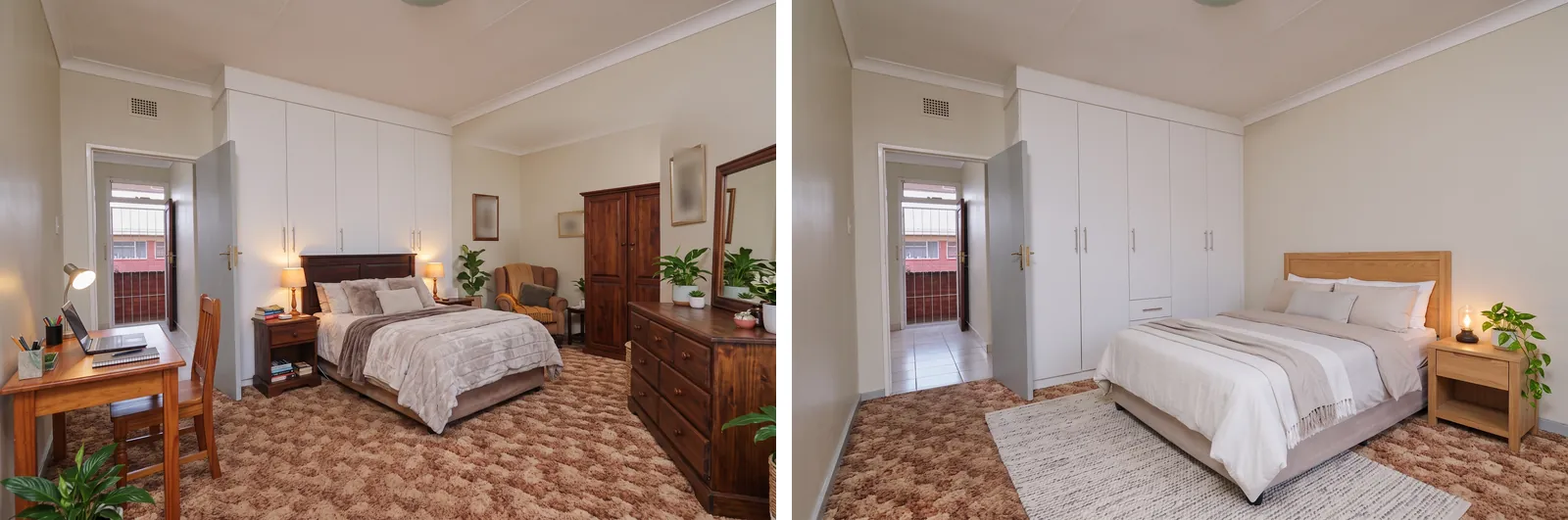
In each image we checked the doors, the windows, the closet fronts, the scale of the furniture and the framing. The amount of furniture shows which plan made which image, so these pairs were judged on these checks, not by a blind preference vote.
- Room A: with the over-full plan, an armchair stood in front of the closet's left door and a desk lamp in front of the window; the plan that fits left both clear.
- Room B: with the over-full plan, the right-hand wall moved and the bed blocked the built-in wardrobe. The plan that fits kept the wall, but its bed hid the wardrobe's lower part.
Our one judge, who could tell the plans apart, also clearly preferred the plan that fits in both rooms.
How to write a furniture plan that fits
- List the fixed features first. Count the doors, windows, radiators and built-in closets, and say where they are.
- Size the furniture to the room. Use a floor plan or a tape measure, and leave out pieces that do not fit.
- Name the wall for the main piece by a feature, such as "the wall with no door or window", not "the left wall".
- Say what must stay clear: a path to every door, the front of every closet, every window.
- Start with fewer pieces. You can add a rug in a second edit, but every extra edit is another chance for details to change.
- End with a keep-list, then check the result with the 10-point list below.
For the full workflow, see our guide to staging an empty room and our checklist for shooting photos for AI staging.
A Real Estate Prompt Template: Name What Must Not Change
Google's image guide gives this template for editing one part of a photo; its example changes "only the blue sofa" in a living room:
Using the provided image, change only the [specific element] to
[new element/description]. Keep everything else in the image
exactly the same, preserving the original style, lighting, and
composition.
A keep-list also names everything that must not change. We compared a short prompt with a keep-list prompt on two furnished rooms, with Nano Banana 2.1 at 2K:
SHORT PROMPT:
Make the sofa dark green.

KEEP-LIST PROMPT:
Using the provided photo, change only the sofa's upholstery to
dark green velvet. Keep everything else in the image exactly the
same: the walls, windows, doors, floor, rug, cushions, artwork,
books, plants, lighting and camera framing.

In each pair we looked at the sofa's shape and size, the cushions, the rug, the other furniture and decor, the walls and any windows, the light and the framing.
- Room C: both prompts turned the sofa dark green, with no change we could see in the cushions, lamp, basket, rug, windows or framing; here the keep-list made no visible difference.
- Room D: the short prompt left the check-patterned seat cushion gray; the keep-list prompt turned it green but split it in two. Neither changed the loose cushions, wallpaper, other furniture or framing.
Our one judge, who did not know which prompt made which image, rated the two results equal in Room C and slightly preferred the short prompt's result in Room D. In this run, the keep-list did not give a better result. A keep-list cannot promise anything, so compare the object you edited with the original, as well as the items around it.
A keep-list you can copy
Using the provided photo, [describe one change]. Keep everything
else in the image exactly the same: the walls, windows, doors,
floor, ceiling, [built-ins such as cabinets, radiators or a
fireplace], [objects next to the change], light fixtures, the
lighting, the view through the windows and the camera framing.
- Make one change per prompt.
- For staging, add "only add furniture and decor".
- For light and color edits, remove "the lighting" from the list.
- We wrote and tested our prompts in English. Google's image guide recommends 15 languages for prompts, including English; if yours is not on that list, write the prompt in English.
Labels, Originals and Watermarks
An edit made with Gemini carries the same disclosure duties as any other edit, and the rules depend on where you list.
What CRMLS asks for in California
California's AB 723 has applied to listing photos since 1 January 2026. CRMLS, a large California MLS, implements it as Rule 11.5.2 (CRMLS FAQ, updated 13 February 2026):
- Label: needed when an edit adds, removes or changes furniture, appliances or decor, and advised whenever you are unsure. Use "Photo Modified", "Virtually Staged", "Digitally Altered", "AI Altered" or a similar accurate term, in the photo's text field. CRMLS does not require a watermark.
- Original: the unaltered photo must appear immediately before or after the altered one.
- Not allowed: changing flooring, walls, windows, cabinetry, paint color, floor plans or other real property elements, unless the property will be improved to match by the close of sale. Changing "views through windows" or neighboring properties, and AI-generated landscaping, are not allowed either.
AB 723 itself also applies to ads outside the MLS, such as flyers and social posts: they need a disclosure next to the altered photo and a link, URL or QR code to the original. These are California rules, and this guide is not legal advice. Our AB 723 compliance guide and MLS photo requirements guide cover them in detail.
Other MLSs set different rules
MLS Now, an MLS in Ohio, works differently. It prohibits "visible branding, watermarks" on listing images, so a photo that still shows the Gemini app's visible mark could break that rule. Every altered, staged or rendered image needs an on-image label such as "Virtually Staged" or "Digitally Altered", repeated in the caption, even for minor exposure and white balance edits. Members must keep the original media and provide it on request.
SynthID, C2PA and the Gemini watermark
- SynthID: Google's image guide says "All generated images include a SynthID watermark", which is invisible.
- Visible watermark: the Gemini app adds a visible mark by default. Since August 2026, a "Media Watermark" setting can switch it off. Google's help page says the setting does not affect SynthID or Content Credentials (C2PA), and that in India, South Korea and Vietnam only AI Ultra subscribers see it.
- C2PA Content Credentials: Google Cloud lists them as supported for this model. In our sample run, the raw API files carried a C2PA manifest from Google saying "Created by Google Generative AI", without naming the model.
- A watermark is not a label. CRMLS wants a text label, and MLS Now bans watermarks and wants its own label. Switching off the visible mark changes neither duty.
Since 7 October 2026, anyone can upload an image to Google's SynthID Detector to check whether it was made with AI from Google or its partners. The result says the media was "made or edited with Google AI" (Search Engine Journal); it does not say how much changed. Assume any Gemini-edited photo can be identified, and label it where required.
Gemini on Your Own vs a Property Photo Tool
| Question | Gemini app or API on your own | Property photo tool |
|---|---|---|
| 25 photos in one style | You repeat and adjust the prompt for each room | Usually one set of style settings for the batch |
| Marking what to remove | Words, or an outline drawn on a copy of the photo | Often a marking screen, as in object removal |
| Staging an empty room | You write the furniture plan and the keep-list | Usually asks for room type and style, as in virtual staging |
| Emptying or decluttering | One prompt per photo | Separate steps, such as emptying a room or virtual decluttering |
| Light and color | Prompt for it, then check that nothing else changed | Photo enhancement or HDR editing |
| Labels and originals | Your job | Usually still your job; check what the tool does |
| Cost | App: flat fee, limits unpublished. API: tokens, which vary with thinking and retries | Per photo or credit; check what a retry costs |
For a one-off edit, such as removing a trash bin from a driveway or testing a paint color for a client, the Gemini app can be enough. For a weekly workflow with many listings, several people and labeling rules, fixed steps and batch settings matter more than the choice of model. Disclosure: Roomagen, which publishes this guide, makes photo editing tools built on Google's Gemini image models. Test any tool, ours included, on a few of your own photos, and compare the cost per usable photo, not the cost per attempt.
A 10-Point Check Before You Publish
Open the original and the edit at the same size and switch between them.
- Doors: every door is still there, in the same place and at the same size, with a clear path to it.
- Windows and views: every window is present, uncovered and the same shape, and the view through it matches the original.
- Built-ins: closets, cabinets, radiators, fireplaces and light fixtures are unchanged and not hidden.
- Surfaces and outside: floors, walls, paint colors and ceilings match the original, and so do the lawn, sky, trees, neighboring houses and street.
- Defects: nothing a buyer should see, such as a crack or a water stain, has been removed or covered.
- Framing: the edges match the original, with no zoom, crop or shift.
- Scale: furniture is in proportion to the doors and windows.
- Small details: fixtures, decor and any text that you did not ask to change are unchanged or not misleading.
- Label and original: the label is where your MLS wants it, and the original is kept and shown where your MLS requires it (CRMLS: right before or after the edited photo).
- Watermark: you know whether the file carries a visible watermark and whether your MLS allows it.
Beyond Brokerage: Rentals, Hotels, Builders and Designers
Short-term rentals and hotels. Guests compare the photos with the room on arrival, so edit light, clutter and seasonal touches only to match what they will find, and do not add furniture that is not there. See our Airbnb staging guide, the Airbnb host toolkit and our post-renovation hotel photography guide.
Property managers. Staging can show the scale and use of empty units; label staged photos where required and keep an unstaged photo of each room. See virtual staging for property managers and our guide to AI photo tools for property managers.
Builders and developers. MLS Now, for example, lets new construction use an architectural rendering as the primary image, but other altered images still need labels. See construction interior visualization for builders and our guide to virtual staging for home builders.
Interior designers, stagers and photographers. Designers can show quick concept options, such as a different sofa or wall color. Photographers should deliver the original with every edited file.
Related tools are grouped in the toolkits for interior designers, home stagers and photographers.
Summary
Nano Banana 2.1 is in the Gemini app on Google AI plans and in the API at US$0.0504 per 2K output image, before input and thinking tokens. For client photos, the paid API's terms protect your content more: Google does not use it to improve its products, while app chats with Keep Activity on can be used for training.
Whether you prompt Gemini yourself or use a tool, the same steps need care. Plan furniture that fits the room, write a keep-list, check the edited object and every door and window, and add a label where your market requires one. For the text side of a listing, see our GPT-6 Astra guide.
Prices, plans, privacy terms, model status and MLS rules checked against the sources below on 12 October 2026. Test results come from a small sample run on licensed photos, described in "How We Tested".
Ready to transform your listings?
Try Roomagen's AI virtual staging for free. Upload your first photo and see the result, usually in under a minute.
Start FreeSources & References
- 1.Google AI for Developers – Gemini Developer API pricing: Nano Banana 2.1, Nano Banana 2, Nano Banana Pro (updated 9 Oct 2026)
- 2.Google AI for Developers – Image generation with Gemini (Nano Banana): editing template, thinking levels, output sizes, languages, SynthID
- 3.Google AI for Developers – Batch API: 50% of standard cost, 24-hour target turnaround
- 4.Google AI for Developers – Gemini API Additional Terms of Service: paid and unpaid services, Google AI Studio
- 5.Google AI for Developers – Interactions API overview: data retention (55 days on the paid tier)
- 6.Google AI for Developers – Gemini API rate limits: per-project limits, images per minute
- 7.Google DeepMind – Nano Banana 2.1 model card (published 6 Oct 2026): distribution and known limitations
- 8.Google Cloud – Nano Banana 2.1 on Gemini Enterprise Agent Platform: GA 6 Oct 2026, regions, input tokens, Content Credentials (updated 10 Oct 2026)
- 9.Google – Gemini app image generation: Nano Banana 2.1 with a Google AI plan, Redo with Pro, watermarks
- 10.Google – Gemini subscriptions, United States: Google AI Plus, Pro and Ultra prices and usage limits
- 11.Google – Gemini Apps Privacy Hub: Keep Activity, human review, 72-hour retention (updated 24 Sep 2026)
- 12.Google – Gemini Apps Help: Manage watermark settings in Gemini Apps (Media Watermark, SynthID, Content Credentials)
- 13.Google – Google expands SynthID Detector for AI content (Pushmeet Kohli, 7 Oct 2026)
- 14.Search Engine Journal – Google opens SynthID watermark detector to the public (7 Oct 2026)
- 15.Search Engine Roundtable – Nano Banana 2.1 rolling out in Google AI Mode (6 Oct 2026)
- 16.CRMLS – Digitally Altered Images (Rule 11.5.2) FAQs, updated 13 Feb 2026
- 17.MLS Now – Rules Section 3: Images, Media & Virtual Staging (updated 23 Sep 2026)
- 18.National Association of Realtors – 2025 Profile of Home Staging press release (6 May 2025)
Frequently Asked Questions

Written by
Roomagen Team
The Roomagen team creates in-depth guides about AI virtual staging, real estate photography, and property marketing strategies to help agents and professionals stay ahead.


