Colorize Apartment Floor Plans — Studio to 3BR Color Layouts
Roomagen Floor Plan Colorize for apartments applies designer palettes to compact unit layouts — studios through 3BRs — with kitchen, bathroom, closet, and entry zones color-coded by AI for rental listings, sale marketing, and Airbnb hosts.
Apartment listings often have small footprint plans where every square foot matters. Black-and-white plans for studios and 1BRs look uninviting and fail to communicate flow. Coloring a small apartment plan in Photoshop still takes 30–60 minutes despite the smaller area — because masking small rooms is fiddly. Designers charge $20–$100 per apartment plan. Roomagen colorizes any apartment plan in under 90 seconds for $0.23–$0.40, with palettes that emphasize spatial flow even in compact layouts.
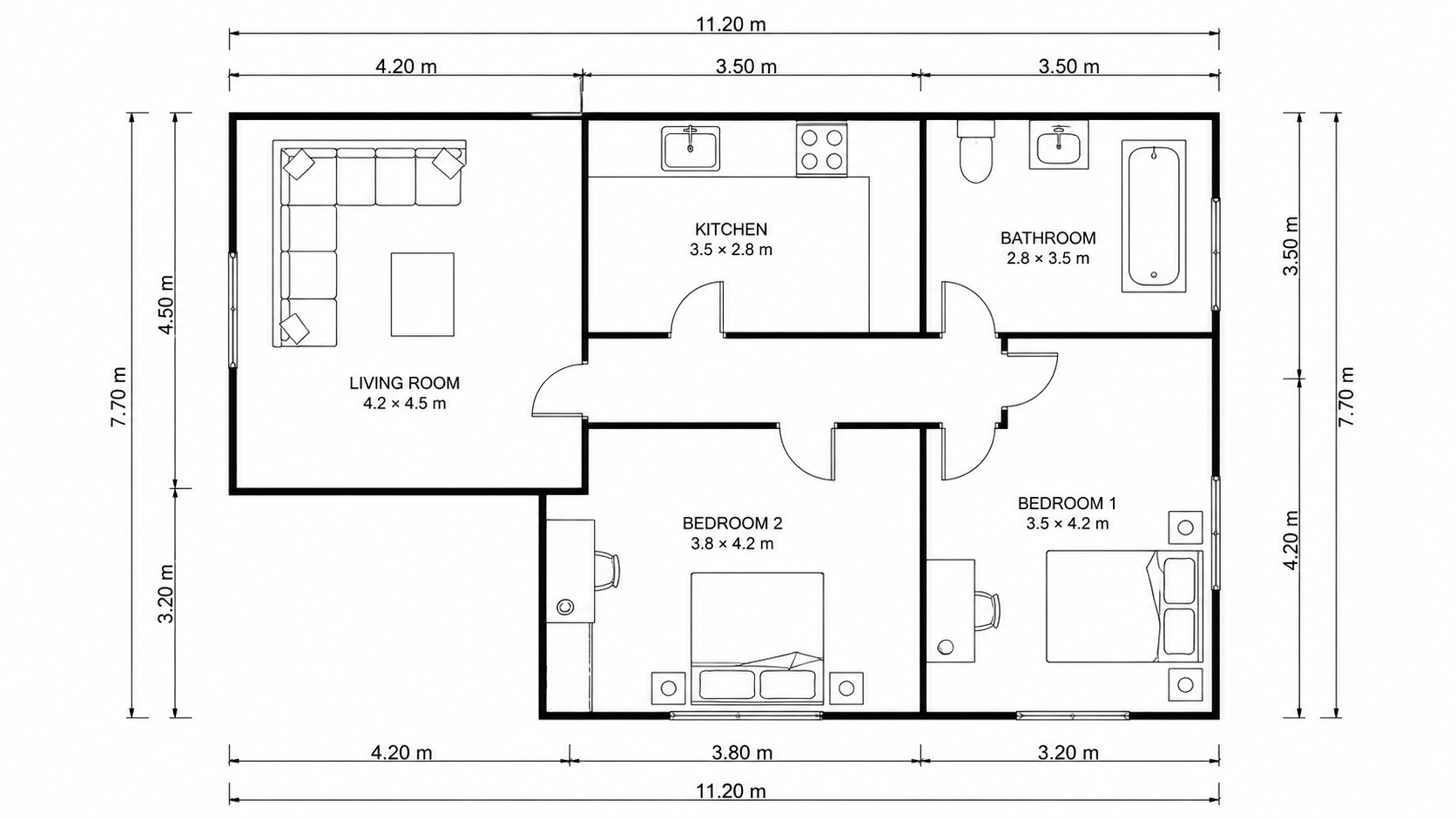
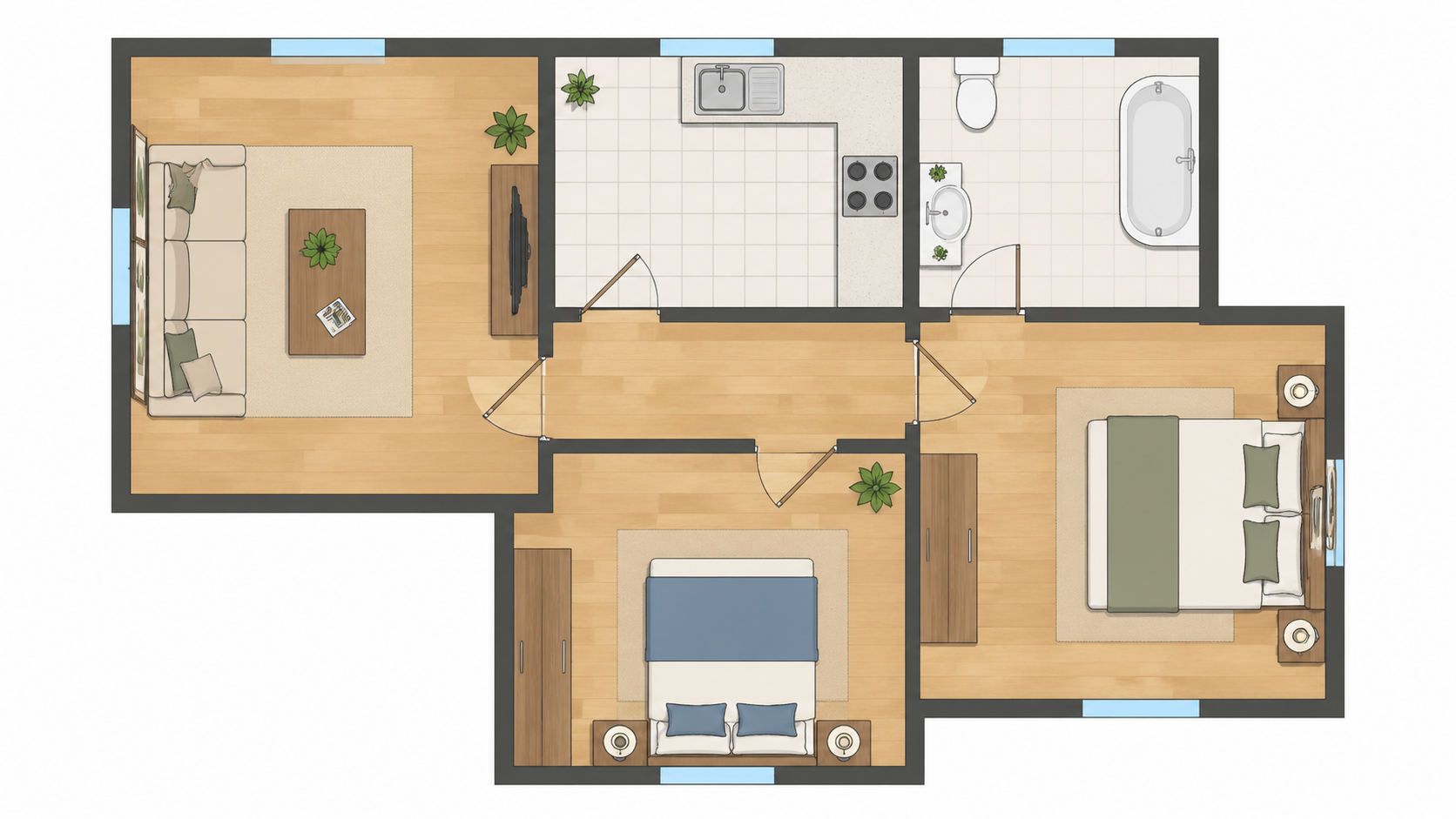
Demo example: the “Before” image was created with AI for this site; it is not a customer photo.
Features
Colorize apartment floor plans with AI — studios, 1BRs, 2BRs, and multi-bedroom units. Kitchen, bathroom, closet zones color-coded for rental listings, sale marketing, and Airbnb hosts in under 90 seconds.
How Does AI Colorize Compact Apartment Layouts?
Studio through 3BR apartment plans colorized in under 90 seconds with kitchen, bathroom, and closet zone detection
What Color Palettes Suit Studios and Small Apartments?
Asian Compact palette specifically tuned for small spaces — warm saturated tones that make compact units feel inviting
Why Add Color to Apartment Listings?
Batch-friendly workflow for property managers handling 5–20+ unit types across an apartment building
How It Works
Get professional results in three simple steps
Drop your photos here
or browse files
Upload Your Photos
Drag and drop your photos or browse to upload them. Roomagen accepts JPEG, PNG and WebP files up to 50 MB each.
AI Processing
Our advanced AI analyzes your images and applies professional enhancements automatically. Choose from virtual staging, enhancement, object removal, or day-to-dusk conversion.
Download Results
Preview your transformed images and download high-resolution results ready for listings, marketing materials, social media, and more. No watermarks on premium plans.
Why Choose Roomagen
Studio, 1BR, 2BR, and 3BR Apartments Color-Coded
Studio through 3BR apartment plans colorized in under 90 seconds with kitchen, bathroom, and closet zone detection
Kitchen, Bathroom, and Closet Zones Highlighted
Asian Compact palette specifically tuned for small spaces — warm saturated tones that make compact units feel inviting
Rental and Sale Listings With Premium Visual Quality
Batch-friendly workflow for property managers handling 5–20+ unit types across an apartment building
Who Is It For?
Apartment Listing Agents
Add colored floor plans to every apartment listing — studios, 1BRs, 2BRs. Listings with floor plans get 35% more inquiries; colored plans push that further.
Rental Property Managers
Colorize all unit-type plans across your portfolio for consistent professional listings — color helps tenants picture the space before showings.
Airbnb Hosts
Add a colored floor plan to your listing to differentiate from competing hosts. Guests can see kitchen, bath, and bedroom flow before booking.
Photoshop coloring of an apartment plan costs $240/yr Adobe Creative Cloud + 30–60 minutes of work — small rooms are fiddly to mask. Hiring a designer for an apartment plan runs $20–$100 per plan. Roomagen colorizes the plan in one of four palettes in under 90 seconds for $0.23–$0.40, with no design skills required; each extra palette is another run.
| Roomagen AI | Photoshop / Designer | Generic Coloring Tool | |
|---|---|---|---|
| Cost per plan | $0.23–$0.40 | $20–$100 designer / $240/yr Photoshop | $0–$30/yr + manual time |
| Turnaround | Under 90 seconds | 30–60 min Photoshop / 1–2 days designer | 30–60 min manual |
| Small-room handling | Auto-detected and colored | Fiddly masking work | Tedious manual selection |
| Studio support | Zone-based coloring | Manual zone marking | Limited or unsupported |
| Multi-unit batch | Process 20 plans for under $5 | 20 plans = 10–20 hours | 20 plans = 10–20 hours manual |
Frequently Asked Questions
Everything you need to know about Roomagen
Yes. Studios with open-plan layouts get zone-based coloring — kitchen area, sleeping area, living area, and bathroom each color-coded distinctly even without wall divisions. The colored plan communicates spatial flow effectively.
Closets, alcoves, and small bathrooms are detected and colored consistently with the room they serve (closet color-matched to bedroom). Small spaces get appropriate color saturation so they read clearly without dominating the layout.
Real Estate Pastel for general appeal. Asian Compact palette is specifically designed for small spaces — it uses warm saturated colors that make compact units feel inviting rather than cramped.
Yes. Property managers often colorize all unit types (5–20 different layouts) in one batch. Each plan costs 2 credits — colorize a 20-unit-type building for under $5.50 total.
The AI handles both. Studios with open layouts use zone-based color coding. 1BRs with separated bedrooms use room-based color coding. Both produce listing-ready output.
Yes. Hosts add a colored floor plan as one of their listing images. Guests appreciate seeing the layout before booking. Differentiates your listing from competitors using only photos.
L-shaped living areas, angled walls and odd corners are colored as part of their parent room. The AI redraws the plan as it colors it, so check that the layout, labels and numbers still match your original.
Pick the palette closest to your brand. For brokerages with strict brand colors, use the colored output as a base and adjust the dominant color in Canva or Photoshop in 5 minutes.
Yes. Balconies, patios, and outdoor spaces are detected and colored with outdoor-appropriate tones (greens, light grays). They appear distinct from interior spaces in the colored output.
Each colorization is 2 credits ($0.23–$0.40). Property managers running 30 unit-type colorizations per quarter spend under $9 — far less than a single Photoshop license month.
Part of
Floor Plan ColorizeMore From This Family
- Online Floor Plan Colorizer
- How to Colorize a Floor Plan
- Free Floor Plan Coloring Tool
- Colorize House Floor Plans
- Colorize Office Floor Plans
- Colorize Restaurant Floor Plans
- Colorize Hotel Floor Plans
- Colorize Retail Floor Plans
- Colorize Clinic Floor Plans
- Colorize Warehouse Floor Plans
- Floor Plan Colorize for Real Estate Agents
- Floor Plan Colorize for Architects
Explore Related Tools
Discover more AI-powered tools to enhance your visual content
Floor Plan Colorize — AI Color for Black-and-White Plans in Under a Minute
Colorize black-and-white floor plans with AI. Four designer palettes, auto-detected rooms, output ready in under 90 seconds for real estate, architecture, and interior design — no Photoshop or design skills required.
Learn moreProfessional 2D & 3D Floor Plans — AI-Generated in Under a Minute
Turn a sketch, scan or old plan into a clean 2D floor plan or a 3D view. Keep or remove measurements and room names, and pick one of four drawing styles.
Learn moreColorize House Floor Plans — AI Color for Residential Layouts
Colorize hand-drawn or digital house floor plans with AI. Multi-room residential layouts with bedrooms, kitchen, garage, and outdoor — color-coded, usually in under a minute, for MLS listings, architect presentations, or homeowner brochures.
Learn moreSketch to Apartment Floor Plan — Quick Digital Plans for Compact Spaces
Convert hand-drawn apartment layout sketches into clean digital floor plans with AI. Studios, one-bedrooms, and multi-bedroom apartments digitized with kitchen, bathroom, and closet positions, usually in under a minute.
Learn moreFloor Plan to 3D — AI Dollhouse View Generator
Convert 2D floor plans into isometric 3D dollhouse views with AI. Upload any floor plan and get a furnished 3D visualization showing room layouts, furniture placement, and spatial relationships — perfect for listings, presentations, and design proposals.
Learn more