Colorize House Floor Plans — AI Color for Residential Layouts
Roomagen Floor Plan Colorize for houses applies designer-curated color palettes to black-and-white residential floor plans — bedrooms, bathrooms, kitchen, garage, and outdoor areas color-coded by AI for MLS listings, presentations, and homeowner brochures.
Real estate agents and home builders receive house floor plans from architects in flat black-and-white format. Black-and-white plans look amateurish in MLS listings and bland on marketing materials. Manually coloring a house plan in Photoshop takes 45–90 minutes per plan, and most agents lack the design skills. Roomagen colorizes a multi-room house floor plan in under 90 seconds for $0.23–$0.40 in one of four palettes, chosen for the audience (listings, brochures or board presentations); each extra palette is another 2-credit run.
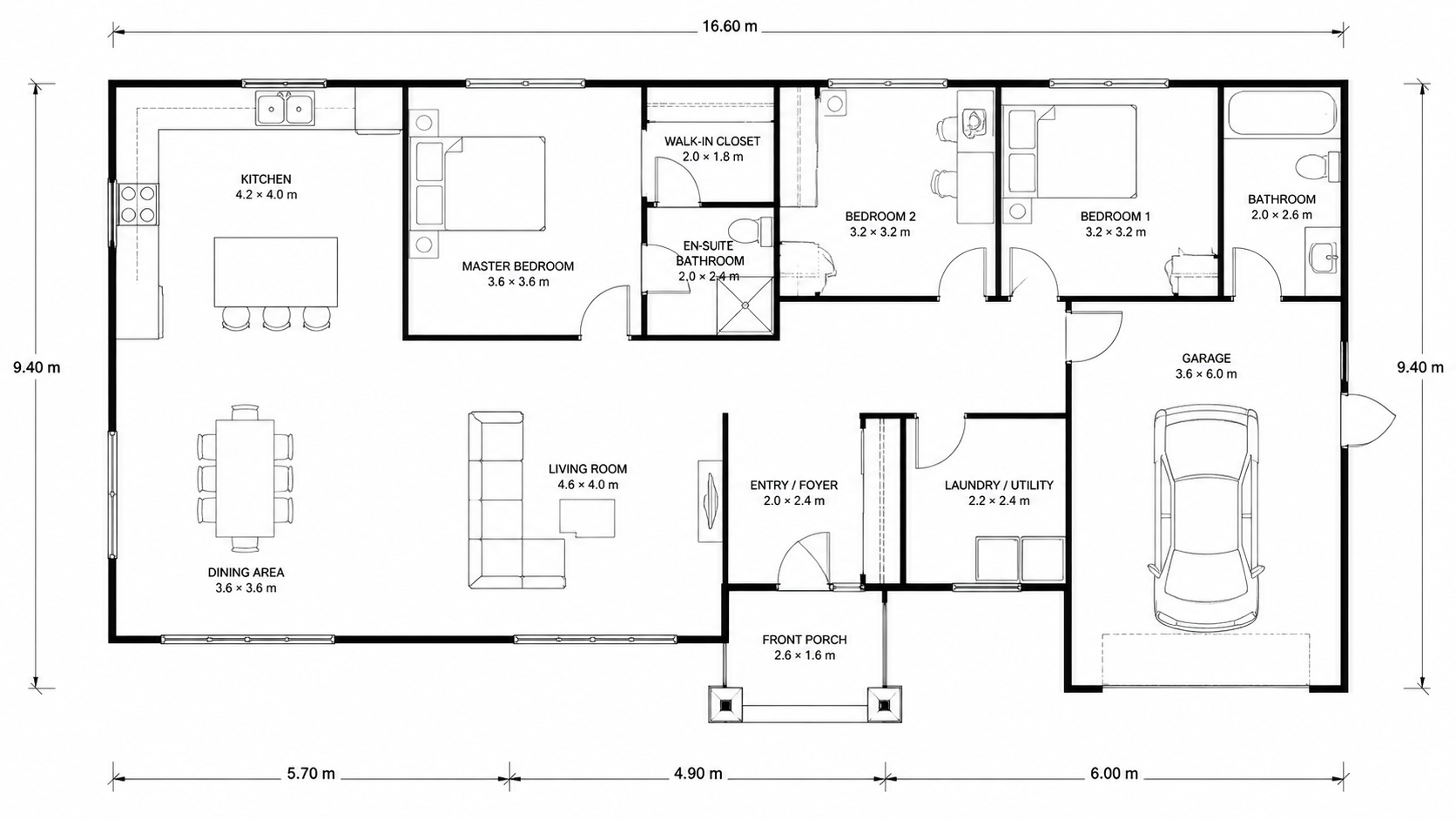
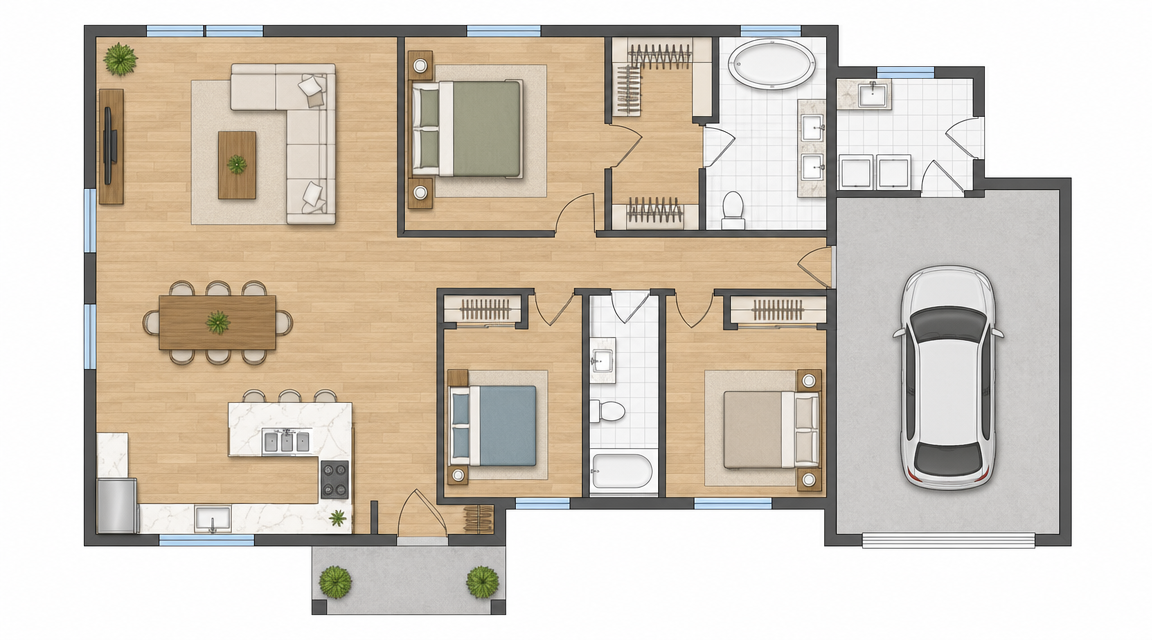
Demo example: the “Before” image was created with AI for this site; it is not a customer photo.
Features
Colorize hand-drawn or digital house floor plans with AI. Multi-room residential layouts with bedrooms, kitchen, garage, and outdoor — color-coded, usually in under a minute, for MLS listings, architect presentations, or homeowner brochures.
How Does AI Colorize Multi-Room House Floor Plans?
Multi-room house floor plans color-coded by AI in under 90 seconds with bedroom, kitchen, garage, and outdoor area detection
What Color Schemes Work for Residential Floor Plans?
Four designer-curated palettes (real-estate-pastel, watercolor, minimalist nordic, asian-compact) — pick what matches the home
Why Colorize a House Floor Plan Instead of Black-and-White?
Listing-ready output, no Photoshop or graphic design skills required
How It Works
Get professional results in three simple steps
Drop your photos here
or browse files
Upload Your Photos
Drag and drop your photos or browse to upload them. Roomagen accepts JPEG, PNG and WebP files up to 50 MB each.
AI Processing
Our advanced AI analyzes your images and applies professional enhancements automatically. Choose from virtual staging, enhancement, object removal, or day-to-dusk conversion.
Download Results
Preview your transformed images and download high-resolution results ready for listings, marketing materials, social media, and more. No watermarks on premium plans.
Why Choose Roomagen
Bedrooms, Bathrooms, Kitchen, and Garage Color-Coded
Multi-room house floor plans color-coded by AI in under 90 seconds with bedroom, kitchen, garage, and outdoor area detection
Designer-Curated Palettes for Modern, Traditional, and Coastal Homes
Four designer-curated palettes (real-estate-pastel, watercolor, minimalist nordic, asian-compact) — pick what matches the home
Listing-Ready Color House Plans Without Designer Hours
Listing-ready output, no Photoshop or graphic design skills required
Who Is It For?
MLS Listing Agents
Upload your listing's floor plan, pick the palette that matches the home and download the colored plan; try another palette for 2 more credits.
Custom Home Builders
Show clients colored versions of their house plan during the design consultation. Color helps non-designers visualize layouts faster than black-and-white drawings.
Real Estate Photographers
Add a colored floor plan to every listing photo package as a premium upgrade — a $5–$10 add-on per listing, with AI processing that usually takes under a minute.
Photoshop coloring of a house floor plan costs $240/yr Adobe Creative Cloud + 45–90 minutes of trained design work. Hiring a graphic designer for the same job runs $80–$200 per plan. Roomagen colorizes the plan in one of four palettes in under 90 seconds for $0.23–$0.40, with no design skills required; each extra palette is another run.
| Roomagen AI | Photoshop / Designer | DIY Coloring Software | |
|---|---|---|---|
| Cost per plan | $0.23–$0.40 | $40–$200 designer / $20+ Photoshop license/mo | $0–$30/yr + 1–3 hours |
| Turnaround | Under 90 seconds | 45–90 min Photoshop / 1–3 days designer | 1–3 hours manual |
| Input | Photo, scan or image export of the plan | Plan + brief + designer skill | Manual click-by-click coloring |
| Multi-room handling | Auto-detected, color-coded | Manual per-room masking | Manual per-area selection |
| Output styles available | 4 palettes to choose from, listing-ready | 1 style per session, custom only | 1 style, depends on tool |
Frequently Asked Questions
Everything you need to know about Roomagen
The AI detects room labels (bedroom, kitchen, bathroom) and applies room-appropriate colors from your selected palette. Living spaces get warm tones, bedrooms get calmer hues, kitchens get accent colors. Each palette has consistent room-color mapping.
Submit each floor as a separate plan. The AI colorizes each independently. Use the same palette across all floors for visual consistency in your listing or presentation.
Yes. Garages, decks, patios, and yards are detected and assigned outdoor-appropriate colors (greens for landscaping, neutral grays for hardscaping). Roof outlines and outdoor structures are color-coded.
The "Real Estate Pastel" palette — soft, warm tones that look professional in any market. It works for traditional homes, modern builds, and coastal properties without alienating buyer aesthetics.
Choose from four built-in palettes. For custom brand colors, use the colored output as a base and adjust in Photoshop or Canva. Most agents find one of the four palettes matches their brand closely.
Very accurate when room labels are present in the source plan. For unlabeled plans, the AI infers room types from layout patterns (bathroom plumbing fixtures, kitchen counters). Output preserves the original drawing.
Yes. Show before-and-after by colorizing the existing plan and the proposed renovation plan separately. Side-by-side colored plans communicate the change far better than black-and-white versions.
Yes — first convert the sketch to a digital plan with Roomagen Sketch to Floor Plan, then colorize. End-to-end from napkin sketch to colored plan in under 3 minutes.
Each colorization costs 2 credits ($0.23–$0.40). A typical agent running 10 listings/month spends $2.30–$4.00 in colorization — far less than a single Photoshop license or designer hour.
Part of
Floor Plan ColorizeMore From This Family
- Online Floor Plan Colorizer
- How to Colorize a Floor Plan
- Free Floor Plan Coloring Tool
- Colorize Apartment Floor Plans
- Colorize Office Floor Plans
- Colorize Restaurant Floor Plans
- Colorize Hotel Floor Plans
- Colorize Retail Floor Plans
- Colorize Clinic Floor Plans
- Colorize Warehouse Floor Plans
- Floor Plan Colorize for Real Estate Agents
- Floor Plan Colorize for Architects
Explore Related Tools
Discover more AI-powered tools to enhance your visual content
Floor Plan Colorize — AI Color for Black-and-White Plans in Under a Minute
Colorize black-and-white floor plans with AI. Four designer palettes, auto-detected rooms, output ready in under 90 seconds for real estate, architecture, and interior design — no Photoshop or design skills required.
Learn moreProfessional 2D & 3D Floor Plans — AI-Generated in Under a Minute
Turn a sketch, scan or old plan into a clean 2D floor plan or a 3D view. Keep or remove measurements and room names, and pick one of four drawing styles.
Learn moreFloor Plan Visualize — AI 3D Renders From 2D Plans in Under a Minute
Visualize 2D floor plans as 3D renders with AI. Photoreal, architectural sketch, stylized, and monochrome styles, furnished or unfurnished, output in under 90 seconds for $0.23–$0.40 per render — no 3ds Max, Lumion, or Twinmotion required.
Learn moreFloor Plan to 3D — AI Dollhouse View Generator
Convert 2D floor plans into isometric 3D dollhouse views with AI. Upload any floor plan and get a furnished 3D visualization showing room layouts, furniture placement, and spatial relationships — perfect for listings, presentations, and design proposals.
Learn moreSketch to House Floor Plan — Hand-Drawn Home Layouts Digitized
Convert hand-drawn house floor plan sketches into clean digital plans with AI. Multi-room layouts with bedrooms, bathrooms, kitchen, garage, and outdoor areas — digitized from paper drawings, usually in under a minute.
Learn more