

Table of Contents(17)
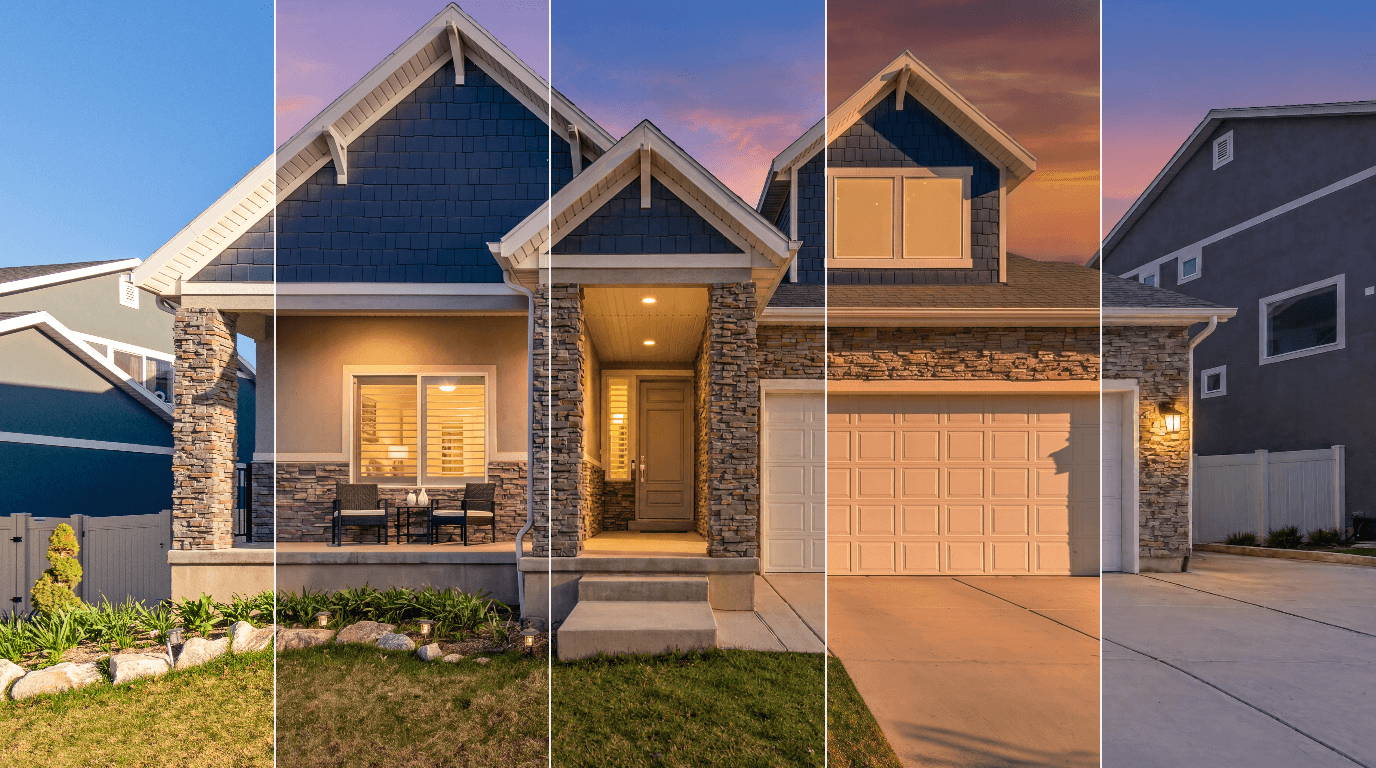
We ran one daytime house photo through seven AI virtual twilight tools on 19 November 2026. Dundy, Enhancia, Relight Spaces and Twilight made believable twilight shots; Roomagen gave a sunset; PropertyPixel changed details; Archify returned daylight.
Virtual Twilight Photo Editing — Day to Dusk for Real Estate Exteriors
Turn a daytime photo of a house, villa or apartment building into a sunset, dusk or night shot with warm window glow in about a minute. 2 credits per photo.
Virtual Twilight Software in Short
We ran one daytime photo of a house through seven AI day-to-dusk tools on 19 November 2026, once each, with each tool's standard dusk setting. There is no single winner. The right pick depends on what you need most:
| Tool | Did it make a twilight shot? | House kept as photographed? | File we got | Watermark on the free trial | Price per twilight photo (checked 19 Nov 2026) |
|---|---|---|---|---|---|
| Archify | No, it came back in daylight | No: doors, fences and soffits changed | 1536 × 1024 | Yes | $0.66 to $0.97 (100 credits) |
| Dundy | Yes, blue-violet sky | Yes, but rooms appeared behind two windows | 5056 × 3372 | No | $0.21 to $0.25 at 2K, $0.42 to $0.49 at 4K |
| Enhancia | Yes, blue-violet sky | Yes, a lamp appeared in the upper window | 3840 × 2558 | Yes | $2.48 to $4.75 (5 credits) |
| PropertyPixel | Yes, deep orange sky | No: front door, porch light and decor changed | 4032 × 2688 | Yes | $0.50 to $1.00; $1.00 to $2.00 with Ultra HD |
| Relight Spaces | Yes, pink and orange clouds over blue | Yes, a lit room appeared in the upper window | 5612 × 3741 (full size) | No | $0.40 to $0.75 (1 credit) |
| Roomagen | Partly: a golden-hour sunset, sun still up | Yes, the upper window glows without an invented room | 2528 × 1696 (paid-plan output) | Yes (none on paid plans) | $0.23 to $0.63 (2 credits; 4 for 4K) |
| Twilight | Yes, blue to pink sky | Yes, blinds appeared in the upper window | 3504 × 2336 | No | $0.33 to $1.20 at 1K, $1.33 to $4.80 at 4K |
- Full-size file, no watermark, low price: Relight Spaces returned the photo at its original 5612 × 3741 pixels for 1 credit.
- Most complete lighting: Dundy turned on all four garden path lights and returned a 4K PNG.
- Most control: Twilight lets you choose the sky, the window glow, outdoor lights, the sun's direction and the resolution, and it flags its own changes.
- Closest to the original house: Enhancia, Dundy, Relight Spaces, Roomagen and Twilight kept the structure and materials. Every one of them except Roomagen put something behind the dark upper window that is not in the photo (see the window test).
Prices are per photo, from monthly plans and one-time packs (yearly billing lowers some further). The range runs from the biggest plan to the smallest purchase.
Disclosure: we make Roomagen, one of the seven tools. We ran ours like the others, once, on the same photo, with its standard dusk setting, and we report its weak points too.
How We Tested the 7 Day-to-Dusk Tools
- The photo: a daytime front view of a two-storey house, 5612 × 3741 pixels, by Get Lost Mike on Pexels. It has the details that trip AI up: a dark upper window, shuttered lower windows, porch lights, four unlit garden path lights and neighbouring houses at both edges.
- One run per tool, on a new or free account, using only free credits. No retries, so you see what a first try gives you. The exception is Roomagen: we ran it once through our own production pipeline, with the output a paid plan gets, rather than through the web app. Its free credits give watermarked results.
- The setting: each tool's standard dusk or twilight option. Where a tool asked for a style, we picked a classic warm dusk with interior lights on. Where it offered a resolution, we took the highest the free credits allowed.
- What we checked: whether the house stayed the same, which windows and lights were lit, what the sky looked like, and anything the tool added that is not in the photo.
- Timing: from the click to the finished result in the browser. For Roomagen, the processing time our run logged.
- Prices: from each tool's own pricing page on 19 November 2026, in US dollars. They change, so check before you buy.
The Results Side by Side
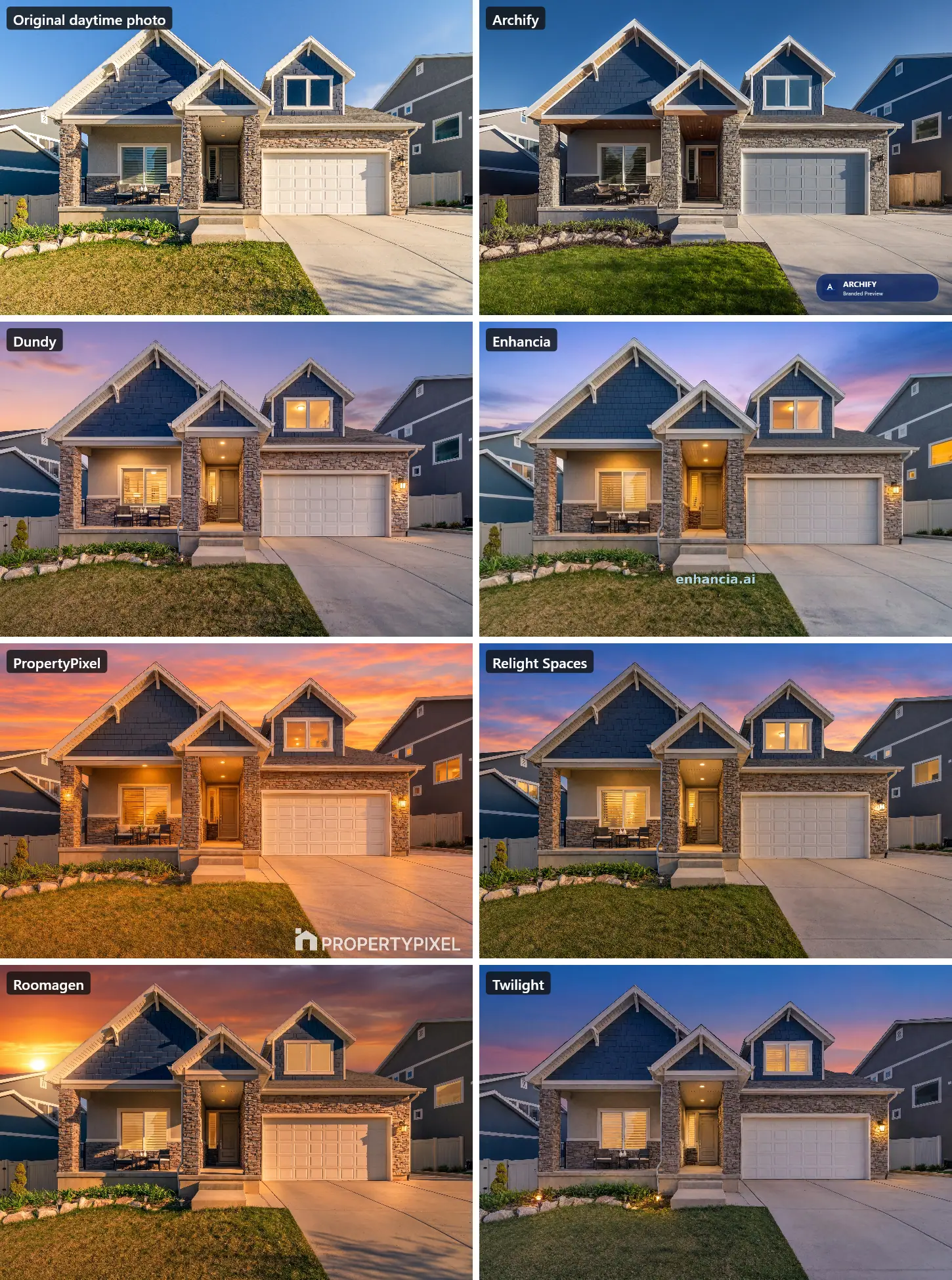
What Each Virtual Twilight Tool Did
The tools are in alphabetical order.
Archify
- Setting: Render > Day to Dusk, with the optional notes left empty. It cost 100 of the 1,000 free credits and took about 36 seconds.
- Result: the run finished without an error, but the image is still daytime: blue sky, dark windows, no lights on.
- What changed: the garage door turned blue-grey, the grey front door became wood with a glass panel, the white soffits and porch ceiling became wood planks, and the white vinyl fences became wooden ones.
- File: 1536 × 1024 with an "Archify Branded Preview" badge.
- Price: monthly plans from $29 for 3,000 credits to $199 for 30,000 (pricing), so a 100-credit Day to Dusk run costs $0.66 to $0.97.
A second try might give a real dusk image. One run is what we compared for every tool, and this was Archify's.
Dundy
- Setting: Image Effects > Virtual Twilight at 4K, which cost 2 credits (2K costs 1). It took about 70 seconds.
- Getting started: the account opens with 0 credits. The 10 free credits arrive after a three-question survey and a welcome-video countdown of about five minutes, and you must name a listing before you can upload.
- Result: a blue-violet sky with a pink glow, all windows and porch lights lit, and all four garden path lights on, the only tool to light all four.
- What changed: a room with a ceiling light and wall art appeared behind the dark upper window, and the closed shutters of the ground-floor window turned partly see-through, showing a lit interior.
- File: a 5056 × 3372 PNG with no watermark.
- Price: $49, $99 or $199 a month for 200, 450 or 950 credits (pricing), so $0.21 to $0.25 for a 2K twilight and $0.42 to $0.49 for 4K.
Enhancia
- Setting: Day-to-Dusk Elegance, 5 of the 10 free credits. It took about 26 seconds, the fastest in the test.
- Result: a blue-to-violet sky with pink near the horizon. The windows, porch lights and two of the path lights glow, and the house, porch furniture and lawn match the photo.
- What changed: a ceiling lamp appeared behind the upper window, and the right-hand neighbour's windows were lit.
- File: 3840 × 2558, with "enhancia.ai" written across the lawn on the free trial.
- Price: credits come in packs from $19 for 20 to $99 at $0.49 each (pricing). At 5 credits a dusk edit, that is $2.48 to $4.75 per photo.
PropertyPixel
- Setting: Day to Dusk ("Warm, fiery sunset exterior") with Ultra HD switched on. That cost 200 of the 500 trial credits (100 for the edit, 100 for Ultra HD) and took about 48 seconds.
- Result: a saturated orange-red sky with the whole scene tinted orange, windows and porch lights on.
- What changed: the most of any tool that produced a dusk image. The grey front door turned brown, a wall light appeared on the left porch column, an extra ceiling light appeared on the porch, and two vases on the porch table became a potted plant.
- File: 4032 × 2688, with a large PropertyPixel logo on the trial.
- Price: $15 for 1,500 credits, so $1.00 per dusk edit or $2.00 with Ultra HD. Monthly plans run from $39 to $249, which brings the edit down to $0.50 (pricing). It also offers a second dusk style, Natural Twilight, which we did not run.
Relight Spaces
- Setting: Virtual Twilight > Classic Twilight ("Warm, open, and immediately inviting"), 1 of the 3 free credits. It took about 60 seconds. The other styles are Golden Hour, Blue Hour and Soft Dusk.
- Result: streaky pink and orange clouds over a blue sky, with the windows and porch lights on. The house and its materials match the photo.
- What changed: a lit room with a ceiling light and a curtain appeared behind the upper window, and windows in both neighbouring houses were lit.
- File: the full 5612 × 3741 pixels of the original, with no watermark. No other tool returned the photo at full size.
- Price: $15 for 20 credits, $36 for 60 or $60 for 150, one-time (pricing), so $0.40 to $0.75 per twilight photo.
Roomagen
- Setting: Day-to-Dusk Exterior with the time slider on its Dusk preset (7 pm). It cost 2 credits and took about 43 seconds of processing.
- Result: a warm orange sunset with the windows, porch lights and the wall lantern lit. The house, porch, doors and neighbours match the photo.
- The upper window: it glows warm, with no room, lamp or blinds invented behind it.
- Weak points: it reads as a sunset more than blue-hour twilight. The sun is still in the sky, and the daytime shadows on the driveway stay. The garden path lights stayed off, and a window in the house next door was lit. For a darker, bluer look, move the time slider later.
- File: 2528 × 1696 (2K) with no watermark, the output a paid plan gets; results from the free credits carry a watermark. 4K is available on the Pro and Business plans at 4 credits.
- Price: 2 credits per photo: $0.23 to $0.40 on the monthly plans, $0.44 to $0.63 with one-time packs (pricing).
Twilight
- Setting: the Twilight mode with its suggested options (Twilight Sky, Warm glow, Outdoor lights on) at 4K, which cost 4 of the 5 free credits (1K costs 1, 2K costs 2). It took about 44 seconds.
- Result: a clear blue-to-pink sky with no clouds and the windows and porch lights lit. Only two garden path lights glow, and one of them is a lantern Twilight added by the steps. The house matches the photo.
- What changed: plantation shutters appeared in the upper window. Twilight's own check, shown under the result, said so: "Plantation shutters added inside upper dormer window, previously dark glass."
- File: 3504 × 2336, which the menu calls 4K, with no watermark.
- Price: $12 for 10 credits, so $1.20 per photo at 1K and $4.80 at 4K. Monthly plans run from $29 for 50 credits to $199 for 600 (pricing), which brings a 1K photo down to $0.33 to $0.58 and a 4K photo to $1.33 to $2.32.
The Window Test: What AI Tools Put Behind Dark Glass
The upper window in the photo is dark glass. Nobody can see what is behind it. To make it glow, most tools invent something:
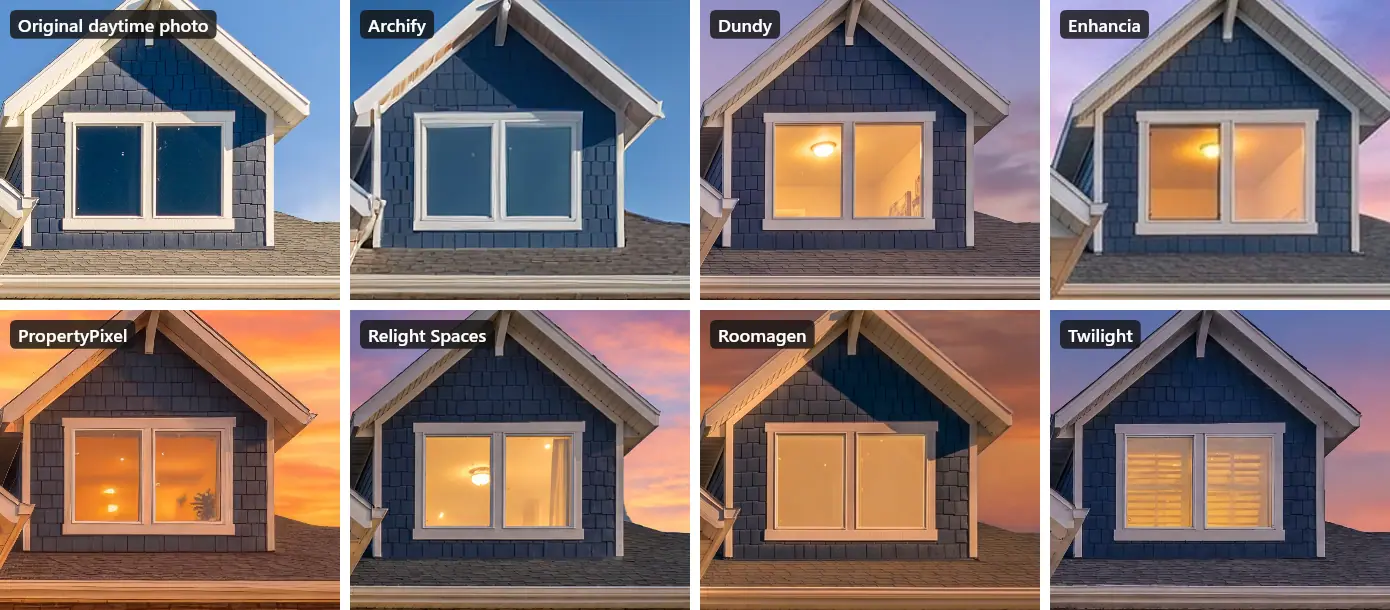
Is that a problem? For a mood shot, usually not. In a property listing, it can be: the image now shows a room, a lamp or window blinds that the buyer will not find. Look at every window of an AI twilight photo before you publish it, and redo or retouch any that show an interior that is not there. Four tools, Roomagen among them, also lit windows in the neighbouring houses, which is worth a look for the same reason.
Price per Twilight Photo, Checked 19 November 2026
| Tool | How you pay | What one twilight photo costs | Free trial | Source |
|---|---|---|---|---|
| Archify | Monthly plans from $29 (3,000 credits) to $199 (30,000 credits) | 100 credits: $0.66 to $0.97 | 1,000 credits (500 after email check), branded previews | archifyai.com/pricing |
| Dundy | $49, $99 or $199 a month (200, 450 or 950 credits) | 1 credit at 2K, 2 at 4K: $0.21 to $0.25, or $0.42 to $0.49 | 10 credits after a video countdown | dundy.ai/pricing |
| Enhancia | Packs from $19 for 20 credits to $99 | 5 credits: $2.48 to $4.75 | 10 credits, watermarked | enhancia.ai/pricing |
| PropertyPixel | $15 for 1,500 credits; monthly plans from $39 to $249 | 100 credits: $0.50 to $1.00 (Ultra HD doubles it) | 500 credits, watermarked | propertypixel.app/pricing |
| Relight Spaces | One-time packs: $15 for 20, $36 for 60, $60 for 150 | 1 credit: $0.40 to $0.75 | 3 credits | relightspaces.com/pricing |
| Roomagen | $12, $29 or $79 a month (60, 200 or 700 credits); one-time packs from $19 for 60 | 2 credits: $0.23 to $0.63 (4 credits for 4K) | 6 credits, watermarked | roomagen.com/pricing |
| Twilight | $12 for 10 credits; monthly plans from $29 (50 credits) to $199 (600) | 1 credit at 1K, 4 at 4K: $0.33 to $1.20, or $1.33 to $4.80 | 5 credits | twilight.pics/pricing |
| BoxBrownie (human editors, not tested) | Pay per photo | $4, delivered within 24 hours | First edits free on sign-up | boxbrownie.com/pricing |
Per-photo figures are the plan or pack price divided by its credits, from monthly plans and one-time packs; yearly billing lowers some of them further. Some sites show a different currency depending on where you are.
Other Day-to-Dusk Options: BoxBrownie, Autoenhance, Photoshop and More
We only compared tools we could run on the same photo with free credits. The others people ask about, from their own pages on 19 November 2026:
- BoxBrownie: human editors, $4 per day-to-dusk photo, delivered within 24 hours. Its sign-up form asks for a phone number and a company, so it was not part of this test.
- Autoenhance: day to dusk is a premium edit that its support team switches on for your account.
- Stylst: its page said "Free photos are not available in your country yet", so we could not try it from our location.
- Fotello: twilight comes with its paid Ultimate plan ($18 per listing, with two twilight creations), not the free one.
- Imagen: its site blocked our automated check, so we could not confirm a dusk option or a price.
- Photoshop, Lightroom and Luminar Neo: you can make a twilight photo by hand with sky replacement, masks and light layers. It takes skill and time per photo, and we did not test these editors.
Virtual Twilight vs a Real Twilight Shoot
A real twilight shoot means a second visit at dusk, and Dundy's own page puts the cost of one at $75 to $200 per image. A human editor such as BoxBrownie charges $4 and takes up to a day. The AI tools in this test charge between about $0.21 and $4.80 and take under two minutes.
The trade-off is control. A photographer captures the real interior lights and the real sky. An AI tool guesses both, and, as the window test shows, it may add things that are not there. For your best listing photo, a real shoot still has the edge. For the rest of the photos, or a listing without the budget for a second visit, an AI twilight edit that you check carefully is a practical choice.
How to Get a Better AI Twilight Photo
- Start from a sharp, well-exposed daytime photo. A blown-out sky or dark shadows give the tool less to work with.
- Pick the look on purpose. A blue or violet twilight sky (Dundy, Enhancia, Relight Spaces and Twilight in our test) reads as dusk. A warm orange sky (PropertyPixel, and Roomagen's Dusk preset) reads as sunset or golden hour. Several tools let you choose: Relight Spaces offers Golden Hour, Blue Hour and Soft Dusk styles, and Roomagen's time slider goes later than its Dusk preset.
- Check every window. Look for invented rooms, lamps, curtains or blinds, and for lit windows in the neighbours' houses.
- Check the house itself. Doors, lights, fences and decor should match the property. PropertyPixel and Archify changed several of these in our run.
- Use the highest resolution you need, not more. Several tools charge more credits for 4K.
- Label the photo as edited where your listing site or MLS asks for it. See our guide to virtual staging and photo editing disclosure rules.
The Bottom Line
Four of the seven tools turned the same house into a believable twilight photo without changing its structure or materials: Dundy, Enhancia, Relight Spaces and Twilight. Roomagen kept the house exactly and invented nothing behind the windows, but its Dusk preset gave a golden-hour sunset rather than twilight. PropertyPixel made a dusk image but changed details of the house, and Archify did not make a dusk image at all in our run. Choose by what matters to you: full-size files at a low price (Relight Spaces), complete lighting and the lowest price per 2K photo (Dundy), fine control (Twilight), or windows without invented rooms (Roomagen). Whichever you use, check the windows before the photo goes live.
Ready to transform your listings?
Try Roomagen's AI virtual staging for free. Upload your first photo and see the result, usually in under a minute.
Start FreeSources & References
- 1.Twilight – Pricing (credit pack and monthly plans; 4 credits per 4K photo), checked 19 November 2026
- 2.Relight Spaces – Pricing (one-time credit packs), checked 19 November 2026
- 3.Dundy – Pricing (monthly credit plans), checked 19 November 2026
- 4.Dundy – Real estate virtual twilight (cost of a traditional twilight shoot per image)
- 5.Enhancia – Pricing (credit packs), checked 19 November 2026
- 6.PropertyPixel – Pricing (credit packs and plans), checked 19 November 2026
- 7.Archify – Pricing (monthly credits per plan), checked 19 November 2026
- 8.BoxBrownie – Pricing (human-edited Day to Dusk, 24-hour delivery), checked 19 November 2026
- 9.Test photo: white and brown house under blue sky, by Get Lost Mike on Pexels (Pexels License)
Frequently Asked Questions

Written by
Roomagen Team
The Roomagen team creates in-depth guides about AI virtual staging, real estate photography, and property marketing strategies to help agents and professionals stay ahead.


