

Table of Contents(14)
Use ChatGPT for ideas and mock-ups of your room. In our 19 November 2026 test it restyled a living room well and kept its walls and windows, but shifted the frame, refurnished the next room and returned a smaller image.
Redesign Your Room With AI — 13 Styles, Usually in Under a Minute
Restyle a furnished room without moving a thing: AI replaces the furniture in one of 13 styles, from modern to farmhouse and luxury, while walls and floors stay.
ChatGPT for Interior Design in Short
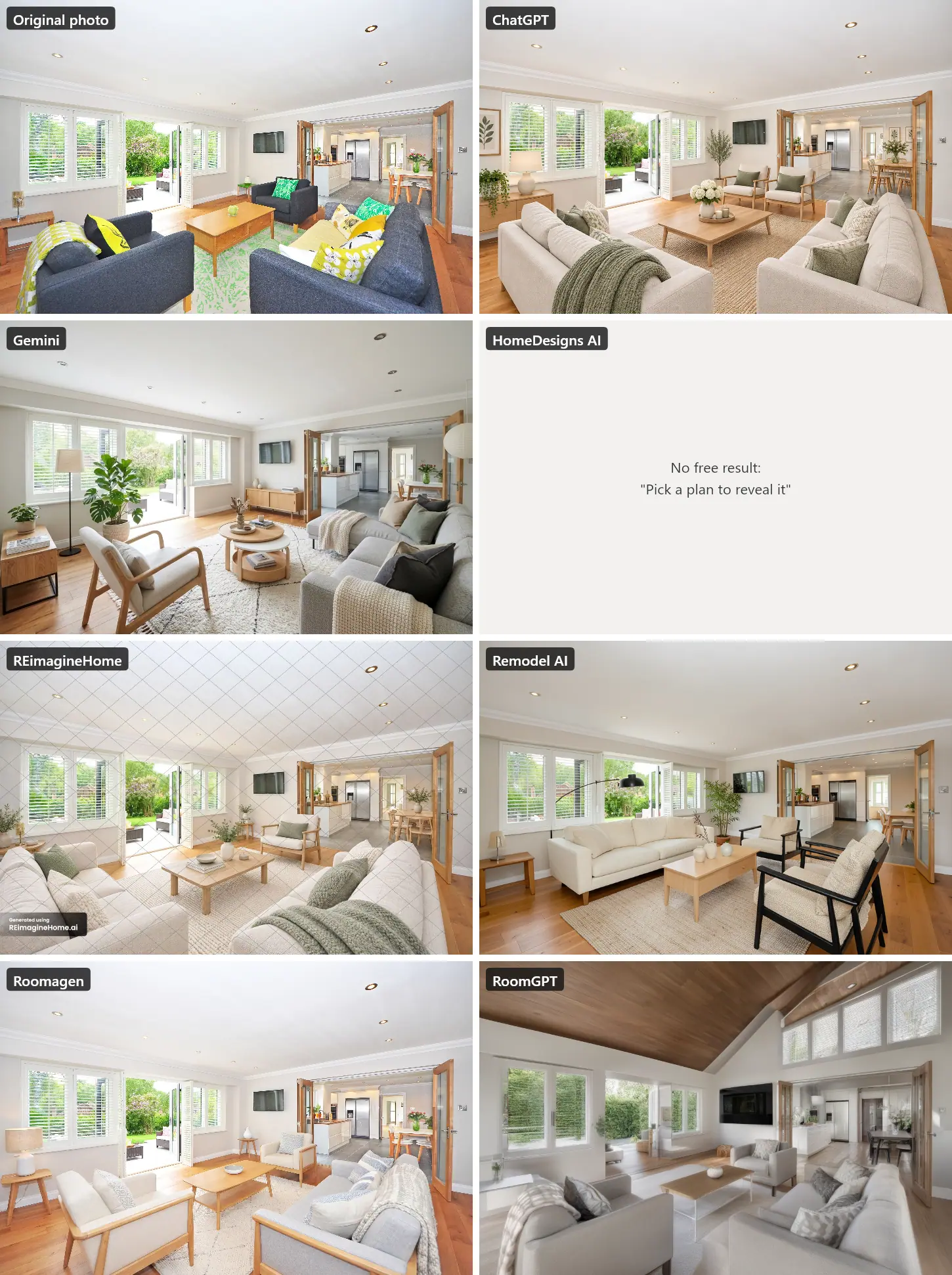
ChatGPT is good for interior design ideas and quick mock-ups of your own room, and in our test it kept the room's walls and windows. It is less suited to exact before-and-after images. We tested it on 19 November 2026 with one living room photo and one instruction, and ran the same photo through six other tools:
| Tool | Kept the room as photographed? | What else changed | File we got | Cost |
|---|---|---|---|---|
| ChatGPT | Mostly: walls, windows and floor kept; the frame shifted about 3% | Added a framed print and a sideboard; refurnished the dining area beyond the glass doors | 1539 × 1022 | Free plan, image usage limit |
| Gemini | Mostly: walls, windows and floor kept; the frame shifted slightly | Hung a paper lantern from the ceiling; added a sideboard | 1253 × 832 | Free with a Google account |
| HomeDesigns AI | Could not see: no free result | "Pick a plan to reveal it" | None | Plans from $22 a month |
| REimagineHome | Yes | Furniture, rugs, plants and decor only | 1539 × 1022, watermarked | 5 free designs; from $19 a month |
| Remodel AI | The living room, yes; the kitchen beyond it was redrawn | New furniture; a different fridge, table and back door in the kitchen | 1024 × 688 | 1 free design without an account; Pro $29 a month, billed yearly |
| Roomagen | Yes | Furniture and decor only | 2528 × 1696 (paid-plan output) | 2 credits, $0.23 to $0.40 on a plan |
| RoomGPT | No: new ceiling and windows | Vaulted wood ceiling, a row of high windows | 1216 × 832 | 1 free credit, old model only |
So use ChatGPT to explore styles, colours and layouts, and to see your room in a new style in seconds. When the before-and-after has to line up exactly, for a renovation decision, a client or a listing, a tool built to keep the photo as it is did better in our test. Check the result either way.
Disclosure: we make Roomagen, one of the tools in the table. Every tool ran once on the same photo; ChatGPT, Gemini and the other apps on free accounts. Roomagen ran once through our own production pipeline, with the output a paid plan gets.
How We Tested
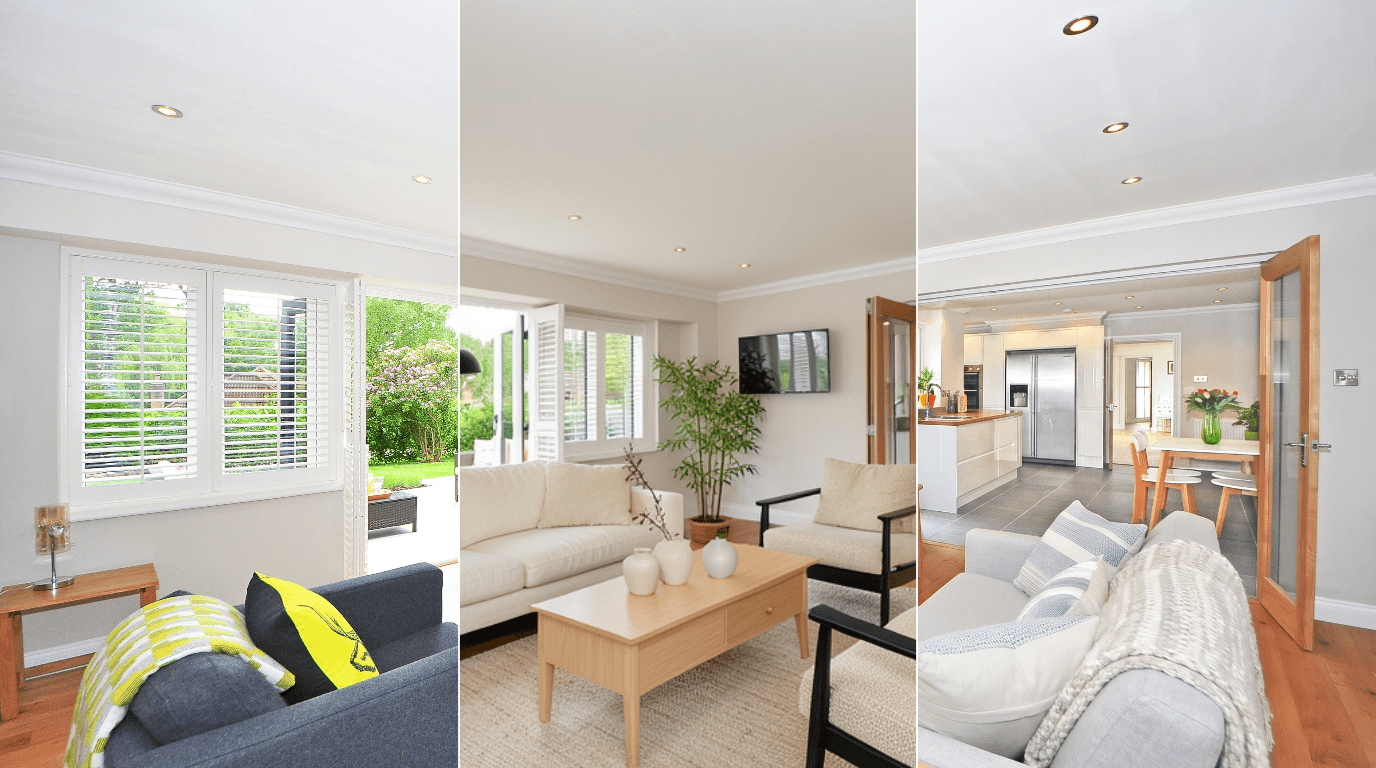
- The photo: a bright living room with plantation-shuttered windows, open garden doors, a wall-mounted TV, glazed doors to the kitchen, a wood floor and recessed ceiling lights, 4288 × 2848 pixels (Pixabay on Pexels).
- The instruction: "Redesign this living room in a modern Scandinavian style. Keep the walls, windows, floor and ceiling exactly as they are; only change the furniture and decor." Where a tool had a style menu instead of a text box, we picked Scandinavian, or the closest style, and its most structure-keeping setting.
- One run per tool, no retries. ChatGPT and Gemini ran in normal chats on free accounts with the instruction above. Roomagen ran its Redesign Furnished Rooms tool with the Scandinavian style, and "Change wall color to match style" and "Change flooring to match style" switched off.
- What we checked: walls, windows, floor, ceiling and framing, using guide lines over the original photo, then what was added or removed, including the kitchen seen through the glass doors.
- Timing: from sending to the result on screen. Gemini's is the time stamped in its image file. Roomagen's is the processing time our run logged.
How ChatGPT Did: Good Style, Small Shifts
ChatGPT's result, after about 20 seconds, is an attractive Scandinavian living room: cream sofas, a light oak coffee table and sideboard, sage-green cushions and throws, a jute rug, plants and a framed botanical print. Its reply listed what it kept: "Preserved: Walls, windows, shutters, ceiling, recessed lights, crown molding, wooden flooring, doors, and room layout." That held. The windows, garden doors, TV and ceiling lights are where they were.
What the reply did not mention:
- The frame moved. The whole scene sits about 3% higher in the image than in the photo. Side by side it is hard to see. In a before-and-after slider, the two images would not line up.
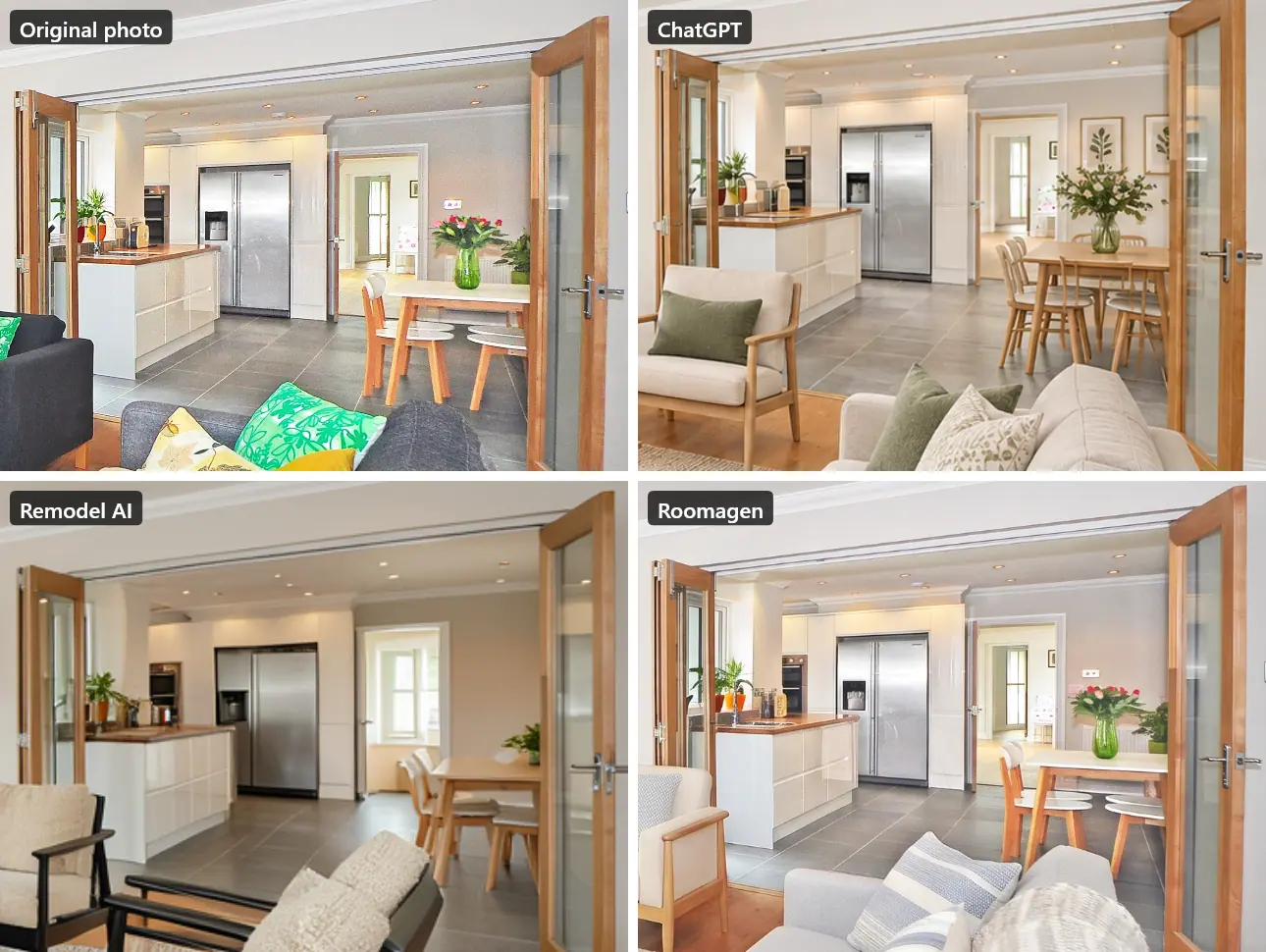
- It furnished more than the living room. Through the glass doors, the dining area got a new, larger table with more chairs and two framed prints on the wall.
- The file is smaller: 1539 × 1022 pixels from a 4288 × 2848 photo.
On the free plan, image generation also has its own usage limit, and ChatGPT tells you when you reach it (OpenAI's free tier FAQ).
How to Use ChatGPT for Interior Design
ChatGPT is most useful before you commit to anything. Six ways to use it well:
- Restyle a photo of your room to compare directions. Upload a clear, level photo and name one style per request. Treat the result as a mood picture, not a plan.
- Ask for a style brief in text. Describe the room, the light and what must stay, and ask for three directions with colours, materials and the key furniture pieces of each.
- Build a colour palette. Ask for wall, trim and accent colours that suit your floor and light, then test real paint samples on the wall before you buy.
- Plan the layout in words. Give the room's measurements and the positions of doors and windows, and ask where the sofa, rug and TV could go. Check the sizes against your tape measure; ChatGPT does not see your room in 3D.
- Write a shopping list. Ask for the pieces you need with sizes and a budget split, then find real products yourself. The furniture in its images is invented.
- Write a better prompt for a design tool. ChatGPT is good at turning a vague idea into a clear instruction you can paste into a room-design app.
The instruction we tested is a good starting point:
Redesign this living room in a modern Scandinavian style. Keep the walls, windows, floor and ceiling exactly as they are; only change the furniture and decor.
If you don't want the next room refurnished too, say so, and compare the result with your photo either way.
Where ChatGPT Falls Short for Interior Design
- It does not keep the photo pixel for pixel. In our test, the frame shifted and the room beyond the doors changed. That is fine for ideas and a problem for a before-and-after slider or a listing.
- Its summary is incomplete. It listed what it preserved, but not what it added or moved.
- It invents products. You cannot buy the sofa in the picture.
- It does not measure. Its layouts and furniture sizes are guesses unless you give it the numbers, and even then, check them.
- It gives a small image on the free plan: fine for a phone screen, not for print or a listing.
Other chat tools can do worse. RoomGPT's free model, for example, rebuilt the ceiling and the windows, as the next section shows.
ChatGPT vs Gemini, REimagineHome, Remodel AI and Other Room-Design Tools
The tools are in alphabetical order.
Gemini
Gemini switched to image creation by itself; its file is stamped about 9 seconds after we sent the prompt. The design is good: a light grey sectional sofa, an oak armchair, a round two-tier coffee table, a monstera and a cream rug. Like ChatGPT, it kept the walls, windows, doors and floor and shifted the frame slightly. It also hung a paper lantern from the ceiling, which the instruction asked it to keep as it was, and added a sideboard under the TV. The file is 1253 × 832. Free with a Google account.
HomeDesigns AI
We chose Scandinavian, set "AI Intervention" to Very Low, the most structure-keeping option, and added our instruction. About six seconds later, the page showed a blurred card: "Pick a plan to reveal it." There was no free result to judge. Its pricing page lists plans from $22 a month.
REimagineHome
REimagineHome now works as a chat ("Your Design Companion"), with no style menu, so we typed our instruction. The result, in about 37 seconds, kept the walls, windows, shutters, floor, ceiling lights and framing exactly. It replaced the sofas, armchair, rug, cushions and coffee table with Scandinavian pieces and plants; beyond the doors, only the flowers on the dining table changed. The free result is 1539 × 1022 with a grid of lines over the whole image and a "Generated using REimagineHome.ai" badge. New users get 5 free designs; plans start at $19 a month for 30 credits (pricing).
Remodel AI
Remodel AI ran without an account. Its Custom mode takes a text prompt instead of the style menu, so we used our instruction. In about 27 seconds it kept the living room and its framing and replaced the furniture with a cream sofa, two black-framed armchairs, an oak coffee table and an arc lamp. Through the glass doors, though, the kitchen was redrawn: a different fridge and dining table, and a window where the back door was. The page shrinks the photo in the browser before uploading, so the result is only 1024 × 688, and downloading needs a free account. Pro is $29 a month, billed yearly at $349, with HD downloads (pricing).
Roomagen
Redesign Furnished Rooms, Scandinavian style, with wall colour and flooring changes switched off, took about 26 seconds of processing for 2 credits. It kept the room exactly as photographed: the same framing, windows, shutters, doors, TV, ceiling lights and floor, and the kitchen beyond the doors untouched. It replaced the furniture and decor with light upholstered armchairs and a sofa, an oak coffee table, a table lamp and a textured rug. The file is 2528 × 1696, the output a paid plan gets; results from the free credits carry a watermark. For edits in plain words, one change at a time, the Design Companion chat works on the same kind of photo; we did not use it in this test.
RoomGPT
RoomGPT's free credit only covers its older "Basic" model, which has no text box (that needs 2 credits) and no Scandinavian theme, so we picked "Modern". The result rebuilt the room: a vaulted wood-panelled ceiling, a row of high windows on the right wall, and a glass panel where the garden doors were. The file is 1216 × 832.
Which Tool Should You Use?
| You want to… | Use | Why |
|---|---|---|
| Explore styles and ideas for free | ChatGPT or Gemini | Fast, conversational, good-looking results that kept the room's structure in our test |
| A before-and-after that lines up exactly | REimagineHome or Roomagen | Both kept the framing and everything except the furniture and decor |
| Use the image in a listing, a client deck or print | A paid plan of a room-design tool | Larger files without watermarks |
| Shop the look | A tool with real products, or your own list | ChatGPT's furniture is invented |
For more on styles, see our guide to Scandinavian, Japandi and other interior styles. For a broader comparison of room-redesign tools, see AI Room Redesign Tools Compared.
The Bottom Line
ChatGPT is a good interior design sparring partner. It suggests styles, palettes and layouts, and in our test it showed the room in a new style within seconds while keeping its walls and windows. It also shifted the frame, refurnished the room next door and returned a smaller image, and its summary mentioned none of that. Use it for ideas. When the before-and-after has to show your real room exactly, use a tool that keeps the photo as it is, and compare the result with the original either way.
Ready to transform your listings?
Try Roomagen's AI virtual staging for free. Upload your first photo and see the result, usually in under a minute.
Start FreeSources & References
- 1.OpenAI Help – ChatGPT Free tier FAQ (separate usage limits for image generation)
- 2.REimagineHome – Pricing (5 free designs; plans from $19 a month), checked 19 November 2026
- 3.Remodel AI – Pricing (free designs; Pro billed yearly), checked 19 November 2026
- 4.HomeDesigns AI – Pricing, checked 19 November 2026
- 5.Google – Gemini Apps Help: create and edit images
- 6.Test photo: living room, by Pixabay on Pexels (Pexels License)
Frequently Asked Questions

Written by
Roomagen Team
The Roomagen team creates in-depth guides about AI virtual staging, real estate photography, and property marketing strategies to help agents and professionals stay ahead.


