
Table of Contents(10)
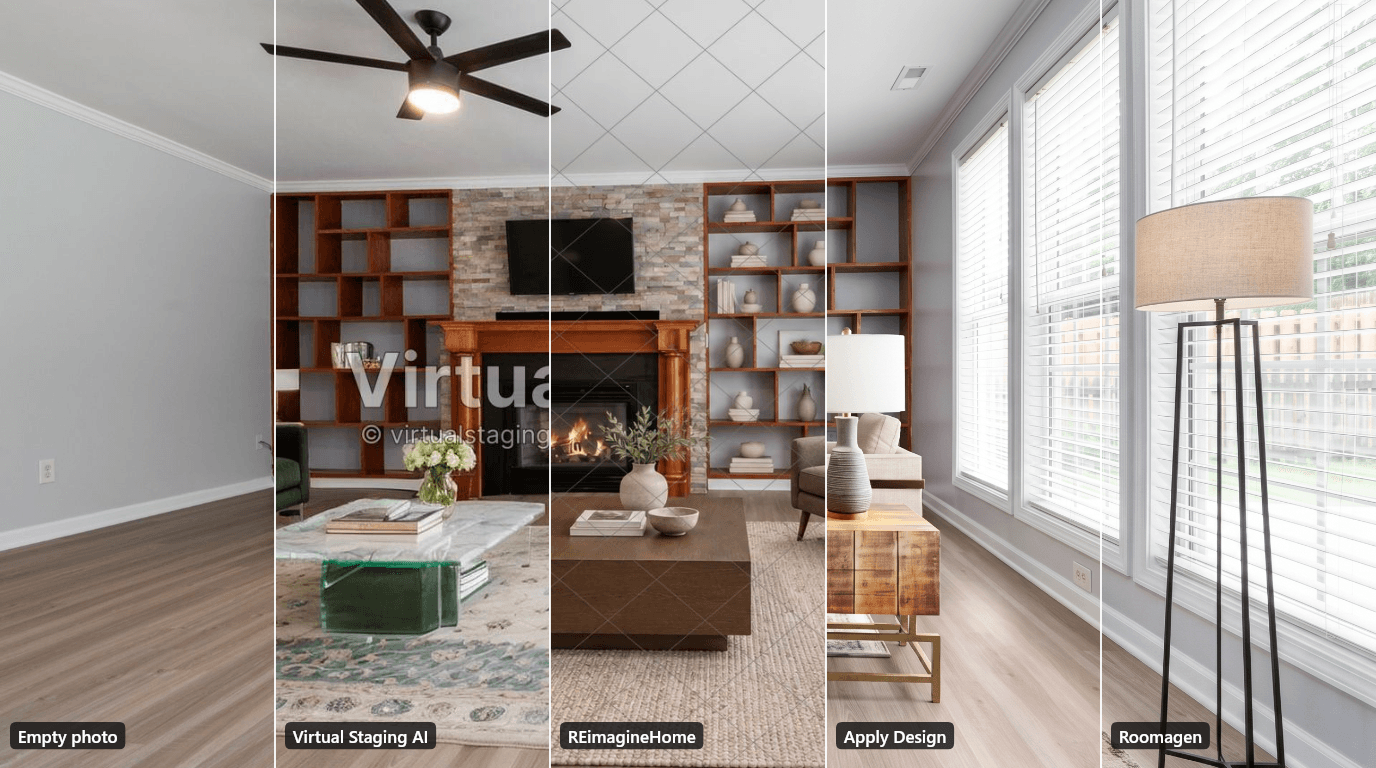
On the same five empty rooms (21 November 2026), Apply Design staged one free room most faithfully but took nearly eight minutes, Virtual Staging AI was fastest at 21 to 24 seconds, and REimagineHome offers five free chat-based designs.
Free AI Virtual Staging — Furnish Any Empty Room, Change Walls and Floors
Stage empty rooms online with AI, usually in under a minute: 13 design styles and 15 room types for listings, rentals and hotels. 6 free credits, no credit card.
Virtual Staging AI vs REimagineHome vs Apply Design in Short
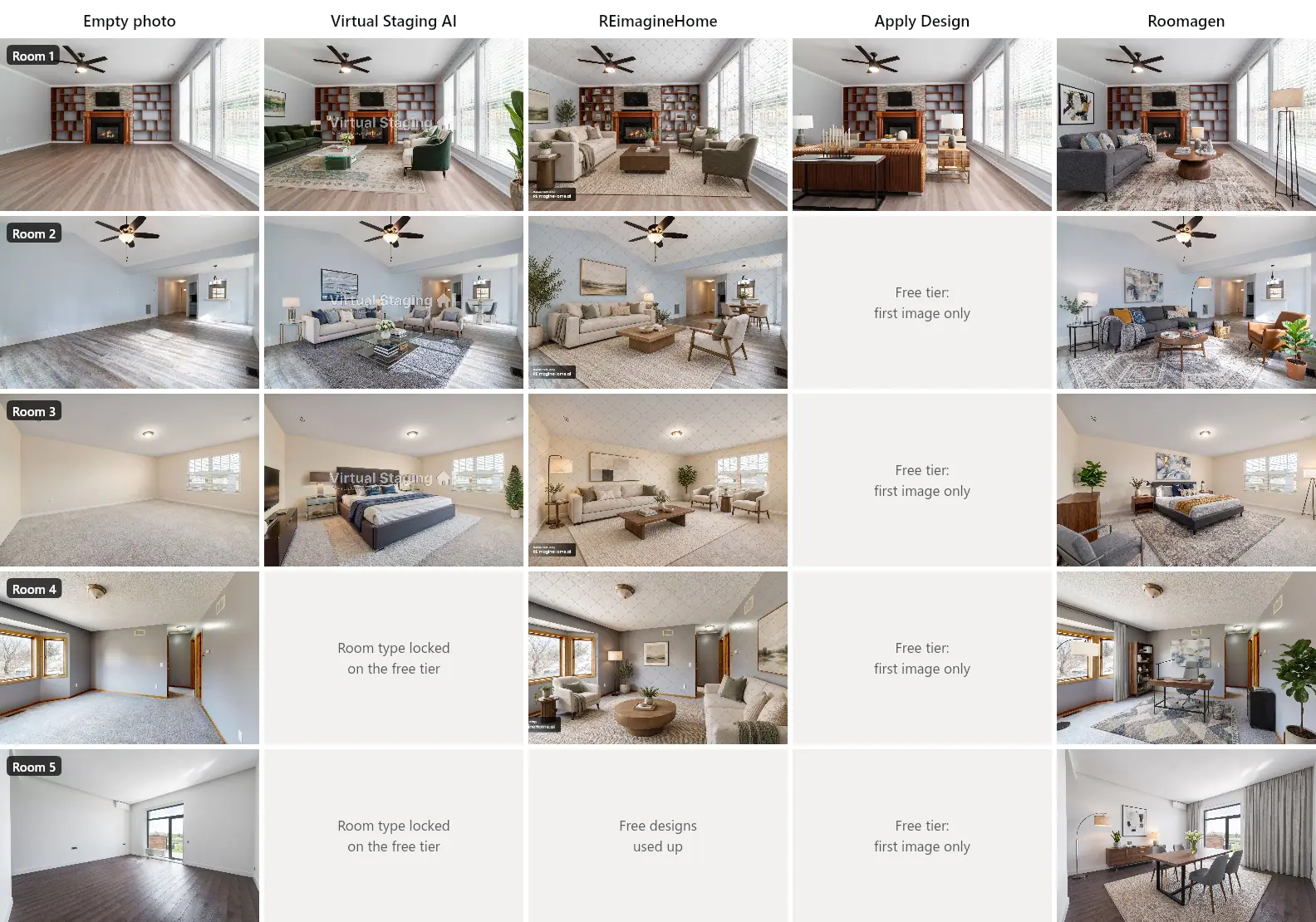
On 21 November 2026 we gave Virtual Staging AI, REimagineHome and Apply Design the same five photos of empty rooms. Each tool got one run per room on its free tier, in a modern style, until the free tier stopped us: Virtual Staging AI staged 3 rooms, REimagineHome 4 and Apply Design 1. We then checked what each tool kept and changed, how long it took, and what its free version lets you download.
| Virtual Staging AI | REimagineHome | Apply Design | |
|---|---|---|---|
| Free tier (21 Nov 2026) | Free widget on the homepage, no counter shown; living rooms and bedrooms only | 5 free designs per account | First image free |
| Rooms we could stage for free | 3 of 5 | 4 of 5 (one free design had gone to an earlier test) | 1 of 5 |
| Time per room | 21–24 seconds, 3 versions per run | 25–29 seconds | 7 min 42 s (the tool quotes 9–15 min) |
| Free result | 1536×1024 JPEG, large watermark across the middle | 1536×1024 JPEG, diagonal line pattern and a corner badge | 2528×1696 PNG, no watermark |
| Kept the room (walls, windows, floor, ceiling, built-ins) | Yes, after we clicked "Keep furniture" in room 1; one wall grille became a niche in room 2 | Yes, but it redrew the built-in shelves in room 1 | Yes, cubby for cubby (one room) |
| Furniture | Believable, sometimes in a walkway | Believable, but no room-type setting | Oversized, and the room looked crowded |
| Price after the free tier (20 Nov 2026) | $25 for 6 photos to $139 for 150 a month | $19 for 30 credits to $119 for 900 a month | $10.50 to $15 per photo, in prepaid coins |
- Apply Design kept room 1 most faithfully. Its one free image kept the built-in shelves cubby for cubby and came without a watermark. It took almost eight minutes, though, and filled the room with an oversized sofa.
- Virtual Staging AI was the quickest free try in our test. It returned three versions in 21 to 24 seconds. In room 1 it offered to remove the fireplace, the TV, a shelving unit and part of the fan as "furniture", and only living rooms and bedrooms are free.
- REimagineHome works as a chat, with no room-type or style settings. It kept the rooms but redrew the dividers of both built-in shelving units in room 1. Because it has no room-type setting and our prompt did not name the room, it furnished the bedroom and the office as sitting rooms.
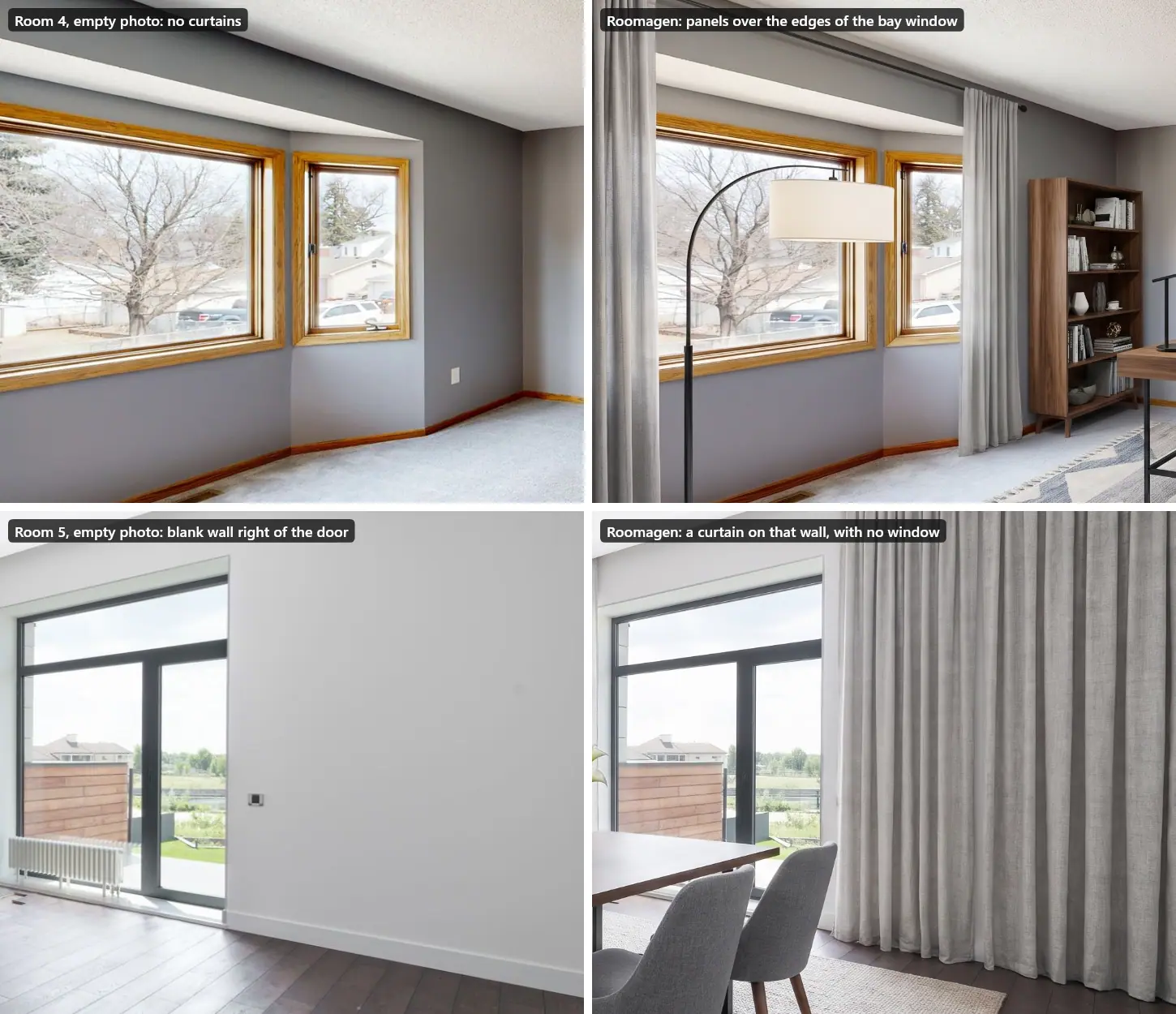
- We also ran Roomagen, the tool we make, on the same five rooms, directly through its staging code with paid-plan settings, not through its app. It kept every room's structure, but it added curtains on its own: in room 4 they cover the edges of the bay window, and in room 5 one hangs on a blank wall.
Disclosure: we make Roomagen. The three tools above ran on free accounts, through their own websites, and are shown as their free tiers deliver them. Roomagen ran directly through its staging code with the settings its app sends for a paid plan, so its results show paid output without a watermark. We report its flaws the same way as the others'.
How We Tested Virtual Staging AI, REimagineHome and Apply Design
- The photos: five real photos of empty rooms from Pexels (photographers listed in the sources):
- a living room with a fireplace and built-in shelves;
- an open-plan living room with a dining nook and a view into the hall and kitchen;
- a carpeted bedroom;
- a room with a bay window, staged as a home office;
- a modern room with a balcony door, staged as a dining room.
- The settings: each tool's staging for empty rooms, the Modern style, the room type above, and the defaults for everything else. Where a tool asked, we chose the option that keeps the room's structure.
- One run per room, no retries. Where a run returned several versions, we judged the one the tool shows first.
- The accounts: free accounts; we bought nothing. Where a free tier ran out or locked a room type, we stopped: we did not pay for the missing rooms.
- Roomagen staged the same photos directly through its staging code, with the settings its app sends for a paid plan. We did not click through its app, so its time is processing time, not click-to-result time.
- What we checked:
- whether walls, windows, doors, floor, ceiling and built-ins stayed;
- what was moved, removed or invented;
- whether the furniture fits the room and the room type;
- the seconds from clicking generate to the result;
- the size and watermark of what you can download.
- Framing: we compared the lines in the upper part of each result (ceiling, upper walls, windows) with the original photo. All 13 results kept the same framing, with no shift or zoom of about 1% or more.
- REimagineHome needs a written request. Its current version has no room-type or style controls, so we typed one fixed prompt for every room: "Furnish this empty room in a modern style. Keep the walls, windows, doors, floor and ceiling exactly as they are." That prompt does not name the room type, which matters for rooms 3 and 4 below.
Room 1: One Living Room in All Four Tools
Room 1 is the only room all four tools could stage. It is also a hard test: a fireplace, a wall TV, two built-in shelving units with uneven cubbies, a ceiling fan and three tall windows.
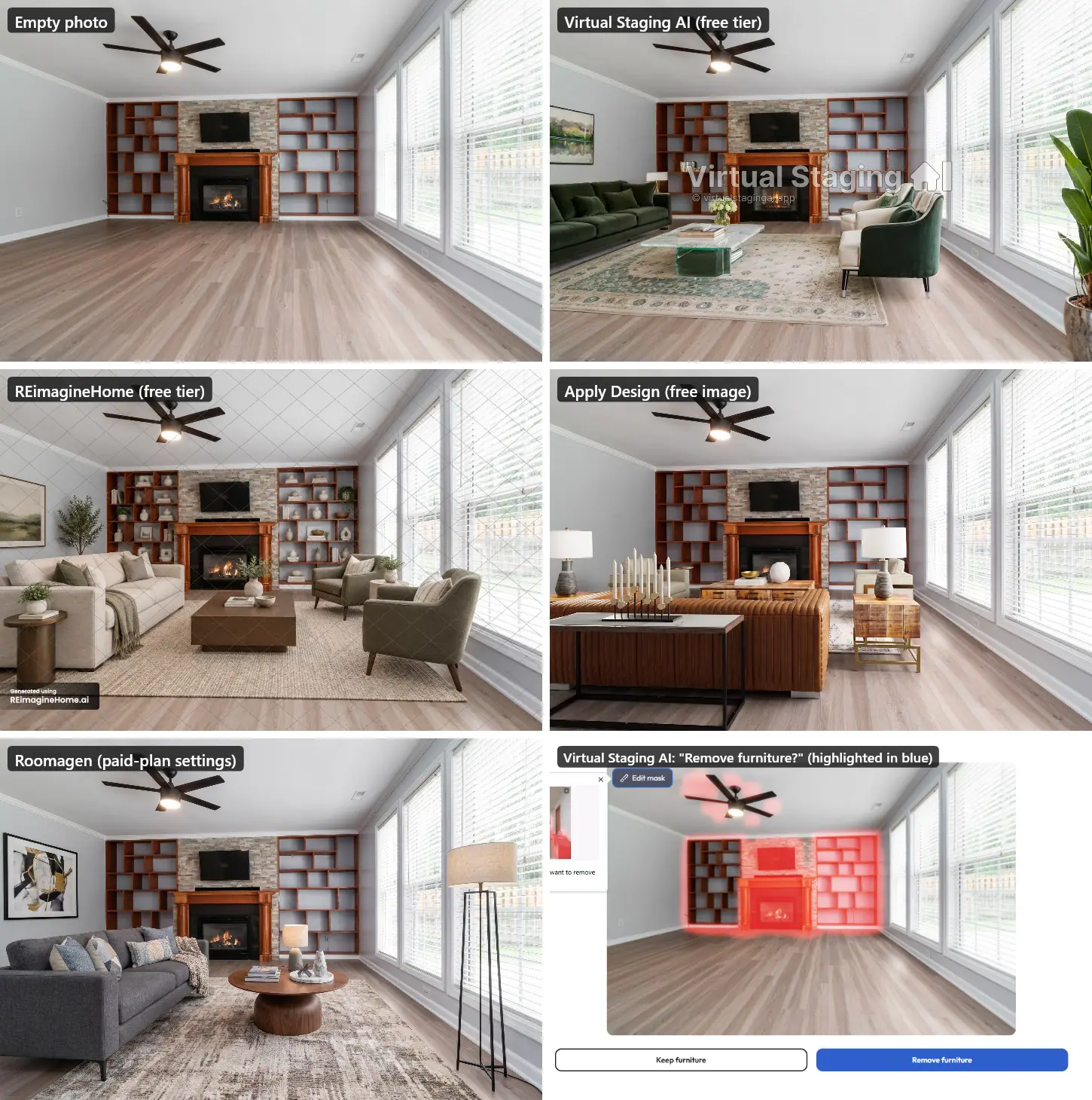
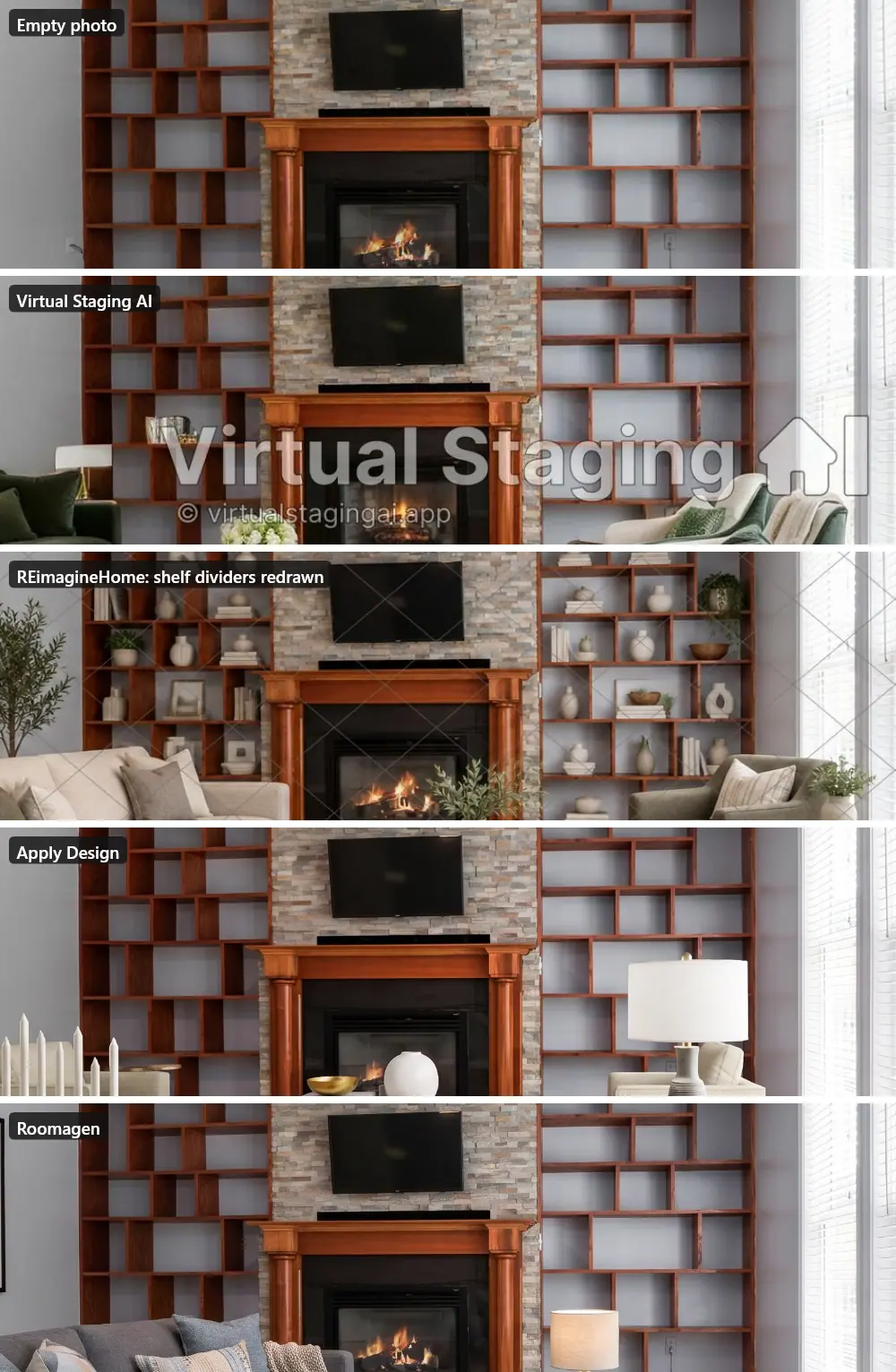
- Virtual Staging AI first asked "Remove furniture?". It had masked the fireplace, the TV with its stone wall, the right-hand shelving unit and part of the fan in red, with the blue "Remove furniture" button highlighted. Going by the mask, a user who clicks it would lose those features; we did not try that path.
- We clicked "Keep furniture". The result kept all of them, and the floor too.
- Its second and third versions repainted the floor along the fireplace wall as reddish-brown wood.
- The furniture: a green velvet sofa, a glass-and-marble table and a traditional rug. It reads more classic than modern.
- REimagineHome kept the fireplace, TV, fan, windows and floor. It kept both shelving units in place, but redrew their dividers as a different grid and filled every shelf with vases and books. The seating is well placed and leaves the windows clear.
- Apply Design kept the room most exactly: every shelf cubby where it was, and windows nearly identical to the photo.
- Its furniture is heavy: a large caramel leather sofa with its back to the camera, and a long console with a tall candelabra in the foreground.
- Decor on the new coffee table hides most of the fire.
- Roomagen kept the fireplace, TV, shelf layout, fan and windows. It added a grey sofa, a round wood coffee table, a rug, a floor lamp and wall art.
Virtual Staging AI: The Quickest Free Try, With a Prompt to Watch
- Free tier: a widget on the homepage, "Upload image for free", with "No sign up | No credit card".
- It showed no counter, and three runs went through with no limit message.
- Free renders did not appear in the account's photo library.
- Room types: only Bedroom and Living room are free. Kitchen, Home office, Dining room, Kids room and Outdoor show "Upgrade to unlock", so we could not stage rooms 4 and 5.
- Speed: 21 to 24 seconds per room, with three versions per run.
- Free result: 1536×1024 pixels, with the "Virtual Staging AI" wordmark across the middle. High resolution and no watermark are paid features.
- Results:
- Room 2 kept the vaulted ceiling, the fan, the hall and the kitchen pass-through. Its first version turned a wall air grille into a dark, niche-like shape, and two armchairs sat in the walkway to the hall.
- Room 3 was a clean bedroom with nothing structural invented; the first version added a wall-mounted TV on the side wall.
- Price (20 Nov 2026): at monthly billing, $25 for 6 photos ($4.17 each), $35 for 20, $79 for 60 and $139 for 150. Billed yearly, the plans cost $16 to $79 a month.
- Its "$0.42 / photo" needs the 10,000-photo plan at $4,199 a month.
- Plans include unlimited re-renders of an uploaded photo, and furniture removal once, at upload.
REimagineHome: Five Free Designs and a Chat Instead of Settings
- Interface: the current version is a chat, "Your Design Companion": you upload a photo, type what you want and send it. It has no room-type or style selector.
- A button switches the account to the old version. We did not test that version, because the switch changes an account setting.
- Free tier: every new account gets five free designs. Ours had used one in an earlier test, so we could stage four rooms. After the fifth design, REimagineHome offered Pro at $36 a month.
- Speed: 25 to 29 seconds from sending the request. It first writes a short design plan, then generates.
- Free result: 1536×1024 pixels (1672×941 for the wider photo), with a thin diamond pattern over the whole image and a "Generated using REimagineHome.ai" badge.
- Results:
- Room 2 kept everything: the ceiling, fan, chandelier, hall and kitchen view. It placed a dining set right at the kitchen doorway.
- Rooms 3 and 4 kept their windows and carpet, and room 4 its doors, but came back as sitting rooms: no bed, no desk. Our prompt did not name the room, so this says more about our test than about the tool. Name the room in your request.
- Price (20 Nov 2026): at monthly billing, Essential costs $19 for 30 credits. That plan uses only the older tools, with no "Next-Gen AI" or high resolution.
- Pro is $36 for 200 credits, Advanced $59 for 400 and Agency $119 for 900, which is $0.13 a design.
- One design costs one credit, and so does every re-run.
Apply Design: A Faithful Room, One Free Image and a Long Wait
- How it works: you upload a photo, pick a room type and, optionally, a style or a furniture bundle. Its one-click "Auto stage" is on by default. We left its preferences at their defaults (for example, no curtains).
- Free tier: "First image is free": the account had one Apply Coin, and none after the first staging.
- Speed: 7 minutes 42 seconds until its "ready to view" notice. The tool quoted 9 to 15 minutes while it worked.
- Free result: a 2528×1696 PNG with no watermark. This is its "4K AI Retouch" version, ticked by default (2528×1696 despite the name; the plain render is 1920×1280).
- Results:
- Structure: the built-in shelves matched cubby for cubby (left empty), the windows were nearly identical to the photo and nothing was invented.
- The furniture was oversized for the room: the sofa back and the console hide most of the floor.
- While it worked: about 10 seconds after we started the job, a "Tell us about yourself" profile form opened ("While your image is processing, let’s personalize your Apply Design experience"). It can be skipped.
- Price (20 Nov 2026): one-click staging costs 1.5 Apply Coins per photo.
- That is $15 at $10 a coin (packs of up to 9 coins), $12 at $8 (10 to 19 coins) and $10.50 at $7 (20 or more coins, a purchase of at least $140).
- Its do-it-yourself editor costs 1 coin a photo, and item removal is included.
Roomagen on the Same Five Rooms
We make Roomagen, so we hold its results to the same checks.
- The run: all five rooms, directly through its staging code with paid-plan settings, so with no watermark and no credits charged (in the app, each photo costs 2 credits on a paid plan).
- The results were 2528×1696 pixels (2752×1536 for the wider photo).
- Rooms 2 to 5 took 43 to 51 seconds each, from the start of its room analysis to the finished image; room 1's log was not kept.
- Results:
- Every room kept its walls, windows, doors, floor, ceiling and built-ins, with the same framing.
- Room 3 became a bedroom (it also drew a wall outlet for the floor lamp that is not in the photo), and room 4 a home office with a desk, with the bay window and hall doors kept.
- The flaws: it adds curtains beside bare windows on its own, and twice they went wrong.
- In room 4 a curtain rod and two panels cover the outer edges of the bay window's glass.
- In room 5, besides a panel next to the balcony door, it hung a floor-to-ceiling curtain across the blank wall to the door's right. That one reads as a window that is not there, and it hides a light switch.
- A buyer could be misled by that, which is why every AI-staged photo needs a check before it goes into a listing (see our guide to virtual staging disclosure rules).
- Price (20 Nov 2026): Starter costs $12 a month for 30 photos ($0.40 each, HD output), Pro $29 for 100 ($0.29) and Business $79 for 350 ($0.23).
- New accounts get 6 free credits, and results made with them are watermarked.
- Every run, including a re-run, costs 2 credits (4 for a 4K image on Pro or Business).
Virtual Staging AI vs REimagineHome vs Apply Design: Prices After the Free Tier
Prices as published on each provider's pricing page on 20 November 2026, in US dollars, at monthly billing (Apply Design sells prepaid coins instead). Yearly billing lowers the Virtual Staging AI and Roomagen plans.
| Smallest purchase | Price per photo there | Lowest self-serve price per photo | |
|---|---|---|---|
| Virtual Staging AI | Basic: $25 a month for 6 photos | $4.17 | $0.42 (10,000 photos a month for $4,199) |
| REimagineHome | Essential: $19 a month for 30 credits (older tools only) | $0.63 | $0.13 (Agency: $119 for 900 credits) |
| Apply Design | Apply Coins in packs of up to 9, at $10 a coin | $15 (1.5 coins) | $10.50 (20 or more coins at $7) |
| Roomagen | Starter: $12 a month for 30 photos | $0.40 | $0.23 (Business: $79 for 350 photos) |
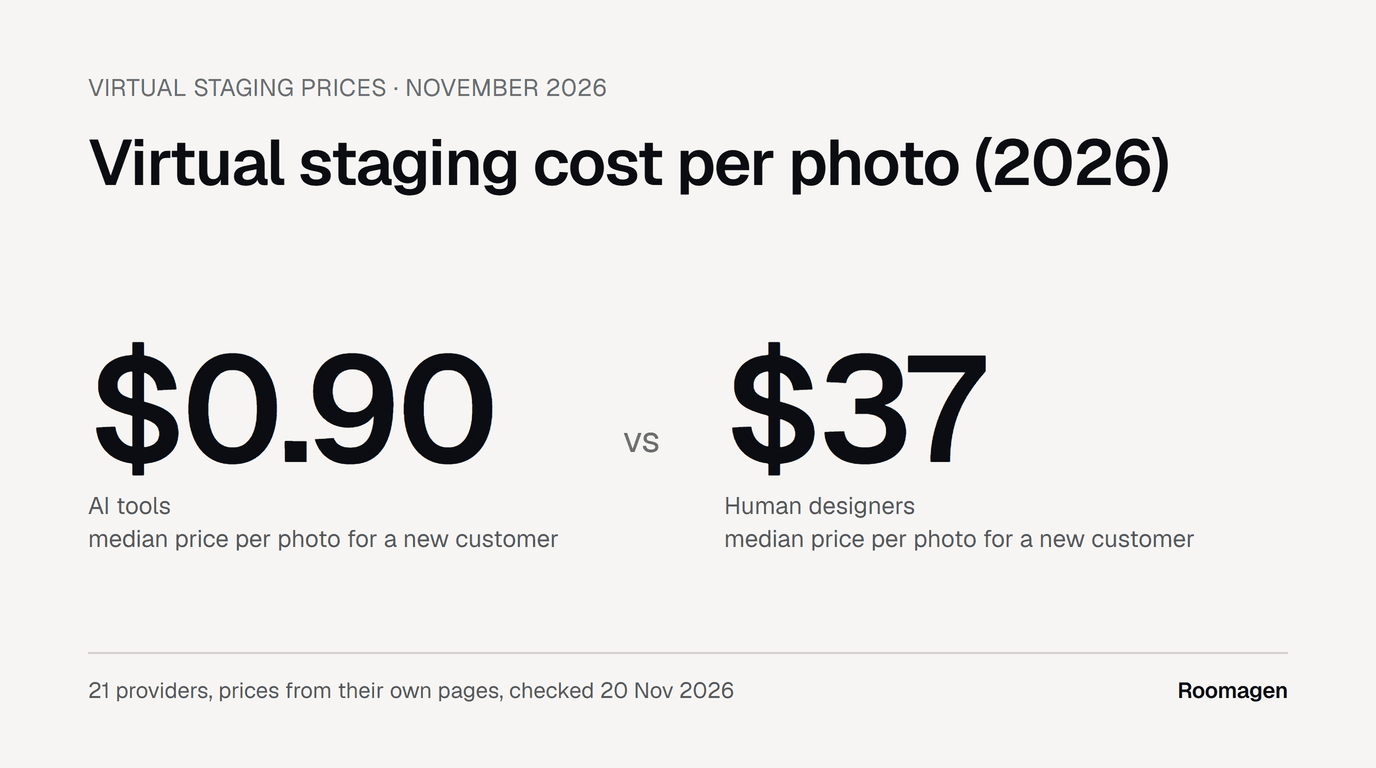
A Virtual Staging AI photo includes unlimited re-renders of that upload; REimagineHome and Roomagen charge for every run. For the same comparison across 21 providers, including human staging services, see what virtual staging costs per photo in 2026.
Which Should You Use?
- One hero photo that must look exactly right, and you can wait: Apply Design. Check the furniture scale before you publish.
- To try a few photos for free, fast: Virtual Staging AI. Click "Keep furniture" when it offers to remove built-ins, and remember that only living rooms and bedrooms are free.
- Chat-style changes and the lowest price per design at volume: REimagineHome. Name the room in every request.
- Whole listings on a monthly plan, at $0.23 to $0.40 a photo (20 Nov 2026): Roomagen's virtual staging, the tool we make. Check every result, as our curtains show.
For a wider comparison of ten virtual staging tools, AI and human, see our best AI virtual staging software in 2026.
What This Test Does Not Show
- One run per room per tool. AI staging varies from one output to the next: Virtual Staging AI's three versions of the same room, from one run, differed in furniture and even in floor color.
- Free tiers, not paid output. The watermarks and smaller files of Virtual Staging AI and REimagineHome are free-tier limits; we did not test their paid plans.
- Not every setting. We did not test REimagineHome's older interface ("Switch to old version" changes an account setting), and our prompt did not name the room.
- Roomagen outside its app. We ran Roomagen's staging code directly with its app's settings, so we did not test its screens, and its times are processing times rather than click-to-result times.
- Five empty, real-estate rooms. We did not test furnished rooms, exteriors or photos with people.
- Our own judgment. We judged the results ourselves, with the edge alignment for framing; no panel of buyers rated them.
Ready to transform your listings?
Try Roomagen's AI virtual staging for free. Upload your first photo and see the result, usually in under a minute.
Start FreeSources & References
- 1.Virtual Staging AI – Prices (monthly plans and Enterprise slider), checked 20 November 2026
- 2.Virtual Staging AI – Free staging widget on the homepage, used 21 November 2026
- 3.REimagineHome – Pricing (monthly credit plans), checked 20 November 2026
- 4.REimagineHome – App (Design Companion), used 21 November 2026
- 5.Apply Design – Pricing (Apply Coins), checked 20 November 2026
- 6.Apply Design – App (one-click staging), used 21 November 2026
- 7.Roomagen – Pricing, checked 20 November 2026
- 8.Room 1: View of an Empty Living Room, photo by Curtis Adams (Pexels)
- 9.Room 2: Empty Living Room, photo by Curtis Adams (Pexels)
- 10.Room 3: An Empty Room With Carpet and White Ceiling, photo by Curtis Adams (Pexels)
- 11.Room 4: Bright Empty Room with Large Windows, photo by Peter Vang (Pexels)
- 12.Room 5: Empty room with balcony and parquet floor, photo by Max Vakhtbovych (Pexels)
Frequently Asked Questions

Written by
Roomagen Team
The Roomagen team creates in-depth guides about AI virtual staging, real estate photography, and property marketing strategies to help agents and professionals stay ahead.