CAD Floor Plan Colorize — AI Coloring for AutoCAD Plot Outputs
Roomagen CAD Floor Plan Colorize colors AutoCAD plot outputs exported as JPEG or PNG in one of four palettes, usually in under a minute, with no CAD hatching or plug-in subscription; the AI redraws linework, so check dimensions and annotations.
CAD users color plans through native hatching (15–30 minutes per plan, requires CAD coloring expertise) or plug-ins ($200–$500/yr plus learning curve). Both approaches consume billable time on coloring instead of design. AutoCAD's built-in hatching is fiddly for color washes versus pattern fills. Roomagen colors CAD plot outputs exported as JPEG or PNG in under 90 seconds for $0.23–$0.40 in one of four palettes; because the AI redraws the plan, check linework and annotations before you share it.
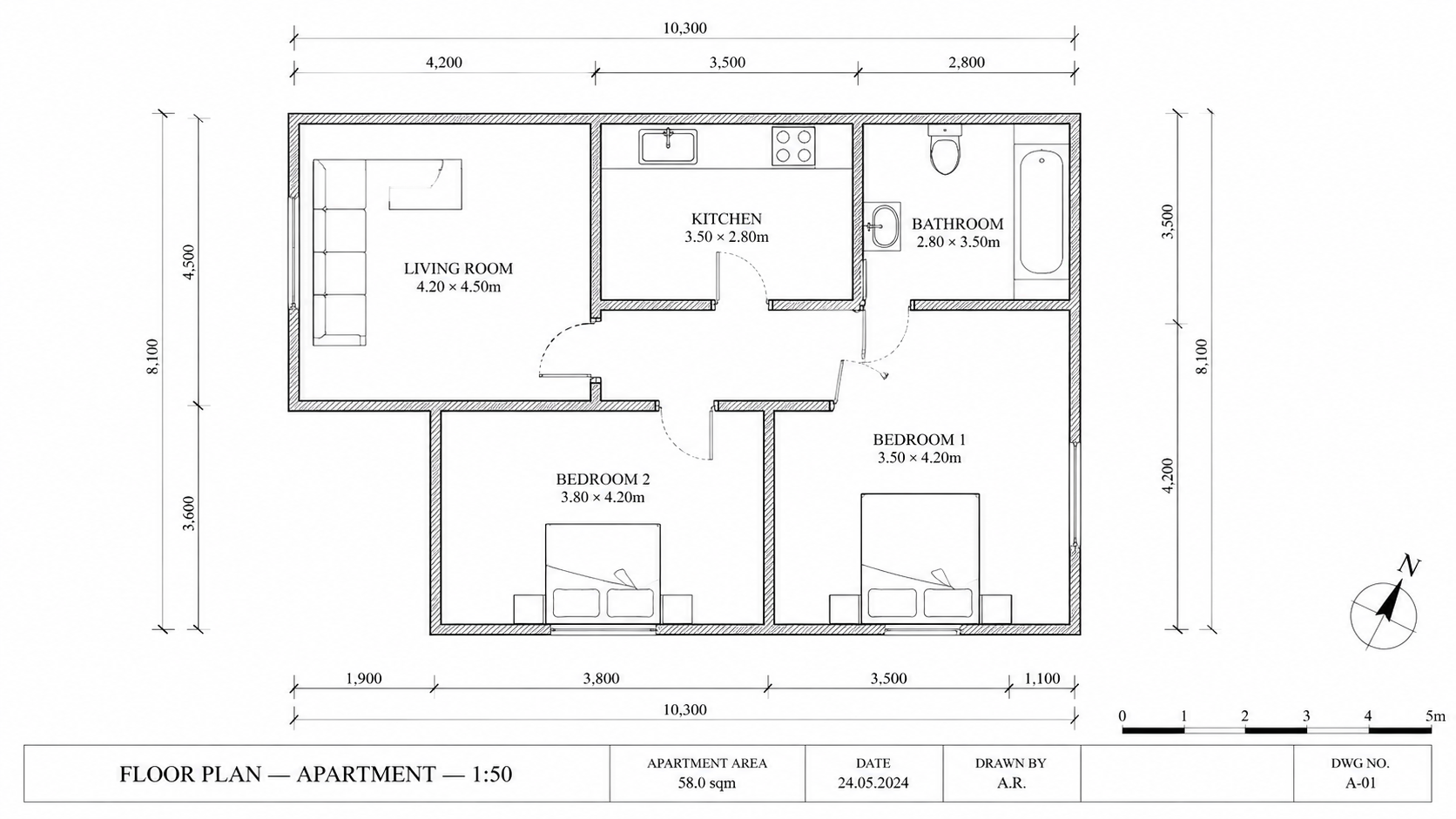
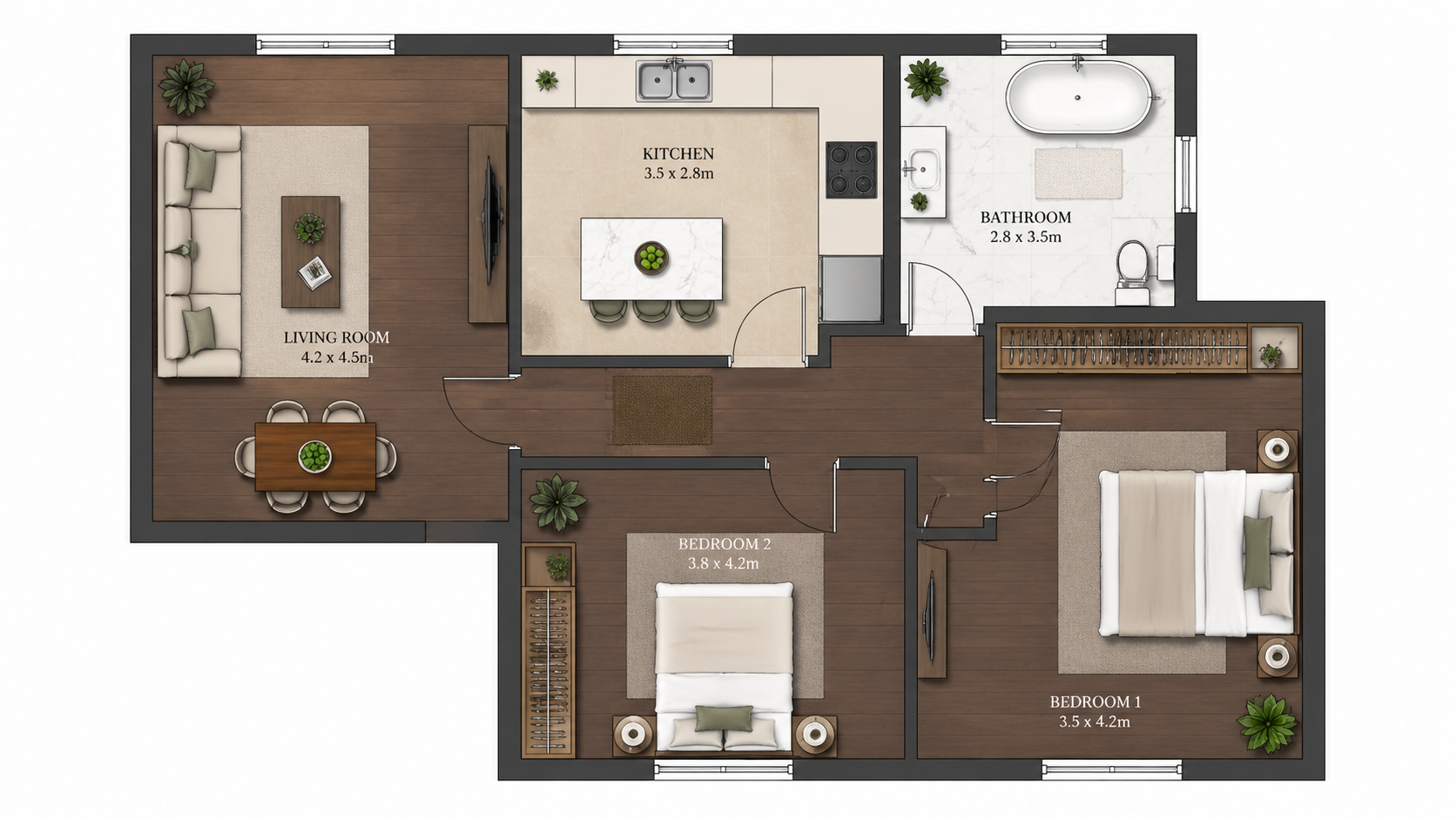
Demo example: the “Before” image was created with AI for this site; it is not a customer photo.
Features
AI coloring for CAD plot outputs from AutoCAD and equivalent tools, exported as JPEG or PNG. Adds color in under 90 seconds without CAD plug-ins or hatching — check dimensions and annotations in the result.
How Does AI Color CAD Plot Outputs, and What Should You Check?
AutoCAD plot outputs exported as JPEG or PNG — colored in one of four palettes; check linework, dimensions and annotations in the result
What CAD Export Formats Work as Input?
Replaces CAD coloring plug-in subscriptions ($200–$500/yr per seat) — coloring handled outside CAD for $0.29 per plan
Why Use AI Coloring Instead of CAD Native Hatching?
Colored output reattaches to CAD as image XREF for presentation drawings — original DWG remains untouched for technical purposes
How It Works
Get professional results in three simple steps
Drop your photos here
or browse files
Upload Your Photos
Drag and drop your photos or browse to upload them. Roomagen accepts JPEG, PNG and WebP files up to 50 MB each.
AI Processing
Our advanced AI analyzes your images and applies professional enhancements automatically. Choose from virtual staging, enhancement, object removal, or day-to-dusk conversion.
Download Results
Preview your transformed images and download high-resolution results ready for listings, marketing materials, social media, and more. No watermarks on premium plans.
Why Choose Roomagen
JPEG and PNG Plot Outputs From AutoCAD and Equivalents
AutoCAD plot outputs exported as JPEG or PNG — colored in one of four palettes; check linework, dimensions and annotations in the result
Check Linework, Dimensions and Annotations
Replaces CAD coloring plug-in subscriptions ($200–$500/yr per seat) — coloring handled outside CAD for $0.29 per plan
Faster Than CAD Hatching, No CAD Plug-in Subscription
Colored output reattaches to CAD as image XREF for presentation drawings — original DWG remains untouched for technical purposes
Who Is It For?
AutoCAD Drafters
Skip the CAD hatching workflow — plot to JPEG or PNG, run it through Roomagen and colorize in under 90 seconds. Drafter time stays on actual drafting.
CAD Managers
Reduce firm dependency on CAD coloring plug-in subscriptions ($200–$500/yr per seat). Roomagen handles coloring outside CAD environment for $0.29 per plan.
Architects Working in CAD
Plot CAD plans to JPEG or PNG for owner reviews and colorize them in Roomagen for the meeting. The original DWG stays untouched for permit and CD purposes.
AutoCAD native hatching for color coloring takes 15–30 minutes per plan with CAD coloring expertise. Coloring plug-ins (Skribbl, AutoCAD Express Tools color) cost $200–$500/yr plus learning. Roomagen accepts CAD plot output and colorizes in 90 seconds for $0.23–$0.40.
| Roomagen for CAD | AutoCAD Native Hatching | CAD Coloring Plug-ins | |
|---|---|---|---|
| Cost per plan | $0.23–$0.40 | Free (within CAD) but 15–30 min | $200–$500/yr + 10–20 min |
| Turnaround | Under 90 seconds | 15–30 min hatching work | 10–20 min plus plug-in time |
| Linework preservation | Exact | Native | Native |
| Per-seat licensing | Account-based | Per CAD seat | Per CAD seat per year |
| Multi-firm consistency | Same palette across firm | Hatching standards required | Plug-in version dependent |
Frequently Asked Questions
Everything you need to know about Roomagen
Yes, when plotted to JPEG or PNG; PDF plots need converting to an image first. The AI works from the plotted image, not the underlying DWG, and redraws plot styles and line weights as it colors — check the result against your plot.
It can. The AI redraws the plan as it adds color and is asked to keep the text as it is, but on dense plots lines, numbers or room labels can shift or drop out. Compare the colored version with your plot before you share it.
For coloring tasks, yes. Plug-ins like Skribbl and AutoCAD Express Tools color cost $200–$500/yr plus learning curves. Roomagen handles the same coloring outside CAD for $0.29 per plan with no subscription tied to CAD seats.
Yes. Bring the colored output back into AutoCAD as an attached image (IMAGEATTACH) or XREF. Useful for presentation drawings where you want CAD linework with AI coloring as a base layer.
Yes. Plot styles, line weights, and visual hierarchy are preserved as they appear in the plot output. The AI works with the rendered visual, not the underlying CAD attributes.
The AI handles typical CAD line types (continuous, dashed, hidden) and fill patterns (solid, hatched). Unusual linework may come out differently, so test with the Free plan's 6 one-time credits first to check the result on your drawing style.
Yes. Multi-floor projects with 5–20 CAD plots can be colorized one at a time. Each plot usually takes under a minute. Use the same palette across all floors for visual consistency.
Yes — CAD site plans, civil drawings, and landscape plans work as input. The AI applies appropriate coloring (greens for landscaping, neutrals for hardscaping) to outdoor and civil elements.
Plot the CAD drawing to JPEG or PNG, run it through Roomagen and place the colored image in PowerPoint or InDesign for client meetings. The original DWG stays untouched; the colored version is for presentation only.
Each colorization is 2 credits ($0.23–$0.40). A firm producing 30–60 CAD-colored plans monthly fits Pro plan ($29/month, 200 credits) — far cheaper than CAD coloring plug-in seats at $200–$500/yr each.
Part of
Floor Plan ColorizeMore From This Family
- Online Floor Plan Colorizer
- How to Colorize a Floor Plan
- Free Floor Plan Coloring Tool
- Colorize House Floor Plans
- Colorize Apartment Floor Plans
- Colorize Office Floor Plans
- Colorize Restaurant Floor Plans
- Colorize Hotel Floor Plans
- Colorize Retail Floor Plans
- Colorize Clinic Floor Plans
- Colorize Warehouse Floor Plans
- Floor Plan Colorize for Real Estate Agents
Explore Related Tools
Discover more AI-powered tools to enhance your visual content
Floor Plan Colorize — AI Color for Black-and-White Plans in Under a Minute
Colorize black-and-white floor plans with AI. Four designer palettes, auto-detected rooms, output ready in under 90 seconds for real estate, architecture, and interior design — no Photoshop or design skills required.
Learn moreArchitectural Floor Plan Coloring — AI for CAD and BIM Workflows
AI architectural floor plan coloring for schematic design, design development, and CD set phases. Compatible with AutoCAD, Revit, ArchiCAD, and SketchUp Pro exports — owner reviews in 90 seconds for $0.29.
Learn moreDWG Floor Plan Colorize — Plot Your DWG, AI Adds Color
Colorize DWG floor plans with AI by plotting them to JPEG or PNG first, then re-attach the colored image to your DWG as an image XREF for presentations. Check dimensions and annotations in the result.
Learn moreBlueprint Coloring Tool — AI Color for Old and New Blueprints
Colorize blueprints with AI — old archival blueprints and newly plotted construction blueprints. Modern audiences cannot read line-only blueprints; AI coloring bridges the gap in 90 seconds for $0.29.
Learn moreFloor Plan Colorize for Architects — Schematic and CD Set Color
Floor plan coloring for architects — schematic design, concept review, CD set and marketing portfolio coloring. Works with CAD and BIM plan exports saved as JPEG or PNG images. AI palettes save renderer hours.
Learn more