
Unfinished Home Office Virtual Staging — From Empty Shell to Workspace
Roomagen Construction Interior for home offices turns construction photos of a spare room into a photorealistic finished workspace with desk, shelving, ergonomic chair and good lighting for pre-sale marketing.
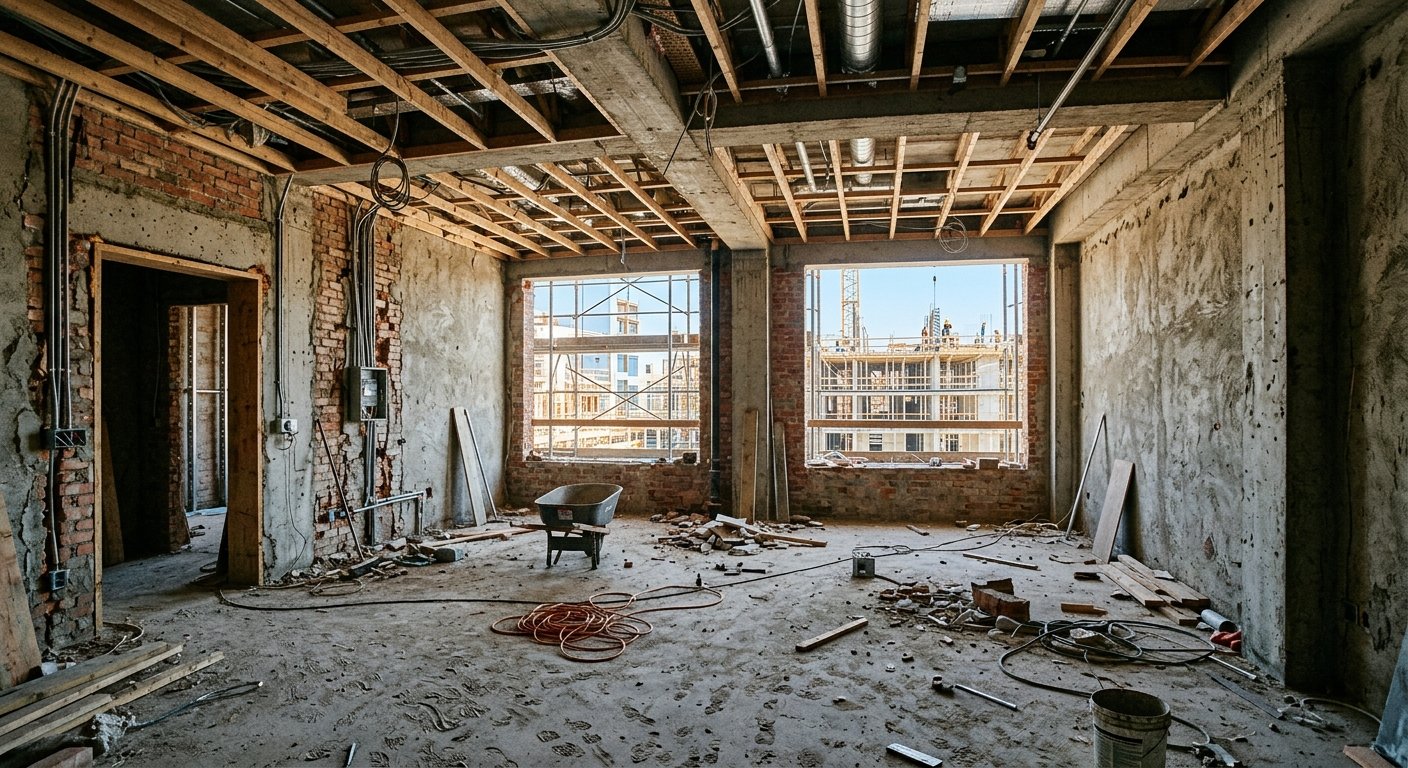
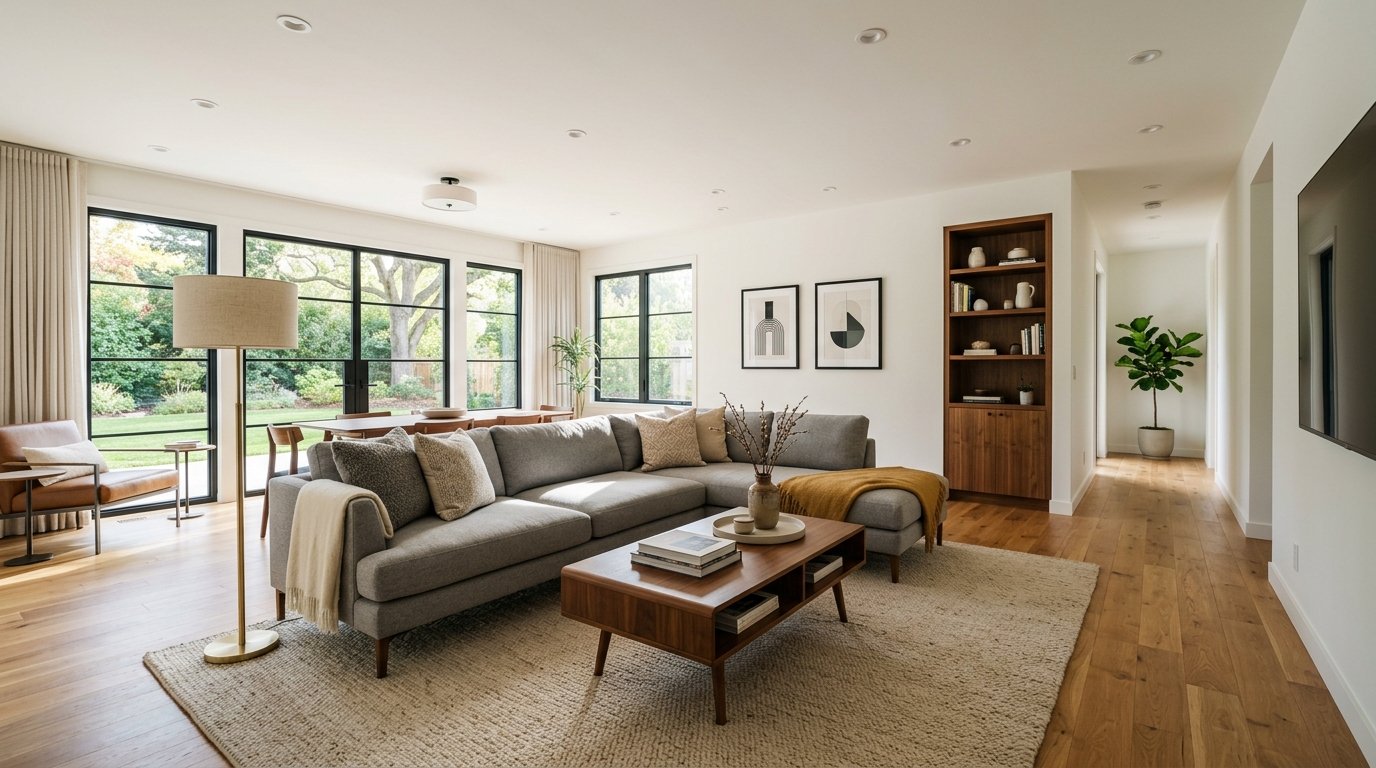
Since 2020, home offices have become a top-3 buyer priority — yet during construction, a home office is just another empty room with no identity. Buyers cannot tell if a 10x12 space will comfortably fit a desk, bookshelf, and video call backdrop. Developers lose the opportunity to market dedicated workspace functionality. Roomagen visualizes home offices from construction photos for 2 credits, showing buyers the productive workspace they need.
Features
Turn a construction photo of a spare room into a finished home office with desk, shelving, ergonomic chair and lighting in under 90 seconds, for pre-sale marketing.
How Does AI Visualize Home Offices From Construction Photos?
Convert construction spare rooms into photorealistic home office spaces with desks and shelving
What Home Office Layouts Can Be Rendered During Construction?
Video call-optimized desk placement and background styling for remote worker appeal
Why Home Office Visualization Matters for Modern Buyers?
Dual-purpose room options showing office/guest room combinations
How It Works
Get professional results in three simple steps
Drop your photos here
or browse files
Upload Your Photos
Drag and drop your photos or browse to upload them. Roomagen accepts JPEG, PNG and WebP files up to 50 MB each.
AI Processing
Our advanced AI analyzes your images and applies professional enhancements automatically. Choose from virtual staging, enhancement, object removal, or day-to-dusk conversion.
Download Results
Preview your transformed images and download high-resolution results ready for listings, marketing materials, social media, and more. No watermarks on premium plans.
Why Choose Roomagen
Bare Room to Ergonomic Workspace
Convert construction spare rooms into photorealistic home office spaces with desks and shelving
Built-In Shelving and Desk Previews
Video call-optimized desk placement and background styling for remote worker appeal
Remote Work Spaces Drive Modern Property Value
Dual-purpose room options showing office/guest room combinations
Who Is It For?
Suburban Home Builders
Market dedicated home office spaces to remote workers — the fastest-growing buyer segment since 2020.
Co-Working Space Developers
Visualize individual office suites and shared workspaces during construction for pre-lease marketing.
Renovation Contractors
Show homeowners how a spare bedroom or basement conversion will look as a professional home office.
Home office staging furniture rental costs $800–$2,000 and requires physical access to completed space. Professional renderings cost $300–$800 per room. Roomagen generates photorealistic home office visualizations from construction photos for $0.23–$0.40 in under 90 seconds.
| Roomagen AI | Office Furniture Showroom | Professional Rendering | |
|---|---|---|---|
| Cost | $0.23–$0.40 per image | Free visit but no context | $300–$800 per room |
| Turnaround | Under 90 seconds | N/A — showroom visit | 3–7 days |
| In actual room | Yes — from construction photo | No — generic showroom | Yes — from CAD model |
| Style options | Unlimited at 2 credits | Limited to showroom stock | $150–$300 per revision |
| Buyer relevance | High — they see their space | Low — abstract connection | High but slow delivery |
Frequently Asked Questions
Everything you need to know about Roomagen
Standard home office set: desk, ergonomic chair, bookshelf or floating shelves, task lighting, monitor setup, and organizational accessories. Layout optimizes for productivity and video call backgrounds.
Yes. Specify built-in shelving in your style preference, and the AI renders wall-to-wall built-ins appropriate to the room dimensions. Alternatively, freestanding bookshelves are placed for a more flexible layout.
The AI places desks and shelving to create visually appealing backgrounds behind the seated position — a key selling point for remote workers who spend hours on video calls.
For larger rooms, the AI can render dual-desk setups suitable for two-person home offices. Smaller rooms receive single-desk layouts optimized for available space.
Windows visible in the construction photo are rendered with appropriate light and desk placement avoids screen glare. Natural light is a premium home office feature that the AI highlights.
Yes. Small office suites, co-working individual offices, and commercial flex spaces all benefit from construction-to-finished visualization. The AI adapts furnishing to the space type.
Yes. Specify dual-purpose room preference and the AI renders a space with both a desk area and a sofa bed or daybed, showing buyers the room serves double duty.
Modern (clean desk, minimal shelving), traditional (wood desk, library wall), industrial (metal frame, exposed elements), and minimalist (floating desk, hidden storage) are all available.
Yes. NAR data shows homes with dedicated office spaces command 5–10% premiums in suburban markets. Visualizing the office during construction helps justify this pricing to buyers.
Each visualization uses 2 credits ($0.23–$0.40). Show buyers their future home office in multiple design styles for under $1 — a tiny investment for a premium room that drives property value.
More From This Family
- Unfinished Living Room Virtual Staging
- Unfinished Bedroom Virtual Staging
- Unfinished Kitchen Virtual Staging
- Unfinished Bathroom Virtual Staging
- Unfinished Hallway Virtual Staging
- Unfinished Entryway Virtual Staging
- Unfinished Dining Room Virtual Staging
- Modern New Construction Interior
- Luxury New Construction Interior
- Minimalist New Construction Interior
- Scandinavian New Construction Interior
- Industrial-Style New Construction Interior
Explore Related Tools
Discover more AI-powered tools to enhance your visual content
Virtual Staging for Apartments and Homes Still Under Construction
Marketing images of rooms still under construction: AI turns site photos with framing, pipes or drywall into finished, furnished interiors in under 90 seconds.
Learn moreVirtual Office Staging — Turn an Empty Room into a Home Office with AI
Stage an empty room as a home office with AI: desk, ergonomic chair, bookshelves, monitor and lamp in 13 design styles, usually in under 90 seconds.
Learn moreModern New Construction Interior — Clean Lines on a Construction Photo
Show a construction site as a modern finished interior: AI adds clean-lined furniture, neutral palettes and contemporary finishes to the photo in under 90 seconds.
Learn moreMinimalist New Construction Interior — Less Is More in Every Room
Show a construction site as a minimalist interior: AI adds essential furniture, open space and a neutral palette, suited to compact apartments and studios.
Learn moreFloor Plan AI — Turn a Sketch, Scan or Old Plan into a 2D or 3D Floor Plan
Turn a sketch, scan or old plan into a clean 2D floor plan or a 3D view. Keep or remove measurements and room names, and pick one of four drawing styles.
Learn more