
3D Kitchen Floor Plan — Counters, Island and Appliances in Isometric View
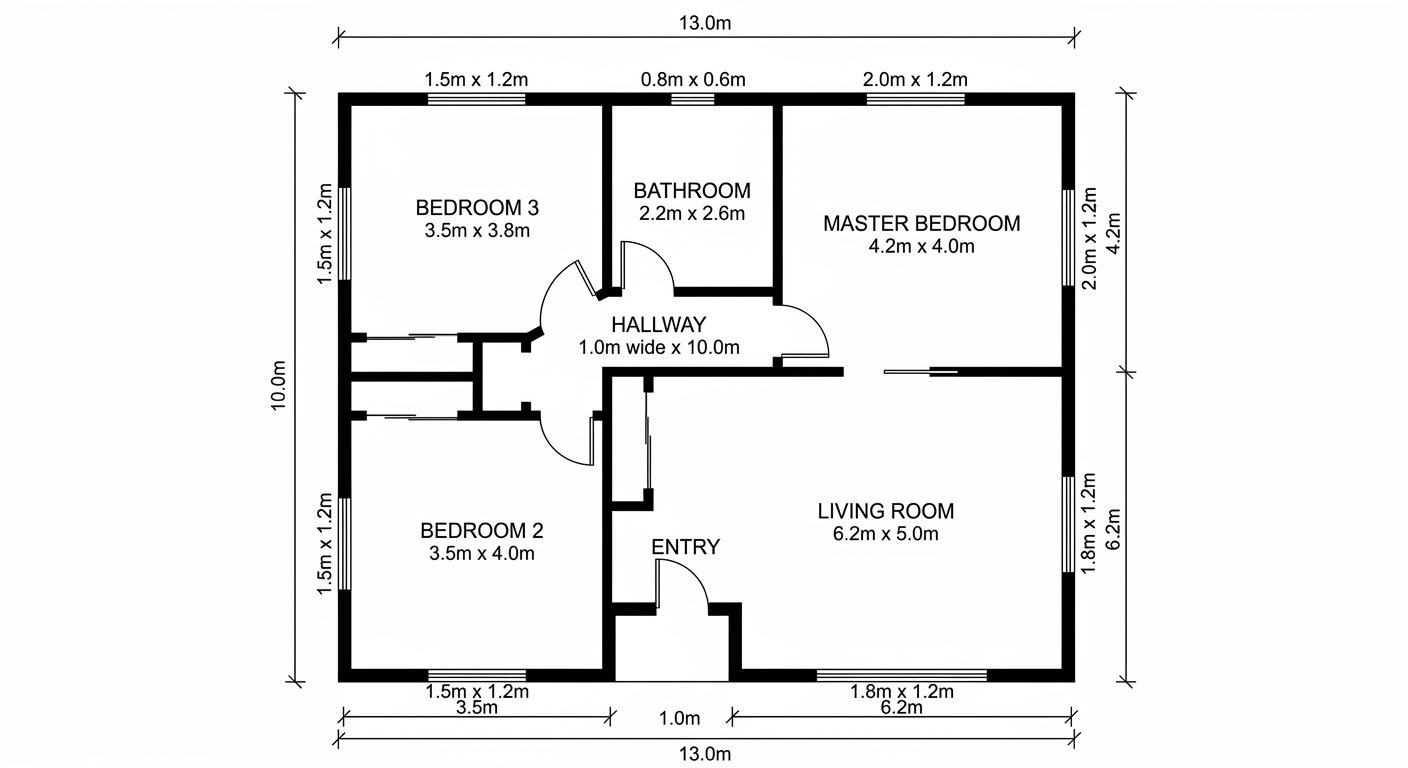
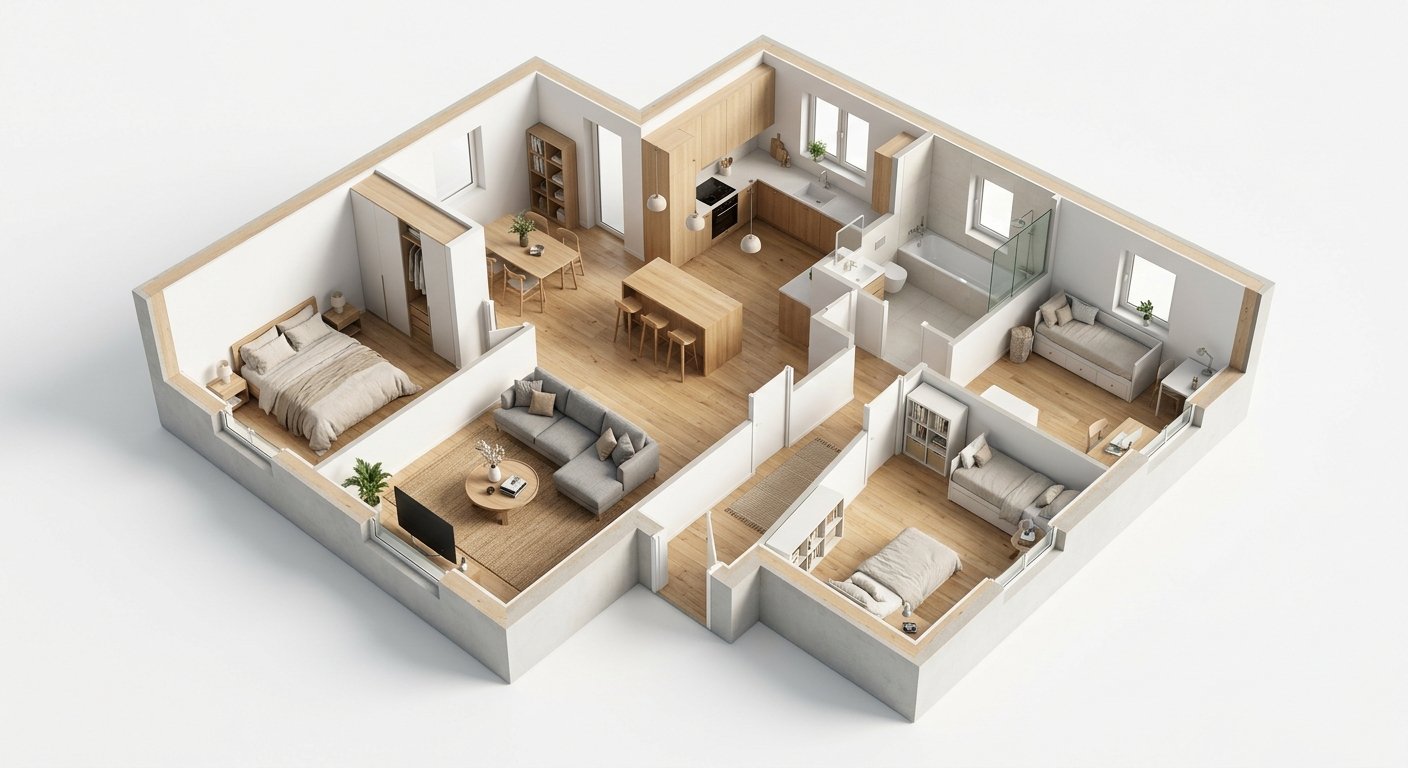
Roomagen Floor Plan to 3D for kitchens turns a 2D floor plan into an isometric 3D view showing cabinet runs, counters, island size and appliance placement, helping buyers and renovators judge workflow and storage.
Kitchen functionality depends on the work triangle (sink-stove-fridge), counter space, and storage capacity — none of which are intuitive from 2D floor plans. Buyers who cannot evaluate kitchen workflow from a flat plan either waste time visiting unsuitable properties or miss ideal kitchens they dismissed from abstract plans. A 3D kitchen floor plan reveals workflow, storage, and counter space at a glance for 2 credits.
Features
Turn the kitchen on a 2D floor plan into an isometric 3D view: cabinet runs, counter space, island size and appliances, to judge workflow and storage.
How Does a 3D View Show Kitchen Work Triangle and Counter Space?
Counter layout, cabinet runs, and appliance placement shown in proportional 3D isometric view
What Kitchen Elements Are Visible in 3D Floor Plans?
Work triangle efficiency visible at a glance — sink, stove, and fridge positions clear in 3D
Why 3D Kitchen Views Matter for Buyers and Renovators?
Island dimensions, walkway clearance, and kitchen-dining flow revealed instantly
How It Works
Get professional results in three simple steps
Drop your photos here
or browse files
Upload Your Photos
Drag and drop your photos or browse to upload them. Roomagen accepts JPEG, PNG and WebP files up to 50 MB each.
AI Processing
Our advanced AI analyzes your images and applies professional enhancements automatically. Choose from virtual staging, enhancement, object removal, or day-to-dusk conversion.
Download Results
Preview your transformed images and download high-resolution results ready for listings, marketing materials, social media, and more. No watermarks on premium plans.
Why Choose Roomagen
Cabinet Runs, Island Dimensions, and Counter Surface Area
Counter layout, cabinet runs, and appliance placement shown in proportional 3D isometric view
Appliance Positions and Workflow Efficiency
Work triangle efficiency visible at a glance — sink, stove, and fridge positions clear in 3D
Kitchen Functionality Evaluated Before Visiting
Island dimensions, walkway clearance, and kitchen-dining flow revealed instantly
Who Is It For?
Home Buyers
Evaluate kitchen size, counter space, and storage capacity from online listings — determine if the kitchen works for your cooking lifestyle before visiting.
Kitchen Renovation Planners
Visualize proposed kitchen layouts in 3D before committing to expensive cabinet orders and appliance purchases.
Real Estate Agents
Showcase kitchen layouts in 3D — the room that influences purchase decisions more than any other.
3D kitchen renders are the most expensive room to visualize ($300–$800) due to cabinet and appliance detail. Kitchen design software requires hours of manual input. Roomagen generates 3D kitchen views from floor plans for $0.23–$0.40 in under 90 seconds.
| Roomagen 3D Kitchen | 2D Kitchen Plan | Kitchen Design Software | |
|---|---|---|---|
| Cost | $0.23–$0.40 | $0 | $0–$99/year + hours |
| Work triangle visibility | Instant in 3D | Requires spatial calculation | Clear after manual input |
| Counter space assessment | Visual — see surfaces | Abstract — measure and imagine | Visual after 2–4 hours work |
| Time to evaluate | Under 90 seconds | 5–10 minutes per plan | 2–4 hours per layout |
| Style preview | Furnished with cabinet style | No style information | Configurable but manual |
Frequently Asked Questions
Everything you need to know about Roomagen
Yes. Countertops are rendered with material textures and dimensions visible from the isometric angle. Buyers can assess total counter preparation area and workspace proportions.
Yes. Sink, stove, and refrigerator positions are clearly visible in the 3D view, revealing the work triangle efficiency. Well-designed kitchens show balanced triangles; poor layouts are immediately obvious.
If the floor plan indicates island placement, the 3D view renders it with countertop, seating (if space permits), and appropriate scale. Island dimensions and walkway clearance are visible.
Upper and lower cabinets along wall runs indicated by the floor plan. Cabinet style matches the selected design aesthetic — shaker, flat-panel, or glass-front uppers.
The 3D view shows cabinet count, pantry areas, and island storage. While you cannot see inside cabinets, the total cabinet run length and pantry size indicate storage capacity.
If the floor plan includes both kitchen and dining areas, the 3D view shows their spatial relationship — open-plan flow, peninsula connections, or doorway transitions.
Yes. The 3D view clearly shows kitchen layout configuration. Buyers can compare different property kitchens by layout type and evaluate which works best for their cooking style.
Standard kitchen appliances: refrigerator, range/oven, dishwasher, and microwave placed in positions indicated by the floor plan. Sink with faucet is also rendered.
Upload your proposed kitchen layout as a 2D plan and see it in 3D before ordering cabinets. This catches workflow issues and spatial problems that are invisible in flat drawings.
Each 3D view costs 2 credits ($0.23–$0.40). Evaluate kitchen layouts before committing to $20,000+ in cabinet and appliance purchases.
Part of
Floor Plan to 3DMore From This Family
Explore Related Tools
Discover more AI-powered tools to enhance your visual content
Floor Plan to 3D — AI Dollhouse View Generator for Any 2D Plan
Convert a 2D floor plan into a furnished 3D dollhouse view with AI: an isometric image showing layout, furniture placement and flow, for listings and proposals.
Learn moreFloor Plan AI — Turn a Sketch, Scan or Old Plan into a 2D or 3D Floor Plan
Turn a sketch, scan or old plan into a clean 2D floor plan or a 3D view. Keep or remove measurements and room names, and pick one of four drawing styles.
Learn moreVirtual Staging Kitchen Photos — Style an Empty Kitchen with AI
Stage empty kitchen photos with AI: bar stools, a dining table, pendant lights and countertop decor in 13 styles, in under 90 seconds, $0.23–$0.40 per image.
Learn more3D Living Room Floor Plan — Isometric View With the Furniture Layout
Turn the living room on a 2D floor plan into an isometric 3D view: sofa placement, walkways, windows and proportions, shown with realistic furniture.
Learn moreModern 3D Floor Plan — Contemporary Furniture in an Isometric View
Furnish a 2D floor plan in modern style and see it as an isometric 3D view: clean-lined furniture and neutral palettes that suit most property marketing.
Learn more